Fission on Kubernetes: Functions, Timers, and Autoscaling in Practice
How does a short Python function become an HTTP endpoint on Kubernetes, run on a timer, and scale with load? We installed Fission in an isolated test namespace, exercised those paths, and compared its design and use cases with Knative.
This is a functional test, not proof of production readiness. We did not benchmark Knative under matching conditions. The cluster name, addresses, and internal registry are anonymized; screenshots are from the actual experiment, and the example page was generated by our test function.
Results
- A Python function returned successfully through an HTTP Trigger. After a code update the same route returned the new content. A timer also returned HTTP 200 twice and was removed after verification.
- Three concurrent calls to a slow PoolManager function coincided with the number of specialized function Pods increasing from one to three. The warm pool still uses resources; this experiment did not verify scale-to-zero.
- NewDeploy used Kubernetes HPA: three clients made 120 requests, all HTTP 200, over 43.925 seconds. Replicas increased from one to three and fell back to one after load stopped. This small functional demonstration is not a throughput limit or latency benchmark.
- Fission organizes code, runtimes, and triggers as functions. Knative Serving centers on container services and Revisions; Knative Functions also supports building functions from source. The right choice depends on delivery, request scaling, events, and operational capabilities.
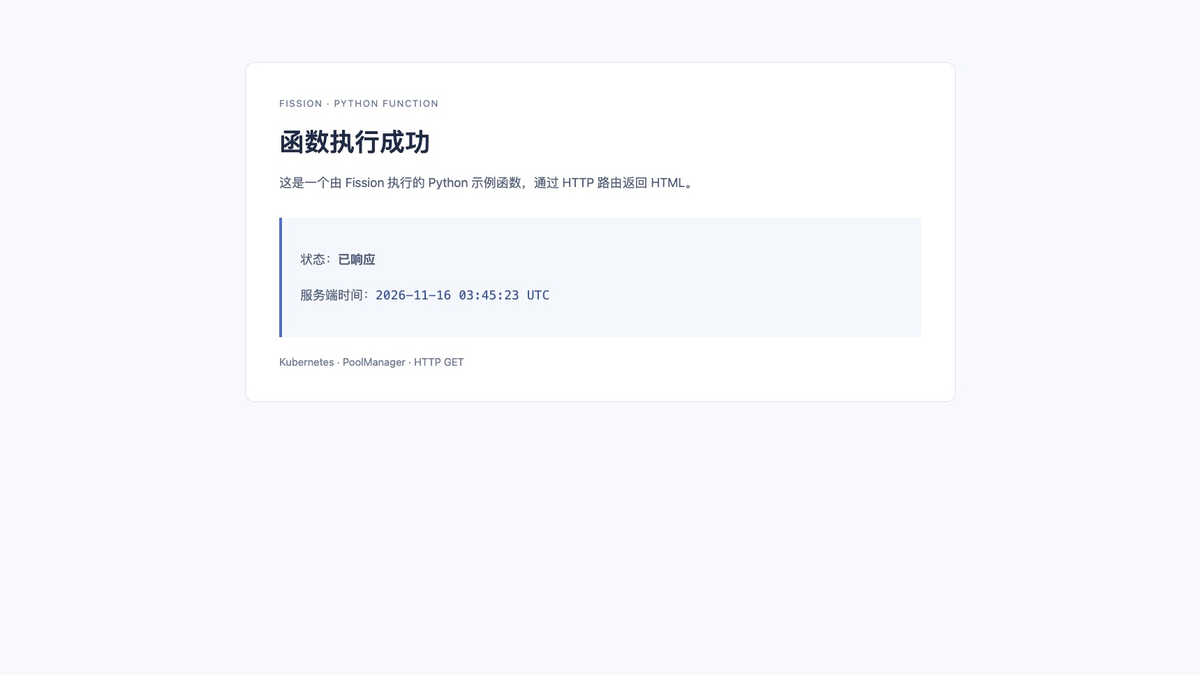
Desktop browser screenshot of our Python test function, showing its response and server time. This is not an official Fission console. The screenshot retains its original Chinese text.
Environment and version boundaries
| Item | Configuration |
|---|---|
| Kubernetes | v1.30.4, x86_64 test cluster |
| Fission | v1.24.0 Helm chart and CLI |
| Python environment image | ghcr.io/fission/python-env:1.34.2 |
| Deployment | Dedicated namespace, ClusterIP components, local port forwarding |
| Package storage | Persistence disabled for the experiment; data may not survive Pod or storage replacement |
| Scope | HTTP, code update, timer, PoolManager, NewDeploy/HPA |
Version selection matters. GitHub marks the installed v1.24.0 as a pre-release; its chart declares Kubernetes 1.28 or later. Newer charts require newer Kubernetes versions. An official advisory affects v1.23 and earlier and identifies v1.24.0 as the fixed version. A successful lab is not a production recommendation: reassess current stable releases, Kubernetes compatibility, images, and advisories before deployment. v1.24.0 chart · Security advisory
A dedicated namespace is not complete isolation: installation includes cluster-scoped CRDs, RBAC and admission configuration. The admission rules cover Fission resources, not all ordinary Pods; inspect existing installations, permissions, and shared components first. Our internal images were mirrored from official images. Commands below use upstream addresses; prepare a trusted mirror when those are unreachable.
1. How a request runs
HTTP request → Router → Executor → Ready function Pod → Python main() → response
                            ↑
                     PoolManager warm pool
PoolManager maintains generic runtime Pods in advance, specializes them for functions as requests arrive, and replenishes the pool. This can reduce some startup waiting, but the pool and control plane consume resources continuously. Image pulls, scheduling, specialization, and queueing can still affect the first request. Fission Executor
NewDeploy follows a different path: a dedicated Deployment runs the function and can use HPA for CPU-based scaling. The scaling observed here is Kubernetes HPA, not Knative's request-driven KPA.
2. Install Fission
This reproducible lab requires Helm, kubectl, cluster-admin permissions, metrics-server, and a matching Fission CLI. Check for existing Fission CRDs and releases before installation; do not overwrite an existing deployment. persistence.enabled=false makes package storage non-durable and is appropriate only for a lab.
kubectl create namespace fission-lab
kubectl kustomize 'https://github.com/fission/fission/crds/v1?ref=v1.24.0' \
  | kubectl apply --server-side --field-manager=fission-lab -f -
helm repo add fission-charts https://fission.github.io/fission-charts/
helm repo update fission-charts
helm install fission fission-charts/fission-all --version 1.24.0 \
  -n fission-lab --set defaultNamespace=fission-lab \
  --set serviceType=ClusterIP --set routerServiceType=ClusterIP \
  --set analytics=false --set persistence.enabled=false \
  --set preUpgradeChecks.enabled=false --set mqt_keda.enabled=false \
  --wait --timeout 8m
kubectl -n fission-lab get pods
We used server-side apply because client-side apply exceeded Kubernetes' annotation-size limit on some large CRDs. We also selected healthy nodes for control components and the runtime environment and configured an internal image mirror; adapt these choices to the target cluster. preUpgradeChecks.enabled=false was a first-install lab choice, not general advice to skip checks during upgrades.
3. Create and call a Python function
cat > hello.py <<'PY'
def main():
    return "Hello, world!\n"
PY

fission -n fission-lab env create --name python-lab \
  --image ghcr.io/fission/python-env:1.34.2 --poolsize 1 \
  --mincpu 50 --maxcpu 1000 --minmemory 128 --maxmemory 512 --version 3
fission -n fission-lab fn create --name hello-lab --env python-lab \
  --code hello.py --executortype poolmgr --concurrency 3 --fntimeout 30
fission -n fission-lab httptrigger create --name hello-route \
  --function hello-lab --url /hello-lab --method GET
kubectl -n fission-lab port-forward svc/router 19884:80
In another terminal:
The first call returned 200 in approximately 0.132 seconds; the next took about 0.058 seconds. These few observations do not establish cold-start performance. After changing hello.py to return Hello from Fission v2!, we ran fission -n fission-lab fn update --name hello-lab --code hello.py and received the new content at the same route.
One practical issue: fission fn test --name hello-lab returned 404 in this combination even though the HTTP Trigger worked. Reading the v1.24 source shows that CLI test and internal routing use different entry points; we did not fully determine the cause. We verified an explicit HTTP Trigger instead of disabling internal authentication.
4. Timer and PoolManager concurrency
fission -n fission-lab timer create --name periodic-lab \
  --function hello-lab --cron '@every 20s' --method GET
kubectl -n fission-lab logs deploy/timer --tail=30
fission -n fission-lab timer delete --name periodic-lab
The timer log showed two successful calls and HTTP 200 responses. We then deleted the timer to prevent ongoing execution. Adjust the Deployment name to match the installation when inspecting logs.
For a slow function that sleeps approximately one second, we set --requestsperpod 1 and --concurrency 3 and issued three simultaneous requests. All succeeded, taking approximately 8.533, 1.171 and 4.725 seconds; during sampling the specialized function Pod count rose from one to three. Individual times include queueing and instance preparation. Three observations are not stable latency percentiles.
One newly replenished warm Pod on another node experienced fetcher probe timeouts and restarts, and a later call timed out. We added a node selector only to this lab Environment; after placing it on a previously healthy node, the pool recovered and calls succeeded again. The root cause remains unproven, and this does not establish a general Fission defect. Further investigation should examine node resources, network and probe logs.
5. Observe HPA with NewDeploy
cat > cpu.py <<'PY'
import time

def main():
    stop = time.monotonic() + 0.5
    while time.monotonic() < stop:
        pass
    return 'CPU test complete\n'
PY
fission -n fission-lab fn create --name cpu-lab --env python-lab \
  --code cpu.py --executortype newdeploy --mincpu 100 --maxcpu 1000 \
  --minmemory 128 --maxmemory 512 --minscale 1 --maxscale 3 --targetcpu 50
fission -n fission-lab httptrigger create --name cpu-route \
  --function cpu-lab --url /cpu-lab --method GET
kubectl -n fission-lab get hpa,pods -w
With the port forward running, use the following client to reproduce the request conditions:
python3 - <<'PYLOAD'
import concurrent.futures
import time
import urllib.request

url = 'http://127.0.0.1:19884/cpu-lab'

def call(_):
    try:
        with urllib.request.urlopen(url, timeout=60) as response:
            return response.status == 200
    except Exception as exc:
        print(type(exc).__name__, str(exc))
        return False

start = time.monotonic()
with concurrent.futures.ThreadPoolExecutor(max_workers=3) as pool:
    results = list(pool.map(call, range(120)))
print(f'HTTP 200: {sum(results)}/120; elapsed: {time.monotonic() - start:.3f}s')
PYLOAD
Three concurrent clients made 120 calls to /cpu-lab; all returned HTTP 200, in 43.925 seconds total. Each function invocation ran a CPU busy loop for approximately 0.5 seconds. Observed HPA CPU utilization reached approximately 601%; replicas grew from one to three and later returned to one. The percentage is relative to Pod CPU requests: including the sidecar, the Pod requested approximately 110m. Environments and sampling times vary, and this number does not mean usage exceeded node capacity.
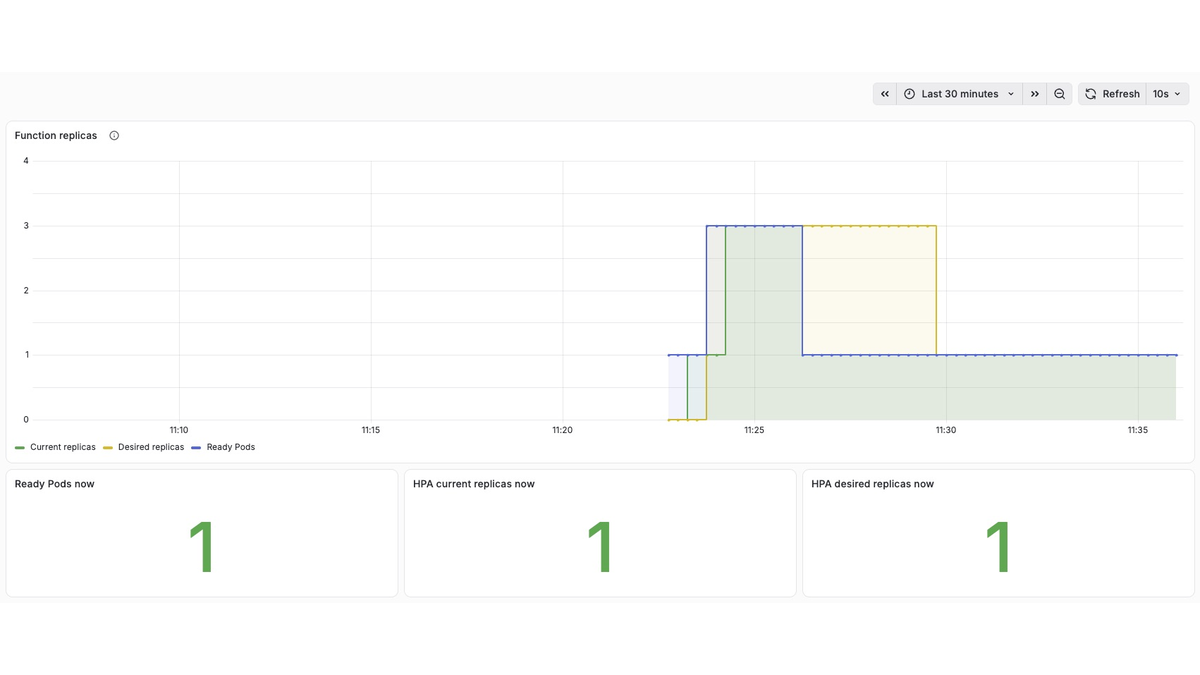
An actual light-theme screenshot of a temporary Grafana dashboard, querying existing Kubernetes HPA and ready-replica metrics. Green is current replicas, yellow desired replicas and blue ready replicas. Sampling and reconciliation happen at different times, so curves need not coincide. This is not an official Fission UI and does not establish that Fission-specific metrics were collected. The screenshot retains its original text.
6. How Fission compares with Knative
The Fission experiment used v1.24.0. Knative descriptions come from official documentation; we did not install or benchmark it in this experiment. Both projects evolve, so check the chosen release for specific features and dependencies.
| Dimension | Fission | Knative |
|---|---|---|
| Core abstractions | Environment, Package, Function and Trigger | Serving Service, Revision and Route; Eventing Source, Broker and Trigger |
| Delivery | Submit function code or packages; an environment image supplies the runtime | Serving runs container images; Functions can build and deploy functions from source |
| Execution and warm-up | PoolManager specializes warm Pods; NewDeploy uses a dedicated Deployment | Serving manages container instances for a Revision with request-path autoscaling components |
| Scaling | This lab observed request-related specialization with PoolManager and CPU HPA with NewDeploy | KPA can scale on concurrency or request rate; scale-to-zero and request activation are available with appropriate configuration |
| Versions and traffic | This lab verified code updates; HTTP Triggers also support weighted routing to multiple functions | Revisions represent versions and support configured traffic splits |
| Events | HTTP, timers, Kubernetes events and message-queue triggers, subject to components | Eventing provides Sources, Brokers, Triggers and a CloudEvents-based model |
| Evidence here | HTTP, timer, warm pool and HPA actually tested; message queues not tested | Documentation-based comparison; no Knative deployment or comparative benchmark |
References: Fission architecture · Knative Functions · KPA · Scale to zero · Traffic management · Eventing.
Fission is a useful starting point for teams delivering small pieces of code as functions with multiple triggers. If teams already ship HTTP services as container images and prioritize Revisions, request-driven elasticity and traffic splitting, Knative Serving deserves consideration. Evaluate complex event routing against the chosen event infrastructure. Warm pools retain capacity to reduce some waiting; scale-to-zero frees idle instances but incurs activation time. This experiment does not prove that either approach is faster or cheaper.
7. Further validation and cleanup
Before production, validate images and dependencies, persistent storage, high availability, function identity and RBAC, network policies, quotas, event retries and idempotency, failure recovery, cold starts and sustained load. Fission runs user code: isolation needs its own design, and ordinary containers should not be assumed to provide a strong security boundary.
After the lab, delete test functions and triggers and uninstall the Helm release before deleting the dedicated namespace. CRDs and ClusterRoles can be shared cluster-wide: assess removal only after confirming that no other installation or custom resources depend on them. Deleting a CRD deletes its custom resources; never perform blind cleanup on a shared cluster.