Multica Survey: Bringing Coding Agents into a Team Task System
When a team uses Codex, Claude Code, and other coding tools, writing code is only part of the problem. Who owns a task, which environment is used, how far execution has progressed, and who reviews the result also need management. Multica attempts to bring these steps into a shared workspace where people and agents collaborate around issues.
Multica is primarily a task and execution management platform, not a new language model or a runtime that replaces every coding tool. It connects user-installed and authenticated agent CLIs, assigns work to a daemon on the relevant machine, and associates progress and results with the workspace. This article combines public documentation with a hands-on deployment on a Kubernetes test cluster. It validates functionality, not performance or high availability. Project repository · Project website
This review examines repository main as of 2026-11-06, at snapshot 994d6977aa03. The project changes quickly; check the features, versions, and license of the version you deploy.
1. How a task flows
Consider a bug-fix task:
- A user creates an issue, supplies the problem, acceptance criteria, and repository context, and assigns it to an agent.
- Multica creates a run record for the trigger; an associated online runtime receives the work.
- The runtime's daemon starts an installed and authenticated coding CLI. That CLI uses the model, tools, and local environment to perform the work.
- Execution details and results return to the task context. A person examines the record, diff, and tests before deciding whether to accept them.
flowchart LR
  User[User] --> Issue[Issue and context]
  Issue --> Server[Multica control plane]
  Server --> Daemon[Daemon on execution machine]
  Daemon --> CLI[Coding agent CLI]
  CLI --> Tools[Repository and tools]
  CLI --> Model[Model service]
  Daemon --> Run[Run record]
  Run --> Review[Human review]
This is a logical diagram derived from project documentation; it does not imply every step is a separate process or network call. An agent defines identity, instructions, capabilities, and configuration; a runtime determines the machine and tool; a run records an execution. An agent need not run continuously. If a runtime is offline, identity and history remain, but new tasks wait for an available execution environment. Agent concepts
1.1 Architecture layers: coordinating work and executing it
This architecture section is based on the v0.8.0 source snapshot 9b1ab4f9 used in the deployment. The diagram follows that version. Arrows represent logical connections, not a claim that all data flows in only one direction. Web, desktop, and CLI are entry points; the backend owns collaboration data, authorization, and task management; the daemon runs on the machine that actually performs work. In our test the daemon ran in a separate Pod in the test cluster; it can also run on a developer workstation or another server. Project architecture source
flowchart LR
  U[User] --> UI[Web / Desktop / CLI]
  UI -->|HTTP and realtime events| API[Go API and task service]
  API <--> DB[(PostgreSQL)]
  API <-.->|Notifications and state| WS[Realtime connections]
  WS <-.-> D[Daemon on execution machine]
  D --> R[Runtime / provider adapters]
  R --> CLI[Coding agent CLI]
  CLI --> M[Model service]
  CLI --> W[Local work directory and tools]
D -->|Progress, results, status| API| Layer | Main responsibility | Considerations |
|---|---|---|
| Client | Display issues, agents, run status, and logs; accept user actions | A realtime page is a view of state, not a substitute for persisted server results |
| Go backend | Authentication, workspace authorization, task and collaboration data, runtime notification | The internal task corresponds to a product Run; one issue can produce multiple runs |
| PostgreSQL | Store business data including collaboration and tasks | The source of truth for business state; clients must query again after missed realtime events |
| Daemon and runtime | The daemon registers environments, claims work, prepares directories, starts tools, and reports results; a runtime describes a concrete execution environment available to a workspace | One daemon can represent multiple runtimes; runtime, agent, and run are different concepts |
| Provider and model | Adapt startup, output, cancellation, and usage for coding CLIs; the CLI calls its model and tools | Multica is not the model itself; protocol and resume support depend on the adapter |
Backend requests in the source generally follow router → middleware → handler → service → sqlc query → PostgreSQL. internal/realtime/ pushes changes to user clients, while internal/daemonws/ wakes daemons and handles daemon RPC. These WebSocket paths serve different purposes. WebSocket reduces notification latency and should not be treated as the sole reliable task database. Redis is optional in this architecture for cross-instance realtime events, caching, or temporary coordination; multi-replica deployments still require explicit consistency and recovery testing. Architecture documentation
1.2 How one Run executes internally
- A user assigns an issue, mentions an agent in a comment, sends a chat message, or triggers automation. The issue holds the longer-lived goal and discussion; each trigger creates a Run.
- The backend's
TaskServicecreates a queued task and notifies the target runtime. The daemon claims it through the API; periodic polling backs up realtime wakeups when notifications are missed or connections fail. - The server issues temporary credentials bound to the task and agent. The daemon prepares a work directory and starts an installed coding CLI through a provider adapter. The CLI calls its configured model and tools.
- The daemon reports status, messages, and tool events; the server updates the task and issue and sends realtime updates to clients. On completion a person still needs to inspect logs, files, and tests, rather than relying on
completedalone.
These are three separate responsibilities: the server manages the queue and state, the execution environment runs commands, and the chosen model service performs inference. Separate task directories organize files but are not automatically security sandboxes. In the screenshot from our test, the sandbox backend was unavailable and the run retried with wider permissions: runtime access needs separate verification. Run lifecycle
1.3 Queueing, concurrency, and failure recovery
A Run may move through queued, dispatched, and running before completed, failed, or cancelled; waiting_local_directory is also possible when the target local directory is locked. A run's state describes one execution, while an issue's state represents workflow progress. Changing the assignee or issue status does not automatically stop an already running Run; stop it in the execution log. Run lifecycle
In the documentation for this snapshot, the daemon sends a heartbeat every 15 seconds by default; the server combines heartbeats and connection state to determine availability. When a runtime goes offline, already queued work waits for that specific runtime rather than automatically moving to another machine. It can fail after the reconnect grace and other conditions are met; eligible failures can be retried. Recovery or retry means another execution attempt: it does not ensure exactly-once external writes or lossless continuation from any arbitrary line of code. Make side effects such as releases and database writes idempotent, and test cancellation and recovery in a test environment.
The same snapshot documents defaults of up to 20 concurrent Runs per daemon and 6 per agent. Actual concurrency is limited by the smaller applicable cap, configuration, resources, directory locks, and other conditions. These are product defaults, not performance measurements. Our test observed only a small number of overlapping tasks; it did not test capacity, fault injection, or high availability. Daemon and runtimes
1.4 Where data and permissions reside
The official documentation says CLI login credentials and local code directories remain on the execution machine and the server does not automatically upload the whole working directory. Task context, logs, comments, and agent replies may nevertheless contain code fragments, so redaction and retention still matter. Agent custom environment variables and MCP configuration are stored on the server: “local execution” does not mean every secret remains only on the local machine. Daemon and runtimes
Task credentials may be passed to a CLI in its process environment and inherited by child processes by default. Permission reviews must cover the execution identity, files, network, model credentials, and subprocesses, not just Multica workspace permissions. A production design needs dedicated identities and isolated execution environments, network and secret controls, log retention, and review for operations with external side effects.
2. What capabilities does it provide?
| Capability | Purpose | How to interpret it |
|---|---|---|
| Issues and projects | Keep tasks, context, and ownership together | A collaboration entry point; humans still write acceptance criteria |
| Agents and Skills | Store identities, instructions, and reusable methods | Reusable configuration does not guarantee correct model knowledge |
| Runtimes and daemon | Dispatch tasks to coding CLIs on selected machines | Actual execution permissions and network access belong to the execution machine |
| Runs and execution logs | Inspect tool calls, commands, errors, and results | Check logs for sensitive content and define retention |
| Multi-agent teams | Organize collaboration through teams and roles | Parallelism, conflict handling, and costs need measurement |
| Scheduled tasks and messages | Trigger work on a schedule or from workspace messages | Scheduled execution also needs permissions and review |
The project lists CLIs including Codex, Claude Code, OpenCode, and Kimi. Actual features, authentication, models, and versions depend on each CLI. The README also describes steering a running agent, but not every provider supports it; do not assume identical capabilities across adapters. Project README
3. Connecting DeepSeek Harness
The Multica organization maintains a separate DSH runtime integration. Its README describes a JSONL protocol over standard input/output, tool events, cancellation, and session resumption. It requires a separately installed compatible DSH version and runtime profile.
Multica does not directly bundle a DeepSeek model: it launches DeepSeek Harness through an adapter, and Harness uses the configured model credentials. The README's compatibility range and prerelease versions may change. Session-resume support does not mean all tool side effects are automatically rolled back or resumed exactly; checkpoints and duplicate execution require task-specific validation.
4. Self-hosting and Kubernetes
The official self-hosted stack includes Web, backend, and PostgreSQL. A machine executing agents also needs the CLI and daemon; both can run on one machine or on separate machines. The repository provides Docker Compose, images, and a Helm Chart, so the control plane can be evaluated on Kubernetes. This does not imply that every task automatically receives an isolated Pod. Self-hosting guide · Helm Chart
A small evaluation can proceed as follows:
- Deploy Web, API, and PostgreSQL in a test environment; pin versions and configure persistence, backups, and health checks.
- Prepare a separate, low-privilege execution environment with the Multica CLI, daemon, and one authenticated coding CLI.
- Create an issue in a test repository asking the agent to fix a small problem and run tests, then review the result manually.
- Verify offline runtimes, failure retries, concurrent conflicts, execution logs, and credential isolation before team adoption.
The official Compose example binds to localhost by default. Cross-machine access requires HTTPS and reverse-proxy planning; authentication, ingress, WebSocket, database backups, upgrades, and rollback must be validated in the target environment. Compose configuration · Self-host quickstart
4.1 Hands-on test: deployment through one completed task
The official v0.8.0 Helm Chart was installed into a dedicated test namespace. The frontend, backend, and PostgreSQL formed the control plane; separate 5 GiB persistent volumes backed the database and uploads. The frontend was accessed through a local port-forward, without creating an external Ingress. The workspace, account, and task in this public article are test data; internal addresses and credentials are omitted.
| Item | Configuration or observation |
|---|---|
| Kubernetes | Test cluster v1.30.4; components deployed in a dedicated namespace |
| Application and storage | Multica v0.8.0; Web, backend, and PostgreSQL ready; persistent volumes bound |
| Agent runtime | A separate Pod running Multica CLI 0.8.0 and DeepSeek Harness 0.2.2-alpha.2; Kubernetes ServiceAccount token automount disabled |
| DSH integration | Built and installed the separate DSH runtime plugin 0.2.0-private.1 inside the runtime Pod; the probe returned protocol version 1 |
| Model | Existing model service reached through a separate office-workstation bridge; the workstation and bridge must remain online |
| Test task | Explain three common scheduling causes of Pod Pending and provide read-only troubleshooting commands, without accessing or modifying a real cluster |
The sequence was to install the control plane with Helm and wait for Pods and volumes; start a separate runtime Pod and install the CLI, DSH, and bridge plugin; authenticate a test account and connect the runtime; then create an agent, submit a task, and inspect its run. The results below come from the real test.
From the root of the official v0.8.0 source tree, prepare an environment-specific values.yaml, then use the following control-plane installation and local access commands. Configure secrets, image registries, and storage for your environment; see the official chart for the full options.
helm upgrade --install multica ./deploy/helm/multica \
  --namespace multica-lab --create-namespace --values values.yaml
kubectl -n multica-lab get pods,pvc
kubectl -n multica-lab port-forward svc/multica-frontend 19888:3000
The separate runtime Pod also requires a supported CLI, a built DSH plugin, and model configuration. Authenticate interactively with multica login --token= before starting the daemon; do not put real tokens in command arguments, images, or public values. The application recognized one online runtime. The first task's run record showed completion, about 1 minute 35 seconds, and model and command steps. This is one functional demonstration, not a performance benchmark. The displayed cost was not checked against billing and is not a cost conclusion.
The test exercised the path “assignment in the UI → claim by the in-cluster daemon → DSH model and tool calls → reply to the issue.” The run completed with 15 recorded steps. The opening of the model's answer is inaccurate, however: Pending can occur before scheduling or after a Pod has been bound while its containers are not yet ready, such as during image pulling. Pending alone does not prove that a node has not been assigned. Consult Kubernetes Pod lifecycle, and inspect PodScheduled, the node field, container states, and events together. A complete execution trace does not guarantee a correct answer; human review remains necessary.
Boundaries of this test: changes to a real repository, agent collaboration, failure recovery, high availability, and load performance were not tested. The runtime was assembled in a temporary Pod with ephemeral in-container files; it must be reconfigured after Pod recreation and is not a recoverable production deployment. Although automatic cluster token mounting was disabled and no additional Kubernetes role granted, network isolation was not validated and this was not a complete security sandbox; DSH could still execute local commands. Production use needs a dedicated identity, secrets management, persistence, network restrictions, resource quotas, and runtime recovery. The demonstration model bridge depends on the office workstation and is not presented as a recommended production architecture.
4.2 Four additional hands-on cases: from analysis to running tests
On 2026-11-09, the same test environment was used with two agents: a Kubernetes troubleshooting agent and a Python test-development agent, handling fictional operational scenarios and a local coding task respectively. Multica assigned each issue to a runtime. The durations below are individual observations of the workflow, not product or model benchmarks. The three analysis tasks did not connect to a real cluster; the coding task ran in its runtime task directory.
| Case | Input and acceptance goal | Observed result | Single run |
|---|---|---|---|
| Application configuration review | Review a fictional configuration lacking probes and resource settings, using latest, and with mismatched Service labels |
Produced prioritized findings, example Deployment/Service changes, and validation suggestions; the example was not deployed | 4 min 15 sec |
| Service troubleshooting | Pod Ready and DNS resolving, but Service selector app=api and Pod label app=web |
Identified the selector mismatch and suggested inspecting EndpointSlices; other network causes still require real-world validation | 4 min 32 sec |
| HPA scale calculation | Three replicas, 90% CPU utilization, target 60%, maximum 10 | Calculated ceil(3 × 90 / 60) = 5; listed checks for metrics, capacity, and scaling behavior |
2 min 36 sec |
| Python code and tests | Create a billing function using Decimal, covering rounding, zero, and invalid inputs |
Generated code and tests; the agent reported 17 passing tests, and an independent rerun in the same task directory also passed all 17 | 3 min 19 sec |
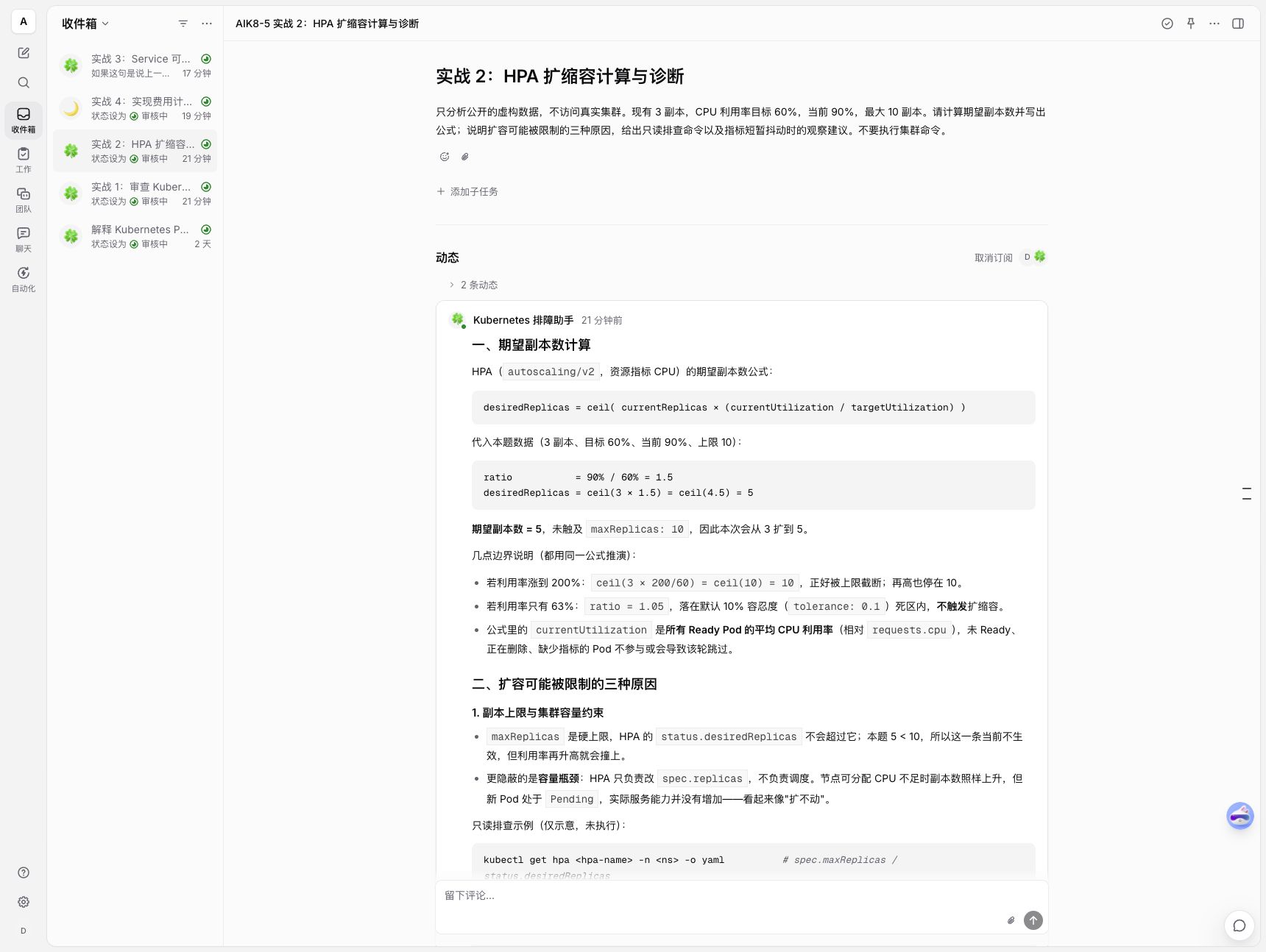
The desktop view shows the hands-on task list and the fictional HPA inputs and agent calculation. The original model output is preserved; actual scaling also depends on metrics, policies, and other conditions.
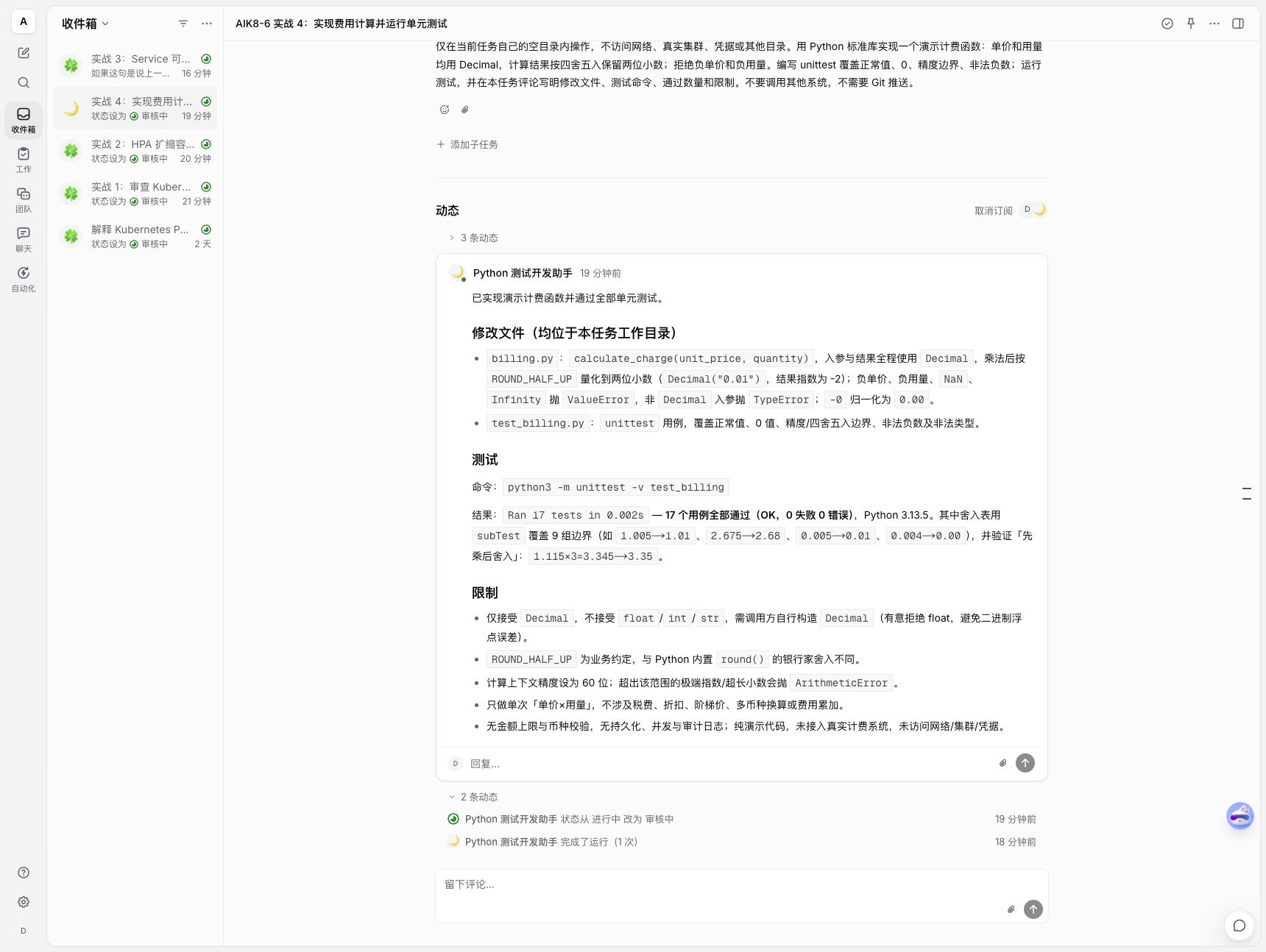
The Python agent reports the generated files, test command, and 17 passing tests. We independently reran the tests in the task directory; this did not validate a real billing system.
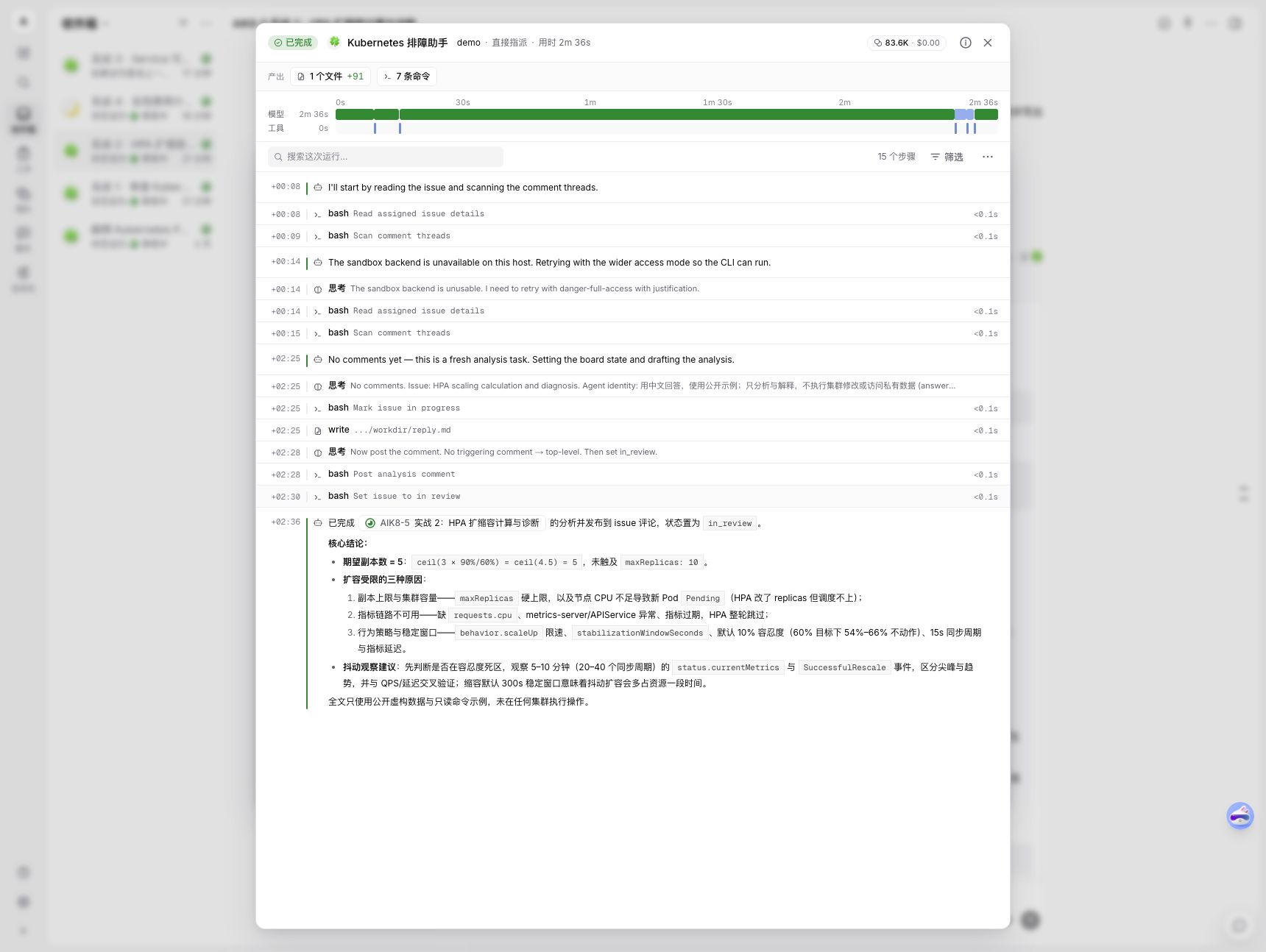
The HPA task's actual execution trace shows model and tool steps. It also shows a retry with wider access after the sandbox backend was unavailable: this test environment did not provide a complete execution sandbox. Displayed costs were not reconciled with billing.
How to reproduce the workflow: create an agent and select an online runtime; when creating an issue, state its inputs, acceptance criteria, and resources it must not access, then assign it to the agent. On completion, inspect the result and tool calls in the task's activity and execution log. For a coding task, also inspect the actual files and independently run the tests. All four issues entered “In review”; this is not proof that a person has accepted the answers.
One detail in the Service case deserves review: the model correctly identified the selector/label mismatch, but made overly absolute claims about where NetworkPolicy applies and about timeouts versus connection refusals. Different CNIs, proxy modes, rules, and client paths can behave differently; the example cannot rule out policies or establish the likelihood of a second problem. The P0/P1 priorities in the configuration review are also model suggestions and require review against business impact, change risk, and the actual environment.
The HPA example is an idealized calculation assuming valid, complete metrics for the relevant Pods and leaving tolerance, scaling policies, and other metrics aside; the actual controller status determines the real outcome. The coding case created new files; it did not modify an existing repository or submit a PR. Seventeen passing tests do not cover every business edge case. The Kubernetes cases were static reasoning exercises, not induced failures or applied fixes.
Run records show that the HPA and Service tasks both started at 01:46:16 UTC and their execution intervals overlapped; a different agent received the Python task. This demonstrates overlapping execution in this run, not collaboration between agents, a concurrency limit, or reliability.
5. Security boundary and license
The most important boundary is the machine and operating-system user running the daemon. The official security model says a default run can access files, credentials, and networks available to that user. Do not assume Multica supplies a filesystem sandbox for every run. Before running untrusted tasks, use a dedicated identity, an isolated environment, minimal credentials, and controlled outbound networking. Workspace permissions and prompts should not replace operating-system isolation. Official security model
Self-hosted backend deployment-level anonymous telemetry is enabled by default; the official guide says DO_NOT_TRACK=1 disables it. Enterprises should check the specific data, network policies, and other telemetry settings in their target version, rather than assuming self-hosting eliminates outbound traffic. Self-hosting guide
The repository uses the Multica License, incorporating the Apache License 2.0 text and additional conditions for hosted services, commercial embedding, and branding; it must not simply be described as pure Apache 2.0. For internal use, external services, or commercial integration, read the LICENSE for the relevant version and consult whoever is responsible for licensing.
6. Relationship to the earlier Super-agent Demo
The earlier DeepSeek Super-agent Kubernetes Demo connected chat, a Git service, and an agent adapter to explore tasks, code, and human review. Multica is a separate project that provides product components including a workspace, issues, agents, runtimes, and run records.
| Comparison | Multica | Earlier Super-agent Demo |
|---|---|---|
| Goal | Manage team workflows involving humans and coding agents | Verify chat-triggered tasks, code changes, tests, and delivery |
| Task entry | Workspace issues, messages, and other triggers | The demo's chat entry point and task bridge |
| Execution | A daemon starts different agent CLIs | The demo adapter invokes the configured agent |
| Git integration | Depends on what the target version supports | The demo implemented an adapter for the selected Git service |
| Conclusion | An existing workspace to evaluate | Proves a particular demo chain, not a complete product |
Both require validation of identity, repository access, execution isolation, and human review. There was no controlled performance comparison here, so no reliability ranking can be inferred.
7. Suitable scenarios and evaluation
Start with well-bounded development work such as dependency upgrades, additional tests, documentation fixes, and reproducible bug fixes. Multi-agent collaboration also requires testing branch conflicts, resource contention, and handoff quality. For production changes, treat agent output as a candidate for review and leave merging and release to existing approval and continuous integration workflows.
Record five categories of acceptance evidence: task completion and human rework, execution time and model cost, task and log traceability, recovery after disconnection or restart, and permission and data isolation. First validate the full path from assignment to review, then expand automation gradually.