NVIDIA NVCRE Architecture and Standalone H20-3e Readiness Tests
A Ready GPU node, a working device plugin, and 100% GPU utilization do not establish that a cluster can run distributed training efficiently. Poor GPU/NIC placement, communication falling back to TCP, slow checkpoints, or intermittent pauses on one machine can leave the entire job waiting.
On October 12, 2026, NVIDIA included NVIDIA Cluster Readiness Engine, or NVCRE, among the open-source DSX AI Factory components in its Open Compute Project (OCP) Global Summit announcements. It actively runs communication, diagnostic, and training workloads on selected nodes, using measured results to determine whether a GPU cluster is ready for workloads. NVIDIA OCP announcement
This article combines NVCRE v0.7.0 source analysis with standalone NCCL/DCGM tests on two nodes containing 16 H20-3e GPUs, reviewed on October 14, 2026. The experiment did not deploy the NVCRE controller or execute its Certification workflow. Results and device curves come from underlying workloads running as ordinary Kubernetes Jobs. The integration conditions for NVCRE's complete controller chain are discussed separately. v0.7.0 release notes
1. Public availability and purpose
NVCRE is an open-source Kubernetes controller licensed under Apache 2.0. Its version history and the broader official announcements need to be distinguished:
| Date | Verifiable public record | Interpretation |
|---|---|---|
| 2026-09-01 | GitHub stable release v0.1.0, with CLI, controller image, and Helm Chart | A user-facing release already existed |
| 2026-09-23 | NVIDIA technical blog introduced NVCRE as an open-source controller | Official explanation of its purpose, architecture, and integration |
| 2026-10-12 | OCP/DSX announcement listed NVCRE as an open-source component | The recent coordinated product and ecosystem announcement |
It is a recently public tool, but October 12 should not be presented as its first open-source date. These records do not establish the exact moment the GitHub repository changed from private to public. v0.1.0 release, September 23 technical introduction
For a GPU platform, NVCRE organizes readiness procedures otherwise scattered across scripts, tickets, and manual checks: select nodes and test categories, run defined workloads, evaluate measurements, and report failures and their scope. Communication tests use NCCL, diagnostics use DCGM, and training workloads can measure Goodput, the share of time contributing useful training progress. The underlying tools still perform the measurements. v0.7.0 project description
This separates workload completion from meeting a performance requirement. Thresholds must reflect the site's hardware, topology, and workloads. A bandwidth threshold for another GPU or rack cannot automatically become an H20-3e admission criterion. Threshold configuration
2. Turning readiness results into production actions
NVCRE fits node onboarding, changes, and repair workflows. The following is an integration recommendation; the H20-3e experiment below validates underlying communication and diagnostic workloads.
| Trigger | Workloads to select | How to use the results |
|---|---|---|
| New capacity or node handover | Software diagnostics, intra-node communication, and cross-node communication within a topology | Verify GPU count and actual paths; allow business scheduling after meeting site criteria |
| Driver, firmware, NCCL, or node-image upgrade | The same catalog and parameters before and after the change | Compare bandwidth, latency, correctness, and diagnostics; continue rollout, investigate, or roll back |
| Slow distributed training without obvious health alerts | Retest selected node groups or topology scopes, using diagnostic grouping where needed | Narrow the suspect scope, then inspect NICs, fabric links, CPU placement, and individual nodes |
| NIC/GPU replacement or node repair | Previously failing checks and related communication tests | Retain before/after records and return the node to service after passing retests |
| Training framework or checkpoint-storage change | Training workloads with configured log parsing, covering save and restore | Compare steady-state steps, restore costs, and Goodput to assess lost useful training time |
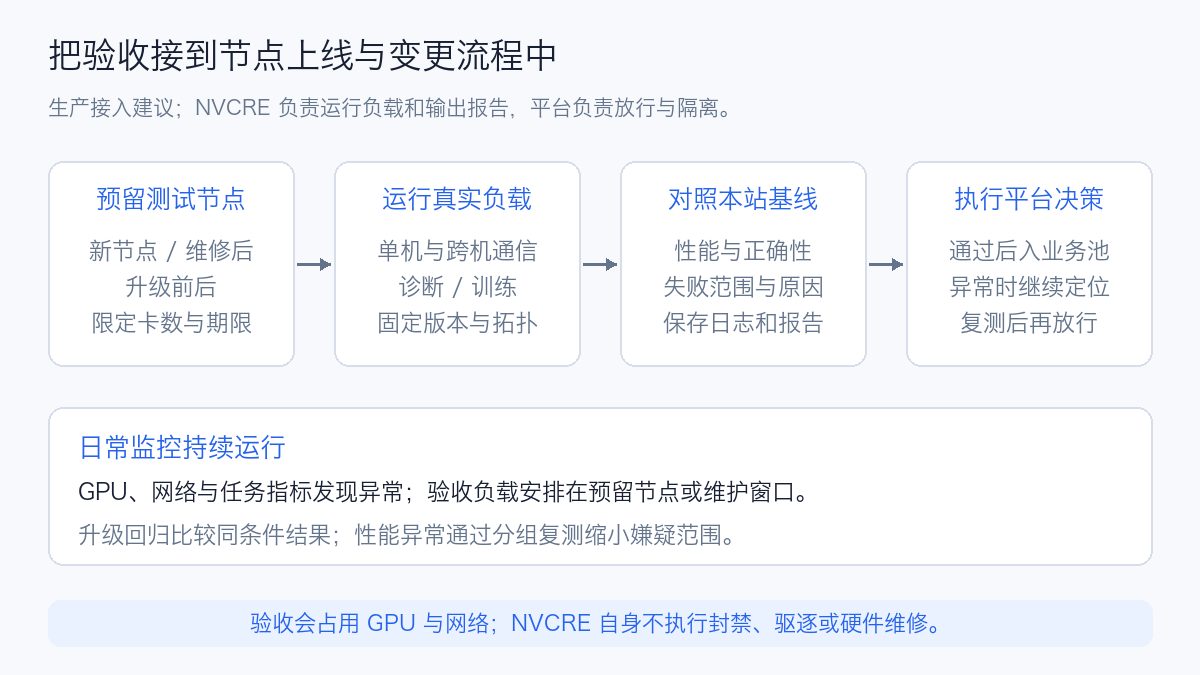
For example, keep a new batch of nodes in a readiness pool, run single-node diagnostics and communication, and then cover the intended cross-node topology. If intra-node tests pass but cross-node tests fail, investigate networking and cross-node configuration before treating all nodes as defective. Record image, driver, NCCL version, and reports before opening scheduling. Retain original failure logs and retest after repair.
A multi-node failure does not necessarily identify one bad machine. NVCRE's diagnose strategy divides failing groups and retests down to the configured minimum group size, producing a suspect scope. This reduces manual grouping, but congestion or shared-link faults can affect several groups. Interpret reports alongside device, network, and workload metrics. Diagnostic grouping definition
NVCRE reports readiness; the business platform owns admission, isolation, and repair. The controller does not itself ban or evict nodes, or change their health conditions. Existing operations processes can consume reports, or NVSentinel integration can connect readiness results with online health governance. Failure attribution and remediation boundaries
The workloads consume GPUs and network capacity, so use reserved nodes or maintenance windows with limits on concurrency, total duration, and topology coverage. Useful measures include defects found before admission, performance changes after upgrades, retests needed to locate faults, and GPU-hours spent testing. The value comes from preventing unvalidated equipment or configuration from entering service and narrowing investigations faster. Actual savings require operational records.
3. Standalone tests on two H20-3e nodes
To check whether the Kubernetes platform could carry communication and diagnostic workloads, we first ran NCCL Tests and DCGM using ordinary batch/v1 Job objects. These were underlying readiness workloads; NVCRE, Kubeflow Trainer, and JobSet were not installed, and Certification was not executed. This establishes devices, networking, software, and collection before deciding whether to integrate the complete orchestration system.
3.1 Hardware, software, and measurement boundaries
Each node had eight H20-3e GPUs. Before execution, we checked actual resource requests, GPU topology, error counters, and NIC state; neither node had another GPU workload. GPU pairs reported NV18. GPUs 0–3 and 4–7 were near different Non-Uniform Memory Access (NUMA) domains. Eight RDMA devices reported PIX proximity to adjacent GPUs. NIC ports were Ethernet, ACTIVE, and reported 200 Gb/s. Accordingly, the cross-node path is described as RDMA over Converged Ethernet (RoCE). Neither the /sys/class/infiniband directory nor NCCL's IB name proves a physical InfiniBand network.
| Item | Actual conditions |
|---|---|
| Kubernetes | 1.30.0 |
| GPU | 2 nodes × 8 H20-3e; each GPU reported 143,771 MiB |
| Driver / CUDA | 580.126.20 / 12.9 |
| NCCL | 2.27.3; logs checked both headers and the loaded library |
| NCCL Tests | v2.17.9, pinned source commit 2535da805b34e96d1dc08be66289be1a6d57f5ad |
| Build | MPI enabled, SM90; identical hash-verified binaries on both nodes |
| Processes | One MPI Rank per GPU; 8 Ranks on one node, 16 on two |
| Messages | 4 KiB–1 GiB, increasing by a factor of 4, 10 sizes; float data |
| Each size | 10 warmups, 50 timed iterations, numerical validation enabled |
| Repeats | 3 rounds per scenario/collective; Out-of-place results reported |
| Network | Independent Pod networking, explicit RDMA requests; ordinary Ethernet for MPI control traffic |
| DCGM | 4.5.3; CUDA 13 diagnostic plugins; independent Unix Socket Hostengine per node |
The image contained two NCCL installations: system version 2.27.3 and PyTorch dependency 2.28.9. We fixed LD_LIBRARY_PATH to the system library and checked the version through NCCL Tests and initialization logs. Recording only the image tag would miss this difference.
Single-node coverage included AllReduce, AllGather, and AllToAll. Two-node coverage included all three over RoCE and AllReduce over Socket/TCP. Forced RoCE used NCCL_NET=IB; TCP used NCCL_NET=Socket and NCCL_IB_DISABLE=1. RoCE logs contained NET/IB/.../GDRDMA, confirming the GPUDirect RDMA path.
NCCL Algorithm and Protocol remained automatic; no collective was assigned a fixed algorithm. Logs showed NVLS topology initialization. We report NCCL Tests' normalized Bus Bandwidth, without converting it into NVLink utilization or physical NIC line rate.
The following illustrates the parameters. Replace hostnames, devices, and MPI launch details for the actual platform:
mpirun -np 16 --map-by ppr:8:node --bind-to none \
  --host <node-a>:8,<node-b>:8 \
  -x LD_LIBRARY_PATH -x NCCL_DEBUG -x NCCL_SOCKET_IFNAME \
  -x NCCL_NET -x NCCL_IB_HCA \
  ./all_reduce_perf -b 4096 -e 1G -f 4 \
  -n 50 -w 10 -c 1 -g 1 -d float
3.2 Communication results: separate large and small messages
| Scenario | Collective | Median BusBW | Three-round range | Median duration | Numerical validation |
|---|---|---|---|---|---|
| Single node A · 8 Ranks | AllReduce | 465.56 GB/s | 465.02–466.02 | 4.04 ms | 3/3, 0 errors |
| Single node A · 8 Ranks | AllGather | 341.38 GB/s | 339.90–341.85 | 2.75 ms | 3/3, 0 errors |
| Single node A · 8 Ranks | AllToAll | 293.55 GB/s | 293.55–293.76 | 3.20 ms | 3/3, 0 errors |
| Single node B · 8 Ranks (additional attempt) | AllReduce | 465.73 GB/s | 465.63–465.77 | 4.03 ms | 3/3, 0 errors |
| Single node B · 8 Ranks (additional attempt) | AllGather | 341.85 GB/s | 341.62–342.42 | 2.75 ms | 3/3, 0 errors |
| Single node B · 8 Ranks (additional attempt) | AllToAll | 288.66 GB/s | 288.45–288.67 | 3.25 ms | 3/3, 0 errors |
| Two-node RoCE · 16 Ranks | AllReduce | 427.58 GB/s | 363.76–452.28 | 4.71 ms | 3/3, 0 errors |
| Two-node RoCE · 16 Ranks | AllGather | 172.73 GB/s | 149.15–187.97 | 5.83 ms | 3/3, 0 errors |
| Two-node RoCE · 16 Ranks | AllToAll | 37.87 GB/s | 37.69–42.26 | 26.58 ms | 3/3, 0 errors |
| Two-node TCP · 16 Ranks | AllReduce | 2.25 GB/s | 2.14–2.29 | 894.75 ms | 3/3, 0 errors |
Bandwidth is Bus Bandwidth at 1 GiB, in GB/s; latency is the collective duration at that size. Each median is calculated independently across three rounds, rather than deriving bandwidth by dividing two medians. AllToAll's In-place validation column is N/A, not an error. Out-of-place bandwidth and correctness are used consistently. NCCL Tests measurement definitions
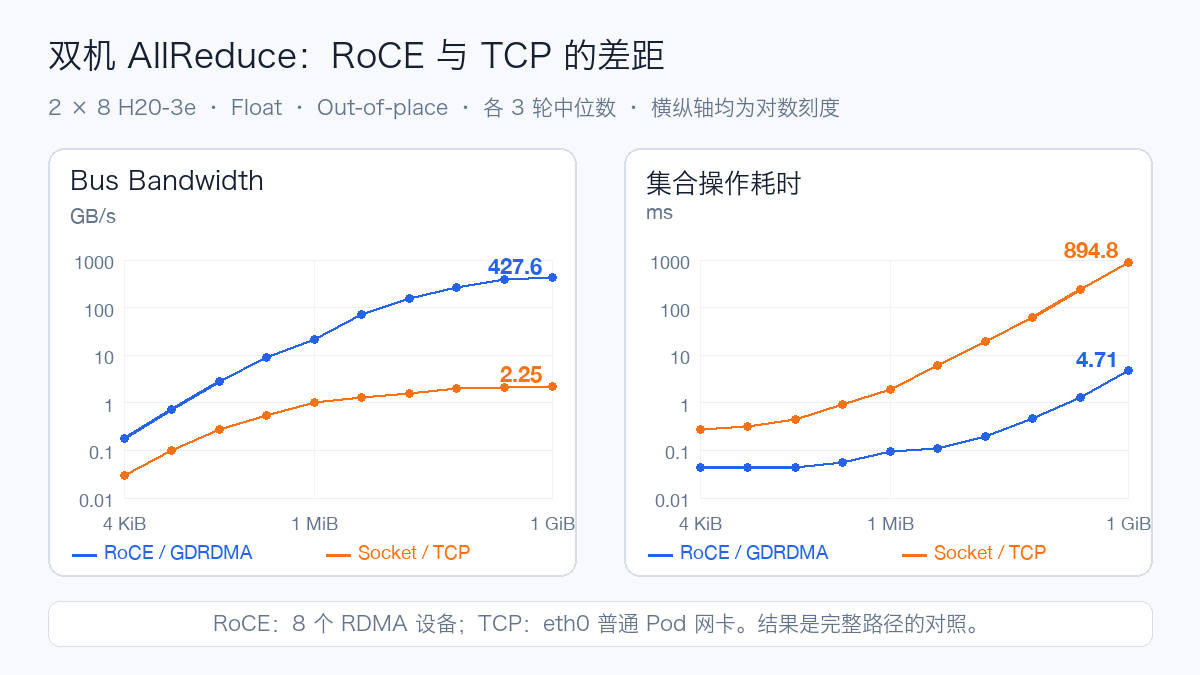
At 1 GiB, median two-node AllReduce bandwidth was 427.58 GB/s for RoCE and 2.25 GB/s for TCP, with durations of approximately 4.71 ms and 894.75 ms, a difference of about 190×. RoCE used eight RDMA devices, while TCP used an ordinary Pod's eth0. This compares complete deployed paths. A protocol-overhead study would additionally need aligned NICs, link limits, and routes.
RoCE AllReduce produced 363.76, 427.58, and 452.28 GB/s. The high-to-low difference was approximately 21% of the median, while single-node AllReduce stayed near 465 GB/s. The cross-node variation is visible, but current evidence does not attribute it to switches, CPU placement, or competing jobs. Correlate port counters, NUMA, CPU behavior, and historical results for the same topology.
Small messages are more sensitive to synchronization, protocols, and latency; larger messages gradually become bandwidth dominated. AllReduce, AllGather, and AllToAll have different normalization and communication graphs. One AllReduce figure cannot represent all training communication. Workloads heavily using AllToAll, such as expert parallelism, need a separate baseline for that collective.
No H20-3e site-performance thresholds were established beforehand. The direct evidence is numerical correctness, a confirmed RoCE path, and readable repeated measurements. Admission to a particular training platform still requires same-topology history and business-model regression.
3.3 DCGM: software checks and device diagnostics
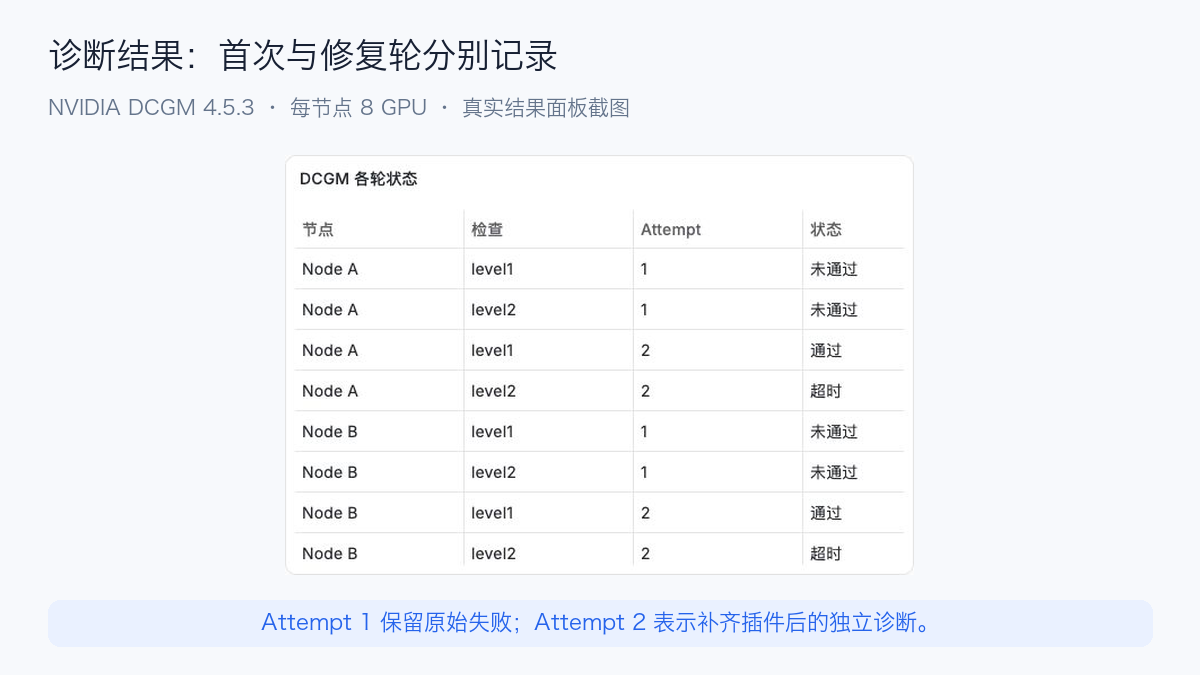
| Node | Initial Level 1 and Level 2 | Repaired Level 1 | Repaired Level 2 |
|---|---|---|---|
| Node A | Missing CUDA 13 plugins, exit 226 | Software 8/8 GPU Pass, 3 s | Timed out, 730 s, exit 137 |
| Node B | Missing CUDA 13 plugins, exit 226 | Software 8/8 GPU Pass, 5 s | Timed out, 730 s, exit 137 |
The first diagnostics failed before loading plugins, reporting Cannot load plugins ... plugins/cuda13 ... No such file or directory. The image only contained datacenter-gpu-manager-4-core. We obtained matching datacenter-gpu-manager-4-cuda13 from NVIDIA's official repository, checked the package SHA-256, 15 unpacked files, and library dependencies, then mounted it read-only into the experiment containers as a second attempt. Hosts and the existing Exporter were unchanged. DCGM installation and CUDA package selection
After adding plugins, both Level 1 Software checks reported Pass for eight GPUs. Level 2 produced no final diagnostic JSON. The executor imposed a 720-second outer deadline plus a 10-second forced-termination grace period; both finished at 730 seconds with exit 137. While waiting, NVVS parents were in ep_poll and two child processes in futex_wait_queue_me. Hostengine also reported a missing NVSwitch query library and HangDetect warnings. This establishes an incomplete diagnostic execution chain, not its exact root cause or a GPU hardware fault.
Further investigation should run PCIe, Memory, and Memory Bandwidth separately, checking complete DCGM dependencies, NVSwitch query libraries, driver combinations, and child behavior. Do not change thresholds or ignore error codes to obtain success. Complete Level 2 hardware-diagnostic conclusions remain unavailable.
An independent Hostengine avoided assuming DCGM Exporter was a connectable diagnostic service. Level 1 and Level 2 were separate executions with original JSON status, exit code, and duration retained. Level 3, Level 4, and training Goodput were not executed. DCGM covers the specified software, memory, and interconnect checks; it does not replace vendor offline hardware diagnostics. DCGM Diagnostics
3.4 Monitoring and retained records
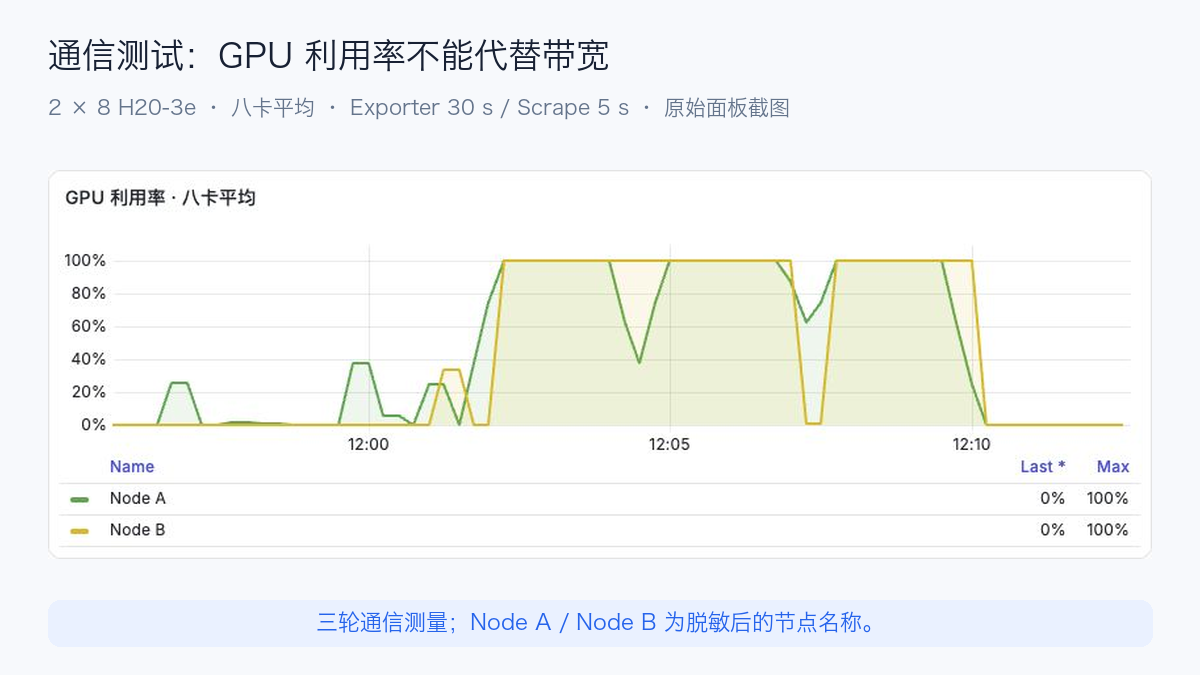
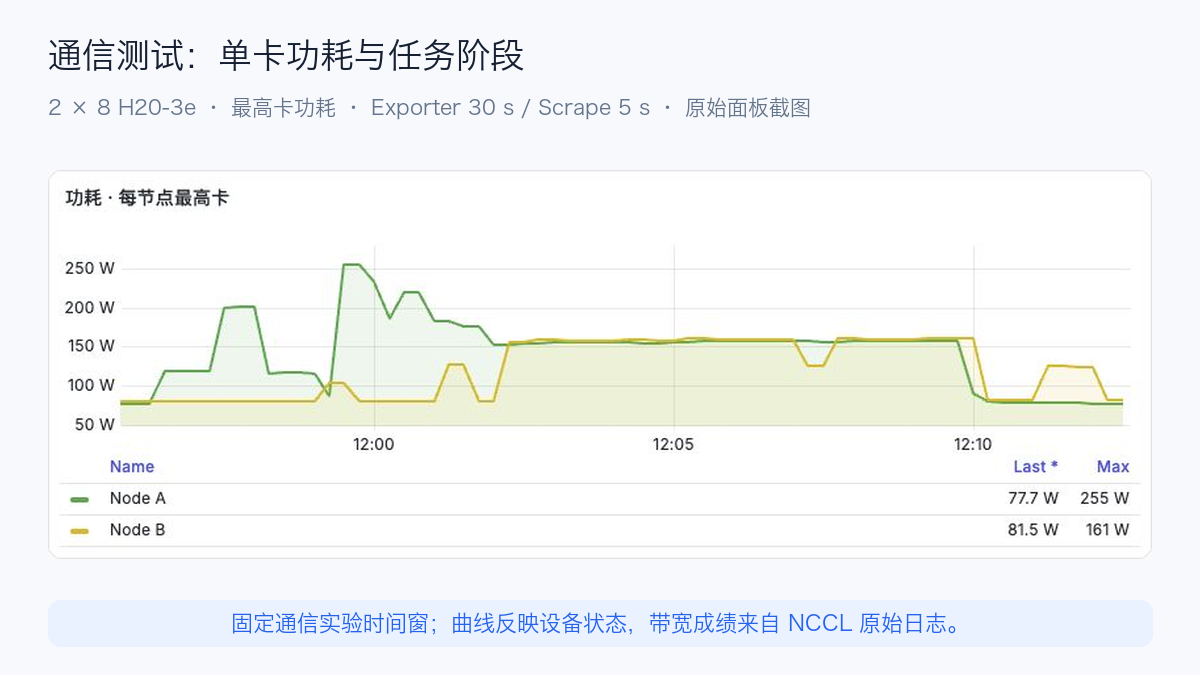
Both nodes' average eight-GPU utilization reached 100%, including during low-bandwidth TCP. Captured peak GPU power was 254.70 W for Node A and 161.06 W for Node B; temperatures were 46/49°C, and memory was approximately 6.48 GiB on each.
Prometheus scraped every 5 seconds, but the existing DCGM Exporter refreshed devices every 30 seconds. These are captured sampling peaks; short communication rounds may be missed. Faster scraping does not improve the device refresh resolution. Complete communication duration and bandwidth come from original NCCL logs; charts correlate device activity.
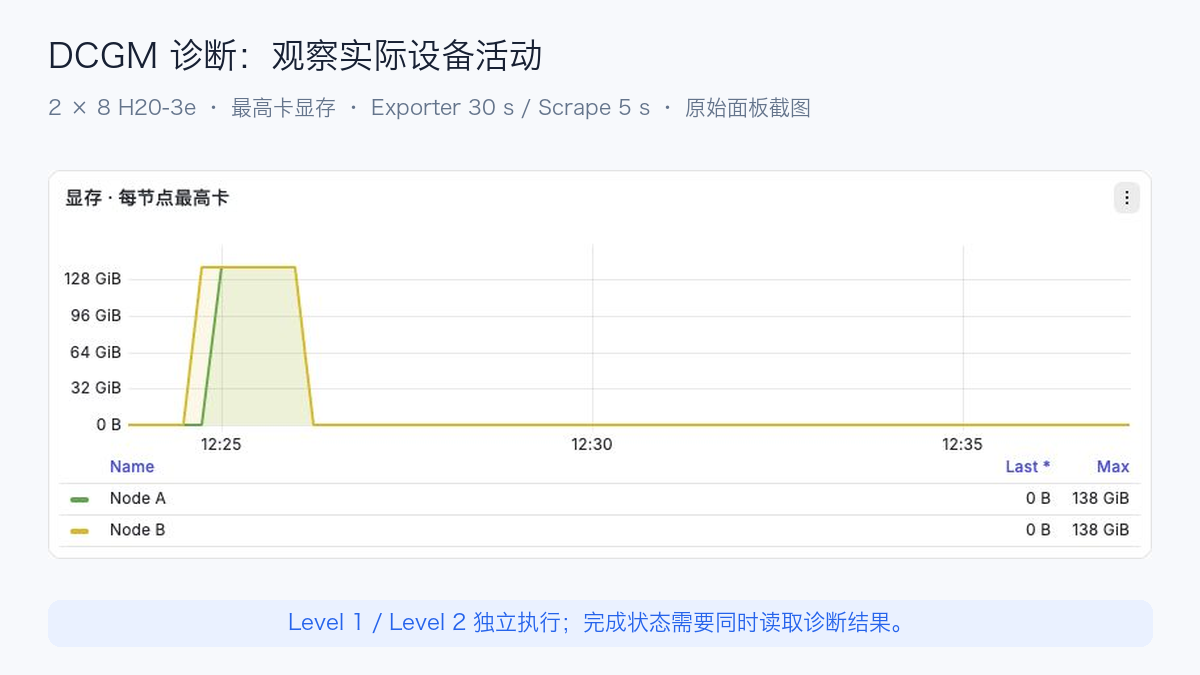
During repaired DCGM attempts, GPU memory reached approximately 138 GiB before falling to very low usage as temperatures declined. Devices were active during diagnostics, but the later process wait should not be interpreted as continuous GPU pressure. Final diagnostic state remains the authority for Level 2 results.
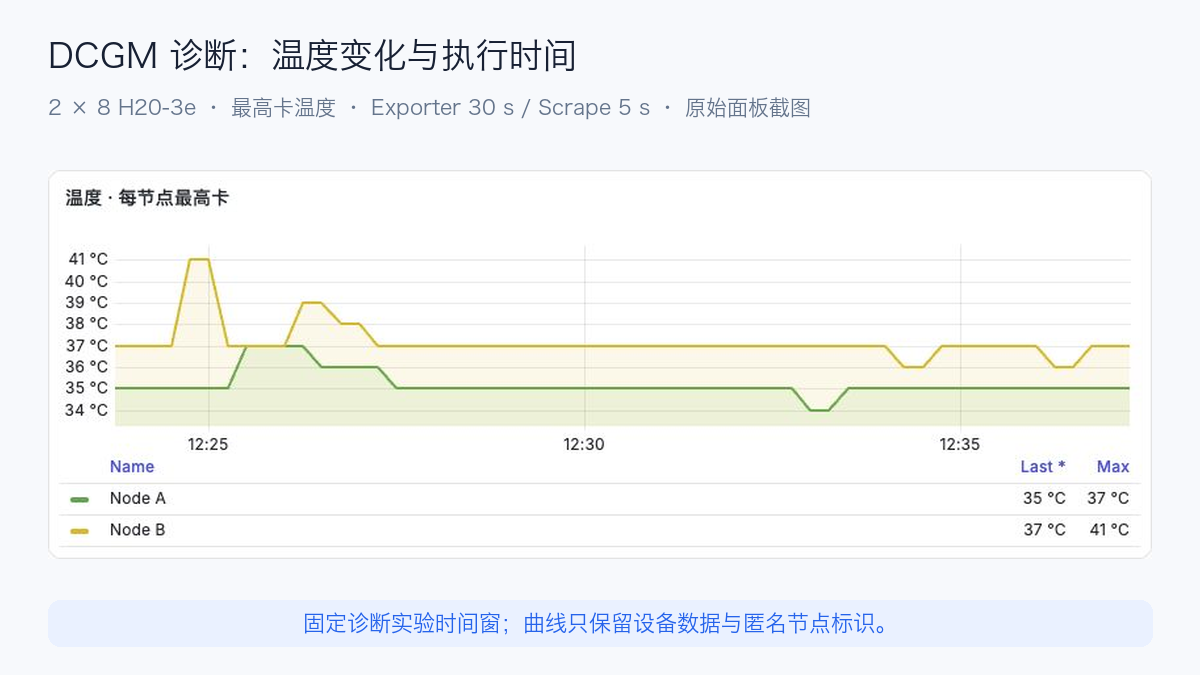
Hardware curves came from the existing DCGM Exporter, scraped by an independent experiment Prometheus every 5 seconds against the Exporter's 30-second refresh. GPU IDs were checked for all eight devices per node. Node A / Node B replace internal identifiers. Utilization is the eight-GPU mean per node; memory, power, and temperature are the highest GPU value per node. This aggregation supports observation, while per-GPU records remain available for anomaly checks.
Communication results were exported from saved NCCL output through independent hw_nccl_* metrics. They are completed measurements, not instantaneous NIC rates or the controller's nvcre_* metrics. They update after archival; performance interpretation still uses original per-size measurements.
Execution and parsing problems were retained. Node B initially lacked the executor, leaving nine single-node checks incomplete; the repair ran as a separate attempt. AllToAll's N/A column and a gateway-truncated output were reparsed from saved node logs, preserving both original and corrected parsing. Additional measurements did not overwrite original requests. Parameters, code hashes, logs, and exit states were retained for every test, and workloads were released after results returned.
Download the sanitized communication CSV and summary JSON. They contain test conditions, message sizes, and repeats, without internal addresses, registries, credentials, or business identifiers.
4. Why add readiness tooling when GPU monitoring already exists?
Routine monitoring asks about current device state; readiness workloads ask whether devices can perform defined work under defined conditions. Both belong in operations, with different measurement subjects.
| Capability | Main subject | Question answered | Additional evidence needed |
|---|---|---|---|
| DCGM Exporter and GPU dashboards | Utilization, memory, power, temperature, and errors | Are GPUs busy or showing abnormal signals? | Does activity produce useful training progress? |
| Manual NCCL Tests | Collective duration and bandwidth | Does multi-GPU/multi-node communication meet expectations? | Coverage, repeats, topology, and archival |
| Training monitoring | Step time, Loss, checkpoints, and restarts | Is one training job progressing normally? | Consistent regression and fault localization after environmental changes |
| NVCRE | Readiness workflows and measurements on selected nodes | Which nodes, tests, and conditions passed or failed? | End-to-end business-model behavior and human confirmation of faults |
For example, busy GPUs with low NCCL bandwidth suggest examining transport paths. Normal communication bandwidth with low training Goodput suggests restarts, checkpoints, input supply, or related overhead. NVCRE organizes these checks and their relationships; a green status does not replace evidence.
5. From certification to Kubernetes workloads
The primary execution chain is Certification → Workflow → Job → TrainJob. Certification describes an acceptance run; Workflow organizes grouping, iterations, and execution by category; NVCRE Job describes one execution; Kubeflow Trainer v2's TrainJob starts the workload. NVCRE Job belongs to nvcre.nvidia.com and is distinct from Kubernetes batch/v1 Job. Workload adaptation
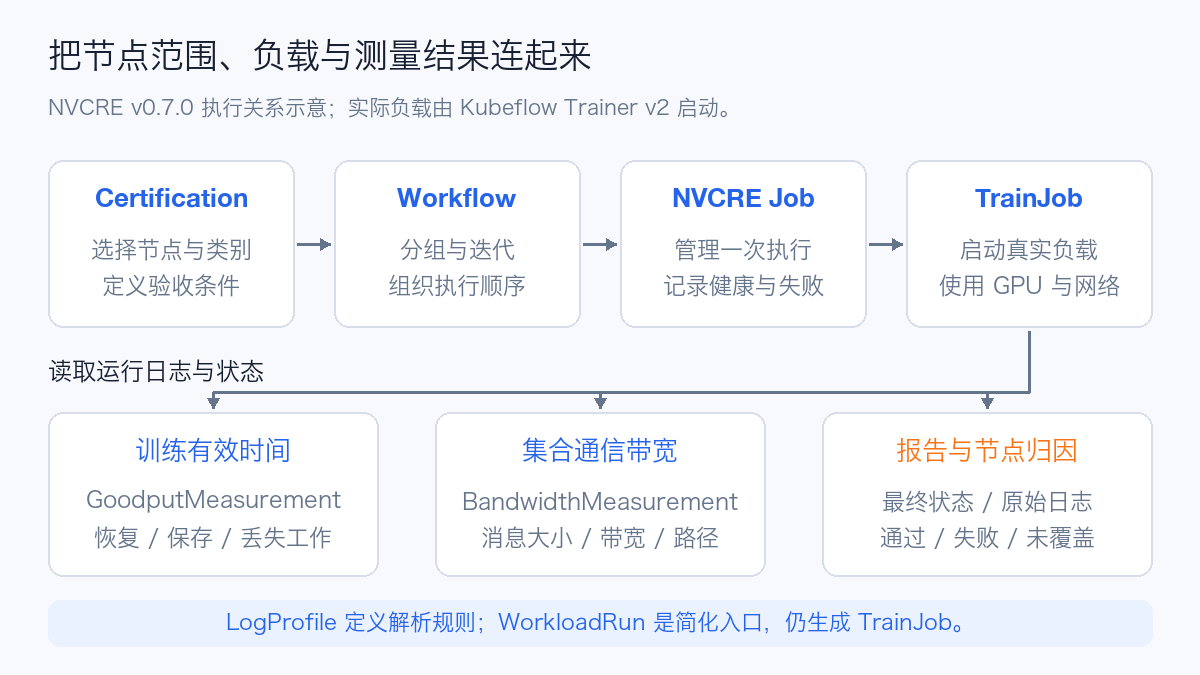
The v0.7.0 Chart contains 7 Custom Resource Definitions (CRDs). All resources except LogProfile are namespaced. CRD directory
| CRD | Purpose |
|---|---|
| Certification | Full acceptance entry point, selecting nodes, categories, and criteria |
| Workflow | Category-level grouping, iteration, execution, and diagnosis |
| Job | Individual execution, health detection, status, and failures |
| WorkloadRun | Simplified entry point for a workload outside the full certification catalog |
| GoodputMeasurement | Useful training time and overhead derived from logs |
| BandwidthMeasurement | Collective communication bandwidth derived from NCCL logs |
| LogProfile | Cluster-level parsing rules for framework logs |
Although WorkloadRun offers torch, mpi, and exec entries, all ultimately become TrainJob. The exec option does not bypass Trainer. An older TFJob or PyTorchJob Operator does not provide Trainer v2's interfaces. Job API and WorkloadRun differences
6. Three measurement layers
6.1 Collectives: bandwidth, message size, and transport
The NVIDIA Collective Communications Library (NCCL) handles GPU collectives. NVCRE's catalog includes AllReduce, AllGather, AllToAll, and intra-node loopback tests. Interpret results by message size and topology, rather than selecting one maximum bandwidth. Communication catalog
Two common metrics are:
| Metric | Meaning | Interpretation |
|---|---|---|
Algorithm Bandwidth, algbw |
Message size divided by operation time | Compare the same message size, collective, and Rank count |
Bus Bandwidth, busbw |
Bandwidth normalized for the collective | Not a direct sample of one NIC's instantaneous line rate |
NCCL Tests applies different algbw → busbw conversions to different collectives. Ranking AllReduce and AllToAll solely by those figures can mislead. NCCL Tests performance calculations
v0.7.0 can also record BandwidthMeasurement.status.transport, such as IB or Socket, but this field is recorded without affecting pass/fail evaluation. A passing result still needs its actual transport checked. Where Remote Direct Memory Access (RDMA) is expected, site rules should detect Socket fallback. Bandwidth measurements
6.2 Training Goodput: how much time becomes useful progress?
Goodput describes the share of time producing useful training progress. It differs from GPU utilization: reloads, repeated unsaved work, and synchronous checkpoint saves consume resources without creating new retained progress.
The v0.7.0 implementation calculates:
Here, t_w is training wall-clock time, t_rm restore overhead, t_ch lost-work time, t_re rescheduling time, and t_save checkpoint-save overhead. The implementation excludes rescheduling time from the denominator, so it is not overall efficiency from job submission to completion. Capacity analysis also needs submission-to-start waiting and full completion time. Goodput calculation
LogProfile extracts steps, timing, and checkpoints from framework logs. Changes to image or framework log format require corresponding parser review. Missing matches do not mean zero overhead. Completed measurement status freezes for consistent repeated reads. Measurement lifecycle
Startup and warmup dominate short jobs, so long-job thresholds should not be copied blindly. Fix model, precision, Batch, parallelism, step count, checkpoint interval, and storage, comparing steady-state step time and restore cost separately.
6.3 Health and fault localization
Built-in health detection uses Common Expression Language (CEL) to read Conditions, Labels, Taints, and Allocatable on Kubernetes Nodes. It does not directly consume all DCGM time series. To turn Xid or ECC errors into node-health judgments, another component must expose suitable node state, or a custom NodeFailureDetector must be implemented. Health detection and attribution
| Failure reason | Direct meaning | Investigation |
|---|---|---|
HardwareFailureDetected |
A configured health condition was triggered | Check driver logs, Xid/ECC, devices, and node state |
ThresholdViolation |
Performance missed the configured threshold | Investigate paths, contention, topology, thresholds, and software |
WorkloadFailed |
A workload exited or stalled | Inspect original exit codes, logs, Pod Events, and dependencies |
The latter two do not establish defective GPUs. Even the first requires checking that the health expression represents hardware state correctly.
Diagnostic mode can narrow abnormal groups and try node pairings across topology boundaries. These are additional real tests consuming GPU time and bandwidth. Multiple faults and cross-domain issues invalidate any assumption of a fixed cost based on ideal binary splitting. Adaptive fault isolation
7. Can Kubernetes 1.30 install it directly?
Distinguish minimum interface requirements from dependency support coverage.
| Component | Reviewed version | Upstream statement | Assessment for 1.30 |
|---|---|---|---|
| NVCRE | 0.7.0 | Requires 1.29+; CRDs use CEL quantity() |
Meets its declared interface minimum |
| Kubeflow Trainer | Installer pins 2.2.1 | Chart README states 1.29+ | Meets the Chart's stated minimum |
| JobSet | Trainer Chart defaults to 0.11.0 | Tagged README lists E2E on 1.32, 1.33, and 1.34 | 1.30 is outside the listed test coverage |
| DRA model-discovery fallback | resource.k8s.io/v1 ResourceSlice |
NVCRE documentation specifies 1.34+ | Use device plugins and accurate node labels on 1.30 |
Sources: NVCRE prerequisites, Trainer pinning, Trainer 2.2.1 Chart, Trainer Chart prerequisites, JobSet 0.11.0 support.
This does not prove JobSet 0.11.0 cannot run on 1.30, but it cannot establish full-stack compatibility either. Prefer validating the complete chain on a Kubernetes version covered by dependencies. If 1.30 is necessary, check CRD admission, Webhooks, JobSet creation, Indexed Jobs, Pod networking, and cleanup in isolation before maintaining a validated combination.
Do not arbitrarily downgrade JobSet to bypass checks. Trainer fields and default-runtime behavior must be validated together. Where other consumers already use JobSet, an installer must not upgrade or remove shared CRDs on their behalf.
8. H20 and L20 primarily need catalog adaptation
Discovery first filters nvidia.com/gpu.present=true, then reads nvidia.com/gpu.product. Allocatable nvidia.com/gpu alone does not guarantee discovery. DRA's fallback model query also does not compensate for a missing gpu.present label. Platform discovery
v0.7.0's product parser recognizes NVIDIA-H20 and NVIDIA-L20 as model strings, but its hardware-default table has no H20 or L20 entries. Unknown models fall back to 4 GPUs and 0 Mellanox NICs per node; --gpu-arch only accepts known default-table models. Parsing a model name and adapting its test catalog are different capabilities. Product parsing, hardware defaults, fallback and argument checks
| Environment | Configure explicitly | Avoid this misinterpretation |
|---|---|---|
| One or a few L20 GPUs | Actual GPU count, PCIe paths, images, and workload size | Four-GPU default requests causing Pending; applying NVSwitch thresholds |
| Eight-GPU H20 nodes | Actual GPU count, intra-node topology, GPU/NIC proximity | Testing four GPUs and claiming full-node acceptance |
| Multi-node H20 with RDMA | NIC resources, device injection, device selection, and transport | Missing NIC allocation or TCP fallback interpreted as RDMA |
| Mixed GPU pools | Separate targets by model and topology | Majority-model configuration hiding heterogeneous behavior |
Do not label H20 as H100 or L20 as L40S to borrow configuration. Labels must reflect actual hardware; adapt parameters, catalog templates, and baselines to the site. A small evaluation can consider custom WorkloadRun objects; sustained use needs maintained catalog entries and regression records.
Built-in communication templates may install SSH packages at startup, while training templates have model and script dependencies. Mirroring the controller image alone does not make execution offline-ready. Review workload images, commands, and runtime downloads together. AllReduce template
9. Production integration: which actions affect workloads?
NVCRE does not Cordon, Taint, or Patch Nodes, but it creates workloads, reads logs, and manages some storage resources. Not modifying Nodes does not make tests resource-neutral. Controller permissions
| Object | Default or optional behavior | Production concern |
|---|---|---|
| NVCRE controller | Cluster-wide Node/Pod/log reads and TrainJob creation | RBAC, readable business scope, audit, and installation identity |
| Communication workloads | GPU requests and collectives; some MPI images need additional capabilities | Exclusive GPU allocation, NIC bandwidth, and Pod security |
| DCGM Level 4 | Base template uses Privileged and HostNetwork, with long stress checks | Maintenance window, cooling/power, and Hostengine reachability |
| RDMA HostPath mode | Mounts /dev/infiniband with Privileged |
Prefer evaluating existing device plugins over broader permissions |
| Checkpoints | PVC creation/deletion/update and some PV operations | StorageClass, capacity, reclaim policy, and shared-volume boundaries |
| Diagnosis and retries | Extra tests or workload restarts | Total GPU-hours, deadlines, network pressure, and human confirmation |
The base Level 4 catalog connects to nvidia-dcgm.gpu-operator.svc:5555, with targeted_power and targeted_stress each set to 1200 seconds. DCGM Exporter alone does not establish that this Hostengine exists. Level 4 is not a lightweight online probe. DCGM Level 4 template
9.1 Start with a limited scope
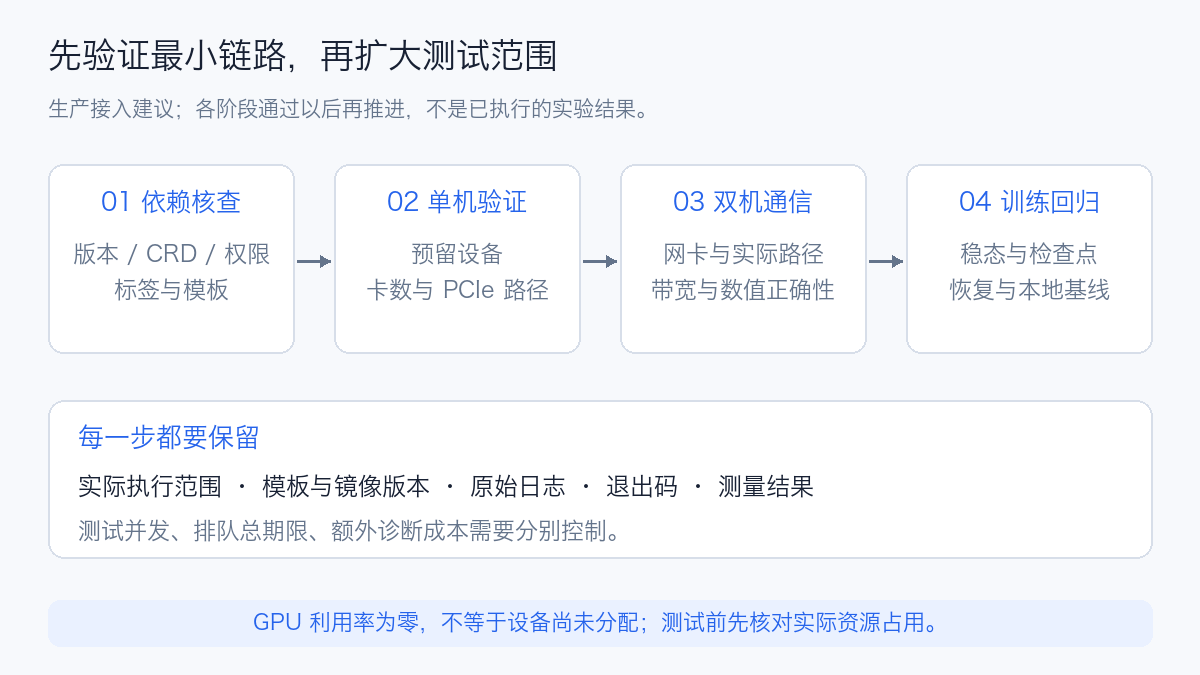
Review versions, templates, labels, and permissions first, then validate a minimal workload on one reserved node. Expand to intra-node multi-GPU, two-node communication, and finally topology domains and checkpointed training. Retain parameters, exit codes, logs, and measurements at each step.
Zero utilization does not establish that a GPU is unallocated. A model server may hold the device without requests. Check actual requests and assignments before testing and identify reserved devices. Training and communication can also affect other workloads sharing network capacity, so assess node isolation and link headroom together.
Controller Reconcile concurrency is the number of concurrent reconciliation requests, not a GPU workload concurrency limit. Configure workload concurrency, quotas, and selectors separately, including diagnostic retests in the budget.
9.2 Make queueing, exclusion, and failure explicit
Cordoned nodes or nodes with insufficient Allocatable may be excluded before execution; exclusion does not mean acceptance. Retain excluded-node reasons and coverage. Exclusion and status semantics
v0.7.0 detects persistently unschedulable Pods and reports WorkloadSchedulingBlocked; blocked time does not count toward timeoutPerJob. This avoids classifying tenant occupancy as a hardware fault, but operations still need an external total deadline including queueing. Archive first, then cancel workloads and reclaim test resources at expiry. Scheduling stall handling
Retries must distinguish causes. Images not ready or transient API connections can justify bounded retries. Changed message size, GPU count, or training precision is a new configuration; preserve the original failure rather than overwriting scores.
10. Prometheus and Grafana integration
Add execution and measurement metrics alongside existing GPU monitoring, correlating cluster, namespace, Workflow, Job, and a fixed experiment interval. Useful dashboard dimensions include:
| Panel | Metrics or source | Purpose |
|---|---|---|
| Certification status | nvcre_certification_status, nvcre_workflow_status, nvcre_job_status |
Category completion and failing stage |
| Node coverage | Target, excluded, and failed nodes in CRs; topology metrics | Denominator, actual scope, and exclusion reasons |
| Collectives | nvcre_nccl_algbw_gbs, nvcre_nccl_busbw_gbs |
Bandwidth by message size and collective |
| Useful training | nvcre_goodput_ratio, nvcre_goodput_avg_step_time_seconds |
Useful-time share and Step time |
| Restore and storage | nvcre_goodput_resume_time_seconds, nvcre_goodput_checkpoint_save_time_seconds, nvcre_goodput_lost_work_time_seconds |
Restore, save, and repeated-work costs |
| Devices and infrastructure | Existing DCGM, CPU, network, disk, and Pod metrics | Correlation with hardware, contention, or storage changes |
This table describes NVCRE integration. Earlier measurements used independent hw_* results and DCGM device metrics, without an NVCRE controller. Names and units follow the v0.7.0 metric definitions. _gbs means GB/s, bytes per second, not Gb/s. Older _gbps names are compatibility aliases and must not be aggregated with the new names.
Four integration details are easy to overlook:
- Selectors. The Chart's default ServiceMonitor label is
release: prometheus; it must match the existing Prometheus selection. Without Prometheus Operator CRDs, disable this resource and configure scraping separately. - Authentication and TLS. Defaults use HTTPS and a ServiceAccount Token. The scraper also needs
/metricsread permissions.insecureSkipVerify: trueskips certificate verification; it does not grant authorization. Production should validate the chain and service name. - Labels. Default
honorLabels: truepreserves measurementjobandnamespace. Changing it can require queries using labels such asexported_job. Add an explicit cluster dimension for cross-cluster collection. - Preserve existing collection. Export current complete kube-prometheus-stack values and append to the live baseline. Compare old/new Jobs, Secret references, and rules, then verify GPUs, control-plane metrics, and new Targets after upgrade.
Defaults: ServiceMonitor template, Metrics Reader permissions.
10.1 Post-run No data can reflect lifecycle behavior
To limit temporary-Job cardinality, NVCRE clears some Gauges after measurement termination. Goodput operation times, TFLOPS, and Step metrics are cleared, while its ratio is retained at completion. NCCL bandwidth Gauges are also cleared at termination. Deleting objects removes further related series. Goodput cleanup, bandwidth termination
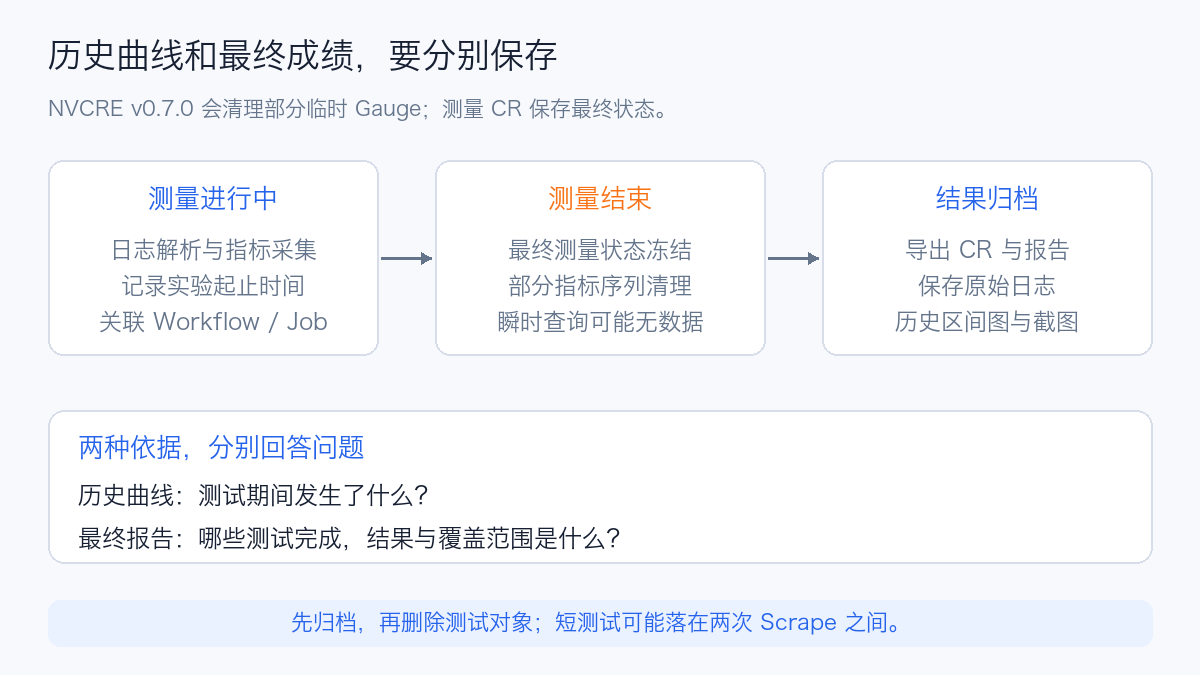
Final reports should use frozen measurement CRs and exported results; Grafana should query the experiment's historical interval. max_over_time shows a window peak, not a final average or percentile. Short tests may finish between Scrapes, leaving Prometheus without a bandwidth sample.
A practical archive includes final CR state, report JSON, logs, template/image Digests, node topology, fixed-window metric exports, and actual screenshots. Verify archival before reclaiming objects; instantaneous dashboard queries alone do not preserve scores.
11. Plan images, installation, and exit together
Offline or restricted networks require controller, Trainer, JobSet, communication, diagnostic, framework, and model artifacts. Pin versions and Digests, mirror the OCI Chart, and retain signature and supply-chain verification. Release notes describe separate validation for CLI, Chart, and controller images; validating one does not cover the others. v0.7.0 artifact verification
Render the actual Chart before installation. Review shared CRDs, Webhooks, RBAC, PVC/PV permissions, and workload images. Development defaults in the source Chart do not replace the released package.
Do not exit by blindly running a global Reset. nvcrectl setup reset defaults to removing NVCRE resources, Trainer dependencies, and three Trainer CRDs. Although it preserves the shared JobSet CRD, other Trainer users may still be affected. Separate deleting this experiment's objects from uninstalling platform components, checking ownership and consumers first. Installation and uninstall semantics
12. Adoption recommendations for production GPU platforms
NVCRE is worth considering for node admission and change regression, but not as an indiscriminate full default suite across an active pool. Integration has three layers:
| Layer | What successful validation establishes |
|---|---|
| Interfaces and dependencies | A specific version combination creates, runs, and reclaims workloads correctly |
| Hardware and catalog adaptation | Actual model, GPU count, topology, and transport are covered |
| Performance and operations | Repeatable baselines, failure attribution, monitoring, and archival |
For Kubernetes 1.30 H20/L20 platforms, first establish dependency compatibility and truthful model discovery, then adapt resource counts, RDMA, and catalogs. Expand after minimal workloads function. Explain threshold misses before automating node removal, which requires adequate evidence.
The long-term benefit is turning scattered readiness scripts into a process with explicit scope, configuration, reports, and historical comparisons. Combined with DCGM, Prometheus, Grafana, and training recovery, it helps explain why nodes may enter service and why an upgrade may proceed.
References
- NVIDIA Cluster Readiness Engine
- v0.1.0 release (2026-09-01)
- NVIDIA technical introduction (2026-09-23)
- OCP/DSX open-source announcement (2026-10-12)
- NVCRE introduction
- v0.7.0 source and documentation
- Kubeflow Trainer 2.2.1
- JobSet 0.11.0
- NCCL Tests performance calculations
Related topics: GPU node software, GPU node failure atlas, GPU and training observability, Device Plugin, CDI, and DRA.