OpenSandbox on Kubernetes: Official Console, Task Execution, and Automatic Cleanup
An agent needs a working environment to modify code, install dependencies, or run Python analysis. A local executor is convenient, but concurrent tasks require consistent ownership, file separation, access credentials, and resource cleanup.
This experiment deployed OpenSandbox 1.1.1 in an existing Kubernetes 1.30.4 test cluster. It exercised real commands, file uploads and downloads, an HTTP service, concurrent tasks, and lifecycle operations, and connected the official Developer Console. The experiment used the container backend on one worker node and required no GPU.
1. Project Origin and the Versions Tested
Alibaba initiated OpenSandbox. The original alibaba/OpenSandbox URL now redirects to opensandbox-group/OpenSandbox, while the official SDK metadata still lists Alibaba Group. The Apache 2.0 project can run on infrastructure you own. Official repository, SDK metadata
The server, controller, gateway, and SDK were pinned to 1.1.1. This release fixes missing generated code in the 1.1.0 server Python package. The experiment did not use floating latest images. 1.1.1 release notes
| Component | Actual version or source | Location |
|---|---|---|
| API server, Controller, Ingress Gateway, execd | release-1.1.1 |
Kubernetes |
| Deployment templates | 531700ca18a7fa5fab6a2f25d6dc68a76eddab12 |
Rendered from the matching Helm charts |
| Python SDK | opensandbox==1.1.1 |
Local validation program |
| Task image | Python 3.12 slim, linux/amd64 | Sandbox Pod |
| Official Developer Console | Main-branch snapshot 834c839dcf587784c16449aed56c21a5cf71b6d1 |
Local Web and BFF connected through port forwarding |
The Console directory is absent from the 1.1.1 release. This is therefore a compatibility experiment combining a released backend with a pinned main-branch Console. A visible button does not establish that every feature works in this version combination.
2. What It Does on Kubernetes
The API server manages environment lifecycles. The Controller turns custom resources such as BatchSandbox into Pods. Inside each sandbox, execd exposes commands, files, and execution results. Ingress Gateway provides an entry point for sandbox services. Architecture for the tested version
flowchart TB
  A["Agent / SDK"] --> B["Lifecycle API<br/>Create, renew, delete"]
  B --> C["BatchSandbox + Controller<br/>Create and reclaim Pods"]
  C --> D["Sandbox Pod<br/>execd + Python"]
  A --> E["Server Proxy / Gateway<br/>Commands, files, services"]
  E --> D
Environment creation and command execution follow different paths. After a successful create request, the execution endpoint must still be reachable, commands must actually finish, and output files must be correct. These stages were checked separately.
3. Deployment Scope and Resources
A dedicated namespace contained one API server, one controller, and one gateway. Control-plane Pods and test tasks were placed on the same available worker. No node DaemonSet was installed, and the cluster network configuration was not changed.
| Component | CPU request / limit | Memory request / limit |
|---|---|---|
| API server | 100m / 1 CPU | 128 MiB / 512 MiB |
| Controller | 100m / 500m | 128 MiB / 256 MiB |
| Ingress Gateway | 100m / 500m | 128 MiB / 256 MiB |
| Each SDK test sandbox | 100m / 500m | 128 MiB / 512 MiB |
ResourceQuota and LimitRange bounded namespace totals and provided defaults for Init Containers without declared resources. Task Pods disabled automatic ServiceAccount Token mounting, dropped Linux capabilities, and used the RuntimeDefault seccomp profile. This validates ordinary container execution; it does not establish virtual-machine isolation.
RBAC, or Role-Based Access Control, was split deliberately. The controller retained the cluster-wide read caches required upstream, while its writes were restricted to the experiment namespace. Server writes were also namespace-scoped. The controller still has cluster-wide reads, including Secret reads, so this lab configuration is not a strict production multi-tenant authorization design.
4. Two Dependencies Encountered During Installation
First, installing only the three container-backend CRDs—Custom Resource Definitions—is insufficient for this configuration. The 1.1.1 service factory combines the container backend and Fast Sandbox service; missing API definitions produced background 404 reads. Installing the 7 CRDs from the matching base component removed these errors. Installing API definitions does not install a Firecracker runtime. Service factory source, base component
Second, this gateway version requires cluster-wide read watches even when its data-plane namespace is configured. With only a namespaced Role, it reported that it could not list BatchSandbox at cluster scope and failed to become ready. Restoring the upstream read permissions resolved startup without broadening writes.
Image delivery was tested rather than assumed. Connections to one public registry path were reset, while another official registry path worked. Internal copies were then prepared through an image relay, with linux/amd64 image config and layers checked against their sources. No upstream program code was changed.
Reproducible Configuration
The companion directory contains a sanitized renderer and CSV verification script. The renderer pins the source version, uses official public images, and generates random API and route-signing keys in its output directory.
git clone --depth 1 --branch release-1.1.1 \
  https://github.com/opensandbox-group/OpenSandbox.git /tmp/OpenSandbox
export OPENSANDBOX_SOURCE=/tmp/OpenSandbox
export OPENSANDBOX_OUTPUT=/tmp/opensandbox-lab
python examples/opensandbox-kubernetes/render-lab.py

kubectl create namespace opensandbox-lab
kubectl apply --server-side --field-manager=opensandbox-lab \
  -f /tmp/opensandbox-lab/crds.yaml
kubectl apply --dry-run=server -f /tmp/opensandbox-lab/install.yaml -o name
kubectl apply -f /tmp/opensandbox-lab/install.yaml
Check ownership before applying over existing resources; the example does not resolve conflicts with another installation. Restricted networks need their own image mapping. Keep generated keys, configuration, and cluster access files out of public repositories.
5. Official Web UI: Login and Environment Creation
The official Developer Console uses a React single-page application and a FastAPI BFF—Backend for Frontend. After browser login, the BFF maintains the session and calls the Lifecycle API, rather than storing a long-lived API Key in browser storage. Console documentation at the pinned snapshot
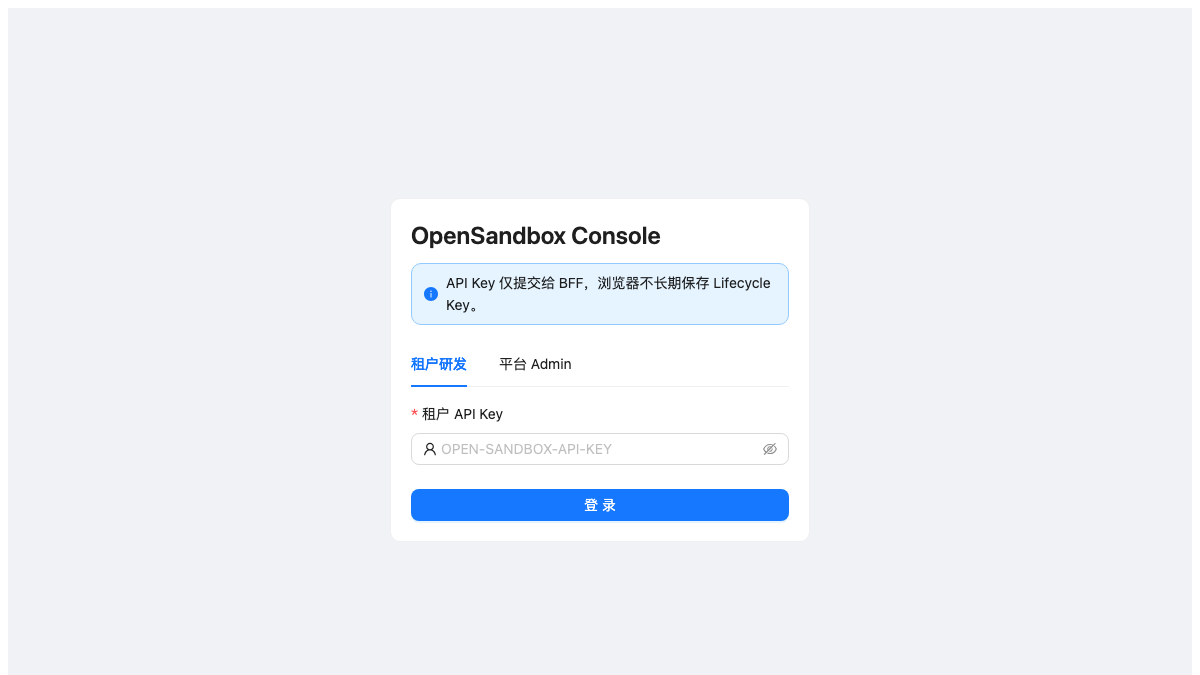
The experiment signed in through the tenant developer tab. In “创建沙箱” (Create sandbox), it entered python:3.12-slim, retained the tail -f /dev/null entrypoint, set CPU, memory, and timeout, and clicked Submit. The page opened the new environment details; refreshing showed Running.
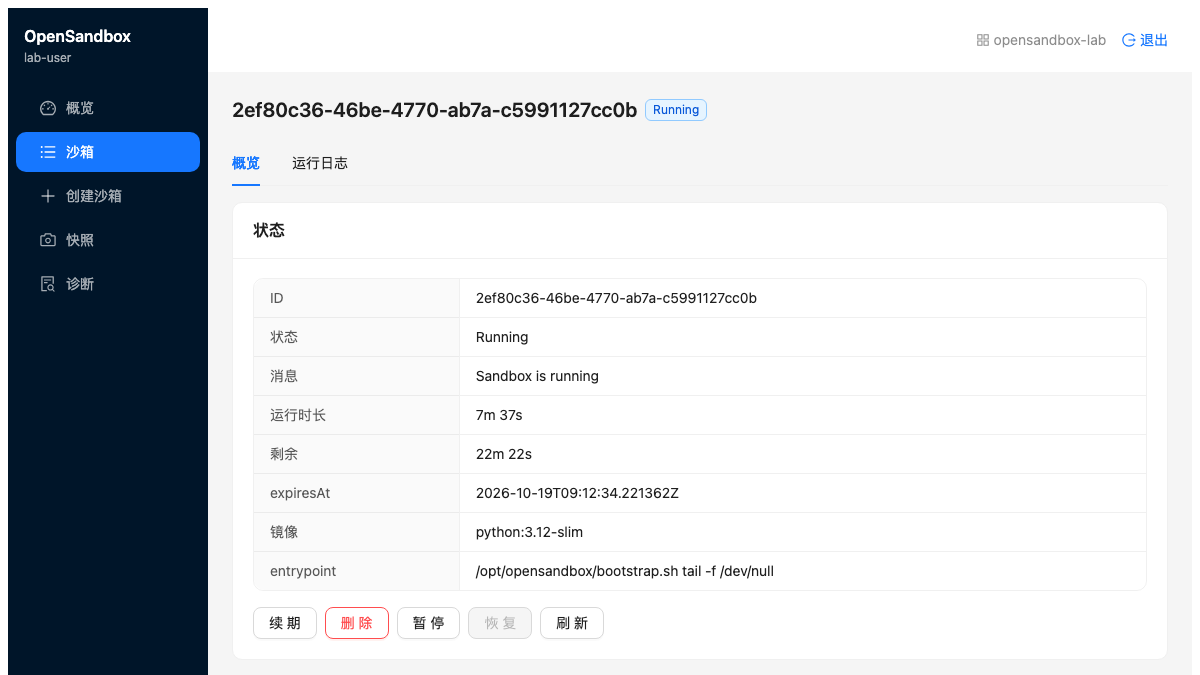
This is the official interface, and the Python environment shown was actually created through its form. Console Web and BFF ran locally, while the execution environment ran in Kubernetes. The entire Console was not deployed as an in-cluster application in this experiment.
Two separate local forwards connected the lifecycle service and execution gateway:
kubectl -n opensandbox-lab port-forward svc/opensandbox-server 38080:80
kubectl -n opensandbox-lab port-forward svc/opensandbox-ingress-gateway 38089:80
The BFF's LIFECYCLE_API_BASE pointed to http://127.0.0.1:38080/v1, and the frontend used the upstream Vite proxy to reach the local BFF. The tenant configuration Key must match a Key accepted by the backend. Login, creation, overview, and details were verified; this lab account mapping is not a production tenant-isolation test.
6. Submitting an Actual Task
The Console creates a working environment. An SDK or agent executor then sends files and commands to it. This experiment used an independently verifiable task: upload 6 sales records, aggregate them by region inside the sandbox, download JSON, and verify the input-file hash.
The essential calls are shown below; the complete program is verify.py in the companion directory:
connection = ConnectionConfig(
    domain="127.0.0.1:38080",
    api_key=os.environ["OPENSANDBOX_API_KEY"],
    use_server_proxy=True,
)
sandbox = await Sandbox.create(
    "python:3.12-slim",
    connection_config=connection,
    timeout=timedelta(minutes=10),
    resource={"cpu": "500m", "memory": "512Mi"},
    secure_access=True,
)
try:
    await sandbox.files.write_files(entries)
    execution = await sandbox.commands.run("python /tmp/analyze.py")
    result = await sandbox.files.read_file("/tmp/result.json")
finally:
    await sandbox.kill()
    await sandbox.close()
use_server_proxy=True lets the local SDK reach execution endpoints through the server when it cannot directly reach Pod IPs. entries contains the input CSV and Python program constructed by the script. The downloaded result must still be parsed and checked; a successful command request alone is insufficient.
The actual results were:
| Acceptance check | Result |
|---|---|
| Input records | 6 |
| Total amount | 400 |
| East / West / North | 150 / 100 / 150 |
| Input-file readback | Matching content and SHA-256 |
| Python execution | Exit code 0 and expected JSON |
| Deliberately failing command | Exit code 7 and preserved stderr |
The same environment also started a Python HTTP service. The execution proxy returned its 1,426-byte HTML report with status 200, demonstrating an actual reachable service as well as short command execution.
7. Verify Both Authentication Layers
The lifecycle API Key and execution-endpoint token serve different purposes. Results were:
| Request | Result |
|---|---|
| Lifecycle API without a Key | HTTP 401 |
| Lifecycle API with the correct Key | HTTP 200 |
| Gateway with routing headers retained but Secure Access removed | HTTP 401 |
| Gateway with all endpoint headers | HTTP 200 |
The execution proxy also requires the security headers returned with the endpoint. A handwritten HTTP request containing only the API Key initially received 401; supplying the complete SDK endpoint headers made it succeed. Agent integrations should therefore retain the full endpoint information.
Keep routing headers when testing gateway authentication. Removing every header can produce a missing-route 400; that is not a successful authentication test.
8. Startup Times and Four Concurrent Tasks
Timing starts when the SDK requests creation and ends when its execution-endpoint health check succeeds. It includes the API, scheduling, container startup, and access path. It is neither Firecracker boot time nor Kubernetes scheduling time alone.
| Scenario | Samples and outcome | Creation to executable |
|---|---|---|
| First environment | 1 / 1 | 6.187 seconds |
| Serial create, execute, delete | 3 / 3 | 4.133, 3.656, 4.601 seconds |
| First four-way attempt | 3 / 4 ready; 1 timeout | Successful items: 4.656, 4.660, 68.574 seconds; failed item not ready within 90 seconds |
| Independent four-way repeat | 4 / 4 ready | 3.978, 5.279, 5.255, 6.126 seconds |
In the repeat, each environment wrote its own identity to the same path, ran a controlled 45-second CPU task, and read its identity back. All 4 tasks returned correct results and could not read the result file in the retained demo environment. Each was then deleted; all 4 subsequent queries returned 404, and the cluster Pod inventory confirmed cleanup.
The initial readiness tail remains relevant. Logs place the slow request in the execution endpoint's /ping access phase. The evidence does not establish whether networking, the proxy, or the application caused it. The repeat demonstrates that this run completed; it does not erase the first failure or establish production capacity or reliability.
9. Renewal and Expiry Cleanup
TTL—Time to Live—should reclaim an environment when it expires, rather than merely stop the client waiting. Renewal was first checked by confirming that the new expiresAt exceeded the previous value, followed by an independent short-lived environment.
The 1.1.1 create API requires timeout >= 60 seconds. An initial 30-second request received 422. After changing it to 60 seconds to satisfy the version constraint, the results were:
| Observation | Measurement |
|---|---|
| Configured TTL | 60 seconds |
| Creation to executable | 3.685 seconds |
| Executable to query returning 404 | 57.111 seconds |
| Creation request to query returning 404 | 60.802 seconds |
| Kubernetes resource check | Corresponding BatchSandbox and Pod deleted |
TTL starts at server-side creation. The subsequent 57.111 seconds should not be interpreted as early cleanup of a 60-second environment.
10. Observing the Running System
One controller metrics endpoint and one VMServiceScrape were added to the existing VictoriaMetrics collection system, with a dashboard provisioned through a ConfigMap. All 77 existing targets were retained; the total became 78, and the new target was UP. Existing Helm values were not overwritten, and monitoring services were not restarted.
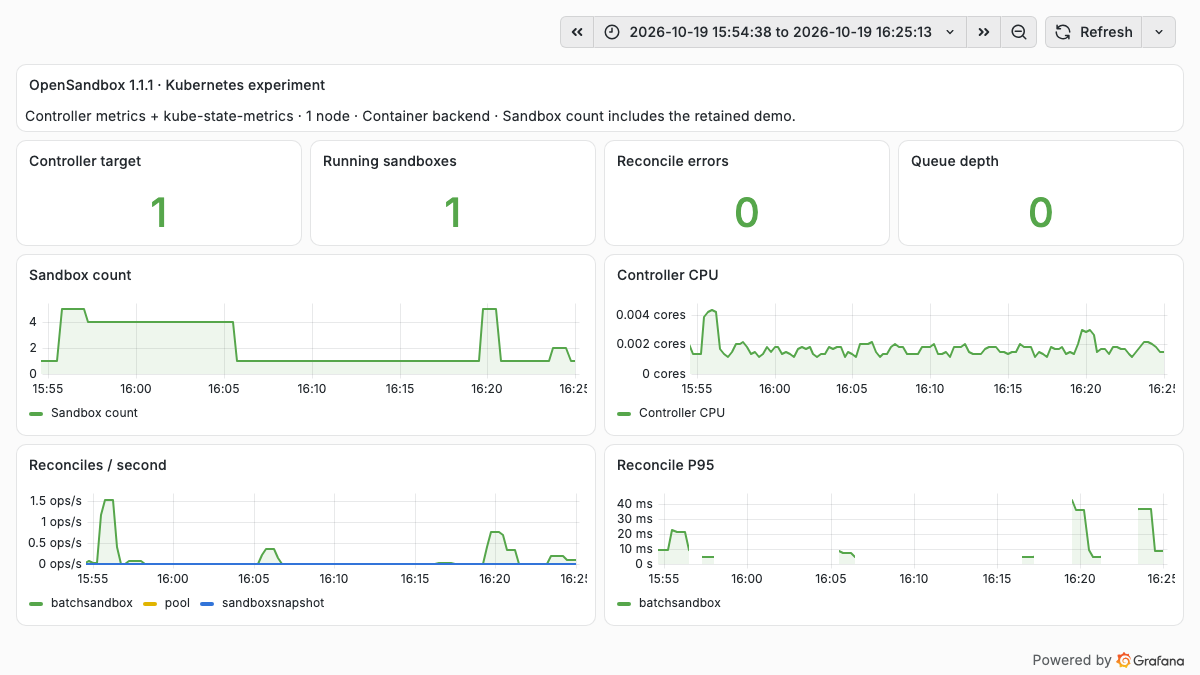
Sandbox count comes from kube-state-metrics; controller metrics come from its native /metrics. The peak of 5 includes one retained demo and four concurrent environments, rather than five test tasks. CPU in this screenshot is controller process CPU, not total task consumption.
| Metric | Observation in this window | Interpretation |
|---|---|---|
| Controller target | UP = 1 | The scrape endpoint is reachable |
| Running sandbox | Peak 5 | Demo plus concurrent environments |
| Reconcile errors | 0 | No recorded controller reconciliation errors; not proof of universal client success |
| Queue depth | Sampled maximum 0 | No queue observed at 15-second sampling; instantaneous queuing remains possible |
| Controller CPU | Maximum about 0.00433 cores | Small controller overhead in this small experiment |
| Reconcile P95 | Window maximum about 42.2 ms | Rolling native-histogram estimate, not end-to-end startup time |
Execution-proxy network requests can still fail after the controller has reconciled a workload. An SDK readiness timeout and zero controller errors can therefore coexist. Following the whole request path is more useful than checking controller health alone.
11. Comparing It with Tencent CubeSandbox
OpenSandbox and Tencent Cloud's open-source CubeSandbox both provide agent execution environments: applications request environments, execute tools, and manage lifecycles through APIs. Selection requires examining how sandboxes run, where state is stored, and which components the operations team must maintain. This comparison covers OpenSandbox 1.1.1 and CubeSandbox v0.7.3. OpenSandbox measurements come from this article's container backend; CubeSandbox measurements come from earlier independent experiments on this site. There was no performance comparison under matched conditions.
11.1 Similar Execution Interfaces, Different Runtimes and Scheduling Paths
The OpenSandbox path tested here is Lifecycle API → BatchSandbox → Pod → execd: Kubernetes creates a Pod for each test environment. CubeSandbox manages microVMs—small virtual machines—through CubeAPI → CubeMaster → Cubelet → CubeShim / CubeHypervisor. CubeMaster selects a compute node, whose runtime creates and restores the VM. CubeSandbox architecture
CubeSandbox's VMM—Virtual Machine Monitor—derives from Cloud Hypervisor. It should not be described as a Firecracker wrapper. VMM documentation in the repository
OpenSandbox is also not limited to ordinary containers. Version 1.1.1 integrates with the external Fast Sandbox platform, which hosts template-based environments, including Firecracker microVMs, in pre-warmed Fastlets. Fast Sandbox has its own control plane, runtime, and node requirements. Installing its CRDs in this experiment did not install or validate that runtime. Consequently, “OpenSandbox uses containers and CubeSandbox uses VMs” describes the configurations of these two experiments, not the complete scope of either project. Fast Sandbox integration
| Dimension | OpenSandbox | Tencent CubeSandbox |
|---|---|---|
| Application interfaces | Its own SDKs and lifecycle, command, file, and endpoint APIs | CubeAPI offers E2B-compatible APIs; integrations must still verify SDK versions and actual methods |
| Isolation path discussed here | Ordinary containers share the host kernel; alternatives include Fast Sandbox runtime paths | MicroVMs use independent guest kernels managed by a node-local VMM |
| Kubernetes scheduling unit | The BatchSandbox path tested here creates Pods per sandbox; Fast Sandbox instead uses pre-warmed pools | Kubernetes hosts platform and node components; CubeMaster schedules internal VMs. A sandbox is not an ordinary Pod |
| Environment preparation | This experiment specifies a container image directly; Fast Sandbox uses prebuilt templates | Images and initialized environments become VM templates, from which instances are cloned and restored |
| Pause and snapshots | Semantics depend on the backend; Fast Sandbox Firecracker checkpoints can preserve memory, VM state, and rootfs | VM snapshots, rollback, and creation from snapshots; process-memory restoration has been tested separately on this site |
| State and storage | This experiment uses SQLite and temporary storage; Fast Sandbox additionally uses CRDs and checkpoint artifact storage | The Helm architecture includes MySQL, Redis, and template/snapshot storage; local XFS and shared S3 paths require separate designs |
| Network and credential governance | This experiment checks API Keys, execution-endpoint security headers, and gateway access; egress policy and Credential Vault were not tested | CubeProxy handles inbound access; CubeVS and CubeEgress provide network policy, outbound proxying, and credential injection. Actual enforcement coverage still needs validation |
| Official interface | Developer Console login, creation, and details were verified here using a pinned main-branch frontend snapshot | WebUI and CubeOps manage sandboxes, templates, and nodes; this does not imply matching authorization models |
| Node operations | No node DaemonSet was installed for this container path; a microVM path requires new host checks | Node components involve runtime, networking, storage, and host privileges; Kubernetes deployment documentation for v0.7.3 is still marked Preview |
Interfaces, components, and storage responsibilities in this table come from the pinned project documentation. Component count alone is not a maturity measure. CubeSandbox's Helm installation and removal also involve host configuration that may remain after uninstall; see node components and chart responsibilities and deployment limitations for this version.
11.2 Long-Task Recovery Requires More Than a Pause Button
Consider a Python program that has computed for half an hour while keeping intermediate variables only in memory. Saving its working directory preserves input and output files but does not automatically recover interpreter objects. Creating another Pod does not restore the original process heap and stack. Continuing that execution state requires application checkpoints or a snapshot that covers process runtime state.
| Existing experiment | What was actually verified | Limits of the result |
|---|---|---|
| This OpenSandbox container backend | Commands, files, an HTTP service, authentication, concurrency, and expiry cleanup | Process-memory snapshots were not tested, so the experiment establishes neither support nor lack of support for memory resumption |
| Earlier CubeSandbox v0.7.3 tests | 3 rounds in each of two environments, 6 / 6 passing overall. After killing the process, rollback restored its memory counter, random identity, and state digest; creation from a snapshot after deleting the source also restored them | Snapshot recovery within each environment was verified; cross-node migration, automatic takeover after node failure, and rollback of external mounted volumes were not |
See process-memory snapshot and recovery tests for CubeSandbox requests, state records, and acceptance checks. OpenSandbox's Fast Sandbox documentation likewise describes checkpoints containing rootfs, guest memory, vCPU, and device state. That is a separate deployment path to validate; missing coverage in this container experiment does not disprove it. OpenSandbox checkpoint mechanism
Storage placement also changes recovery capabilities. CubeSandbox's default local XFS path does not automatically provide recovery after losing the source node. Cross-node snapshots require a separately configured shared S3/CubeS3lvol path, compatible targets, and ready snapshot artifacts. Same-node recovery, cross-node recovery, and automatic task resumption after failure need separate acceptance checks. Cross-node snapshot conditions
Neither platform's VM snapshots undo operations already committed to an external database or automatically preserve an agent's conversations and approval state on an office computer. Long-running tasks still need associations between task records, sandbox recovery points, and idempotency keys for external operations.
11.3 Start Enterprise Selection with the Workload
The recommendations below are an analysis of the architecture and experiments above, not official product capability scores.
| Requirement | Suggested starting point | Essential acceptance checks |
|---|---|---|
| Existing Kubernetes; expose controlled Python, Shell, and file processing as remote tools first | Use this OpenSandbox container path to complete one real task flow | Tenant permissions, resource limits, command cancellation, tail latency, and cleanup; untrusted code requires a separate isolation-backend assessment |
| Independent guest kernels and preservation of stateful program execution | Shortlist CubeSandbox and the OpenSandbox Fast Sandbox microVM path together | Memory recovery for the same task, storage durability, network reconnection, and target-node compatibility |
| Existing E2B clients moving to self-hosted execution | Verify CubeAPI compatibility first | The file, command, timeout, pause, and resume methods actually used, beyond the create API alone |
| One application interface with a choice of execution backends | Evaluate OpenSandbox's backend integration model | Snapshot semantics, limitations, and errors across backends; a common API does not mean identical capabilities |
For operations teams, the OpenSandbox container experiment here made relatively few changes and offers an inexpensive starting point. Independent-kernel isolation and VM-memory recovery require node runtimes, template production, snapshot storage, and upgrade recovery as well. CubeSandbox organizes these into a platform, while its v0.7.3 Kubernetes Preview limitations remain part of the assessment. Both need enterprise identity, quotas, auditing, and outbound permissions. A successful lab deployment does not replace those production checks.
11.4 Comparing Startup Speed and Cost Fairly Next Time
The several-second SDK creation-to-executable times here cannot be compared directly with CubeSandbox's advertised millisecond VM startup. Authentication, template preparation, scheduling, proxying, and application readiness may be included or omitted differently, and the isolation mechanisms differ.
A useful comparison should match hardware, dependencies, CPU and memory specifications, and network paths. If comparing microVMs, use microVM backends on both sides. Measure uncached templates, cached templates, available warm capacity, and capacity exhaustion separately. Start the clock at the client request and stop when the first command returns a correct result. Report P50, P95, timeouts, and the original success denominator.
Cost must include control planes, guest kernels and VMMs, idle warm capacity, node caches, templates, and snapshot storage, together with measured resource release after pause. Existing records help prioritize the next validation, but do not establish which platform is faster or less expensive overall. See Firecracker and CubeSandbox enterprise selection for a deeper discussion of responsibilities at the underlying layers.
12. What This Experiment Establishes
OpenSandbox provides usable interfaces for requesting environments, running commands, exchanging files, exposing services, and reclaiming resources. Its official Console also makes environment creation and state visible. These capabilities fit an agent's tool-execution layer.
No model was connected to perform an autonomous task here. The CSV program is a deterministic execution-chain check, not an evaluation of agent planning or answer quality. This container-backed experiment also does not validate Firecracker, gVisor/Kata, memory snapshots, egress policy, or Credential Vault.
The server uses one replica and SQLite on emptyDir for inexpensive validation. Recovery of history after server replacement was not tested. Long-running tasks require additional checks for persistence, snapshots, session resumption, and idempotent external actions. Visible Pause and Resume buttons do not substitute for those checks.
For an actual agent integration, begin by moving one independently verifiable task to remote execution, then check ownership and cleanup after cancellation, timeout, and retries. Investigate the initial concurrent readiness tail before expanding usage.