CubeSandbox Agent Adapter v0.6: One Entry Point, Multiple Execution Clusters
Local agents are getting better and better, but production resources won't move to a developer's computer just because of that. Data cleaning needs access to intranet data, training tasks need to go to GPU clusters, and test and production each have their own networks, images, and permissions. Saving several sets of addresses and long-term credentials for each client quickly becomes yet another hard-to-maintain configuration.
v0.5 solved the problem of persistent accounting before execution. The Adapter v0.6.0, released on October 15, 2026, extends the execution entry point to multiple CubeSandbox backends: the Agent selects an authorized Profile, and the platform decides the specific cluster, template, network, and tool boundaries. It also adds internal OpenClaw templates, controlled sandbox MCP, long-task continuation, and a Light console that can query records directly.
This round used two independent clusters for creation, execution, and isolation acceptance, and also made real calls from OpenClaw, DSH, Hermes, Codex, and OpenCode. The sections below follow usage scenarios; the configuration and screenshots correspond to the CubeSandbox v0.7.3 backend and Python SDK 0.7.3.
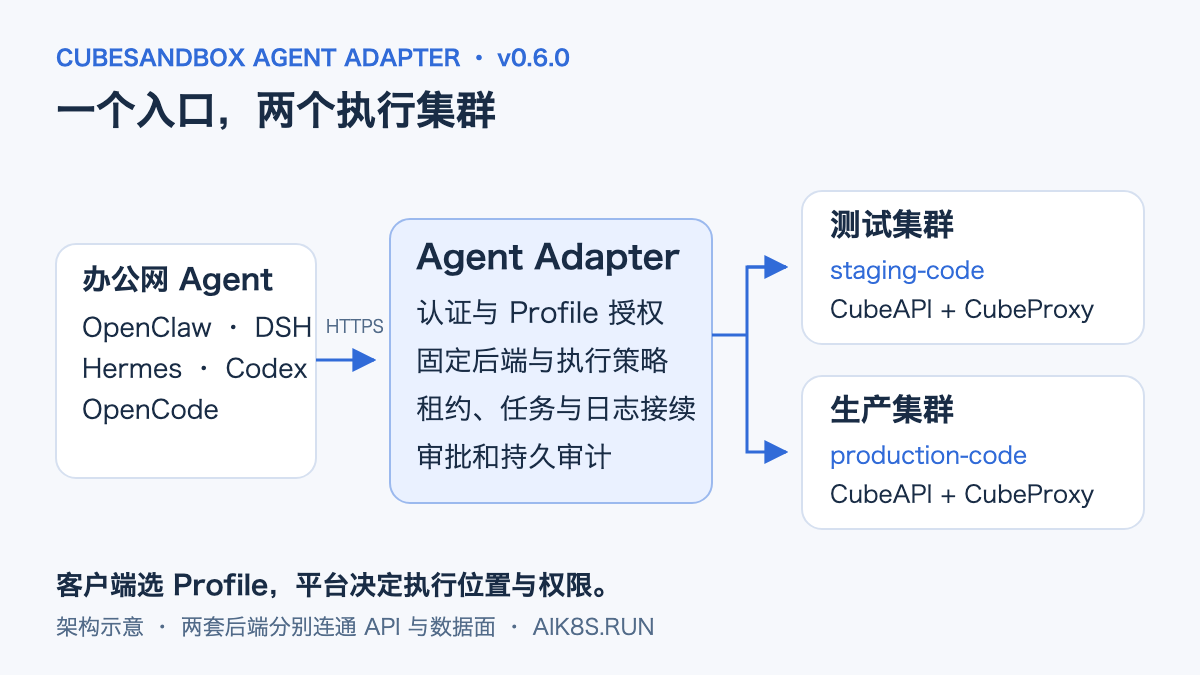
Architecture diagram. In the figure, test and production are execution environment roles, not real addresses that need to be written into the client.
First, Turn Two Clusters into Selectable Execution Environments
For example, data checks first run on staging-code to confirm the script and output are correct, then are handed to the named task on the production side. The developer always uses the same client and the same Adapter address, without needing CubeAPI Keys for both clusters.
The new cube_profiles returns the policies the current identity is authorized to use. Each Profile binds to a backend via backend_id; leases, Jobs, task plans, and receipts continue to carry this binding. Even if session names are the same, selecting a different Profile will not reuse a sandbox on the other side.
The platform first prepares the backend registry. The domain names below are placeholders; replace them with entry points actually reachable from the Adapter's network during deployment:
# backends.yaml
backends:
  staging:
    api_url: https://cube-api-staging.example.invalid
    api_key: ${FILE:/etc/cube-secrets/staging-key}
    proxy_host: cube-proxy-staging.example.invalid
    proxy_port: 80
    sandbox_domain: cube.app
  production:
    api_url: https://cube-api-production.example.invalid
    api_key: ${FILE:/etc/cube-secrets/production-key}
    proxy_host: cube-proxy-production.example.invalid
    proxy_port: 80
    sandbox_domain: cube.app
Then configure Profiles for existing READY templates:
# profiles.yaml
profiles:
  staging-code:
    backend_id: staging
    template: REPLACE_WITH_STAGING_READY_TEMPLATE_ID
    allow_internet_access: false
    network: {allow_public_traffic: false}
    keepalive_enabled: true
    max_keepalive_seconds: 3600
    sandbox_timeout_seconds: 300
    max_command_seconds: 1800
  production-code:
    backend_id: production
    template: REPLACE_WITH_PRODUCTION_READY_TEMPLATE_ID
    allow_internet_access: false
    network: {allow_public_traffic: false}
Mount both files along with the read-only credential file into the Adapter, and set the following environment variables; Kubernetes can deliver these via ConfigMap, Secret, and the corresponding Chart mount items:
CUBE_ADAPTER_BACKENDS_FILE=/etc/cube-adapter/backends.yaml
CUBE_ADAPTER_PROFILES_FILE=/etc/cube-adapter/profiles.yaml
The identity's allowed_profiles and allowed_actions still determine final permissions. If the production side should only allow training submission or data cleaning, give it a TaskTemplate and task:* identity rather than casually opening up a raw Shell. After modifying the cluster, template, or execution policy of an approved task, the plan and approval must be re-created.
Run a Dual-Cluster Check Inside the Agent
Once the two authorized Profiles are ready, you can give a native client a prompt like this:
English rendering — the original text is retained below.
Only use CubeSandbox tools, not the host Shell or file tools.
First query the Profile with permissions.
Execute printf STAGING_ROUTE_OK on staging-code;
Execute printf PRODUCTION_ROUTE_OK on production-code.
Only renew the lease for staging-code, and finally use kill to release both sandboxes.
Report the actual results, and do not output full resource references or connection credentials.
OpenClaw, DSH, and Hermes lease-type tools just need profile; when Codex and OpenCode use stdio MCP, first obtain leases separately with cube_acquire, then pass the corresponding lease_ref for subsequent operations.
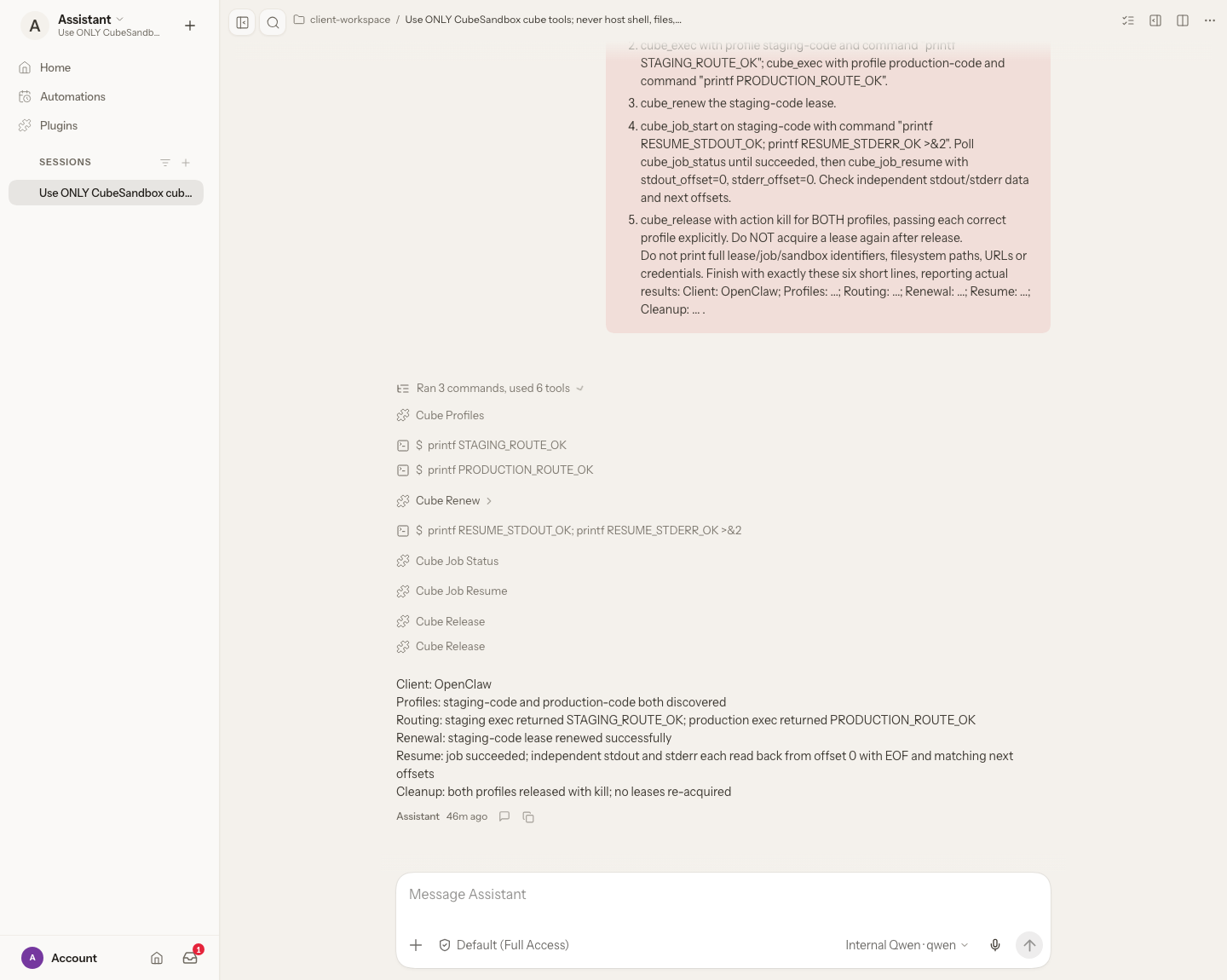
OpenClaw Light interface. This round also executed an async Job and log continuation; the tool list and final result summary are preserved in the figure. Click to view the original image.
Why Opening Only CubeAPI Is Not Enough
Cross-network access must consider two links at the same time:
- CubeAPI handles template queries, sandbox creation, and lifecycle management;
- CubeProxy carries data-plane communication such as commands, files, PTY, and Jobs.
If the office network only opens CubeAPI, creation may succeed, but execution results cannot be retrieved. The Adapter needs access to each backend's API and Proxy, while the sandbox itself needs outbound permissions to business APIs, model gateways, or data services. The two cannot replace each other.
SDK 0.7.3's data plane uses HTTP; cross-network deployments should arrange controlled intranet links or tunnels. Adding a new backend configuration does not automatically open routes, nor does it modify host NAT, node labels, or NetworkPolicy. Exposing the Adapter's HTTPS address to Agents and letting the Adapter reach the production data plane are two separate deployment steps.
Internal OpenClaw Templates: Leave Repetitive Configuration to the Platform
Re-filling the model address, API Key, default model, and fallback model every time an OpenClaw sandbox is created is not suitable for team use. Worse, the image entry point may regenerate configuration and overwrite what was just written.
v0.6.0 can use versioned presets to pin internal template IDs, initialization commands, pre-checks, and configuration files. Model support includes default models, fallbacks, and aliases; creation checks whether provider and model ID match, and also rejects hard-to-notice issues such as trailing spaces in provider names.
Below is the model fragment of the OpenClaw configuration file in the preset; model-a and model-b need to be replaced with the IDs actually registered by the internal service. The outer template definition is in the complete example:
models:
  providers:
    internal:
      baseUrl: ${FILE:/etc/cube-secrets/models/base-url}
      apiKey: ${FILE:/etc/cube-secrets/models/api-key}
      api: openai-completions
      models:
        - {id: model-a, name: Internal Primary}
        - {id: model-b, name: Internal Fallback}
agents:
  defaults:
    model:
      primary: internal/model-a
      fallbacks: [internal/model-b]
Load the outer preset with CUBE_ADAPTER_TEMPLATE_PRESETS_FILE and reference template_preset in the Profile. Secrets are resolved when the sandbox is created and written to a configuration file with permission 0600; they are not pre-baked into the shared image. The internal image must remove initialization logic that overwrites configuration, or use the platform-pinned bootstrap to stop initialization, inject configuration, restart the application, and then run pre-checks.
This round, in a temporary sandbox on the production side, first passed configuration injection and structural pre-checks, then called the internal Qwen model via openclaw agent --local and received the agreed response:
This record covers the embedded CLI; the gateway/TUI and other fallback models each require application-level verification. The model service's network must also be tested from inside the sandbox; a successful request from the host machine cannot substitute. See the model response record for this round.
If the Agent has root/Shell permissions inside the sandbox, it can still read the in-sandbox configuration. When sensitive production credentials are involved, narrow access to named tasks or controlled MCP tools; do not treat Secret file injection as a mechanism for hiding keys from root.
Long Tasks: Handle Lease Renewal and Log Continuation Separately
Data cleaning, dependency builds, and training submission often last longer than a single chat request. Sandbox lifetime, command time limits, and client log cursors need to be managed separately.
The Profile's keepalive_enabled enables background lease renewal, and max_keepalive_seconds limits total lifetime; the background only renews running leases that have active Jobs/PTYs. Manual cube_renew is subject to the same lifetime cap, and renewal does not relax max_command_seconds. The renewal interval must also be less than half of the initial sandbox timeout.
One independent long-task test set the initial timeout to 15 seconds, the expiration action to delete, and disabled automatic recovery. A 35-second Job completed across an Adapter restart, recording 6 renewals, and the original command was not restarted. Restart continuation used encrypted, persistent Redis state; this differs from temporarily holding a Job reference in a single process. The original results preserve these parameters.
Client testing used two different markers to verify cursors:
cube_job_resume receives independent stdout_offset and stderr_offset, returning Base64 data and their respective next_offset. This round read from 0/0, and both channels each returned 16 bytes; OpenCode also continued reading with a new 16/16 cursor, getting empty content and EOF.
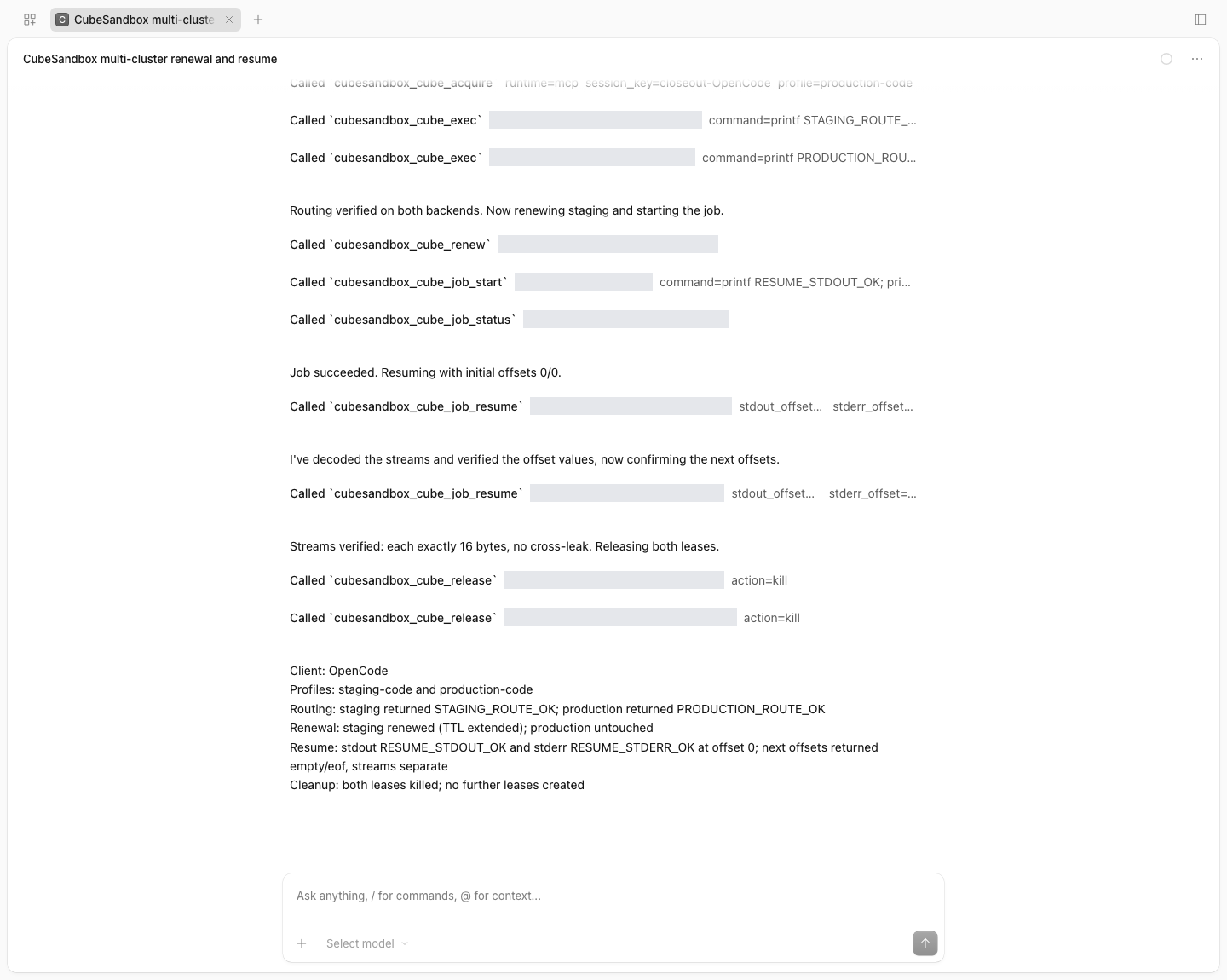
OpenCode Light session. The second cube_job_resume was used to verify EOF; the full lease and Job references have been obscured.
Clients should persist both cursors, concatenate by byte, and then decode UTF-8. cube_recover is used to look up the original lease and task mapping; expired sandboxes are not automatically rebuilt because of this, and tasks with unknown status are not automatically re-run. Business artifacts need to be saved separately to controlled persistent storage; after the sandbox is deleted, the state store cannot restore log files that have already disappeared.
Let the Sandbox Call Controlled MCP Tools
MCP has two layers here: Codex and OpenCode call the Adapter through local stdio MCP; the Adapter's cube_mcp_call can in turn call the MCP gateway of CubeSandbox v0.7.3 inside the sandbox.
The latter is suitable for turning production data checks, metadata queries, or task submission into narrow interfaces. The platform pins the server startup command, environment variables, allowed tools, and parameter Schema in mcp-policies.yaml; the Agent cannot temporarily specify an arbitrary server or backend address.
The repository's controlled-echo example registers the echo tool, which only accepts an text of at most 256 characters, rejects extra fields, and sets a 15-second call timeout with input and output limits. Real business can wrap data-check tools the same way, with the server implementing limits on readable data and accessible interfaces.
The image must pre-install the gateway and server, the template exposes port 50005, and the Profile binds mcp_policy and disables public traffic. The MCP Profile does not enable Checkpoint for now, to avoid snapshot reuse of gateway tokens. When a call times out or the result cannot be confirmed, the pending intent is preserved and execution is blocked; operations with side effects cannot be blindly retried.
Approval and Audit Can Finally Be Viewed Directly on a Page
The Adapter now ships with a Light console. After enabling CUBE_ADAPTER_AUDIT_UI=1, visit /console to view execution policies, inspect task parameters, approve independently, and query audit records. Remote access requires HTTPS, and the token is kept only in the current page's memory.

The policy catalog uses a demo tenant, showing three Profile types: code, internal template, and sandbox MCP.
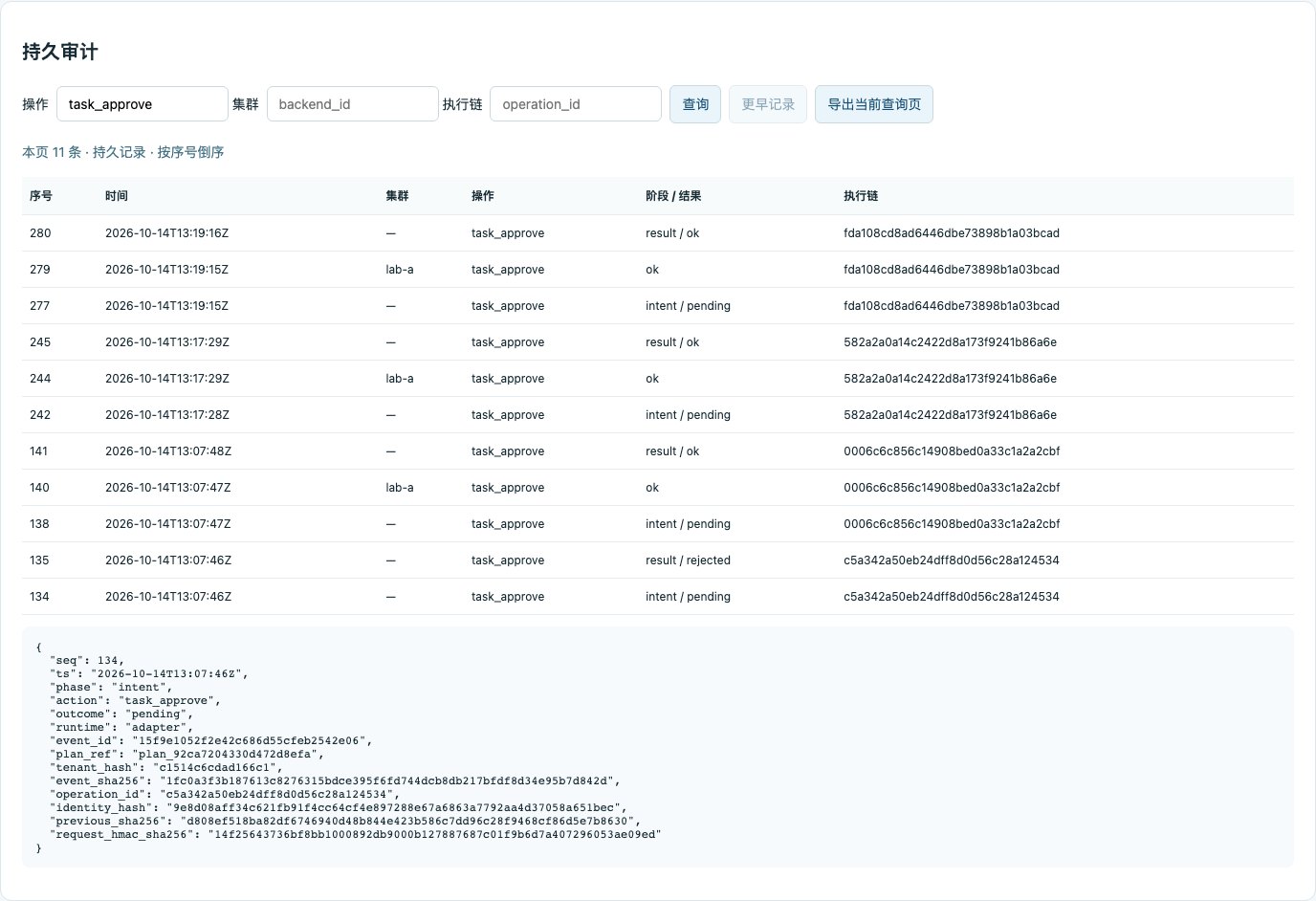
Audit queries support filtering by cluster, operation, and execution chain; you can page to earlier records, expand details, and export the current page. The screenshot shows approval records for the demo tenant.
auditor and approver can only view their own tenant; administrators can query across tenants. The approval identity is independent of the requesting identity, and the Agent's tool list has no approval tool. Queries themselves are also audited; when the audit store is not writable, the page does not bypass strong audit and continue execution.
From Single-Replica SQLite to PostgreSQL Multi-Writer
SQLite remains the default, suitable for one Adapter writer process with reliable local disk or block storage. When multiple instances are needed, v0.6.0 adds PostgreSQL authoritative audit: execution intents, completion status, and the outbound queue are committed in a synchronous transaction; runtime state is stored in encrypted Redis.
Multi-replica deployments must share the HMAC Key, encrypted state configuration, policies, and namespaces. You cannot just change replicaCount from 1 to 2, nor can two instances share the old SQLite PVC.
In one audit-boundary fault drill, after stopping PostgreSQL, both Adapters returned 503 and the controlled test backend call count was 0. The disconnected instance stayed blocked, and recovered after verification and restart; after pg_dump was restored to an independent database, 15 events and the chain summary were consistent. This drill used a countable test backend to isolate audit faults; real MicroVM execution was covered by acceptance on a separate cluster. The fault and recovery record lists the two scopes separately.
Database synchronous replicas, reliable storage, WAL archiving, and backup recovery need to be built separately. The event hash chain should be verified against independently saved trusted anchors; it cannot prevent a database administrator from rewriting all history. JSONL, stdout, and the HTTP Collector continue to serve as retryable copies, deduplicated by the receiving end via event_id.
How Far the Five Clients Actually Got
The client flows on October 15, 2026 uniformly covered: Profile discovery, execution on two real clusters, renewing only the test-side lease, async Jobs, independent stdout/stderr cursors, and kill release on both sides. Verification read the tool return values recorded by each client, checking status, resource ownership, and byte content respectively.
| Client | Integration Method | Cube Calls This Round | Result |
|---|---|---|---|
| OpenClaw | Native Tool Plugin | 9 | Passed |
| DSH | Cordis Plugin | 9 | Passed |
| Hermes | Native Tool Plugin | 9 | Passed |
| Codex | stdio MCP | 11 | Passed |
| OpenCode | stdio MCP | 12 | Passed |
| Total | 50 |
MCP clients explicitly obtain two leases; native plugins obtain them implicitly; OpenCode additionally read EOF once, hence the different call counts. The 10 tool calls shown in the Hermes interface include one built-in Schema query; the table only counts Cube tools. The DSH screenshot comes from an additional Web-side re-test of the same flow and is not counted in the table's 50 calls.
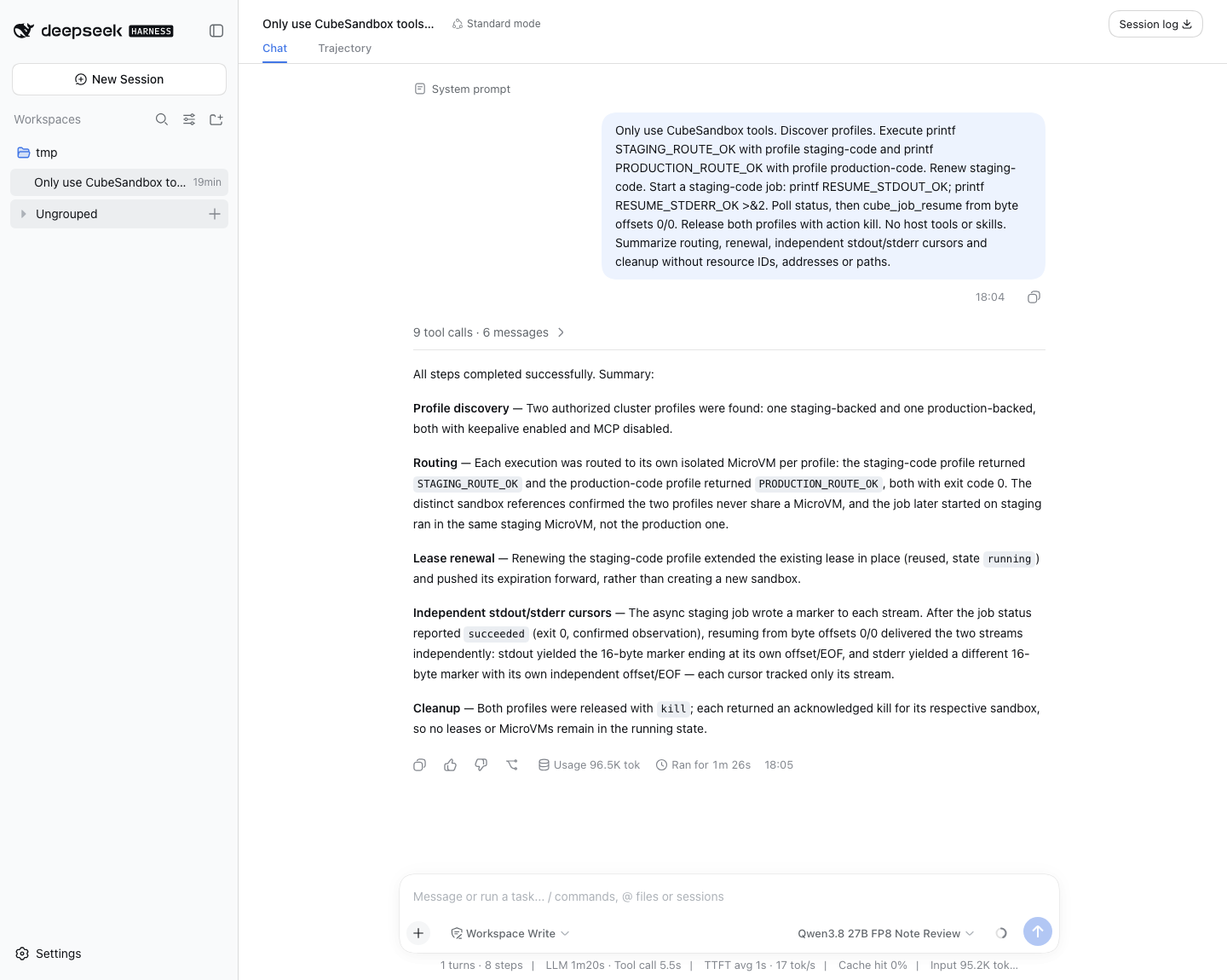
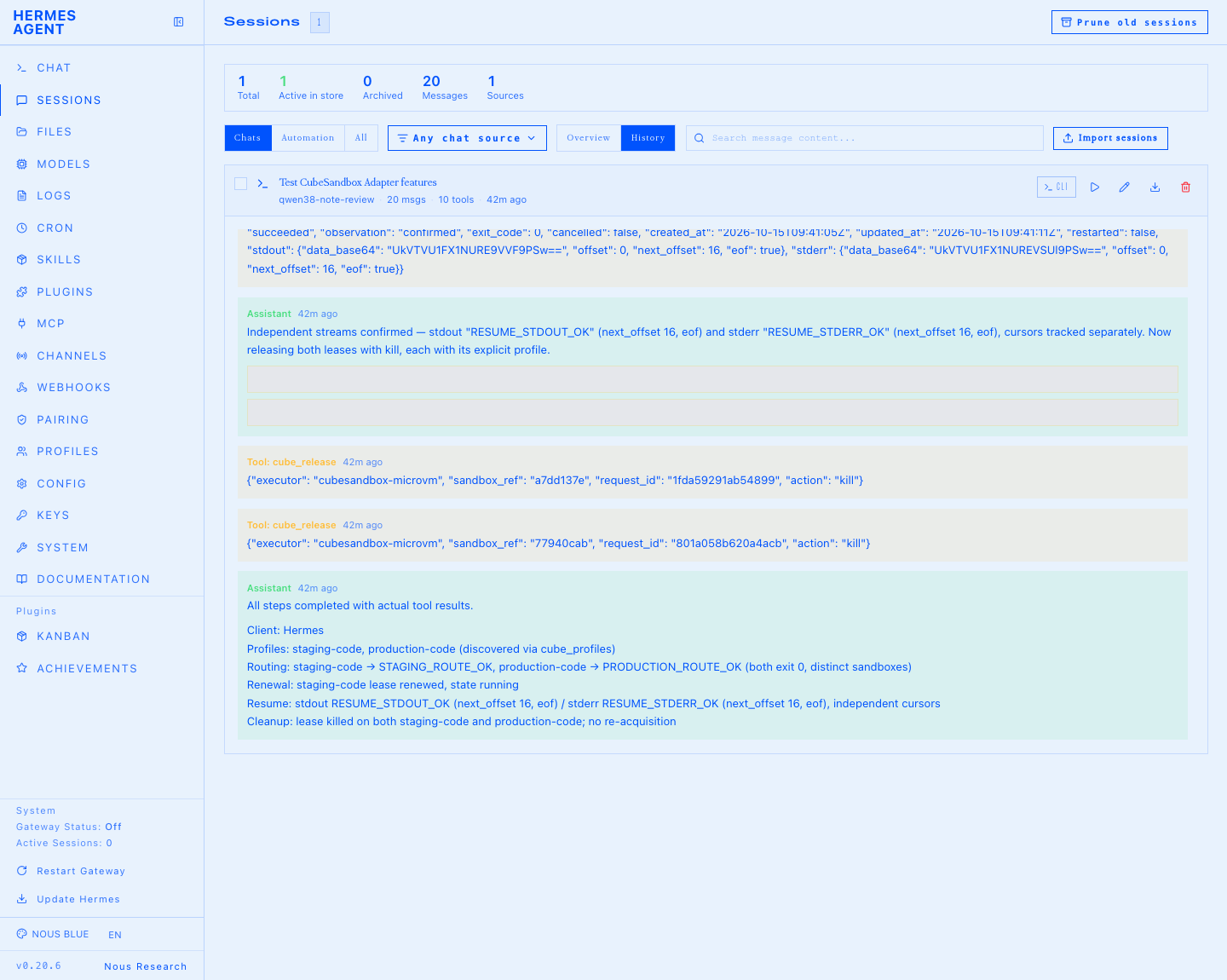
The four client screenshots are all from this round's Light interface; Hermes' full lease and Job references have been obscured. Codex results are saved in the redacted tool verification record; Claude Code's historical integration test is in the v0.5 article and is not counted in this round's results.
Where to Start Deploying and Trying
First prepare an accessible CubeSandbox, READY templates, and the Agent application. The Adapter can be deployed on an office-network server or in Kubernetes; it does not itself require KVM — virtualization conditions are provided by the CubeSandbox compute nodes.
For a single machine, first follow the Docker Compose deployment guide to generate .env, set up a dedicated Token/HMAC Key, CubeAPI, CubeProxy, and templates, then start the pinned version:
git clone --branch v0.6.0 --depth 1 \
  https://github.com/aik8s/cubesandbox-agent-adapter.git
cd cubesandbox-agent-adapter

# 按部署指南准备 .env、后端与凭据后执行
docker compose pull adapter
docker compose up -d --no-build adapter
curl --fail http://127.0.0.1:18080/healthz
curl --fail http://127.0.0.1:18080/readyz
The v0.6.0 image provides both Linux amd64 and arm64; both architectures have passed version verification, SDK 0.7.3 verification, and non-root runtime verification. The image is ghcr.io/aik8s/cubesandbox-agent-adapter:v0.6.0; for production you can pin the OCI Index digest:
It is recommended to start with one test Profile, run through creation, execution, and release, then add a second backend. Before connecting production credentials, complete networking and authentication first, then choose an internal preset or a named task; if you have multi-replica requirements, introduce PostgreSQL and encrypted Redis afterwards. The production feature examples provide a complete directory and Helm HA values; databases and synchronous standby replicas are not automatically created by these examples.
For upgrades from older versions, preserve the audit volume, Token, HMAC Key, and existing Profiles. First stop writes, verify pending intents, then perform an offline SQLite export and import into an empty target database, compare counts, summaries, and the pending delivery queue before switching; do not delete the old database. Running old leases keep their original default endpoints or should be cleaned up first; old plans without policy bindings need to be recreated.
The three native plugins have grown from 19 to 25 tools. After upgrading the OpenClaw plugin, re-run the installer to merge and fill in the allowlist for the six new tools while preserving existing allowed entries. New routes, presets, sandbox MCP, automatic lease renewal, and the console all require explicit configuration; swapping images will not automatically open production permissions.
Combining these capabilities into business workflows
For data cleaning, you can have a local Agent first inspect samples and parameters on a test Profile; formal tasks use a fixed TaskTemplate, restricted data paths, and an output allowlist, and after approval execute on the production side. Long tasks recover the original Job through Redis, continue reading logs with a cursor, and write important artifacts to persistent storage; the audit console verifies plans, approvals, and results along the execution chain.
For training tasks, you can use the MicroVM as a narrow-permission submission and verification environment: pin training parameters and submission scripts, launch tasks to Kubernetes, Volcano, or an internal training platform, then return the task reference and the metrics allowed for viewing. GPU scheduling remains the responsibility of the training platform; the Adapter will not automatically turn an ordinary code sandbox into a GPU cluster.
v0.6.0 connects these steps together: clients continue using the familiar Agent, the platform manages execution locations, templates, and permissions, long tasks can continue, and operation records have a place to be queried.
References and reproduction
- Adapter v0.6.0 Release: dual-architecture images, Chart, and release verification records.
- Multi-cluster, internal templates, and persistent audit: configuration fields, networking, and migration details.
- Dual-cluster acceptance script: creation, execution, isolation, rejection, audit, and cleanup.
- Client generic prompt and return value verification script.
- Image source and usage.