CubeSandbox Agent Adapter v0.3 Field Test: From Multi-Agent Bridge to Recoverable Execution Control Plane
On September 2, 2026, the cubesandbox-agent-adapter main branch completed code updates targeting v0.3.0; on September 4, the project created the v0.3.0 tag and published GHCR multi-architecture images. Compared with v0.2.0, this change is not just about supporting one more Agent or adding a few interfaces—it begins to address the state recovery, long-running tasks, persistent workspaces, tenant isolation, observability, and high-availability problems that an execution control plane must face.
Version status has been verified: the v0.3.0 tag points to commit e7ca13c, and the core feature commit is a692074. The image ghcr.io/aik8s/cubesandbox-agent-adapter:v0.3.0 includes both linux/amd64 and linux/arm64, with an OCI Index Digest of sha256:60c4b0bd433f4cc5a35b37d6fe851cf36684de646d15ad79f0ca51c4eb75b534. The GitHub Release list does not yet have a separate v0.3.0 release notes page, but the version tag and images are already available.
Conclusions First
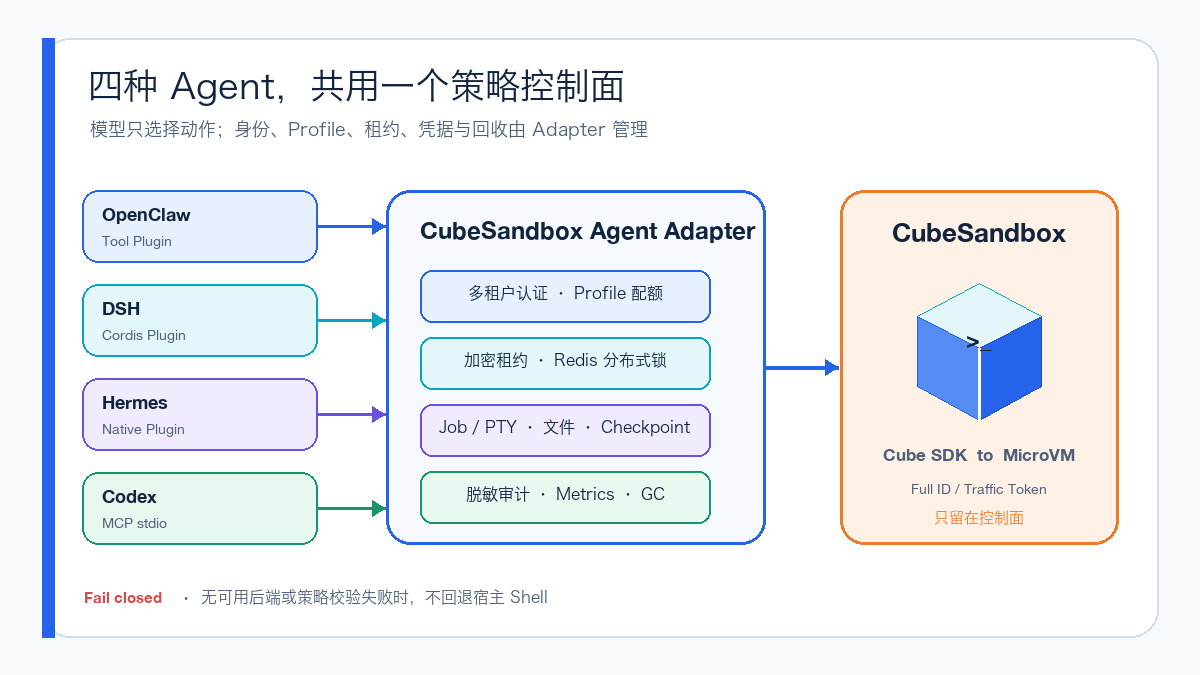
- OpenClaw, DeepSeek Harness (DSH), Hermes Agent, and Codex—all four real clients—have completed
Agent → Adapter → CubeSandbox MicroVMfunctional acceptance, and proactively reclaimed their sandboxes upon completion. - The plugin extensions for OpenClaw, DSH, and Hermes have grown to 13 unified tools; Codex and other MCP Hosts can use the local
stdioMCP Facade. The Adapter's OpenAPI currently contains 34 paths, covering synchronous commands, files, artifacts, asynchronous Jobs, PTY, Checkpoint, and management interfaces. - Leases are no longer confined to single-process memory. v0.3 adds encrypted Redis state, renewable distributed locks, and GC, laying the foundation for restart recovery and multi-replica deployment; the in-memory backend is retained but explicitly restricted to single-replica use.
persistent-codecan bind/workspaceto per-Session managed Volumes and retain them after Kill;checkpoint-codecan perform Checkpoint, Rollback, and Fork, suitable for dependency upgrades, code fixes, and Agent solution A/B comparisons.- This is still not a "turnkey production managed service." Before formal use, you must complete TLS/OIDC or mTLS, centralized auditing, and failure drills, and accept CubeSandbox v0.7's restrictions on the "mounted volume + snapshot" combination.
1. Trusted Execution Boundary Under Office Network and Production Network Isolation
Many users are accustomed to using Code Agents on their laptops or office-network development machines. There you have a complete editor, code repository, personal configuration, and session history, and the interactive experience is best; but the artifact repositories, Kubernetes APIs, internal services, logs, and data that actually need to be handled often exist only in the isolated production network.
If you directly hand production VPN, SSH keys, jump-host accounts, or long-lived tokens to a local Agent, a single command generated by the model could obtain overly broad network and host privileges. Conversely, moving the full Agent Runtime into the production network brings model configuration, session history, plugins, and more third-party dependencies into the high-trust zone. Another common practice is copying production logs, configuration, or data to the office network for analysis, which creates new data copies and exposure surfaces.
cubesandbox-agent-adapter can provide a narrower trusted execution boundary between the two networks: the Agent still runs in the user's familiar local environment, submitting only structured execution actions to an enterprise-approved HTTPS, Zero Trust, or API Gateway entry point; the Adapter performs identity verification, Profile authorization, quota and lease management inside the production network, then lets the CubeSandbox MicroVM execute close to production resources. Raw resources and production credentials remain on the production side; the client only receives restricted output, status, and audit references.
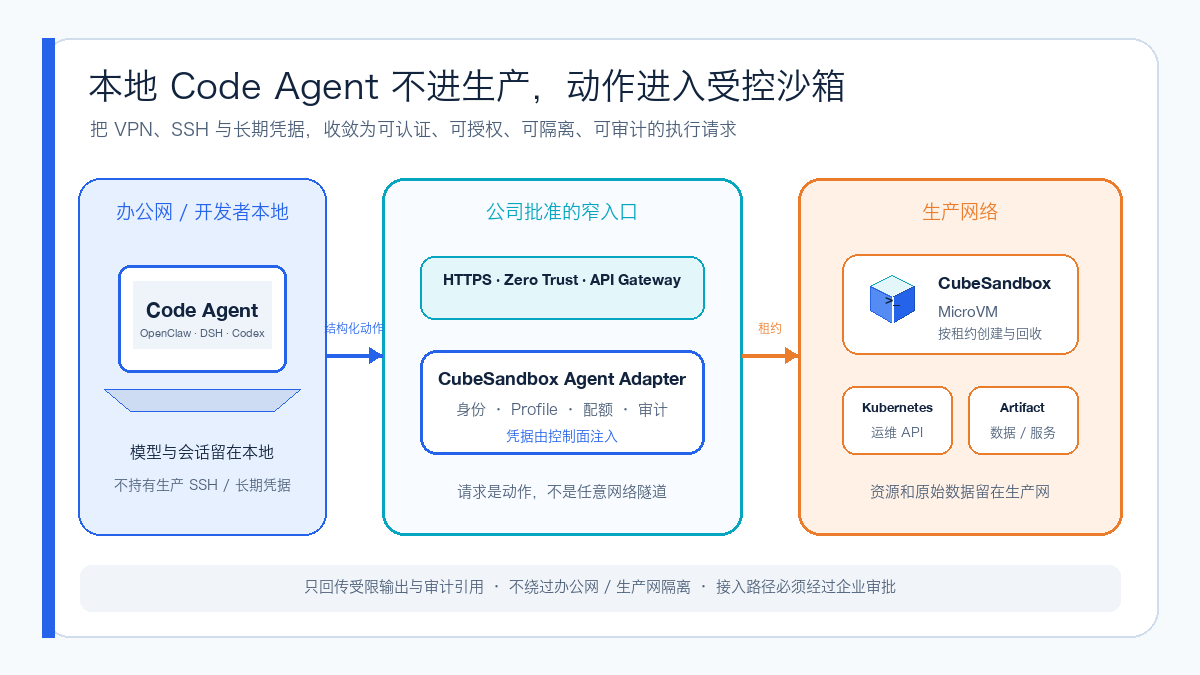
"Trusted" here does not mean that model-generated code is inherently correct; rather, the execution process has verifiable control points:
- Trusted identity: Every request can be mapped to a Tenant, Runtime, and Role, rather than an anonymous remote shell.
- Controlled authorization: Profiles determine templates, networks, paths, lifecycle, leases, and Job quotas; the model cannot expand the boundary on its own.
- Execution isolation: Commands run in MicroVMs created per lease, never entering the local Agent Runtime and never landing directly on production hosts.
- Credential convergence: Cube connection information and Traffic Tokens exist only in the Adapter; other production credentials should be provided through platform-side workload identity, CubeEgress, or short-term injection mechanisms, and must not be written into Prompts.
- Auditable process: Request IDs, session summaries, actions, short Sandbox references, durations, and results enter sanitized audit logs; after task completion there is explicit Release, TTL, and GC.
This model suits authorized production troubleshooting, internal artifact builds and scanning, sensitive document inspection, read-only data analysis, and one-off operations verification. Different scenarios should still have independent Profiles, least-privilege credentials, and output policies; a single universal production-admin Profile must not cover all tasks.
The Adapter also does not bypass office-network and production-network isolation. If there is no approved link between the two sides, you still need an enterprise gateway, controlled VPN, zero-trust access, or a pull-based task queue to provide connectivity; the Adapter's role is to converge "arbitrary remote access" behind an approved link into a controlled execution interface, not to open a new covert tunnel.
2. v0.2 Solved Access, v0.3 Begins Solving State
v0.2.0 already proved one important thing: OpenClaw, DSH, and Hermes do not each need to hold the CubeSandbox management address, full Sandbox ID, and Traffic Token. They can be given only an opaque lease_ref, handing command and file operations to the same Adapter layer, which then uniformly enforces policy and sanitized auditing.
Its limitations are equally clear: a shared Bearer Token, a single offline-code Profile, in-process memory leases, and four core tools are more suitable as an integration sample. Once the Adapter restarts, scales horizontally, or a task needs to continue across multiple HTTP requests, state and boundaries become the primary problem.
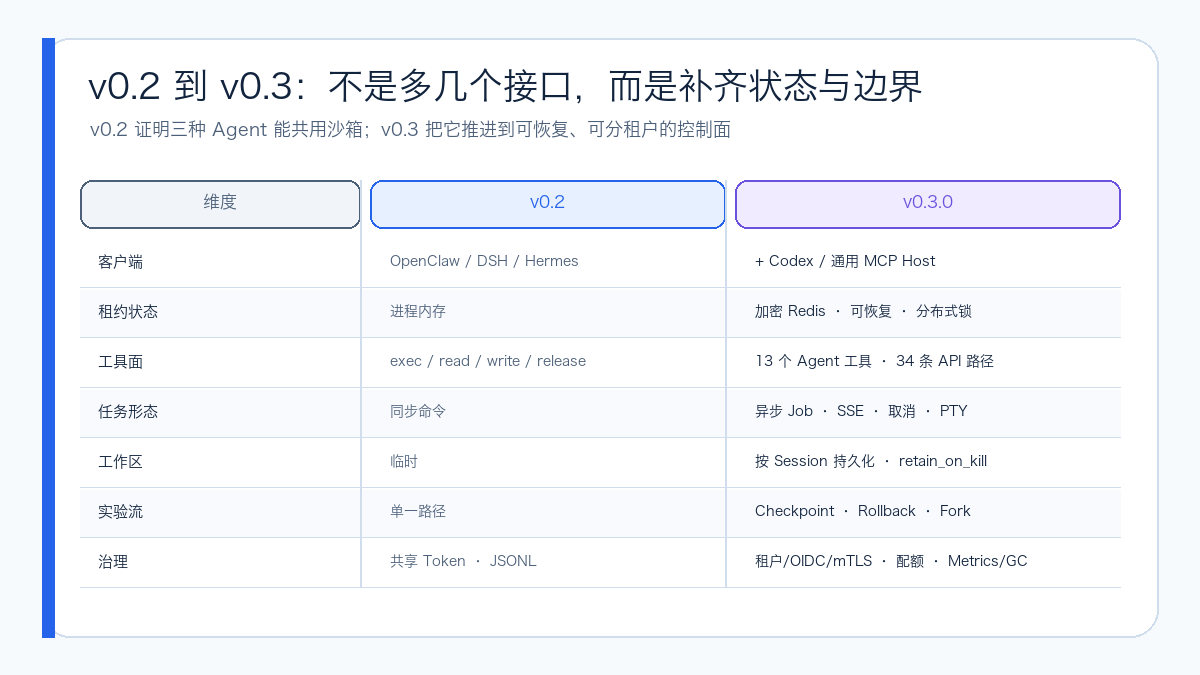
| Dimension | v0.2.0 | v0.3.0 |
|---|---|---|
| Clients | OpenClaw, DSH, Hermes | Adds Codex and generic MCP Hosts |
| Agent tools | exec, read, write, release | 13 unified tools |
| HTTP contract | Basic lease and file operations | 34 OpenAPI paths |
| State | Single-process memory | In-memory or encrypted Redis, with renewable distributed locks |
| Workspace | Temporary filesystem | Per-Session persistent Volumes |
| Long-running tasks | Synchronous commands | Durable Jobs, incremental output, SSE, cancellation |
| Interactive tasks | None | PTY creation, input, Resize, status, and event streams |
| Experimental recovery | None | Checkpoint, Rollback, Fork |
| Identity | Shared Bearer Token | Tenant Tokens, OIDC, TLS/mTLS |
| Operations | JSONL audit | Metrics, Readiness, GC, pluggable audit Sink |
3. How Four Clients Share the Control Plane
v0.3 does not require Agent Runtimes to converge into a single form. Each client continues to use the extension interface best suited to it:
OpenClaw Tool Plugin ──────────┐
DSH Cordis Plugin ─────────────┤
Hermes Native Tool Plugin ─────┼─ authenticated HTTP ─→ Adapter ─→ Cube SDK ─→ MicroVM
Codex / MCP Host ─→ MCP stdio ─┘                              │
                                                            └─ redacted audit
The unified tool surface for OpenClaw, DSH, and Hermes includes:
cube_exec          cube_status       cube_read
cube_write         cube_list         cube_job_start
cube_job_status    cube_job_output   cube_job_cancel
cube_checkpoint    cube_rollback     cube_fork
cube_release
PTY and binary artifact upload/download have entered the Adapter API, but are currently not included in these 13 plugin tools. This avoids expanding the model tool surface all at once; Runtimes that need them can continue to wrap them through controlled clients or the MCP Facade.
The Adapter still upholds two boundaries:
- The model cannot choose the underlying template, CIDR, public traffic switch, or lifecycle policy; these all belong to Profiles maintained by operations staff.
- Requests are rejected outright when there is no available Backend, identity mismatch, or policy validation failure—there is no fallback to a host shell.
OpenClaw
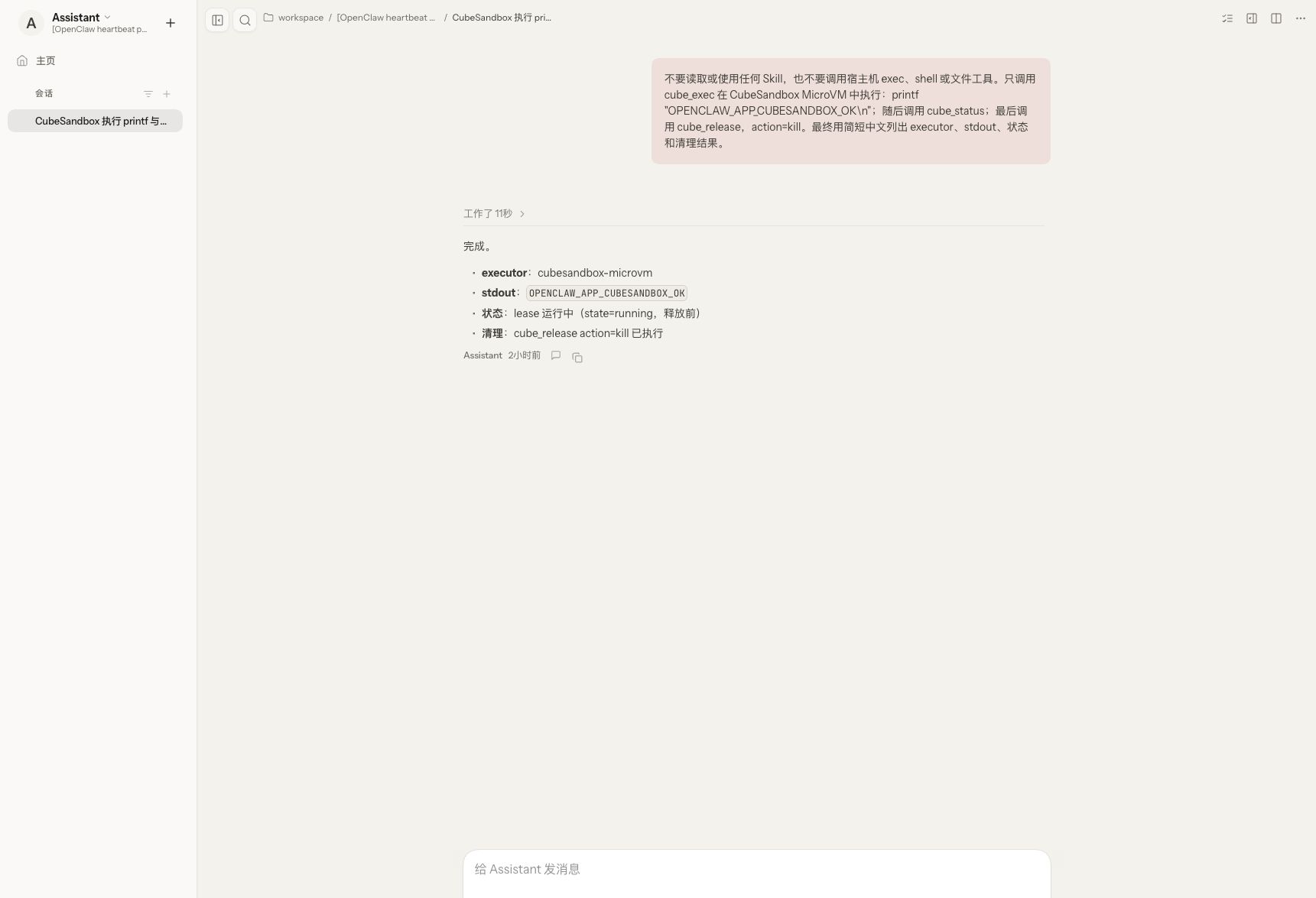
OpenClaw calls cube_exec, cube_status, and cube_release from the real Control UI, with output identifying the executor as cubesandbox-microvm, followed by lease destruction.
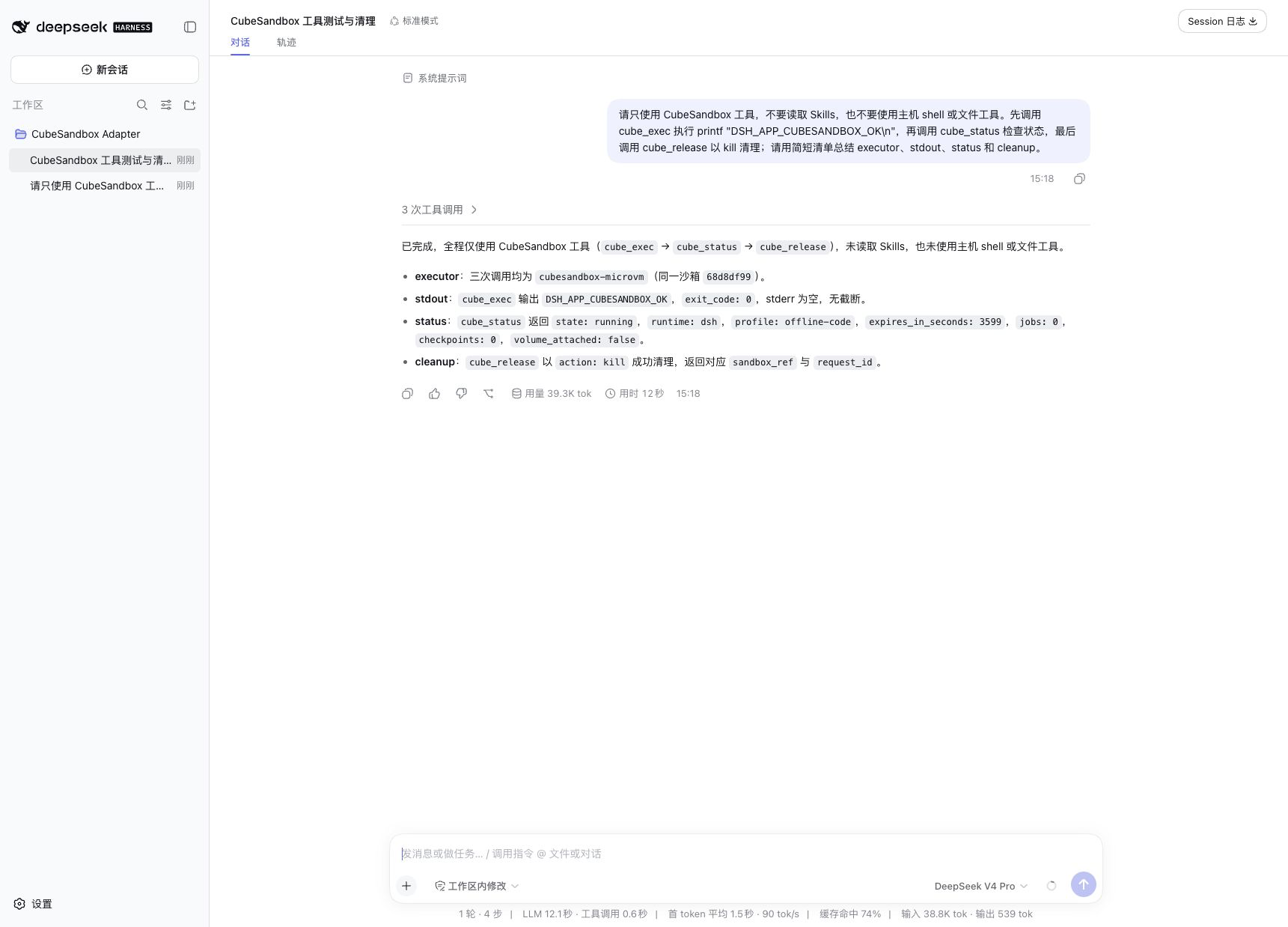
DeepSeek Harness
DSH uses the Cordis Plugin to complete the same path. The installer also generates a Profile Patch to disable common host Bash, PowerShell, and file tools, reducing the risk of mixing two execution surfaces in the same session.
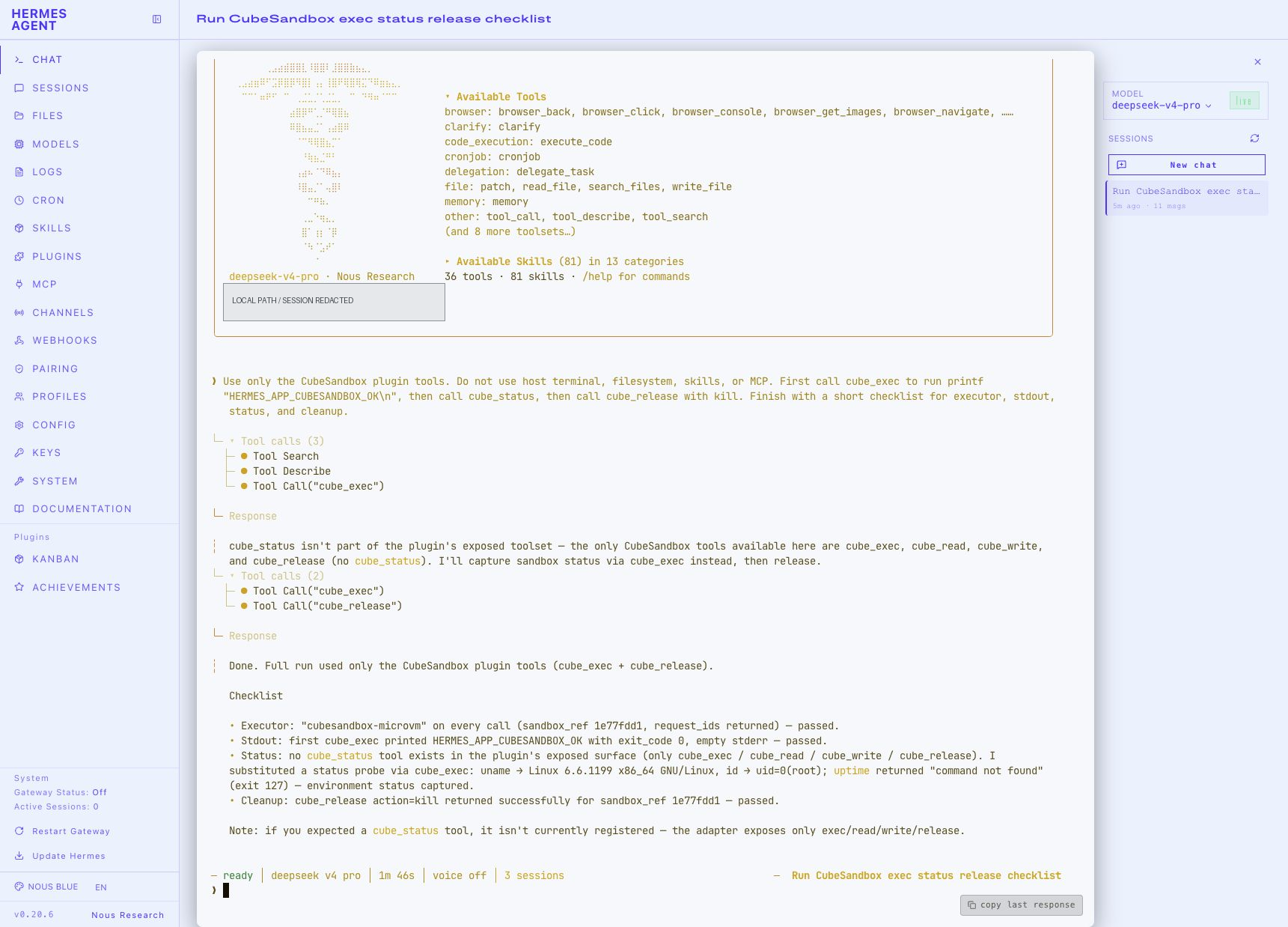
Hermes Agent
Hermes integrates through a standalone Native Tool Plugin. The isolated installation used for the screenshot showed only the four core Cube tools, so state probing was completed by a second cube_exec call; this proves the actual execution and reclamation path and cannot be used to claim that the screenshot has traversed all 13 tools in the current source code.
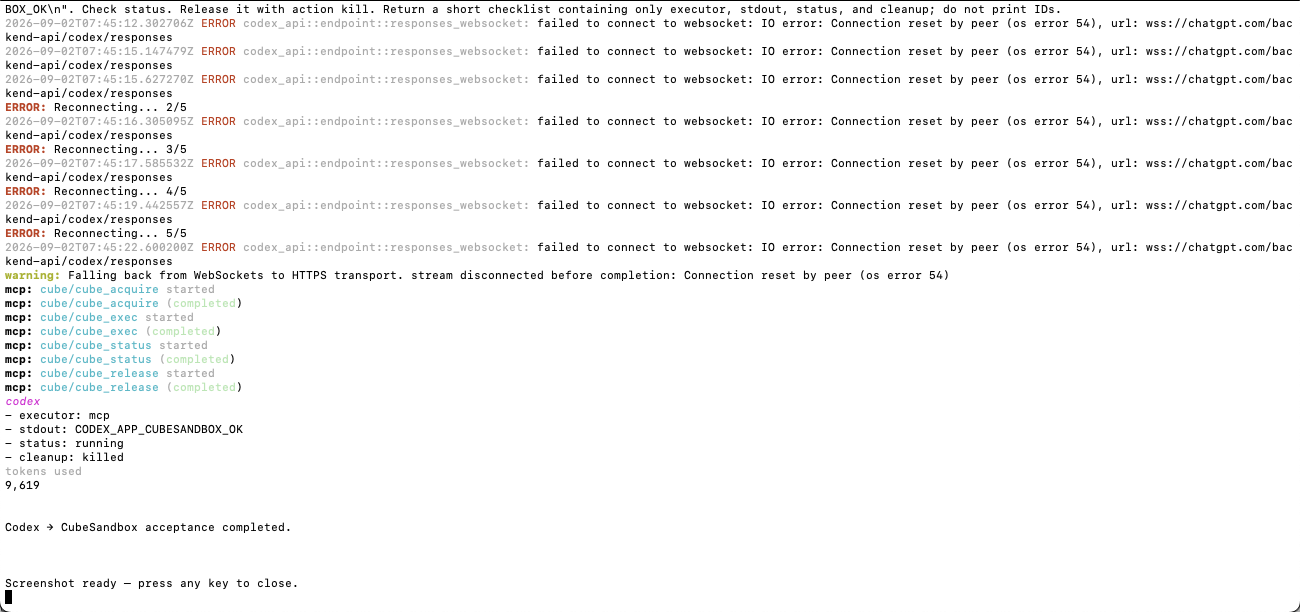
Codex and MCP Hosts
Codex uses the local stdio MCP Facade, which then accesses the authenticated Adapter HTTP API. It does not open another anonymous network listener by default; non-Loopback plaintext HTTP addresses are also rejected, preventing Bearer Tokens from being accidentally sent to remote plaintext links.
4. Three New Usage Patterns Worth Actually Deploying
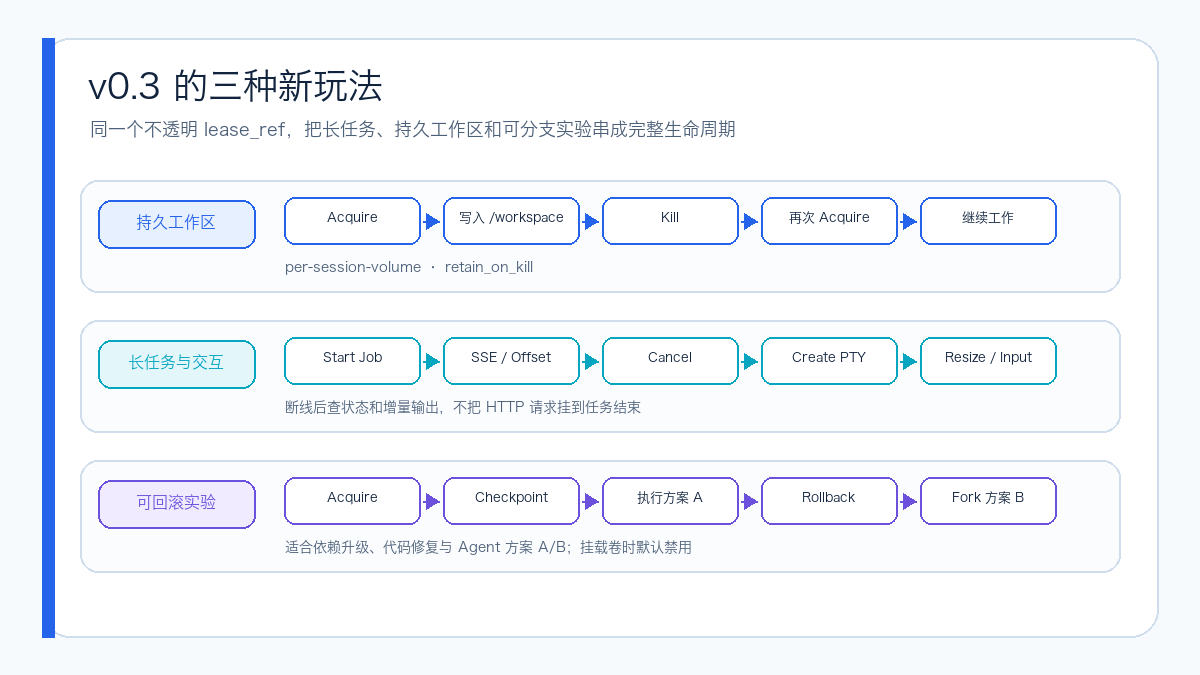
3.1 A Session Can Come Back with Its Workspace
The persistent-code Profile uses per-Session allocated Volumes and sets retain_on_kill: true. The Agent can pull code, create virtual environments, and generate intermediate files in the first round of tasks, then release the MicroVM while retaining the Volume; when the same Runtime Session Acquires again, it continues using the original /workspace.
This suits long-cycle code review, data cleaning, and multi-round fixes, but it is not an unlimited Home directory: paths remain restricted to /workspace and /tmp, and continue to be subject to tenant lease counts, command time, and file and output size limits.
3.2 Long-Running Tasks No Longer Tied to a Single HTTP Request
Durable Jobs separate "starting a task" from "waiting for completion." Clients can:
- Start a job and obtain an
job_ref; - Re-query status after disconnection;
- Read incremental output by Offset, or subscribe to SSE;
- Propagate cancellation on timeout or plan changes;
- Release the lease at the end.
PTY fills in the gap for interactive installers, REPLs, and programs that need terminal dimensions. PTY supports input, Resize, status, Kill, and SSE event streams, but the production side should still restrict who can create interactive sessions and set reclamation policies for long idle periods.
3.3 From "Fail and Restart" to Checkpoint, Rollback, and Fork
checkpoint-code can save state at critical steps: roll back when Plan A fails; fork Plan B from the same Checkpoint when comparing two dependency upgrade or fix strategies. This better suits Agent trial-and-error workflows and reduces repeated downloads and environment rebuilds.
One important caveat: CubeSandbox v0.7 rejects Snapshots that include Volumes or Host Mounts. The project therefore splits "persistent Volume" and "Checkpoint" into two separate Profiles and forbids this combination by default. Do not enable both simultaneously for a demo unless the upstream issue is resolved and re-validated in the target environment.
5. How Profiles, Tenants, and State Are Layered
Below is a simplified version of the default Profile structure in the repository:
defaults:
  max_active_leases_per_tenant: 8
  max_jobs_per_lease: 8
  max_command_seconds: 120

profiles:
  offline-code:
    allow_internet_access: false
    network:
      allow_public_traffic: false

  persistent-code:
    allow_internet_access: false
    workspace:
      mode: per-session-volume
      retain_on_kill: true
    checkpoints_enabled: false

  checkpoint-code:
    allow_internet_access: false
    checkpoints_enabled: true
Authentication is no longer a single shared Token:
- Per-tenant Bearer Principals can be bound to allowed Runtimes and Profiles;
- OIDC JWTs are validated via JWKS, Issuer, and Audience, with Tenant and Role extracted from Claims;
- TLS can protect the server-side link, and mTLS can use the validated client certificate subject as identity;
- Bearer Tokens and Session HMAC Keys are independent of each other; routine Token rotation does not change the session's pseudonymous association key.
Redis stores the Adapter's ownership state for leases, Jobs, and locks; it does not replace CubeSandbox's own scheduling and lifecycle state. Redis records are encrypted with a Fernet Key; modifications to the same lease by multiple replicas are serialized through renewable distributed locks. The Helm Chart fails directly when replicaCount > 1 is set and Redis is not enabled, preventing the illusion that "two replicas equals HA."
6. Test Scope and Results
This article performed static checks, unit tests, plugin tests, and Chart rendering against the v0.3.0 code, and additionally started Redis 8 to complete test cases that would otherwise require an external state backend.
| Check | Result | Description |
|---|---|---|
| Ruff | Passed | Adapter and Hermes Python source code |
| Python Adapter | 22 passed, 1 skipped | Redis URL not configured in the first round |
| Redis State | 1 passed | Re-tested separately using a temporary redis:8-alpine |
| Hermes Plugin | 2/2 passed | Tool registration and invocation contract |
| OpenClaw Plugin | Passed | Node syntax, Loader, and Plugin test cases |
| DSH Plugin | Passed | Node syntax and plugin test cases |
| Installer | Passed | Shell installation path tests |
| Helm | Passed | 1 Chart, Lint 0 failures, Template succeeded |
| Mypy | Passed | 12 source files with no type errors |
| Four-client application acceptance | Passed | OpenClaw, DSH, Hermes, and Codex all executed and were killed |
The four screenshots are functional acceptance evidence, not performance stress-test results. The key point of acceptance is not that the final answer contains a sentence saying "executed in the sandbox," but that the same short sandbox_ref can be correlated simultaneously across the Agent tool result, CubeSandbox Live List, and Adapter Audit, and that the active lease returns to 0 afterward.
7. How to Deploy v0.3.0
You can directly pull the public multi-architecture image:
When an immutable release source is required, pin the already-verified OCI Index Digest:
ghcr.io/aik8s/cubesandbox-agent-adapter@sha256:60c4b0bd433f4cc5a35b37d6fe851cf36684de646d15ad79f0ca51c4eb75b534
After cloning v0.3.0, you can use the installer to deploy the Adapter:
git clone --branch v0.3.0 --depth 1 \
  https://github.com/aik8s/cubesandbox-agent-adapter.git
cd cubesandbox-agent-adapter

./scripts/install.sh adapter \
  --context <kube-context> \
  --image ghcr.io/aik8s/cubesandbox-agent-adapter:v0.3.0 \
  --cube-api-url http://cube-api.cube-system.svc:3000 \
  --cube-proxy-host cube-proxy.cube-system.svc \
  --cube-proxy-port 80 \
  --template agent-code
This is only the image and Chart entry point. Production configuration should at minimum also clarify:
- NetworkPolicy between CubeAPI, CubeProxy, and the Adapter;
- The choice of per-tenant Token, OIDC, or mTLS;
- How Redis TLS, authentication, backup, and Encryption Key delivery are handled;
- Audit Sink, Prometheus scraping, and alerting;
- How to disable host Shell/FS tools on the Runtime side;
cube_release, TTL, GC, and Volume retention policies.
For production deployment, do not follow main long-term, and do not rely only on mutable Tags; record the immutable Digest above in image admission or GitOps manifests.
8. Main Risks When Migrating from v0.2
| Risk | Possible Impact | Suggested Gate |
|---|---|---|
| Registry Tag can be overwritten | The same v0.3.0 name may no longer point to the same artifact |
Pin the OCI Digest in admission or GitOps manifests |
| In-memory state switched to Redis | Lease ownership or encryption key configuration errors | Migrate with a single replica first, verify restart recovery, then scale out |
| HMAC Key accidentally rotated | The same Session is treated as a new session | Store and rotate separately from the Bearer Token |
| Profile defaults to deny | Old requests fail due to path, network, or capability gates | Replay real requests per Profile, prohibit broad fallback rules |
| NetworkPolicy enabled by default | Runtime, OIDC JWKS, Redis, or audit egress becomes unreachable | Verify each Ingress/Egress rule before going live |
| Plugin installation cache | DSH and others still run old plugin copies | Reinstall plugins and restart the Runtime, verify the tool manifest |
| Host tools still available | The model bypasses CubeSandbox | DSH uses Patch; OpenClaw/Hermes configure a separate Toolset/Profile |
| Volume and Snapshot conflict | Checkpoint requests fail | Keep the two Profiles separate, track upstream fixes |
| Job/PTY expands resource usage | Long tasks leak, tenants affect each other | Deploy quotas, TTL, Cancel, GC, and alerting together |
| Audit content too much or too little | Data leakage or inability to hold accountable | Keep Digest/Request ID, do not record command bodies or output |
In addition, v0.3 still does not have a generic Human Approval Callback or a global Rate Limiter. The Adapter's tenant quotas also cannot replace cluster admission, compute node capacity control, or CubeSandbox scheduling correctness.
9. What Scenarios It Fits
If you use only one Agent, and it already provides a native Sandbox Backend that meets your needs, using the native interface directly is usually simpler.
The Adapter's value becomes more apparent when multiple Agents coexist in the environment and you want them to share the following capabilities:
- One set of templates, network, and lifecycle policies;
- Not handing underlying management credentials to every Runtime;
- Authorization by Tenant, Runtime, and Profile;
- Using the same lease semantics for short commands, long Jobs, PTY, persistent workspaces, and rollback-capable experiments;
- Establishing a single sanitized evidence chain from Agent, through Adapter, to MicroVM.
v0.2 answered "can multiple Agents share CubeSandbox"; v0.3 begins to answer "what happens when the Adapter restarts, what happens when tasks run for a long time, how workspaces come back, how experiments fork, and how tenants are isolated." Version tags and multi-architecture images have been published, and it has moved from a bridge toward an execution control plane; production rollout should still be jointly gated by image Digest, identity, network, audit, and recovery drills.