Getting Started with OpenTelemetry and Kubernetes: From Trace and Span to Collector
OpenTelemetry is often abbreviated as OTel. When you first encounter it, the two most common problems are: there are many terms, and it appears to overlap with Prometheus, logging systems, and APM.
If you already understand the basic concepts and want to directly observe the API Server, Scheduler, Controller Manager, etcd, CoreDNS, and cluster object state, you can continue reading OpenTelemetry × Grafana in Practice: Observing the Kubernetes Control Plane and Cluster State.
You can start by remembering one sentence:
OpenTelemetry is a set of open standards and tools for generating, transmitting, and processing telemetry data; it is not itself responsible for long-term storage and querying.
Telemetry data is the observational material that a system actively leaves behind at runtime, mainly including Trace, Metric, and Log. OpenTelemetry enables different languages, frameworks, and platforms to use the same data model, field conventions, and transmission protocol, with the observability backend responsible for storage, retrieval, dashboards, and alerting.
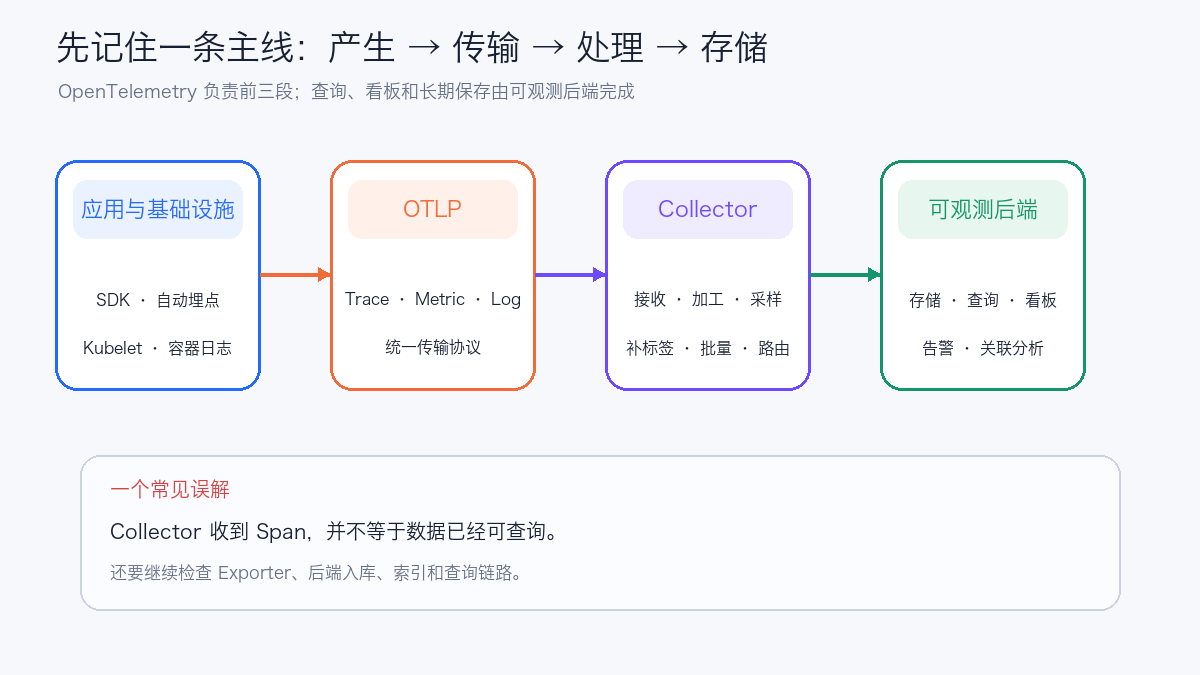
This article does not require the reader to have prior knowledge of distributed tracing. We will start with a single order request and progressively answer the following questions:
- What Trace and Span actually are;
- What problems Trace, Metric, and Log each solve;
- Why Context can link calls across multiple services;
- Where SDK, automatic instrumentation, OTLP, and Collector each sit;
- Why the Collector in Kubernetes often appears in both DaemonSet and Deployment forms;
- How to validate the entire pipeline with five test Traces.
1. Understanding Four Basic Concepts Using a Delivery System
Imagine a user request as a delivery package:
| Delivery system | OpenTelemetry | Problem it solves |
|---|---|---|
| The complete shipping process of one package | Trace | Which services this request actually passed through |
| The package passing through sorting centers, trunk lines, and delivery stations | Span | How long each specific step took, whether it succeeded or failed |
| The package always carrying the same tracking number | Trace Context | Whether these steps still belong to the same request after crossing processes |
| Hourly package volume, average delivery time, and timeout ratio | Metric | Whether the overall system is slowing down and whether errors are increasing |
| Detailed records such as "address unrecognized" and "vehicle breakdown" | Log | What specifically happened at a given point in time |
These signals answer different questions:
- Metric excels at quickly detecting "error rate rising from 0.1% to 5%";
- Trace excels at explaining "errors are concentrated in the step where the payment service calls the database";
- Log excels at providing "which error code the database returned and what context existed at the time".
A complete troubleshooting process usually starts with Metric to detect the anomaly, then uses Trace to find the slow point or failing step, and finally enters the Log associated with the corresponding Span to inspect details.
2. Trace and Span: The Tree of a Request
Assume a user calls POST /checkout, and the frontend sequentially accesses the order service, payment service, and database:
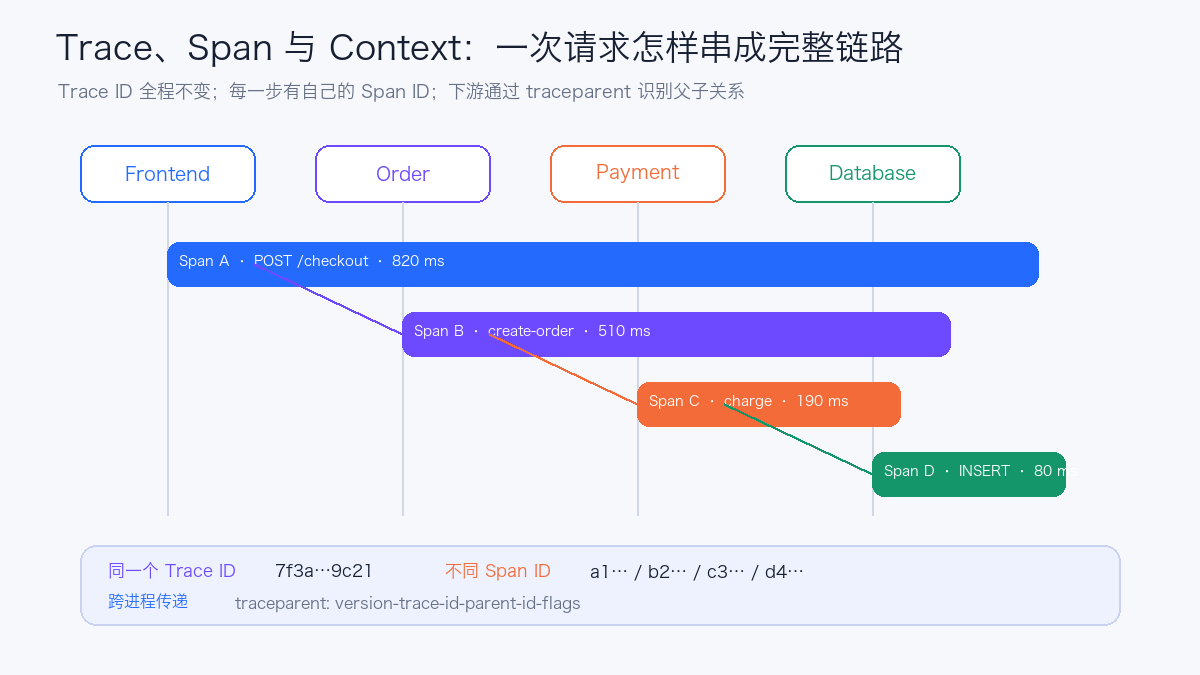
The entire call process is a Trace, and each step is a Span:
Trace: checkout request
└─ Span A: Frontend POST /checkout
   └─ Span B: Order create-order
      └─ Span C: Payment charge
         └─ Span D: Database INSERT
Each Span typically contains:
| Field | Meaning | Example |
|---|---|---|
| Trace ID | Identity of the entire call chain | Identical across all four Spans |
| Span ID | Identity of the current step | Different for each Span |
| Parent Span ID | Who called the current step | Span C's parent is Span B |
| Name | What this step does | POST /checkout, charge |
| Start / End | Start, end, and duration | 190 ms |
| Status | Success, error, or unset | ERROR |
| Attributes | Key-value pairs used for filtering and analysis | HTTP method, status code, database type |
| Events | Discrete events within the Span lifecycle | Exceptions, retries, cache misses |
| Links | Non-parent-child associations with other Traces or Spans | Message queue producer and consumer |
A Span is a unit of work with a start and an end. An application running continuously is not an infinitely long Span; a single request, a single database query, or a single message processing operation is an appropriate Span boundary.
2.1 Span Kind
Span Kind describes the role of the current operation in the call relationship:
| Kind | Common location |
|---|---|
SERVER |
HTTP/gRPC server handling a request |
CLIENT |
Calling downstream HTTP, database, or RPC |
PRODUCER |
Sending a message to a messaging system |
CONSUMER |
Receiving and processing a message from a messaging system |
INTERNAL |
In-process business step |
Kind does not determine parent-child relationships, but it helps the backend correctly draw service call graphs and calculate server-side and client-side latency.
2.2 How to Choose Attributes and Events
Fields that are stable and used for filtering are suitable as Attributes, for example:
http.request.method = POST
http.response.status_code = 503
server.address = order-api
db.system.name = postgresql
Information that occurs within the Span lifecycle and carries a timestamp is suitable as an Event, such as "first retry", "connection pool wait timeout", or "exception thrown".
High-cardinality or sensitive data such as order IDs, user IDs, and full URL parameters must not be unconditionally written into Attributes. Although Trace backends can tolerate higher cardinality than Metric, data volume, privacy, and indexing costs still exist.
3. Context Propagation: Still the Same Chain Across Services
When Frontend calls Order, the two processes do not share memory. They need to carry Trace Context through the request. In HTTP scenarios, the traceparent Header defined by W3C Trace Context is typically used:
English rendering — the original text is retained below.
The sending side injects the current context into HTTP Headers, and the receiving side extracts it and creates a child Span. Most HTTP, gRPC, and message queue clients can perform injection and extraction through automatic instrumentation.
If a hop does not propagate Context, the downstream will create a new Trace ID, and you will see two disconnected chains on the page. When troubleshooting broken Traces, check in this order:
- Whether the client injects
traceparent; - Whether the server extracts the Header;
- Whether the reverse proxy or gateway has removed the Header;
- Whether asynchronous tasks save and restore Context;
- Whether message producers and consumers use the correct propagation method.
3.1 Baggage Is Not a Trace Attribute
Baggage is key-value data that propagates across services with Context, such as a controlled tenant tier. It can help downstream decide how to tag Spans, but it also propagates with the request, increasing network overhead and potentially leaking information.
Passwords, Tokens, Cookies, personally identifiable information, and full Prompts must not be placed in Baggage. Baggage also does not automatically appear on Spans; it requires instrumentation or a Processor to explicitly read and copy it.
4. Differences Between Trace, Metric, and Log
4.1 Trace: Preserving the Causal Relationship of a Single Request
Trace is suitable for answering:
- Which service is the slowest;
- Where the error first appears;
- Whether retries amplify downstream pressure;
- Whether cross-service calls match expectations;
- What differences exist between an anomalous request and a normal request.
Trace data volume is usually proportional to request count, so sampling is often needed in production environments.
4.2 Metric: Aggregating Large Numbers of Events into Time Series
Metric is suitable for answering:
- What is the number of requests per second;
- Whether P95 latency crosses the SLO;
- Whether the error rate is continuously rising;
- Whether the Collector queue is approaching its limit;
- How CPU, memory, or queue length changes.
Common Metric Instruments:
| Instrument | Purpose | Example |
|---|---|---|
| Counter | Cumulative value that only increases | Total requests, total errors |
| UpDownCounter | Can increase or decrease | Current connection count |
| Histogram | Records the distribution of values | Request duration, response size |
| Gauge | Records a value at a point in time | Temperature, queue depth |
Metric Label cardinality must be controlled. Putting Request ID, Trace ID, Pod UID, or user ID into Labels creates a new time series for each value, rapidly consuming Prometheus memory and storage.
4.3 Log: Recording Discrete Events
Log contains timestamp, severity level, body, and structured fields. OpenTelemetry can:
- Have applications emit logs directly through the OTel Log SDK;
- Integrate existing logging frameworks through log bridges;
- Read container stdout/stderr files on Kubernetes nodes;
- Inject
trace_idandspan_idinto logs to establish jump links between Log and Trace.
Sending logs into the Collector does not automatically turn unstructured bodies into high-quality fields. In production, you still need to agree on JSON structure, timestamp format, severity level, service name, error codes, and redaction rules.
5. Resource, Attribute, and Instrumentation Scope
These three concepts are easy to confuse.
5.1 Resource: Who Produced the Data
Resource describes the entity that produced the telemetry:
service.name = checkout-api
service.version = 1.8.2
deployment.environment.name = production
k8s.namespace.name = commerce
k8s.pod.name = checkout-api-7c8d9f-x2p4k
k8s.node.name = worker-17
These fields are shared by multiple Spans, Metric Data Points, or Log Records produced by the same entity.
5.2 Attribute: What Characteristics This Operation Has
Attributes usually belong to a specific Span, Metric Data Point, or Log, such as HTTP method, status code, and database operation. service.name should be a Resource Attribute; http.request.method should be a Span Attribute.
5.3 Instrumentation Scope: Who Created This Telemetry
Instrumentation Scope records the library or module that produced the telemetry, such as opentelemetry.instrumentation.fastapi and its version. It helps troubleshoot "whether this batch of Spans was produced by manual business instrumentation or by a specific automatic instrumentation library".
A simplified OTel data hierarchy is:
6. How API, SDK, Automatic Instrumentation, and Collector Work Together
6.1 API
The API defines how application code creates objects such as Spans and Metrics. Once business libraries depend on the API, they do not need to be bound to a specific export implementation.
6.2 SDK
The SDK implements sampling, processing, aggregation, and export. Application processes typically configure the SDK through environment variables or code to send data to the Collector.
6.3 Automatic Instrumentation
Automatic instrumentation creates Spans for common components such as HTTP frameworks, RPC, database clients, and messaging systems. It is suitable for quickly gaining entry points and dependency calls, but it does not know business semantics.
For example, automatic instrumentation can know that the service called POST /orders, but it cannot know whether the internal operation is "inventory reservation" or "risk control check". Critical business steps are still suitable for adding manual Spans.
6.4 Collector
The Collector is a standalone process located between the application and the observability backend. It consists of components and Pipelines:
| Component | Role | Example |
|---|---|---|
| Receiver | Receives or scrapes data | OTLP, Prometheus, File Log, Kubelet Stats |
| Processor | Processes data | Memory Limiter, Kubernetes Attributes, Batch, Filter |
| Exporter | Sends to a destination | OTLP, Prometheus, Debug |
| Connector | Connects two Pipelines | Generating Metrics from Traces |
| Extension | Provides non-data-plane capabilities | Health Check, authentication, persistent queue |
Configuring a component does not mean it is running. A component must be referenced by an service.pipelines:
receivers:
  otlp:
    protocols:
      grpc:
        endpoint: 0.0.0.0:4317
      http:
        endpoint: 0.0.0.0:4318

processors:
  memory_limiter:
    check_interval: 1s
    limit_mib: 192
  batch:
    timeout: 2s

exporters:
  debug:
    verbosity: detailed

service:
  pipelines:
    traces:
      receivers: [otlp]
      processors: [memory_limiter, batch]
      exporters: [debug]
The meaning of this Pipeline is: receive Traces on 4317/4318, first protect memory, then batch process, and finally print to the Collector log.
7. OTLP: The Unified Transmission Protocol
OTLP is the OpenTelemetry Protocol. Common entry points are:
| Transport | Default port | Common address |
|---|---|---|
| OTLP/gRPC | 4317 | otel-collector:4317 |
| OTLP/HTTP | 4318 | /v1/traces, /v1/metrics, /v1/logs |
OTLP defines how data is encoded and transmitted; Semantic Conventions define how common fields are named. The two solve different problems: protocol consistency only guarantees that data can be delivered; field semantic consistency enables data from multiple teams to be queried together.
Applications do not need to route all three signals through the same port. You can start by having Trace use OTLP, continue having Metric scraped by Prometheus, and keep Log writing to stdout, then unify gradually.
8. What Difficulties Kubernetes Adds to OpenTelemetry
In the virtual machine era, the relationship between service instances and hosts was relatively stable. In Kubernetes, Pods are recreated, drift, and scale in and out; a container IP alone makes it difficult to explain which Workload the telemetry came from.
Platforms typically need to associate the following layers:
Cluster
└─ Namespace
   └─ Deployment / StatefulSet / DaemonSet / Job
      └─ Pod
         └─ Container
            └─ Application service
This is precisely the value of the Kubernetes Attributes Processor. It finds the Pod based on Pod UID, connection source, and other information, then supplements controlled Kubernetes Resource Attributes to Traces, Metrics, and Logs.
One important boundary is: the Kubernetes Attributes Processor is only responsible for supplementing metadata; it does not actively collect node CPU, Pod memory, container logs, or Kubernetes object state. These data each require other Receivers:
| What to collect | Common components | Typical deployment location |
|---|---|---|
| Application OTLP | OTLP Receiver | Agent or Gateway |
| Container stdout/stderr | File Log Receiver | Per-node DaemonSet |
| Node, Pod, Container resource metrics | Kubelet Stats Receiver | Per-node DaemonSet |
| Node host metrics | Host Metrics Receiver | Per-node DaemonSet |
| Kubernetes objects and cluster events | Kubernetes Cluster Receiver | Single active instance |
Existing Prometheus /metrics |
Prometheus Receiver | Explicit sharding or Target Allocator |
9. How to Deploy the Collector in Kubernetes
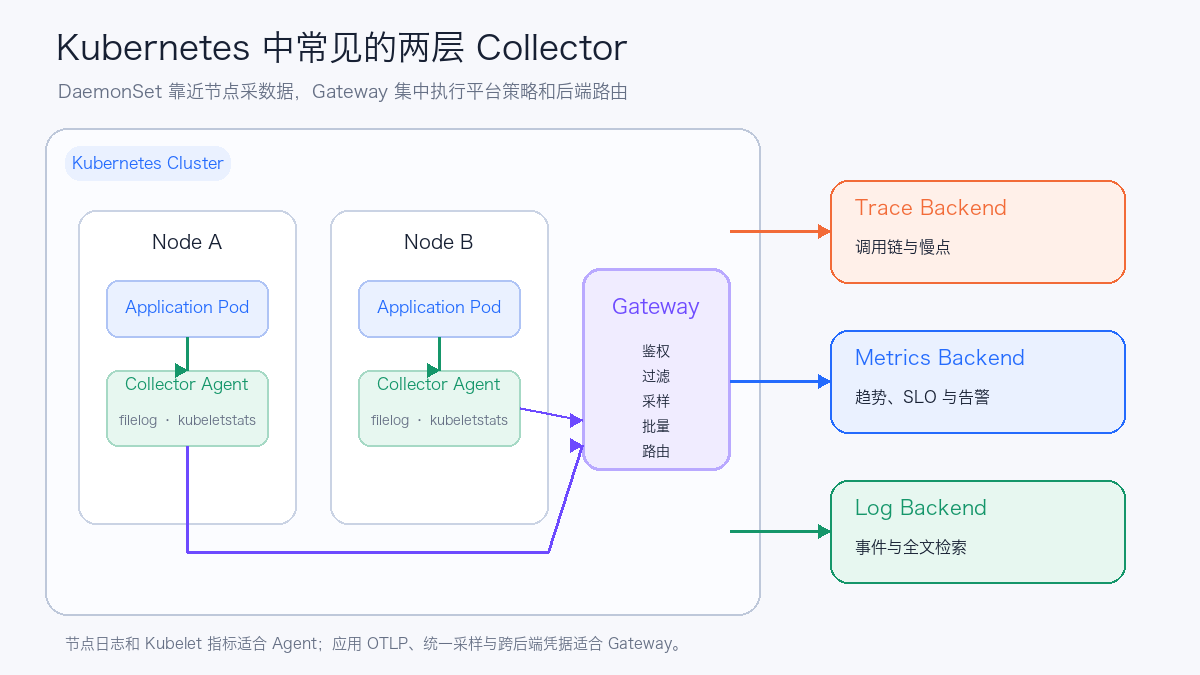
9.1 Sidecar
Each business Pod carries a Collector alongside it. Isolation is clear, but CPU, memory, configuration, and upgrade costs all grow with the number of Pods. It suits a small number of workloads that need independent credentials or special pipelines.
9.2 DaemonSet Agent
One Collector per node. It sits close to Kubelet and container log files, making it suitable for File Log, Kubelet Stats, and Host Metrics, and it can also receive OTLP from applications on the same node.
9.3 Deployment Gateway
One or more Collector replicas provide a unified OTLP entry point through a Service, centrally handling authentication, filtering, sampling, batching, and backend routing. Applications only need to know one in-cluster address.
9.4 Agent + Gateway
A more complete production structure usually has two layers:
The Agent handles collection and initial processing close to the data source, while the Gateway manages cross-team policies and backend credentials. Both layers add resource and operational costs; small clusters can start with a single-layer Gateway.
10. Five-Minute Experiment: Look at OpenTelemetry Itself
To understand the Collector first, no observability backend is installed. The experiment uses telemetrygen to generate five Traces, which the Collector's Debug Exporter prints out.
The complete manifest is at examples/opentelemetry-kubernetes-basics.
10.1 Deploy the Collector
cd examples/opentelemetry-kubernetes-basics
kubectl apply -f collector.yaml
kubectl -n otel-basics rollout status deploy/otel-collector
Confirm the OTLP Service:
It exposes both 4317 and 4318; the test Job uses gRPC 4317.
10.2 Send Five Traces
kubectl apply -f trace-job.yaml
kubectl -n otel-basics wait \
  --for=condition=complete job/telemetrygen-traces \
  --timeout=180s
If a network-restricted cluster cannot access GHCR directly, first sync telemetrygen:v0.158.0 to a Registry the cluster can reach, and modify only the image address.
10.3 Observe Collector Output
Five Trace IDs should be found in the logs. telemetrygen generates parent-child Spans for each Trace and attaches the following test fields:
When the Job runs directly inside the cluster, the Kubernetes Attributes Processor also supplements Resource Attributes such as Namespace, Pod, UID, and Node based on the connection source.
At this point the full data path can already be answered:
telemetrygenis the data producer;- OTLP/gRPC is the transport protocol;
otlpis the Receiver;memory_limiter,k8s_attributes, andbatchare Processors;debugis the Exporter;- Collector logs are the temporary output destination.
The Debug Exporter is only for learning and troubleshooting. High-detail printing in production generates large amounts of logs and consumes CPU and disk.
10.4 Cleanup
kubectl delete namespace otel-basics
kubectl delete clusterrolebinding otel-basics-collector
kubectl delete clusterrole otel-basics-collector
After the Namespace is deleted, the ClusterRole and ClusterRoleBinding still need to be cleaned up separately.
11. From Introductory Configuration to a Queryable System
The Debug Exporter verifies that the Collector has received data. To make data queryable, backend Exporters need to be configured for different Pipelines:
The three signals can go to different systems. When choosing a backend, each needs separate consideration:
| Signal | Main capacity factors | Common query methods |
|---|---|---|
| Trace | Request volume, Span count, sampling rate, Attribute indexing | Trace ID, service, operation, error, latency |
| Metric | Active Series, collection interval, retention time | Aggregation, rate, quantile, alerting |
| Log | Bytes per second, field indexing, compression ratio, retention time | Keyword, structured fields, Trace ID |
During acceptance testing, check layer by layer along the pipeline:
English rendering — the original text is retained below.
A business request returning 200 and a successful telemetry pipeline are two independent things. Exporter failures usually do not cause business requests to fail, so the Collector itself must be monitored.
12. Sampling: Controlling Trace Volume
12.1 Head Sampling
Decide whether to sample when the request starts. It has low overhead and is simple to implement, but at this point it is not yet known whether the request will ultimately be an error or slow.
12.2 Tail Sampling
The Collector buffers the Spans of a Trace and waits until the request finishes before deciding whether to keep it. It can prioritize retaining errors, slow requests, and critical paths, but it requires more memory and requires that Spans of the same Trace arrive at the same stateful sampler.
12.3 Sampling Does Not Replace Metrics
If only 10% of Traces are kept, the sampled Trace count cannot be used directly to calculate accurate request rates and error rates. Request volume, error rate, and latency SLOs should continue to use Metrics; Traces are used to explain the causal relationships of a single request.
13. What to Pay Attention to in Production
13.1 First Unify Resource and Field Conventions
At minimum, unify:
- Naming rules for
service.name; - Environment, version, region, and cluster fields;
- The allowlist for Kubernetes metadata;
- The Semantic Conventions followed by HTTP, RPC, database, and messaging systems;
- Which fields are sensitive information or prohibited from indexing.
Without these conventions, even if all services can report OTLP, cross-team queries will still be full of synonymous fields and wrong dimensions.
13.2 Control Cardinality and Bodies
- Metric Labels use only a limited number of stable values;
- URL route templates take priority over raw URLs;
- Trace Attributes do not record passwords, Tokens, Cookies, or full request bodies;
- Logs apply field allowlists and masking on the Collector side;
- Baggage does not propagate sensitive information.
13.3 Make the Collector Observable
Monitor these key points:
- Data volume received and rejected by Receivers;
- Exporter success and failure counts;
- Send queue length and capacity;
- Memory, CPU, GC, and process restarts;
- Backend request latency, timeouts, and retries;
- Span counts before and after Sampling;
- Collector configuration version and release status.
A Collector Pod's Running only means the process exists. When Exporters keep failing, the queue is full, or a Processor mistakenly drops data, the Pod can still remain Ready.
13.4 Stateful Components Cannot Be Freely Replicated
- The Kubernetes Cluster Receiver usually keeps only one active instance to avoid duplicate cluster data collection;
- Multiple identical replicas of the Prometheus Receiver will scrape duplicates; scaling requires sharding or a Target Allocator;
- Tail Sampling requires stable routing by Trace ID;
- Metric data flows must maintain a unique Resource identity and a Single Writer.
13.5 Security Boundaries
- The OTLP Service is exposed only on a controlled network;
- Use TLS/mTLS and authentication across network boundaries;
- Use NetworkPolicy to restrict producers and backends;
- The Collector ServiceAccount uses minimal RBAC;
- Backend credentials are injected via Secrets;
- Validate or rebuild Trace Context coming from the public internet, and do not trust arbitrary external context.
14. Common Questions for Beginners
Does OpenTelemetry store data?
No. The SDK and Collector are responsible for generating, collecting, processing, and exporting; the backend is responsible for persistence and querying.
Must applications deploy a Collector?
At the protocol level, the SDK can send directly to the backend. Kubernetes production environments usually keep a Collector because it centrally manages credentials, retries, filtering, sampling, metadata, and backend migration.
After automatic instrumentation, do I still need to change code?
Automatic instrumentation first covers HTTP, RPC, database, and messaging components. Business steps such as inventory reservation and risk-control checks still need manual Spans, and business errors also need explicit status and attributes set.
Do Kubernetes Metadata appear automatically?
No. Applications can write the Pod UID via the Downward API, or the Kubernetes Attributes Processor can associate it based on connection or UID. The Processor also needs read-only RBAC.
Must all three signals be migrated together?
No. A common order is to first onboard Traces while keeping existing Metric and Log pipelines; after field conventions and the Collector stabilize, unify the rest gradually.
Why does one HTTP request produce multiple Spans?
Besides the Server Span, frameworks such as ASGI may record internal Spans like send and receive, and downstream clients also create Client Spans. First confirm whether these Spans provide troubleshooting value, then filter them through automatic instrumentation configuration; do not blindly delete them by name in the backend.
15. Recommended Learning Order
- Use the five-minute experiment in this article to understand Receiver, Processor, Exporter, and Pipeline;
- Enable HTTP automatic instrumentation on one non-core service;
- Check whether
traceparentpropagates across two services; - Add a manual Span with business meaning;
- Add Trace ID and Span ID to logs;
- Connect a real Trace backend and verify errors and slow requests;
- Then learn sampling, Agent + Gateway, high availability, and capacity planning;
- Finally, unify Resource, Semantic Conventions, and privacy rules across the whole company.