Lessons from Building a GPU Development Platform in the LLM Era
A GPU Notebook platform often starts with a simple problem: give users a Jupyter Pod with a GPU attached. In the LLM era, it quickly becomes a set of interconnected problems: one GPU cannot hold the model, yet eight-GPU machines cannot be given to every user; user environment write paths are unpredictable; shared file systems are slowed down by small files and directory scans; and environments cannot be fully restored after container rebuilds.
Our evolution was not an architectural design exercise but a causal chain driven by production incidents:
English rendering — the original text is retained below.
JupyterHub + KubeSpawner
  → code-server becomes the default entry, Jupyter remains an optional tool
  → group-level shared eight-GPU development machine + user resource attribution
  → local disk capacity insufficient and cannot be shared
  → self-built NFS has limited expansion capability
  → all Home goes into CephFS, MDS bears uncontrollable metadata pressure
  → per-user Ceph RBD + explicit CephFS shared directory
  → personal images can only provide point-in-time recovery
  → Workspace Operator unifies lifecycle
  → KubeVirt + Ceph RBD root disk preserves complete user environment
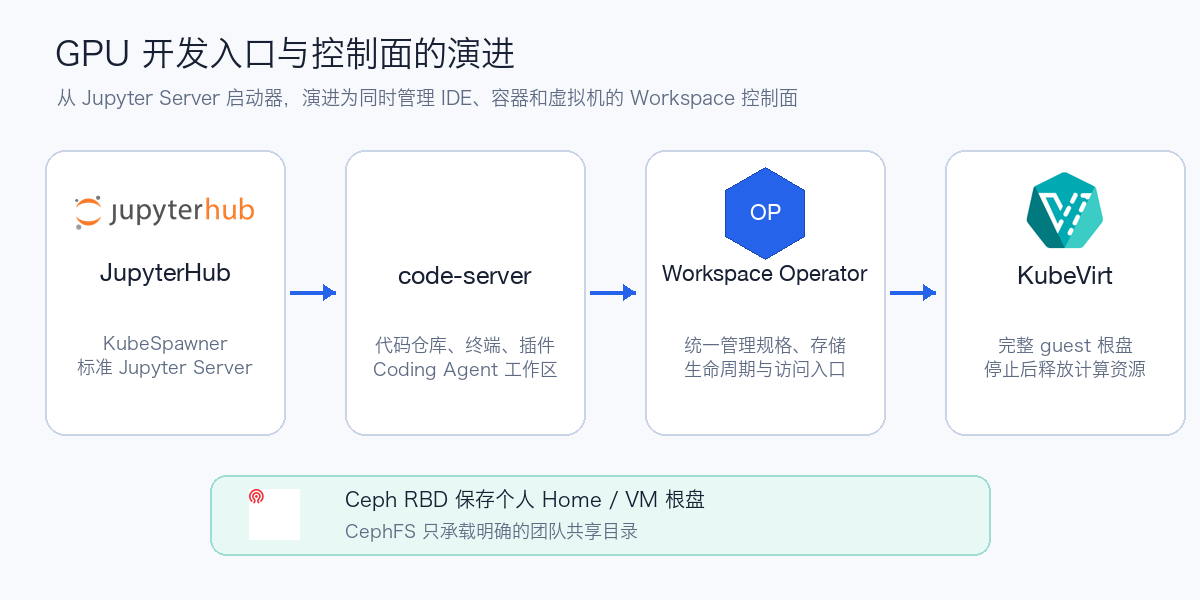
This article first explains why we changed, then provides deployable configurations for Ceph RBD, KubeVirt/CDI, and workspace lifecycle management. More complete steps for VMs, GPU passthrough, snapshots, and failure recovery are in Building Persistent GPU Notebooks with KubeVirt and Ceph RBD.
1. Why We Stopped Stacking Configuration on KubeSpawner
The first version used JupyterHub on Kubernetes, with KubeSpawner creating user Pods. In standard Jupyter scenarios, this approach is mature enough: Profiles can expose images, CPU, memory, GPU, and PVCs, and users can enter JupyterLab with a click.
As platform requirements grew, we wanted unified management of:
- Two development entry points: Notebook and code-server;
- Pods, PVCs, Services, access URLs, and user state;
- Create, stop, resume, upgrade, rebuild, and retention periods;
- Two runtime forms: containers and KubeVirt VMs;
- Versioned templates, approvals, auditing, and storage reclamation.
KubeSpawner's core abstraction is "start or stop a Server for a JupyterHub user." The platform goal is more like a Workspace Controller that continuously reconciles multiple resources. As conditions in Profiles, Overrides, and Hooks multiplied, continuing to stack configuration would only make a single Server startup bear the entire workspace lifecycle.
This is not a flaw in KubeSpawner but a difference in abstraction level. Standard Jupyter Servers can continue to be managed by it; a general-purpose development platform needs to elevate the workspace to its own resource:
English rendering — the original text is retained below.
2. Why the Default Entry Point Shifted to code-server
Algorithm engineers' primary work is no longer confined to Notebook cells. LLM and Coding Agent development typically requires full code repositories, terminals, Git, debuggers, language servers, file indexing, container tooling, and many plugins. code-server's VS Code-compatible workflow is better suited to these tasks, and it quickly gained more daily users in our internal usage.
Especially in secondary development on open-source Coding Agents, users need to read multiple repositories simultaneously, modify tool calls, run Agents, inspect diffs, and debug long-running processes. code-server is closer to a full development machine than a plain Notebook page.
Jupyter has not disappeared. Data exploration, visualization, and step-by-step experimentation still fit JupyterLab well, but it is now just one tool inside the Workspace, not the definition of the entire platform. The platform manages resources and lifecycle beyond the IDE.
3. GPU Sharing: Put Resource Boundaries at the Team Level
One GPU per person often cannot load models during LLM debugging; one eight-GPU machine per person is unaffordable. Notebook workloads are also highly bursty: GPUs are suddenly saturated while running experiments, yet utilization stays near 0 for long stretches while reading code, writing configs, and attending meetings.
Our choice was to allocate several eight-GPU development machines to each algorithm group, fully shared within the group. When resources are idle, every user can use all 8 GPUs and nearly the full machine's CPU and memory; the platform no longer permanently reserves a machine for any individual.
After sharing, the most critical companion is not more sophisticated quotas but resource attribution. User dashboards need to directly show:
- Total nodes, idle capacity, and abnormal states;
- CPU, memory, GPU utilization, GPU memory, and power consumption;
- The user corresponding to each process, container, or Workspace;
- Current top consumers and growth trends over a period.
When resources are insufficient, group members first check attribution, then negotiate pauses, staggered schedules, or migrations. This shifts much of the "who is occupying the GPUs" communication from the platform team back to the resource-owning teams.
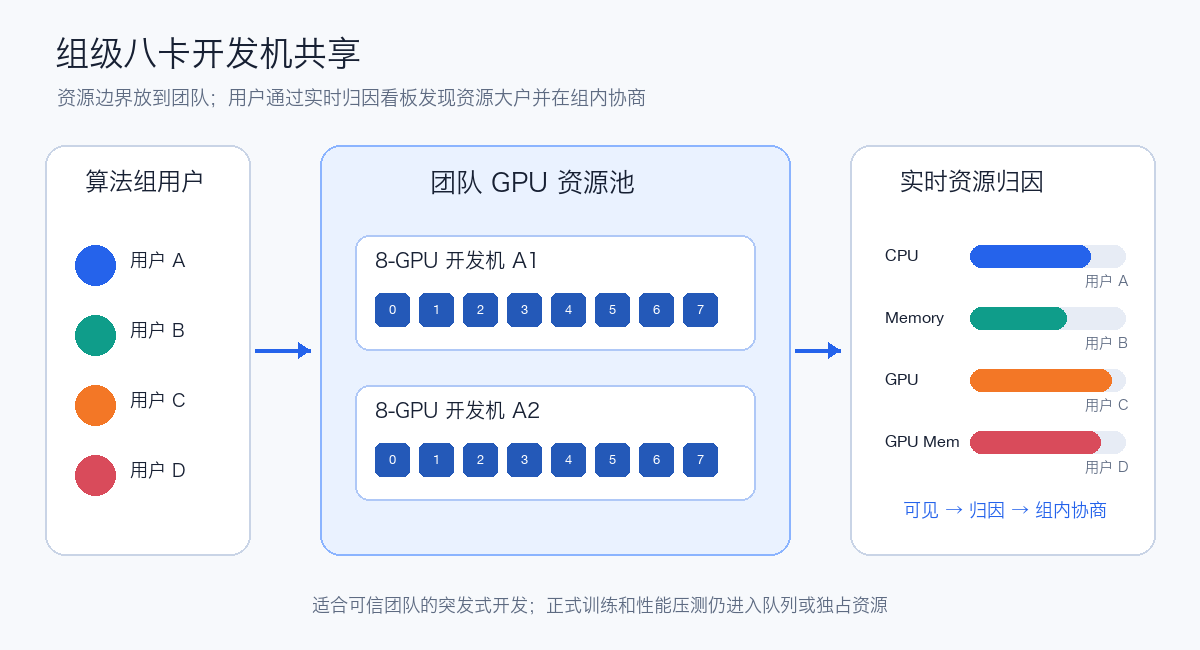
This model is soft isolation within a trusted team, not strict performance isolation. Node boundaries should be preserved across teams; performance testing, formal training, and stable-SLO tasks still enter dedicated resources or a queue-governed Job system.
4. Why Storage Went from Local Disks All the Way to RBD + CephFS
4.1 GPU Node Local Disks
Local NVMe has low latency and suits model caches, data shards, compilation caches, and scratch space. But models, datasets, Conda environments, and checkpoints quickly exhaust capacity, and users cannot continue using their original directories after moving to another node. On node failure, local disks cannot serve as the only copy either.
4.2 Self-Hosted NFS
NFS solved cross-node sharing and has good POSIX compatibility, but capacity, throughput, high availability, backup, and noisy-tenant governance gradually concentrate on a few servers. As user counts and small-file concurrency grow, it becomes hard to scale linearly.
4.3 All Homes on CephFS
CephFS CSI provides dynamic RWX and full POSIX semantics. Initially, migrating all user Homes into CephFS seemed natural, but in practice it fed all of the Notebook users' unpredictable behavior into the shared metadata plane:
- Conda, pip, and npm create large numbers of small files;
- Git checkouts, recursive scans, IDE indexing, and file watching;
- Model extraction, cache directories, and temporary files;
- Multiple kernels and background processes scanning Home simultaneously.
CephFS metadata such as directories, permissions, and inodes must pass through the MDS. A directory storm created by one user can affect everyone's Git, Python imports, Conda, and IDE startup. Simply adding more MDS resources does not change the load model.
4.4 Personal RBD, Team-Shared CephFS
Personal Homes typically do not need multi-node concurrent read/write; they only need exclusive mounting, retention after stop, and re-attachment across nodes. This maps exactly to Ceph RBD:
English rendering — the original text is retained below.
Small-file operations in personal directories complete within their own file systems and no longer enter the CephFS MDS hot path; each user's volume can also be independently resized, snapshotted, restored, and reclaimed. The cost is that the platform must guarantee only one active workspace per user and carefully handle RBD re-mounting and split-brain prevention after a node becomes unreachable.
5. Why a Persistent Home Is Still Not Enough
When a container is rebuilt, only mounted directories are retained. Users may write software to /opt, /usr/local, /var, the system Python, the APT database, or hidden directories the platform did not anticipate. Even if Home, Conda, and pip caches are bound to RBD, losing a single system library can make the entire environment unusable.
Base images therefore keep growing: CUDA, PyTorch, build tools, code-server, JupyterLab, and common dependencies all want to be preinstalled. Large image pulls and pre-warming are slow, while slim images shift the rebuild cost to users.
We once supported users saving the current container as a personal image through the platform. This is an effective stop-loss measure, but it can only restore to the last save point. If the machine fails between two saves, system-level modifications are still lost; a large number of personal images also increases Registry, pull, and garbage-collection pressure.
6. Final Workspace and Storage Layering
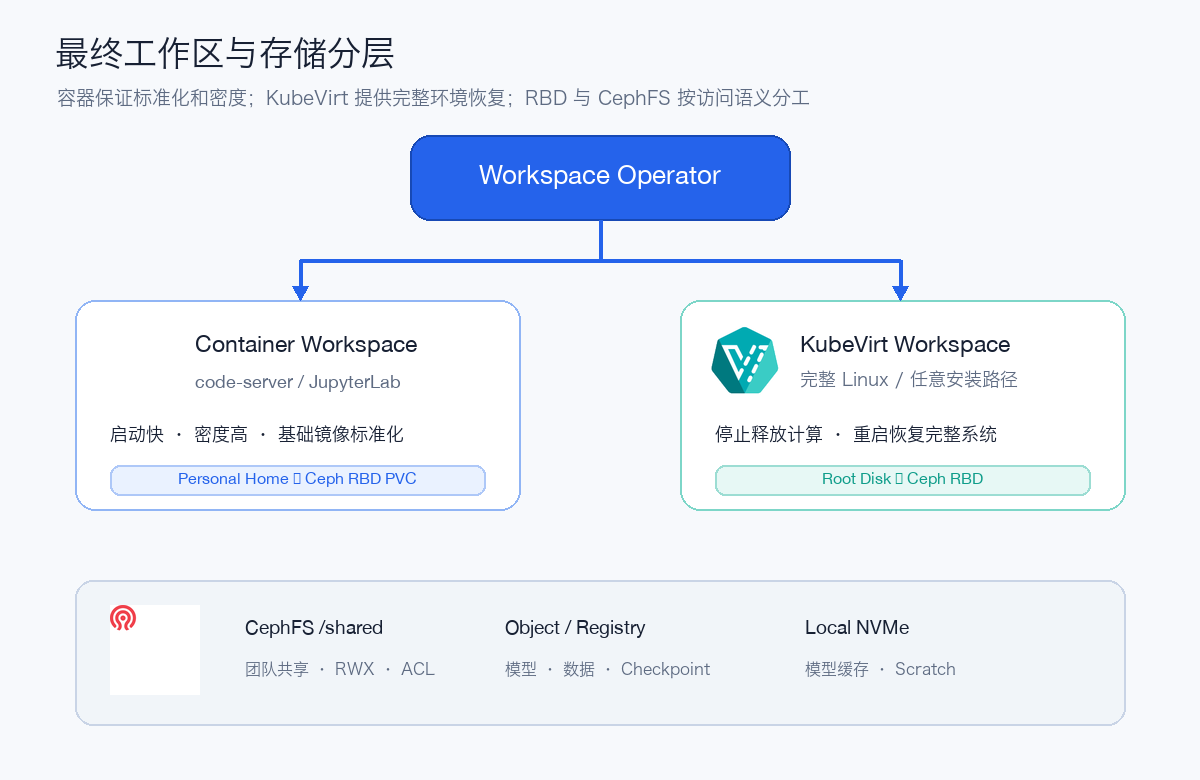
The Operator ultimately manages two types of workspaces:
| Workspace | Persistence method | Advantages | Constraints |
|---|---|---|---|
| Container Notebook/code-server | Per-user RBD Home | Fast startup, high density, standardized images | Arbitrary system paths still reside in the container writable layer |
| KubeVirt Workspace | Per-user RBD root disk | Complete guest file system continuously saved | Higher startup and operational cost |
Both can mount explicit CephFS team-shared directories. Local NVMe carries only rebuildable caches and scratch space, never the only copy of data.
KubeVirt mode saves the entire root file system. User modifications in /etc, /opt, /usr/local, /var, and Home all go into RBD. Stopping the VMI releases CPU, memory, and GPU; the VirtualMachine and root disk remain; restarting restores the entire Linux environment.
7. Minimal Ceph RBD Preparation
The following examples assume the cluster already has Ceph RBD CSI. First confirm the StorageClass, snapshot class, and CSI Pods:
kubectl get storageclass
kubectl get volumesnapshotclass
kubectl get pods -A | grep -E 'rbd-csi|csi-rbd'
Production StorageClass names vary by environment; this article uniformly uses ceph-rbd. Personal Homes and VM root disks are recommended to use ReadWriteOnce or ReadWriteOncePod, with explicit resize, snapshot, quota, retention, and alerting policies.
The container workspace's personal Home can directly use a PVC:
apiVersion: v1
kind: PersistentVolumeClaim
metadata:
  name: user01-home
  namespace: gpu-workspaces
  labels:
    platform.aik8s.run/owner: user01
spec:
  accessModes:
    - ReadWriteOnce
  storageClassName: ceph-rbd
  resources:
    requests:
      storage: 200Gi
When a workspace is deleted, do not let an ordinary Pod OwnerReference cascade-delete this PVC. The platform should design "stop workspace," "delete compute object," "enter disk retention period," and "final disk reclamation" as distinct states.
8. KubeVirt + RBD Root Disk Deployment Skeleton
8.1 Verify the Control Plane First
kubectl get pods -n kubevirt
kubectl get pods -n cdi
kubectl get kubevirt -n kubevirt
kubectl get cdi -n cdi
In the test cluster, Kubernetes v1.30.4, KubeVirt v1.4.1, and CDI v1.61.1 have completed control-path verification. virt-api, virt-controller, virt-handler, virt-operator, and the CDI controller remain Running; the same Namespace also keeps both Running and Stopped user VMs to verify that stopping releases compute, retains objects, and allows restart.
Public configuration follows the production target below: the root disk StorageClass uses ceph-rbd.
8.2 Clone an Independent Root Disk from a Golden Image
The following DataVolume assumes vm-images/ubuntu-24-04-gpu is a prepared CDI DataSource. Cross-Namespace cloning also requires configuring CDI Clone authorization.
apiVersion: cdi.kubevirt.io/v1beta1
kind: DataVolume
metadata:
  name: notebook-user01-root
  namespace: gpu-workspaces
  labels:
    platform.aik8s.run/owner: user01
spec:
  sourceRef:
    kind: DataSource
    name: ubuntu-24-04-gpu
    namespace: vm-images
  storage:
    accessModes:
      - ReadWriteOnce
    storageClassName: ceph-rbd
    resources:
      requests:
        storage: 200Gi
8.3 VM References the Root Disk Independently
The root disk is not placed in the VM's dataVolumeTemplates; instead, the platform creates it independently and the VM references it. This way, deleting or rebuilding the VM does not naturally treat the user disk as a temporary sub-resource.
apiVersion: kubevirt.io/v1
kind: VirtualMachine
metadata:
  name: notebook-user01
  namespace: gpu-workspaces
  labels:
    platform.aik8s.run/owner: user01
spec:
  runStrategy: Halted
  template:
    metadata:
      labels:
        kubevirt.io/domain: notebook-user01
        platform.aik8s.run/owner: user01
    spec:
      terminationGracePeriodSeconds: 120
      domain:
        cpu:
          cores: 16
        resources:
          requests:
            memory: 64Gi
        devices:
          disks:
            - name: root
              disk:
                bus: virtio
          interfaces:
            - name: default
              masquerade: {}
      networks:
        - name: default
          pod: {}
      volumes:
        - name: root
          dataVolume:
            name: notebook-user01-root
GPU PCI Passthrough or vGPU resource names, IOMMU groups, drivers, and migration constraints all depend on the hardware environment. They should be injected by the Operator per specification after node acceptance, not copied directly from generic examples.
8.4 Exposing code-server or JupyterLab
The in-guest service listen address should be 0.0.0.0, with authentication placed at the unified Gateway/OIDC layer. The Service can select the VMI's stable labels:
apiVersion: v1
kind: Service
metadata:
  name: notebook-user01
  namespace: gpu-workspaces
spec:
  selector:
    kubevirt.io/domain: notebook-user01
  ports:
    - name: code-server
      port: 8080
      targetPort: 8080
    - name: jupyter
      port: 8888
      targetPort: 8888
Production entry points must also check NetworkPolicy, TLS, authorization from user identity to Workspace, and how the Gateway returns a clear state when the VM is stopped.
9. Actually Verifying the Lifecycle
First check that the DataVolume has finished cloning:
Then start the VM:
Inside the guest, install a system package, modify /etc and /opt, and write a verification file in Home. After stopping, confirm the VMI is gone while the VM, DataVolume, and PVC remain:
Restart and verify these files still exist:
The test cluster verified both Running and Stopped user workspaces. This is exactly the mixed state the controller should support long-term: stopped users do not occupy VMI compute resources, while workspace objects and personal disks remain under controlled retention.
If the StorageClass uses WaitForFirstConsumer, DataVolumes/PVCs for users who have not yet started may remain in a waiting state when there is no consumer. When diagnosing anomalies, check the DataVolume Condition, PVC Events, StorageClass binding mode, and whether the VM is actually ready to start — do not simply delete and recreate upon seeing Pending.
10. Minimal State Machine the Operator Should Implement
Requested
  → ProvisioningDisk
  → Stopped
  → Starting
  → Running
  → Stopping
  → Stopped
  → Retained
  → DeletingDisk
At minimum, the following invariants must hold:
- A single user has at most one active Pod or VMI for the same workspace;
- Stopping the compute object does not delete the personal RBD;
- Deleting a Workspace enters a disk retention period by default;
- Before forced migration, confirm the old node is fenced to avoid RBD double-mounting;
- Disk resize, snapshot, restore, and final deletion all have audit records;
- code-server and JupyterLab use the same identity, specification, and access policy;
- Users can see attribution data for CPU, memory, GPU, GPU memory, and capacity.
11. Failures That Must Be Verified Before Production
| Failure | Expected behavior |
|---|---|
| Container Workspace Pod deleted | Automatically rebuilt, personal RBD Home retained |
| KubeVirt VMI stopped | CPU, memory, and GPU released, RBD root disk retained |
| VM object rebuilt | Re-references the original root disk, does not accidentally delete the PVC |
| Compute node unreachable | RBD re-mount on other nodes allowed only after fencing |
| CephFS MDS pressure rises | Personal Homes are not directly affected by shared metadata hotspots |
| RBD capacity approaching limit | Platform alerts in advance and supports controlled resize |
| User accidentally deletes files | Recoverable from snapshots or backups; snapshots are not treated as the only backup |
| Shared GPU fully occupied | Dashboard can locate the user and Workspace; coordination within the group |
12. Selection Conclusions
- High standardization, fast startup, and high density needed: containers + per-user Ceph RBD Home.
apt, systemd, or arbitrary system paths must persist: KubeVirt + Ceph RBD root disk.- Directories that teams genuinely need to read/write concurrently: use CephFS separately, do not put all personal Homes into it.
- Hot models, compilation caches, and temporary data: use rebuildable local NVMe.
- Bursty LLM development: group-level shared eight-GPU machines with user resource attribution.
- Formal training and performance testing: enter queues or dedicated resources, do not rely on soft isolation of shared development machines.
The biggest lesson is not "VM is better than container" or "RBD is better than CephFS," but to first identify access semantics and failure boundaries: personal writes do not need RWX, team sharing should not carry all Homes, caches should not be the only copy, stopping compute is not deleting data, and point-in-time images are not equivalent to continuously saved disks.
Once these boundaries are clear, JupyterLab, code-server, containers, and KubeVirt can be organized into a GPU development platform that users can truly understand and recover.