Omarchy Linux and Agent OS Overview: Desktop Systems, Agent Runtimes, and Enterprise Deployment
In the past, adjusting a Linux desktop usually meant finding configuration files, checking syntax, modifying parameters, and then reloading the window manager. Now you can simply describe the intent: "Change this shortcut to open my notes, keep the other bindings," and let the Agent locate the configuration, generate the modification, and verify the result. After an application crash, you can also hand the logs and call stack to the Agent for assisted analysis.
Omarchy brings this way of working into the Linux desktop. It was initiated by David Heinemeier Hansson (DHH), is based on Arch Linux, and integrates the desktop, development tools, system commands, and Agent usage habits into one environment. The current official website explicitly emphasizes that the system can be understood, troubleshot, and customized with the help of Agents. Omarchy official website, official repository
However, "Agent OS" is also used to describe agent service frameworks, browsers, and development specification systems. When choosing such a product, the first question is which part of the work it takes over.
This article was verified on October 16, 2026. Omarchy release information is based on 4.0.4, and commands and configuration mechanisms are cross-referenced against the official quattro branch's fixed snapshot 51bfd1db. The rolling manual may lead the release image, so the commands in this article should be used against the actual installed version. Section 9 supplements hands-on testing of the KubeVirt installation and Agent configuration tasks; the installation completion, desktop, and task screenshots all come from this virtual machine. The showcase images in Section 2 are separately marked as official images.
1. What Routes "Agent OS" Currently Includes
An operating system (OS) typically manages processes, memory, devices, files, and permissions. In the Agent domain, this name is also borrowed to mean "providing shared infrastructure for a group of agents." The objects managed by different projects vary greatly.
| Project or Route | What It Actually Provides | Primary Managed Objects | Is It an Installable Desktop Linux |
|---|---|---|---|
| Omarchy | Arch Linux desktop, development environment, and Agent integration | User's computer, desktop configuration, system operation entry points | Yes |
| Agno AgentOS | FastAPI-based agent service runtime with management interface integration | Agents, teams, workflows, sessions, and execution records | No |
| AIOS | Resource management abstraction and SDK for large language models | Model requests, context, storage, tools, and access control | No |
| BrowserOS / BrowserOS neo | A browser with a built-in Agent, or a browser environment for existing Agents | Web pages, login sessions, tabs, and action replay | No |
| Builder Methods Agent OS | Development conventions, requirements specifications, and context organization methods | Code conventions, specifications, and Agent development workflows | No |
| Agent Harness | The execution loop between models and tools | Reasoning, tool calls, state, and verification for individual tasks | Usually not |
The first five items are compiled from the official documentation of Omarchy, Agno, AIOS, BrowserOS, and Builder Methods respectively. The Harness mechanism can be read alongside this site's Agent Harness Technical Overview.
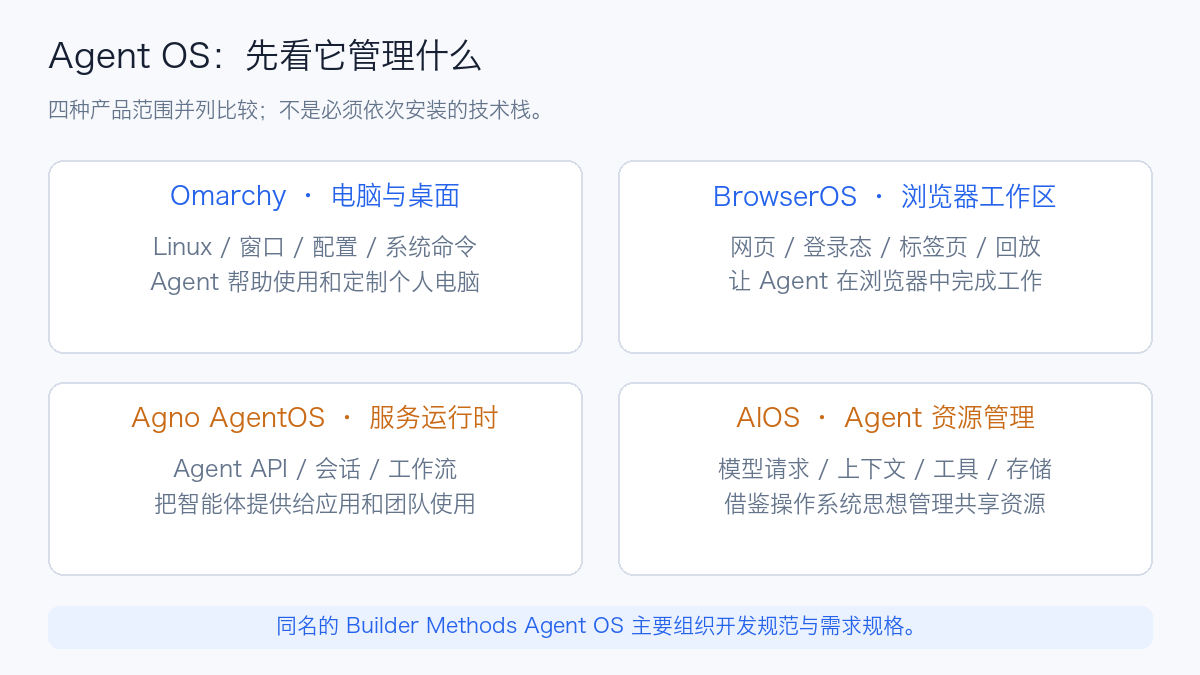
For example, a programming Harness can run on Omarchy; that Harness can call BrowserOS's browser tools, and it can also access remote Agents published by Agno. These can be combined, but there is no need to install them all as one package before getting started.
2. What Kind of Linux Is Omarchy
2.1 Starting from a Pre-Assembled Development Desktop
Arch Linux provides the distribution foundation; Hyprland handles window layout and compositing in the Wayland desktop; Omarchy then organizes themes, menus, shortcuts, terminals, and development tools into a ready-to-use environment. For developers familiar with tiling windows and terminal workflows, it reduces the time spent picking components from scratch and debugging them one by one. Official system architecture documentation
Omarchy 4, codename Quattro, was released on August 14, 2026 UTC. This version uses a unified desktop Shell based on Quickshell to take over the status bar, launcher, menus, notifications, lock screen, and other functions, and migrates Hyprland configuration to Lua. The steps in older tutorials for customizing the desktop around Waybar, Walker, and Mako cannot be directly applied to 4.x. 4.0.0 release notes
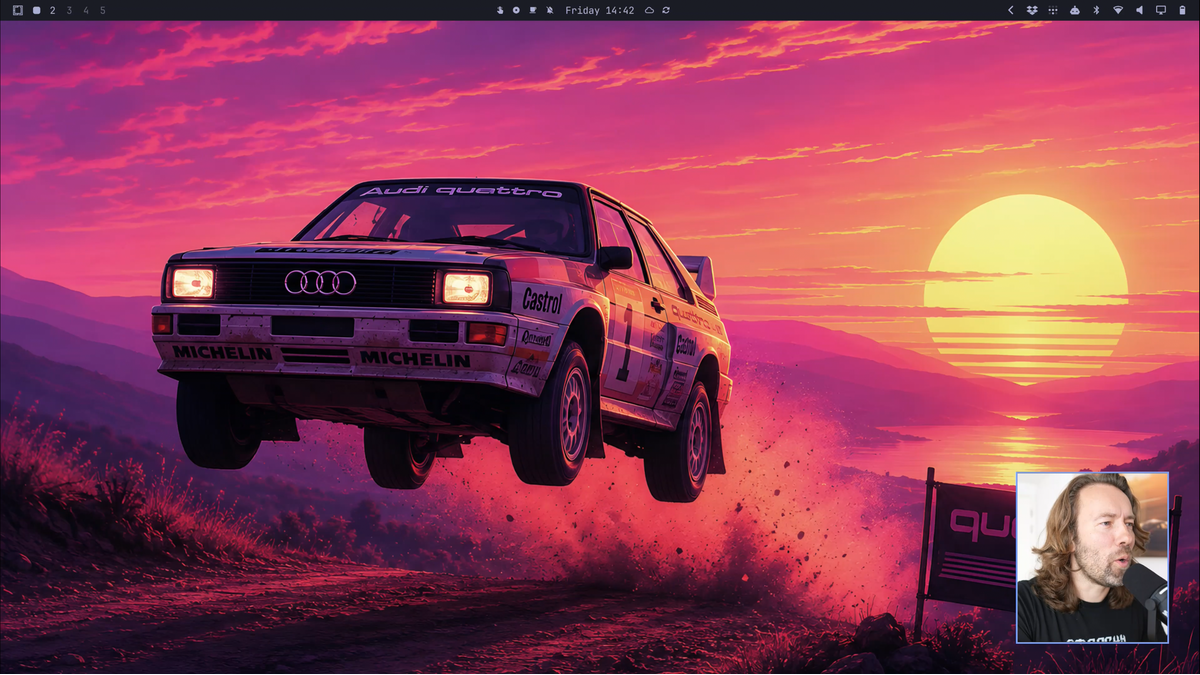
Image source: Omarchy 4.0.0 official release notes, shown scaled down. Screenshots from this KubeVirt hands-on test are in Section 9.
There is also an easily confused detail: 4.0.4 has introduced the project-maintained linux-omarchy custom Linux kernel, and the official release emphasizes adjustments in desktop responsiveness, memory pressure, hardware compatibility, and power management. Therefore, describing it today merely as "a package of themes and configuration for Arch" is no longer complete. However, the custom Linux kernel and the "LLM Kernel" mentioned later in the AIOS section operate at different levels. 4.0.4 release notes
2.2 How the Agent Knows What to Modify
The difficulty for an Agent modifying a system often lies in environment knowledge: which file is a user override configuration, which belongs to a package; what needs to be reloaded after a change; and which older tutorials are no longer applicable.
Omarchy supplements this knowledge with system commands and Skills. A Skill is a set of task descriptions and reference materials for the Agent to read, such as theme customization, window configuration, plugin development, and screenshot methods. It reduces the probability of the model guessing paths from memory; the actual modifications are still performed by the Harness calling commands and file tools.
In the current configuration conventions, two types of directories need to be distinguished: Dotfiles manual, Omarchy Skill source code
| Location | Owner and Purpose | How to Handle When Customizing |
|---|---|---|
/usr/share/omarchy/ |
Commands, templates, and defaults maintained by the Omarchy package | Read as reference; direct modification may be overwritten by upgrades |
~/.config/ |
Current user's configuration and overrides | Place personal modifications in the corresponding configuration and back them up separately |
~/.config/hypr/bindings.lua |
User shortcut configuration in the current manual | Check existing bindings first, then modify the target item |
~/.config/omarchy/shell.json |
Desktop Shell configuration in the current manual | Adjust status bar, widgets, etc.; verify the installed version first |
The value of this approach is turning system experience into readable, updatable materials. A Skill stating "do not modify a certain directory" is a behavioral constraint; operating system permissions, sandboxing, and tool authorization are the execution-level restrictions. Both need to be considered together.
2.3 Integrating an Agent Does Not Mean Bundling Model Weights
Omarchy provides launch entry points for multiple programming Agents, uses mise to manage the corresponding tools, and many entry points only download the actual program on first run. After the user selects a default Agent, tasks can be launched from the menu, shortcuts, or commands. Model accounts, subscriptions, or API credentials still need to be configured according to the chosen tool; for local models, there are separate integration options such as LM Studio and Ollama. AI manual
Installing Omarchy itself does not require a GPU configured for large model inference. When using remote model APIs, the computer mainly handles the desktop and tool execution; only after choosing a local model do you need to evaluate memory, GPU memory, and speed based on model size, precision, and context.
3. How a Task Moves from the Desktop into the Agent
3.1 Unified Launch Entry Point
The current command system provides omarchy default agent <name> to select the default Agent, and then omarchy agent prompt "…" to submit tasks. The latter command passes the prompt to a unified launch script, which selects the actual Harness and opens a terminal. Prompt entry point source code, launch script
For users, this means the same desktop entry point can be kept while swapping the underlying Agent. The model capabilities, tool implementations, recovery methods, and authorization semantics of different Harnesses remain independent; the unified entry point does not flatten these differences.
3.2 Auto-Approval Behavior of Quick Launch Entry Points
The launch script explicitly aims to reduce interaction pauses. For example, 4.0.4 uses --auto for OpenCode, --allow-all for Copilot, --yolo for interactive Hermes, and --permission-mode auto for Claude. These are each tool's own modes, and their protection scopes and judgment mechanisms cannot simply be treated as identical. 4.0.4 launch script
This choice suits users who want the Agent to continuously complete personal computer configuration tasks. For enterprise use, the actual launch parameters and tool policies should be checked first: whether the entire user directory can be read, whether network access is available, whether privilege-escalating programs can be invoked, and whether production credentials are touched. Asking the prompt to "provide a plan first" helps with communication but does not replace authorization settings at the execution layer.
This also clarifies the difference between Omarchy and simply installing an Agent on a regular Linux system: both can run tools; Omarchy has pre-wired the default selection, invocation entry points, system knowledge, and desktop feedback. The convenience comes from this integration layer; permissions still depend on the actual execution environment.
3.3 How Crash Notifications Become Diagnostic Tasks
Omarchy listens for process crashes recorded by systemd-coredump. When the user clicks the notification, it can be handed to the default Agent for analysis. Its diagnose-crash Skill requires combining the call stack, log timeline, resource exhaustion, and recent updates to determine the cause; when evidence is insufficient, uncertainty should be explicitly preserved. Crash diagnostic Skill
It is worth noting that the Skill itself limits the diagnostic scope to reading and analysis; fixing requires separate handling. Therefore, "handing a crash to the Agent" should not be understood as automatically changing configuration after detecting a fault, and certainly cannot be used to promise that all problems will self-heal.
A core dump is a copy of process memory and may contain passwords, tokens, or document content. The upstream Skill also specifically reminds users of this. When enterprise applications are involved, you should first confirm which materials are allowed to be read and submitted before deciding whether to use a remote model for analysis.
4. Understanding Its Practical Value with a Configuration Example
Suppose you want a shortcut to open your personal notes directory. You could describe the requirement like this:
English reading of the prompt — use the original input below when reproducing the example.
Check the current Omarchy version and user shortcut configuration. Find a combination that does not conflict, and open
~/Noteswith the default editor. First list the files to be modified and the differences, preserve existing bindings, and explain how to verify and undo.
Original prompt (verbatim)
检查当前 Omarchy 版本和用户快捷键配置。找一个没有冲突的组合,用默认编辑器打开
~/Notes。先列出拟修改文件与差异,保留原有绑定,并说明怎样验证和撤销。
This is a usage example; actual authorization still needs to be set in the chosen Harness. A verifiable processing flow is as follows:
- Read the current configuration and Omarchy reference materials to confirm the syntax in use.
- Check for shortcut conflicts, whether the directory exists, and whether the editor entry point is available.
- Modify only the corresponding user configuration, and keep the pre-modification file.
- Check syntax, reload the relevant components, and then actually trigger the shortcut.
- If verification fails, restore the original file and confirm that other shortcuts still work.
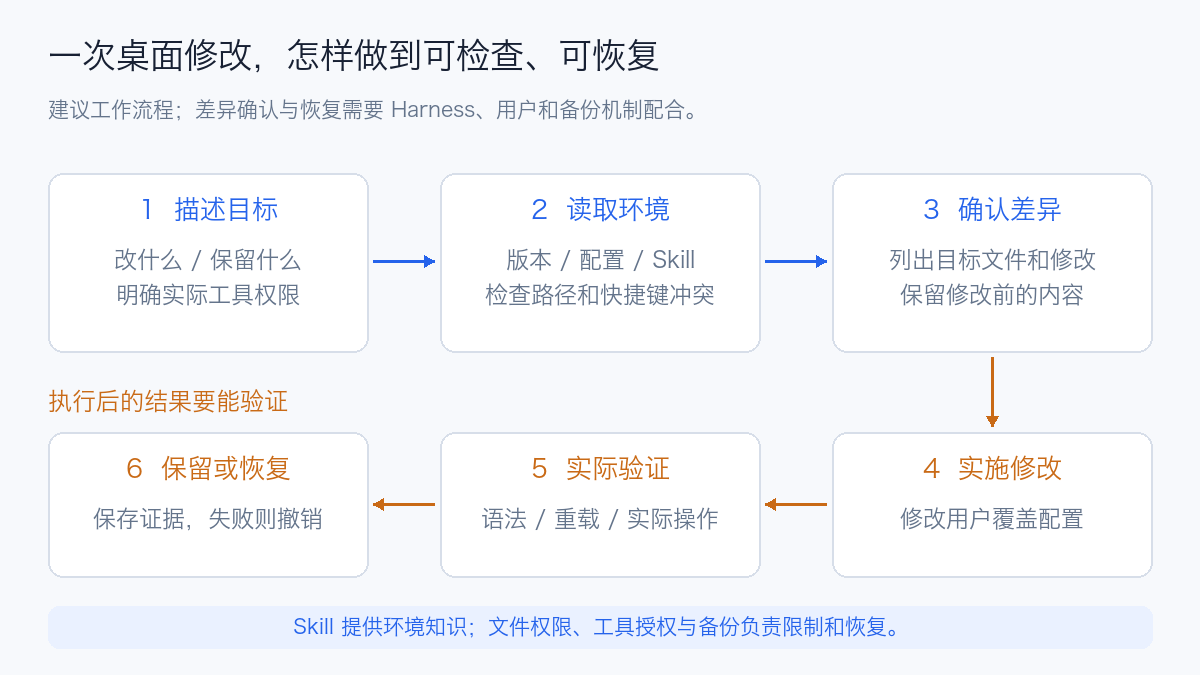
The "confirm differences, keep backups, accept and restore" steps in the diagram are the usage flow recommended by this article and require cooperation between the user and the Harness to implement.
The benefit of this example is fairly concrete: the user does not need to learn the entire desktop configuration system first to complete a small change; the paths, commands, and Skills provided by the system help the Agent narrow its search scope. For changes to firewalls, startup items, and disk layouts, the impact scope expands, and corresponding backup, recovery entry points, and change judgment are still required.
5. What Problems Other Agent OSes Solve
5.1 Agno AgentOS: Turning Agents into Services
The Agno SDK is used to build Agents, teams, and workflows, and AgentOS publishes them as services based on FastAPI. It provides APIs, streaming output, session persistence, tool integration, and optional authorization and tracing configuration. Streaming output often uses Server-Sent Events (SSE); tool interoperability can use the Model Context Protocol (MCP). Agno Runtime
It is better suited to needs like this: a team maintains multiple business Agents and wants to submit tasks through a unified API, viewing sessions, tool calls, evaluations, and approvals. The Control Plane provides a browser interface; the specific execution and permission checks are handled by the selected AgentOS endpoint. Which data is displayed depends on which capabilities are enabled in the runtime and database. Control Plane
Whether execution can continue after a service restart must be examined separately against the task queue. Current documentation distinguishes between ordinary background execution and persistent queues: only by configuring a persistent queue and matching Workers can accepted queueable tasks resume processing after crashes or deployments. Even so, external writes still need to consider duplicate execution and idempotency. Background execution and persistent queues
If the goal is enterprise service-ization, a runtime like Agno is closer to the problem than a desktop distribution; if the goal is changing how a personal computer is interacted with, Omarchy's desktop integration is more direct.
5.2 AIOS: Borrowing Operating System Ideas to Manage Agent Resources
The research starting point of AIOS is resource contention when multiple Agents use models and tools simultaneously. The paper was first submitted on March 25, 2024, and later published at COLM 2025, proposing to abstract scheduling, context, memory, storage, and access control into shared services. AIOS paper
The project calls its core the AIOS Kernel, which interacts with Agents through the Cerebrum SDK. The official architecture documentation places this layer above the existing operating system kernel: it manages the model and tool resources needed by Agents, while the host OS remains responsible for processes, devices, and underlying memory management. AIOS official architecture
An analogy is multiple people sharing a laboratory: the host OS manages the room, power, and equipment; AIOS attempts to manage when each person uses the model, what context is retained, and how tools are accessed. The direction worth watching is centralizing the resource management work that each Agent currently reimplements.
The "scheduling" here differs in managed objects from Kubernetes selecting nodes for Pods, and from Linux allocating CPU time to threads. After adopting AIOS, GPU capacity, model inference queuing, and container isolation still need to be handled by the corresponding infrastructure.
5.3 BrowserOS: Giving Existing Agents a Browser Work Environment
The current BrowserOS repository maintains two products simultaneously: BrowserOS is a Chromium browser with a built-in Agent; BrowserOS neo is positioned as a second browser for existing Agents, capable of importing login state, connecting to MCP-supported tools, and displaying and replaying task sessions. BrowserOS official documentation
For "compiling a report from an already logged-in business system," persistent login, visible tabs, and replay are closer to the requirement than replacing the entire desktop system. It can also work with Omarchy, ordinary Linux, macOS, or Windows.
The browser retains the login state, and therefore retains account capabilities. Having independent tabs for multiple tasks does not mean that security isolation between different employees or tenants has been achieved. It is also necessary to distinguish between browser data stored locally and the model inference location: when the Agent selects a remote model, the data flow of the related context needs to be reviewed separately.
5.4 Builder Methods Agent OS: Organizing Development Context
This same-named project is used to extract coding conventions, provide relevant conventions per task, form requirement specifications, and organize these materials. It works with existing programming Agents to address the problem of "how project conventions continuously enter the context." Builder Methods Agent OS
For example, if a team agrees on interface error structures, database migration methods, and test directory layouts, these can be organized into conventions and then provided to the Agent according to the current task. It is suitable for improving code consistency; process hosting, desktop, model services, and tenant isolation are handled by other systems.
6. Once the Agent Has Computer Permissions, Which Boundaries Matter Most
6.1 System Security and Agent Authorization Should Be Considered Separately
The official Omarchy documentation states that the default installation uses LUKS (Linux Unified Key Setup) disk encryption and enables an inbound firewall. The former mainly protects offline data after device loss; the latter restricts inbound network access. Security manual
Once the Agent is running as a user, which files it can read, which programs it can invoke, and which model it sends content to depend on runtime authorization and system permissions. After the encrypted disk is unlocked, it does not prevent the current user's Agent from reading files it is authorized to access; the inbound firewall also does not equal an outbound data policy for model requests.
Therefore, enterprise deployment should clarify at least three things: what identity to give it, which tools it is allowed to use, and where task data may be sent. The smoother the desktop experience, the more these boundaries should be easy to understand and inspect.
6.2 Switching Model Accounts Does Not Equal Isolating Employee Data
Omarchy's account management makes it convenient for the same user to switch between supported provider accounts. The current manual states that history, settings, Skills, and other content are shared, and existing sessions continue to use the account active at startup. This feature is suitable for personal workflows and cannot directly serve as the data boundary for enterprise multi-tenancy. Agent account documentation
If multiple employees share one machine, operating system accounts, user directories, credentials, and execution environment isolation should be designed separately. Switching model logins within one desktop and having independent workspaces for different employees are two different requirements.
6.3 System Snapshots, Personal Files, and Task Resumption Are Three Separate Things
Omarchy supports creating system snapshots during updates and also provides manual creation and restore entry points; the related startup recovery capability depends on Limine. The official documentation specifically states: restoring overwrites the root filesystem and does not restore /home, so the user's ~/.config will also retain its current state. System snapshot manual
| Type of failure | Primary recovery target | What should be prepared |
|---|---|---|
| System unusable after upgrade | System packages, libraries, and root filesystem | Bootable snapshot and system recovery entry point |
| Agent breaks personal desktop configuration | Configuration files in the user directory | Configuration backup or version management |
| Project files incorrectly modified | Source code, documentation, and generated results | Git commits, diff checks, and file backups |
| Agent process exits after a one-hour task | Execution state, tool results, and incomplete steps | Persistent state, checkpoints, and recovery logic |
| Ticket already created or data modified in an external system | External side effects | Operation receipts, idempotency identifiers, and compensation flows |
Suppose the Agent breaks ~/.config; restoring only the system snapshot may leave the original erroneous configuration in place. Suppose it has already sent one external request; rolling back the local disk will not undo the remote result. Task resumption needs to be designed at the application layer; see Agent long-task interruption and resumption.
7. How to Divide Responsibilities with Kubernetes in Enterprise Use
A desktop system is suitable for a human and an Agent sharing one computer. For multi-user, long-running services, identity, execution environment, state, and evidence need to be arranged separately. The following is a combination recommendation representing an engineering design approach.
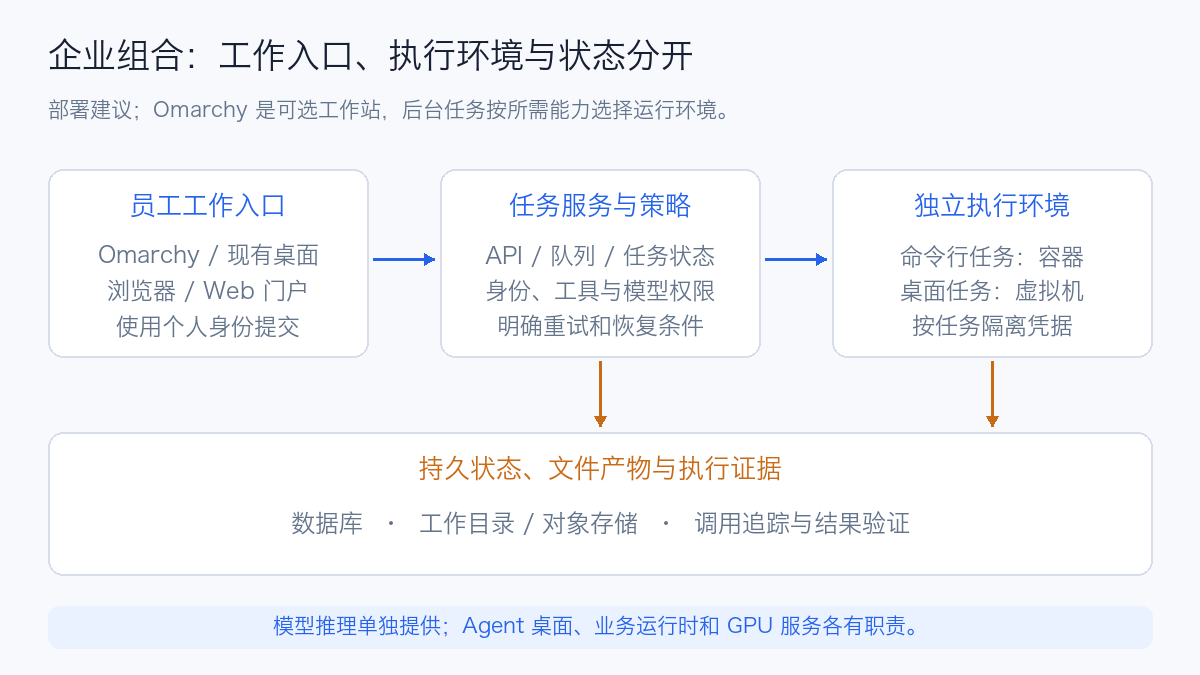
7.1 The Desktop Is the Entry Point; Task Execution Can Be Deployed Independently
Developers can submit tasks from Omarchy, an existing desktop, or a web portal. The backend receives tasks via API, performs permission checks and queuing, and then hands them to the execution environment. Pure command-line tasks are suitable for containers; tasks that depend on a full desktop, browser login, and interactive state can be evaluated for independent virtual machines.
The trade-off here depends on the task: containers are usually easier to form into repeatable execution environments, while virtual machines are closer to a persistent computer. Both require independent credentials and persistence policies; the relevant boundaries are described in Agent Sandbox selection.
Omarchy can serve as a personal workstation or as the system choice for a specific interactive virtual machine. Agent Workers without a graphical interface can usually reuse the base images the team already maintains, without adding a full desktop just to run the Harness.
7.2 Where State and Artifacts Should Be Stored
Task records should save inputs, execution versions, step states, tool results, and final artifacts. After the process exits, the next execution can determine how far the task progressed and which operations are allowed to be retried. Model memory and chat history help provide context but cannot alone bear the responsibility of the task state machine.
For example, the container working directory can use persistent volumes for storage, structured task state can be placed in a database, and large files and reports can be placed in object storage. On recovery, first read the state and receipts, then continue the steps not yet completed. This design applies equally to runtimes such as Agno and self-wrapped Harnesses; the specific implementation should be checked against the chosen framework.
7.3 What Effects Should Be Observed
CPU, memory, and Pod liveness can indicate infrastructure status, but evaluating Agent work effectiveness should also record: task completion rate, verification pass status, number of human interventions, model and tool call latency, and whether failures are re-executed.
A task should ideally have a stable task identifier, associating model calls, tool executions, retries, file changes, and final checks. Browser replay is suitable for viewing page operations; execution tracing is suitable for locating why a particular step became slow; artifact verification is used to determine whether the goal was achieved. Only by combining several types of evidence can the difference between "the run finished" and "the work was done correctly" be explained. Agent evaluation methods
8. How to Determine Whether You Need This Category of Product
| Current need | Route worth trying first | What to confirm first |
|---|---|---|
| Want to customize Linux with natural language and reduce desktop configuration burden | Omarchy | Hardware compatibility, desktop habits, upgrade and user configuration recovery |
| Already have a computer, only need the Agent to operate already-logged-in web pages | Browser environments such as BrowserOS neo | Login state permissions, page visibility, operation replay, and data flow |
| Publish several business Agents as stable services | Agno AgentOS or similar runtimes | Identity, persistent state, queues, retries, and service observability |
| Research model resource sharing and scheduling across multiple Agents | AIOS | Interface adaptation, queuing policy, context cost, and actual benefit |
| Programming Agents often do not follow project conventions | Convention and specification management tools | Convention quality, whether loaded per task, whether verified |
| Already have OpenClaw, Pi, Hermes, or DSH workflows | First improve the existing Harness and execution environment | What is actually missing: desktop entry, browser, recovery, or governance |
When trying Omarchy, you can first refer to the official Try Omarchy virtual machine approach, or use the distribution image in an isolated environment. First select a few verifiable small tasks: adjust one shortcut, generate a theme, analyze one crash with evidence, and recover one erroneous configuration. Pay attention to whether it can explain modifications, accept verification correctly, and restore the original state after undo.
The same task can also be executed on an existing Linux system with the same Harness. This makes it easier to see where Omarchy's value comes from: preconfigured tools, system knowledge, unified interaction, or the model's own capability. Costs should also include time for migrating configuration, maintaining upgrades, and manual review, not just model invocation fees.
9. KubeVirt Hands-on Test: Experiencing the Full Desktop with a GPU-less Virtual Machine
To observe how Omarchy actually works, this time an independent virtual machine was created in the existing KubeVirt environment, the system was installed from the official ISO, and OpenCode was then used to read system knowledge and generate user configuration. The model used a remote API; the virtual machine was only responsible for the desktop and tool execution.
9.1 Actual Configuration and Versions
| Item | This configuration or actual read result |
|---|---|
| Virtualization platform | KubeVirt 1.4.1, x86-64, KVM acceleration |
| CPU / memory | 4 vCPU / 8 GiB |
| Persistent disk | 64 GiB PVC, VirtIO root disk, node-local LVM storage |
| Firmware | Q35, UEFI, Secure Boot disabled |
| Installation media | Official Omarchy 4.0.4 ISO, approximately 6.19 GB; SHA-256 verified after upload |
| System and kernel | omarchy 4.0.4-1, 7.2.5-3-omarchy |
| Desktop components | Hyprland 0.56.2-2, Quickshell 0.3.1-1, Mesa 26.2.2-1 |
| Graphics device | Bochs virtual display device, guest driver bochs-drm, no GPU passthrough |
| Agent | OpenCode 1.19.2, official Linux x64 binary |
| Desktop access | noVNC, accessed via port forwarding listening only on localhost |
The 4 vCPU and 8 GiB here are a configuration for a functional experience, not the official minimum requirement or a capacity stress test result. When the desktop had just started and the Agent was not yet running, the guest system free -h showed approximately 1.6 GiB used, 6.2 GiB available; after opening the terminal and task interface, one sample of the running Pod on the host side was approximately 89m CPU, 4308 MiB memory. The two statistics have different scopes and sampling times and cannot be directly subtracted to infer virtualization overhead.
This was a disposable experiment, so unencrypted installation was chosen, with a separate account and separate SSH key. This differs from the default encrypted physical installation described earlier and should not be copied as the security configuration for enterprise endpoints.
9.2 Installing from the Official ISO Rather Than Just Starting a Container
The installation used the officially supported unattended mechanism: the configuration file was placed on media labeled cidata and mounted into the VM together with the ISO. The disk configuration pointed only to the newly created VirtIO root disk for this VM; the installer needs to format the disk, so host devices cannot be passed directly in. Official unattended installation manual
The installer ultimately displayed Installed Omarchy in 4m31s. This is the phase duration counted by the installer and does not include the time for downloading, uploading the ISO, creating the PVC, or troubleshooting the mount.
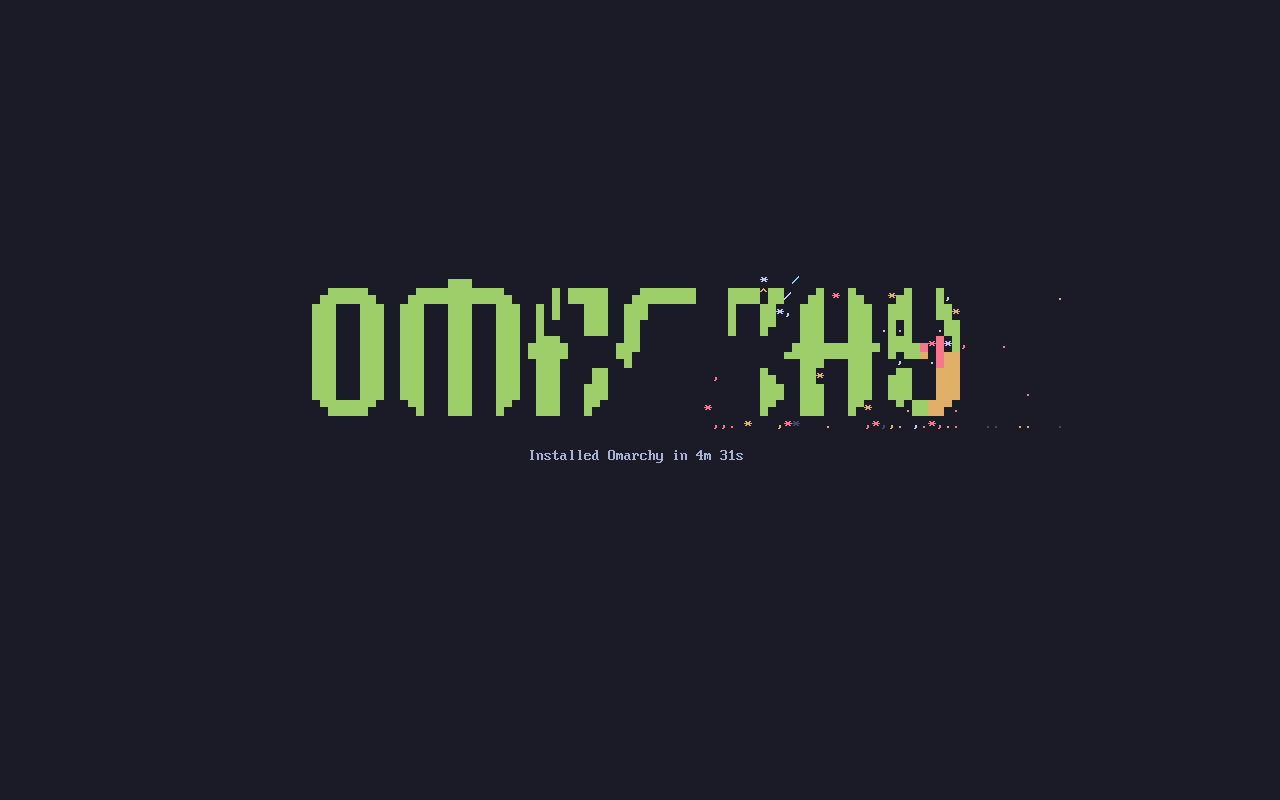
The original display of this VM. The system subsequently booted from the persistent root disk and entered the graphical login page.
One practical issue was encountered during deployment: the Pod uploading the ISO still had the installation disk mounted read-write, while the VM requested a read-only mount of the same volume; the local CSI driver therefore refused the second mount, and the VM remained stuck at the boot stage. After finishing the upload, verifying the file checksum, and deleting the upload Pod, the VM booted normally. Releasing the volume's user after the upload completes is part of the installation process; you cannot simply see that the file has finished uploading and start waiting for the guest system.
9.3 Without a Dedicated GPU, Can the Desktop Really Open
After login, both Hyprland and Quickshell ran normally, and menus, terminals, and applications could be opened; systemctl --user --failed had no failed units. The following is the desktop of this VM, not an upstream promotional image.
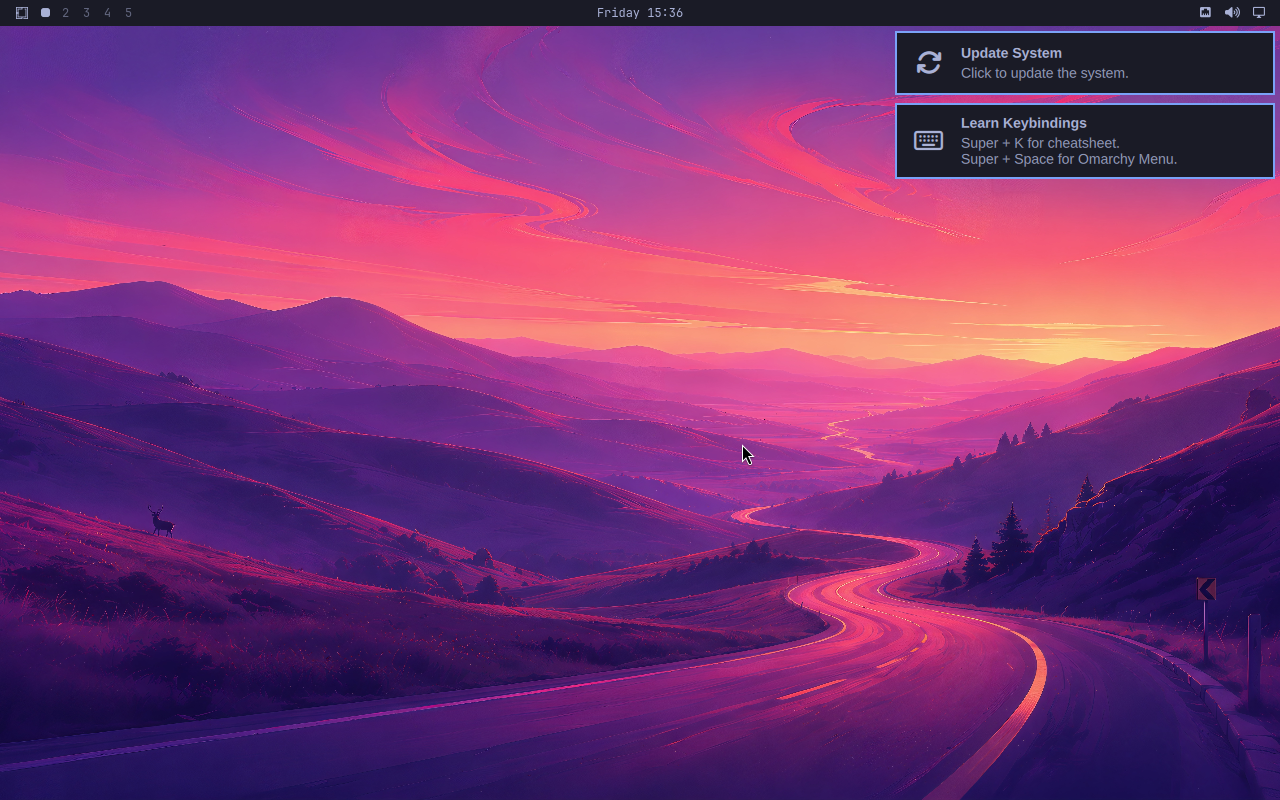
The EGL probe in the guest produced:
EGL:      1.5
Renderer: llvmpipe (LLVM 22.1.8, 256 bits)
Vendor:   Mesa
OpenGL:   OpenGL ES 3.2 Mesa 26.2.2-arch1.1
This shows that the graphics capability in this instance came from CPU software rendering, not from the virtual machine receiving a dedicated GPU. Combined with the actual desktop screenshot, it can be confirmed that this version combination can provide a low-cost functional experience; it cannot be used to infer the experience of high-resolution, multi-user, or video workloads.
The logs still contain EGL and DRM rendering initialization warnings related to the Bochs device. Therefore, even though the desktop is usable, this result cannot be interpreted as fully passing graphics compatibility. For long-term workstations, virtual devices with graphics acceleration or physical desktops should still be evaluated. The existing environment is KubeVirt 1.4.1, so the devices.video field supported only by newer documentation cannot be directly copied; this instance retained the existing platform configuration to complete verification.
9.4 Having the Agent Generate One Configuration Based on the Actual System
To verify the workflow in Section 4, a task with a very small impact scope was chosen: adding a shortcut for the notes directory, first generating a proposal, then checking and applying it. The core requirements of the prompt were:
English reading of the prompt — use the original input below when reproducing the example.
Read the installed Omarchy Skills, Hyprland documentation, and user and default shortcut configurations. Check whether
SUPER + CTRL + F12conflicts, and generate a binding named Lab notes for it that opens~/Notes. Preserve the original configuration and write only the complete proposal and review notes to the experiment working directory; do not modify the currently active configuration, do not use sudo, and do not access credentials or the external network.
Original prompt (verbatim)
读取已安装 Omarchy 的 Skill、Hyprland 说明、用户与默认快捷键配置。检查
SUPER + CTRL + F12是否冲突,为其生成名为 Lab notes 的绑定,打开~/Notes。保留原配置,只把完整提案和审查说明写到实验工作目录;不要修改当前生效配置,不使用 sudo,不访问凭据或外部网络。
OpenCode read the actual system materials through file and command tools, checked the default bindings and hyprctl binds, and generated proposed-bindings.lua and REVIEW.md. The task window is shown below:
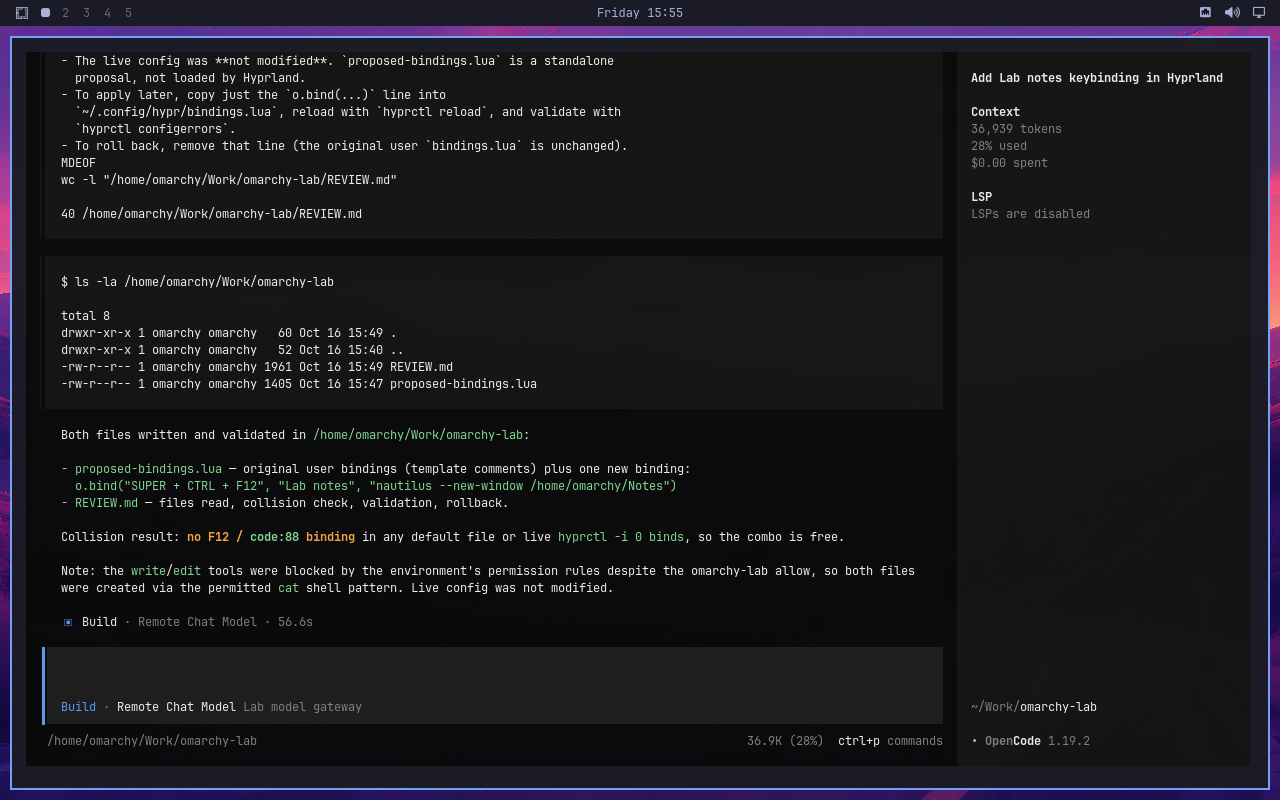
The Remote Chat Model and Lab model gateway shown in the interface are experimental display names; the actual calls went to a remote model API. The cost shown in the screenshot is the tool's displayed value and was not used to calculate actual costs.
The proposal preserved the original file and only appended the following binding and explanation:
After checking the diff, the user configuration was backed up first, and then the proposal was applied to ~/.config/hypr/bindings.lua. The luac -p syntax check passed; after running hyprctl reload, hyprctl configerrors was empty, and at runtime one Lab notes binding could be found, with a modifier mask of 68, meaning Super and Ctrl.
Two types of integration issues were also encountered here. First, the VM's direct connection to the model gateway timed out, while the office machine could call the same gateway normally, so the path was changed to VM loopback → SSH forwarding → office machine loopback forwarder → model gateway. The actual credentials remained on the office machine and were not copied into the guest system; what this proved is that model and tool interaction can be completed through this path, and it cannot be concluded that the VM's direct outbound networking has been resolved.
Second, the non-interactive run was initially blocked by external directory authorization, and the write tool was further restricted by path rules; the final record showed that the file was generated through an allowed Shell command. This also demonstrates that configuring permissions by command name does not equal a filesystem sandbox: for example, a rule allowing cat also needs to consider redirection. The experiment contained no production credentials, and the proposal was applied only after diff checking; enterprise deployment should separately restrict the operating system identity, writable paths, and network egress, and this task's success should not be treated as a passed permission isolation test. OpenCode permission documentation
9.5 Verifying Undo, Then Verifying the Persistent Disk
Configuration acceptance did not stop at "the Agent said it was done." First the backup was restored and reloaded, and the runtime Lab notes count became 0; the proposal was applied again and reloaded, and the count returned to 1, with both configuration error checks empty. This confirms that the change can be undone and that the original configuration also has an independent backup.
Then shut down the VM, detach the installation ISO and the cidata media, and reboot from the original root disk. In Kubernetes, both the VMI (VirtualMachineInstance) and the virt-launcher Pod have been replaced, and the guest boot ID has also changed, so this check spans a real workload instance rebuild.
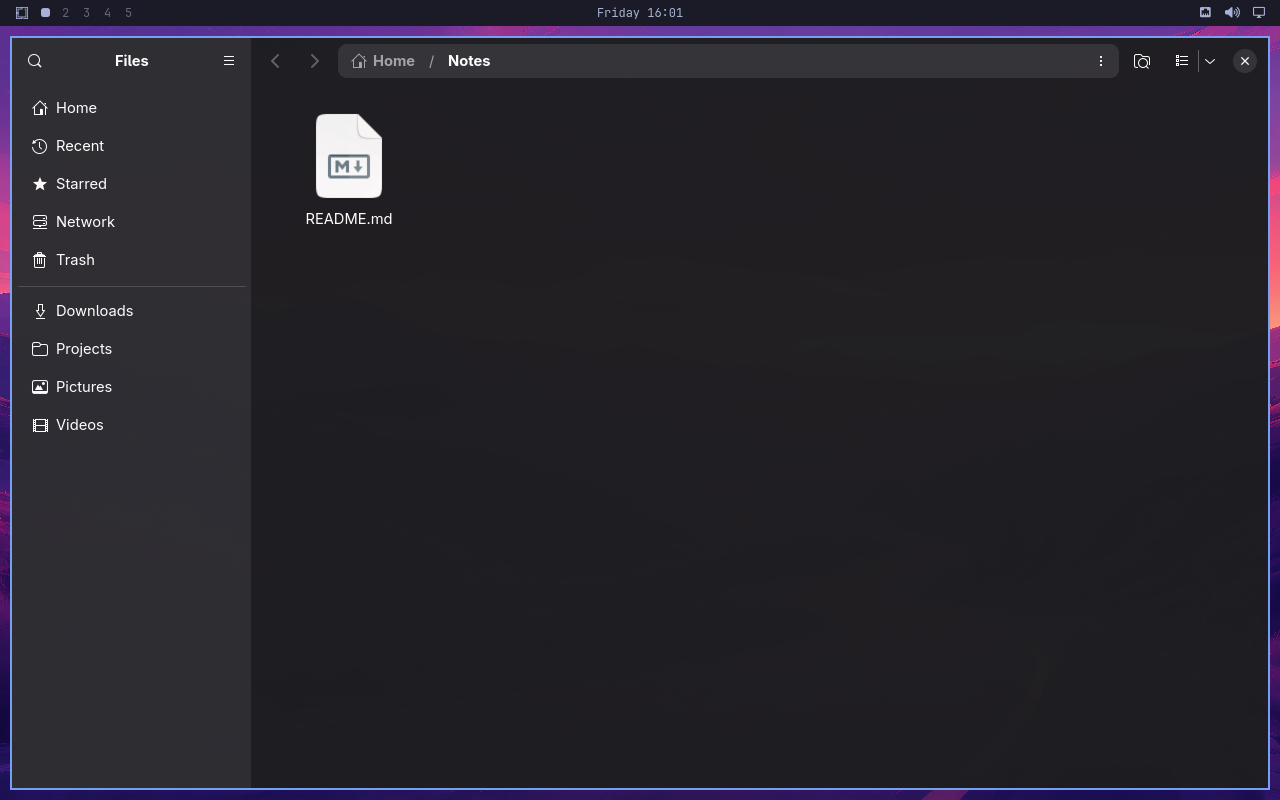
After the rebuild, log in again and send Super + Ctrl + F12 via noVNC; the file manager indeed opens Notes, which still contains README.md created before the rebuild.
| Verification item | Actual result |
|---|---|
| Independent boot from persistent root disk | Successful, ISO and installation seed disk no longer mounted |
| User shortcut file | SHA-256 identical before and after rebuild |
Notes Notes/README.md |
SHA-256 identical before and after rebuild |
Agent-generated REVIEW.md |
SHA-256 identical before and after rebuild |
| Hyprland configuration | No configuration errors, Lab notes still registered as one entry |
| End-to-end shortcut | Triggered successfully after re-login, opens the Notes directory |
| Agent session records | Original session still listable, task title and working directory preserved |
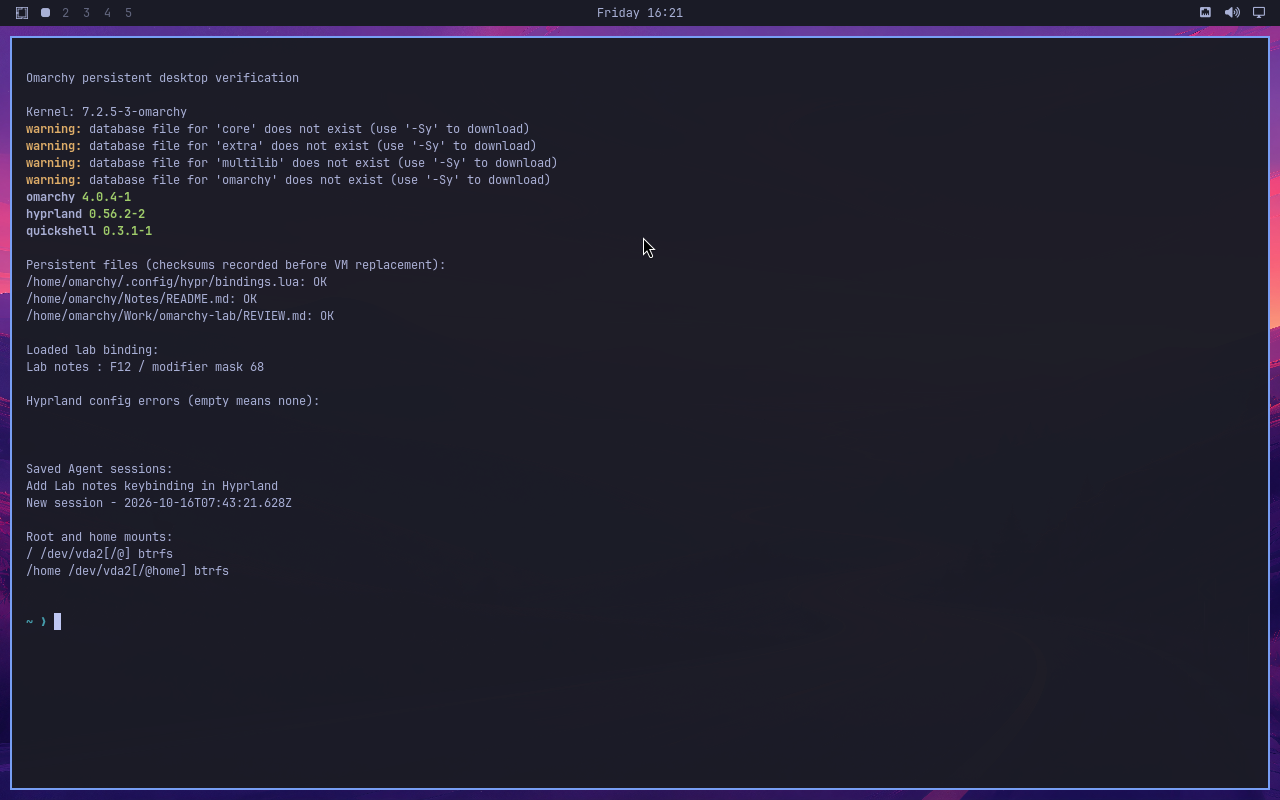
Output comes from check commands actually executed after the rebuild; the file verification manifest was generated before the rebuild. The pacman package repository index out-of-sync warning shown in the figure is retained as-is; local package version queries and subsequent verification completed normally. Screenshots and the redacted result summary are in experimental results record.
What is verified here is the preservation of system and user state on the same persistent disk. This is not equivalent to resuming a running Agent task, nor does it test node failure migration. This test uses node-local volumes; when the node is unavailable, the disk will not automatically appear on another node. If a persistent desktop is to be provided to multiple users, shared storage, backup, and failure recovery solutions must be selected separately.
For low-cost trials, a single VM like this is already enough to observe Omarchy's main integration value: system knowledge can be read by the Agent, configuration changes have reviewable file diffs, desktop operations can have results verified, and the persistent root disk preserves the personal environment. The issues that have a greater practical impact are software rendering, browser remote keyboard forwarding, and the network path from the guest system to the model gateway — these cannot be checked merely by whether the installer exits successfully.
10. Why this route is worth watching
Omarchy demonstrates a shift in desktop software: configuration files, system commands, logs, and development tools are progressively becoming interfaces usable by Agents, and users participate in system customization by describing goals. The default bundle and environment knowledge the project provides determine how smooth this interaction is.
Agno, AIOS, and BrowserOS respectively add service hosting, resource management, and browser execution capabilities. "Agent OS" is currently more like a set of converging engineering directions; it is not yet appropriate to infer from a single name that it already encompasses all capabilities. For individuals, the first question is whether it reduces daily operational burden; for enterprises, keep asking who executes tasks, where state lives, how permissions are restricted, and how results are verified.
References
- Omarchy official site and manual
- Omarchy 4.0.0: Quattro release notes
- Omarchy 4.0.4: custom Linux kernel
- Omarchy AI, default Agent, and account management
- Omarchy Dotfiles, system snapshots, security
- Agno Runtime, Control Plane, background execution
- AIOS project, AIOS paper
- BrowserOS and BrowserOS neo
- Builder Methods Agent OS