ChatGPT Dots Technical Analysis: Persistent Agents, Cloud Computers, and Enterprise Applications
On September 29, 2026, OpenAI introduced Dots in its DevDay update: users can give their Dot an ongoing responsibility, allowing it to continue working between conversations and return with results or questions that need judgment. Dots is the product name; Dot refers to the user's own persistent agent. DevDay 2026
As of this article's verification, the official introduction states that Dot is powered by GPT-6 Astra, has its own cloud computer and browser, and can handle research, documents, data, and software work, as well as coordinate ChatGPT Work and Codex tasks. Meet dots
To understand it, imagine a project colleague who is long-term responsible for release preparation: collecting questions today, updating materials tomorrow after seeing new results, and coming to you when a decision is needed. What the user delegates is not just a one-time output, but also what should be continuously monitored, which materials to rely on, when to notify, and which actions require confirmation.
This article analyzes the product and engineering applications based on official materials as of October 14, 2026. The diagrams represent logical relationships between publicly available capabilities; the enterprise integration diagram and trial tasks are design recommendations.
1. Release Timing and Current Availability Scope
Dot is a recently launched product, and public updates can be read along the following timeline:
| Time | Official Update | Significance for Users |
|---|---|---|
| 2026-09-29 | DevDay introduces Dots, gradually rolling out to eligible accounts | Begins organizing ongoing responsibilities, cloud execution, and result reporting into a product |
| 2026-09-28—10-02 | Weekly update introduces delegating long-running work to Dot, and collaboration with Work and Codex | Clarifies that it handles ongoing follow-up and task coordination |
| 2026-10-05—10-09 | Support for creating Dots in the mobile app; enhanced ChatGPT/Codex context usage and task follow-up | Mobile can become an entry point for delegating work and viewing results |
Sources: DevDay update, late-September weekly update, early-October Dots update.
The official documentation currently lists availability conditions for Pro 100, Pro 200, Pro 500, Business Premium, and Enterprise; personal Pro has age and regional restrictions, and Enterprise is disabled by default and requires administrator enablement. Meeting plan eligibility does not mean the account immediately has access, because the product is still rolling out gradually. Supported surfaces include the desktop app, desktop browser, and mobile app; mobile web is not yet supported. Access conditions
Conversations with Dot do not count toward ChatGPT conversation usage limits, but Work and Codex tasks that it starts or manages are still billed according to the corresponding products. When making choices, check task usage and account terms rather than interpreting "persistent" as unlimited execution resources. Usage notes
2. Its Relationship with Chat, Work, and Codex
These entry points can collaborate with each other; the main difference lies in the form of work the user delegates.
| Entry Point | Better Suited for Delegating | Delivery Focus |
|---|---|---|
| ChatGPT conversation | Explaining problems, discussing approaches, drafting content | Answers and materials within the current conversation |
| ChatGPT Work | A research, analysis, spreadsheet, or document task | Task results and files that can be reviewed |
| Codex | Modifying code, testing, debugging, and reviewing | Code changes, tool execution, and verification results |
| Dot | Continuously monitoring a project or responsibility and following up on changes | Current progress, next tasks, and items requiring user judgment |
For example, developing a feature can be delegated directly to Codex; if you want to continuously track related feedback, coordinate fixes, and update release materials, Dot is better suited to handle the follow-up, then delegate the specific code work to Codex. Recent official updates also clarify Dot's ability to initiate Codex work, follow up on existing threads, and use relevant context. Work getting started, Dots and Codex update
Continuous follow-up does not mean the model generates tokens around the clock. The official description includes waiting, pausing, and resuming. This can be understood as task management that requires execution and waiting, but the official documentation does not disclose the underlying scheduling algorithm, state database, or failure recovery implementation.
3. Understanding the Work Structure from Public Capabilities
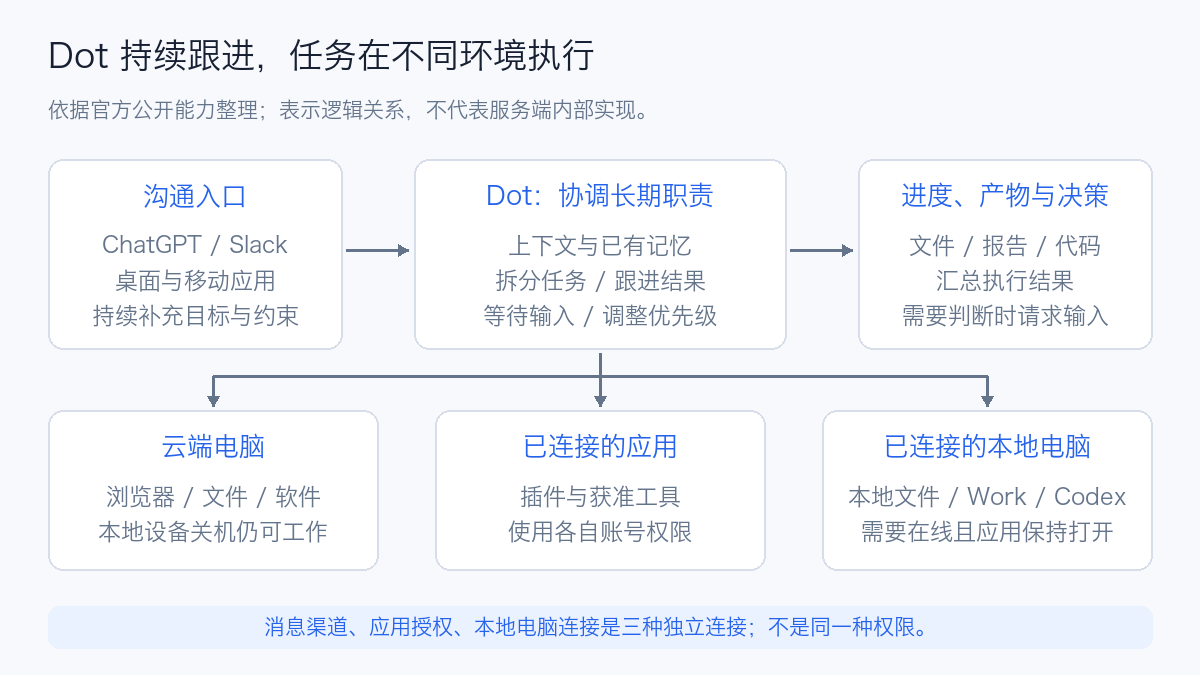
The user first provides the responsibility, materials, boundaries, and result requirements. Dot can break down the specific work, then review the returned results and continue supplementing or adjusting. The three types of connections below serve different functions:
| Connection | Primary Role | Conditions That Need Separate Verification |
|---|---|---|
| Messaging channels | Sending instructions, receiving progress and decision requests | Channel is connected, notification recipients and visibility scope are clear |
| App plugins | Tools and data for accessing services such as files, email, and code | App account authorization, as well as specific read/write permissions |
| Local computer | Using local files, applications, and development tasks | Separate access permission granted, computer online, and ChatGPT app kept open |
Connecting Slack does not simultaneously authorize email or the local computer. Existing browser logins also do not automatically appear in the cloud browser. Checking these conditions separately makes it easier to explain "can chat but cannot read files" or "can work in the cloud but cannot continue local tasks." Connections and settings, Cloud and local sessions
3.1 Cloud Work and Local Work
The cloud computer has independent files, software, and browser sessions, and can maintain state across usage periods. When the local device is off, cloud work can still continue; steps that depend on local files and tools require the local computer to be available.
The official documentation currently allows connecting one personal computer. Changing the selected computer does not automatically migrate existing tasks; execution location, working directory, dependencies, and login state need to be verified separately. Cloud website logins are completed through a private login flow or human takeover, and login credentials do not need to be placed in the conversation. Execution environment and login
For engineering teams, this means "continuing to delegate work from the phone" and "migrating tasks to execute on the phone" are two different things. The phone can provide new constraints, but the actual task still uses the original cloud environment or online computer. Work that requires the enterprise private network must also confirm that the actual execution endpoint can reach the corresponding services.
3.2 Plugins, Skills, and MCP
Plugins are installable capability packages that can include Skills, Model Context Protocol (MCP) servers, and optional interfaces. Skills describe operating methods for repetitive tasks; MCP servers provide callable tools, parameters, and authentication boundaries. A plugin can contain only operating instructions, or it can include enterprise server-side capabilities. Plugin architecture
Encapsulating enterprise queries as tools is easier to manage than giving an agent an unconstrained Shell command: the server side can verify identity, restrict query targets, filter returned content, and log requests. A plugin being installable does not yet mean it supports all of Dot's current execution environments; local Skills in particular depend on an available local computer.
4. Memory, Context, and Task Progress Should Be Considered Separately
Dot uses the current conversation, relevant ChatGPT memories, and notes it saves itself. Notes can record preferences, decisions, and ongoing work, persisting across conversations, but they are not a complete chat log; changing settings for ChatGPT's saved memories does not necessarily change the notes Dot has already formed. Tasks and memory
From an engineering perspective, three types of information can be used to explain long-running tasks. This is an analytical approach, not the official storage architecture:
| Information | Example | How to Verify |
|---|---|---|
| Long-term preferences | Reports should include sources, charts should use fixed units | After the user changes preferences, whether subsequent outputs adopt the new requirements |
| Current task progress | Completed checks, outstanding items, pending decisions | Cross-reference files, logs, task IDs, and external system state |
| Working environment state | Files, dependencies, browser sessions | Whether files exist, dependencies are available, and logins are still valid |
Remembering that "test reports need charts" is not the same as knowing "whether the last round of tests executed successfully." A one-line progress description cannot replace a task receipt. The information the model uses in the next interaction is selected context, and it cannot be assumed that every delegated task has the full history of the main conversation.
Therefore, when discussing interrupted and resumed runs, test separately: whether the goal and completed results can be recovered, whether still-running tasks can be found, and whether external writes are duplicated. The public documentation describes task continuation and state retention, but does not promise precise checkpoint recovery under arbitrary failures. For related engineering mechanisms, see Agent long-task interruption and resumption and Agent Memory technical survey.
5. The Difference Between Scheduled, Event-Driven, and Proactive Research
Dot can work according to saved schedules, and can also follow up on specified events when the connected service supports it. The former should specify timezone, frequency, end date, and delivery location; the latter should specify the event source and trigger conditions. Connecting a channel does not itself create a monitoring task; after configuration, verify the task it actually saved. Scheduled and event tasks
The official documentation also distinguishes proactive research: it uses restricted tools to read authorized information and organize private findings, and any subsequent sending, modification, or computer operations still require the corresponding authorization. This is different from periodic tasks that the user explicitly delegates and authorizes for execution. Proactive research
For periodic tasks, I focus on four acceptance points: whether a saved trigger configuration exists, whether the data time window is consistent, where outputs land, and how task failure is notified. For cluster acceptance or performance testing, the execution platform should independently set deadlines and resource reclamation, rather than relying solely on a one-time natural language commitment.
6. Communication Channels and Control Capabilities
ChatGPT, Slack, and Teams can serve as channels for contacting the same Dot. Switching channels does not recreate the agent, but visible messages still belong to their respective conversations and are not fully mirrored. Being able to use private chat context does not mean permission to post it to a team channel. Messaging channels
The current documentation notes that Teams availability is an invite-only Alpha; SMS remains a coming-soon capability. After a voice call ends, work that was already delegated may continue. Pilots should be based on the entry points actually available in the account. Channel status, Administration guide
In Slack, currently only owners can initiate work with a personal Dot; other participants' messages can become context but will not directly start tasks. Therefore, personal responsibility follow-up and team-shared service identity and authorization need to be designed separately. Participant permissions
For action control, there are at least three independent layers: app connections determine what can be accessed, tool permissions determine which operations are allowed, and action review determines whether a given step can execute directly. Users can configure rules for direct execution, execution after explicit request, prior confirmation, or handling it themselves; rules do not grant app permissions out of thin air, nor do they override built-in security requirements. Control methods
Stopping work also requires distinguishing scope:
| Action | Scope of Impact |
|---|---|
| Pause | Pauses the Dot's current main task |
| Stop a specific task in Activity | Stops the corresponding delegated task |
| Disable or delete a schedule in Scheduled | Stops subsequent scheduled executions |
Stopping is not a rollback; already-sent messages or external modifications still need to be handled independently. When exiting a long-term project, verify the main task, delegated tasks, and schedules to avoid missing work that will still run. Stopping work
7. Enterprise Deployment Boundaries: Cluster Integration Is Possible, but Hosted Dot and Self-Hosted Runtimes Are Different
The official offering is a hosted product within ChatGPT, along with its computer and app connections. The Dots documentation reviewed in this article does not provide a distribution package or Helm Chart for installing Dot itself into Kubernetes.
If the enterprise needs its own execution environment, it can connect to existing systems through controlled tools; if it needs to control the entire agent runtime, it should evaluate development interfaces or a self-built Harness. OpenAI's Agents API, Agents SDK, and Responses API provide a hosted Harness, in-app Agent Loop, and lower-level model/tool integration options respectively, and none of these interfaces can be directly equated with the Dot product. Agent runtime selection
7.1 Kubernetes Operations Integration Recommendations
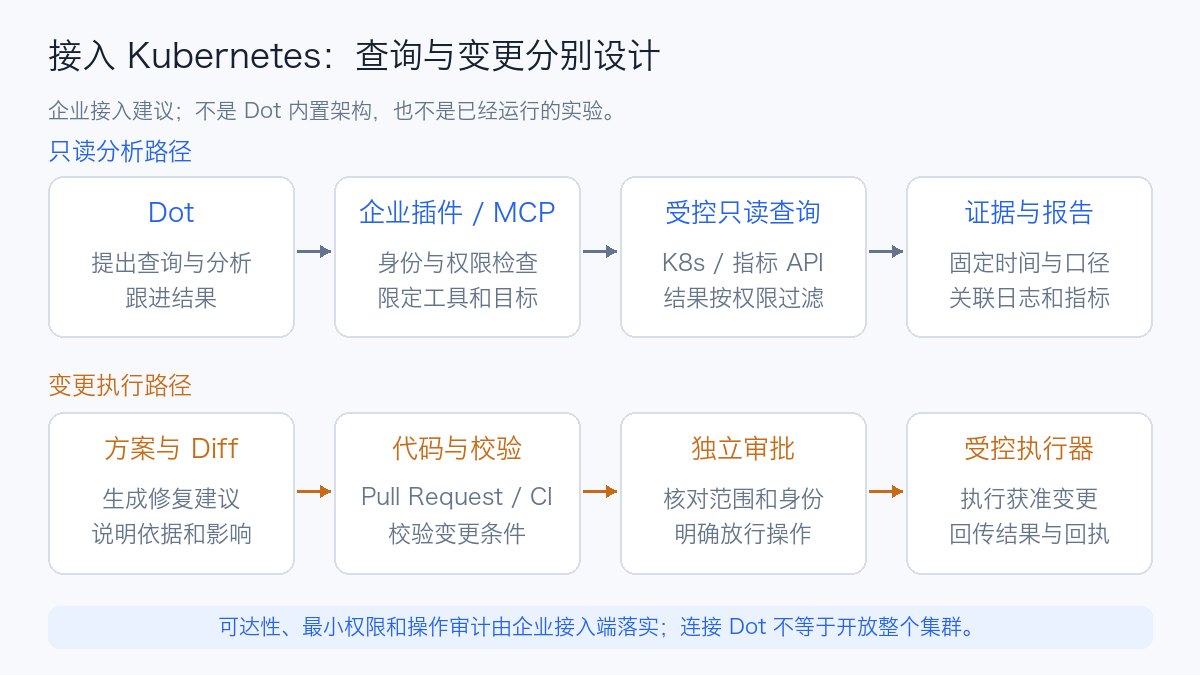
This diagram is an enterprise integration recommendation. First, a controlled plugin or MCP service provides query capabilities, restricted to specific clusters and namespaces, then checks user identity against Role-Based Access Control (RBAC). Query results include metric time windows, original sources, and necessary logs for review.
Tools can start with a few clearly defined capabilities:
| Tool Example | What It Returns | What the Server Side Should Restrict |
|---|---|---|
get_cluster_summary |
Node, Pod, version, and anomaly overview | Accessible clusters and field scope |
query_metrics |
Metrics and query conditions for a fixed time window | Query time span, result size, and tenant labels |
get_workload_events |
Events and status for specified workloads | Namespace, log scope, and sensitive information |
prepare_change |
Remediation plans, configuration diffs, and check results | Output drafts only; no direct modification of production state |
Changes can go through Pull Request (PR) and Continuous Integration (CI) validation, then be executed by independent approval and executor mechanisms. This way, the agent handles analysis and follow-up, while the enterprise platform retains change identity, receipts, and rollback mechanisms.
The cloud computer does not automatically inherit the office computer's Virtual Private Network (VPN) and logins. The enterprise must first resolve execution-endpoint reachability, then check whether data is permitted to enter the hosted service; "already connected to Slack" cannot be used to infer that it can already access the internal cluster. Enterprise access conditions
7.2 Additional Points to Check for Workspace Administration
Administrators can separately control Dot usage rights, Slack participation, local computer access, apps and actions, and cloud browser and network capabilities. The current documentation also explicitly states: Enterprise model controls and defaults do not apply to Dots, and ordinary chat model settings cannot be used to infer Dot policy. Administrative capabilities
Pilots can expand in the following order: public material research → authorized internal read-only tasks → drafts and code review → controlled changes. Each step should be judged by specific work and outputs, not by treating "already having a Dot" as launch completion.
Offboarding or permission revocation must also cover app authorizations, website sessions, and existing memories. Disconnecting an app connection does not delete information already obtained; administrators should also confirm the scope of supported records during audits. Access revocation and records
8. Three Tasks to Start Piloting
The following are task design examples, not results of executed functional tests. They respectively test continuous follow-up, technical evidence, and long-task management.
8.1 Weekly Technical Project Review
English rendering — the original text is retained below.
For the next four weeks, every Friday at 16:00, using Asia/Shanghai timezone,
organize the official Releases, documentation, and public issue discussions of the specified project.
Distinguish released features, roadmap, and unverified opinions, and provide original links.
Write this week's changes, deployment impact, and items to be verified into the report.
First confirm the saved schedule, scope of materials, and report location.
When reviewing, check version dates, whether citations support the conclusions, and whether the following week correctly carries forward confirmed information. Only reopening the materials and verifying differences qualifies as a review; reusing last week's summary may miss updates.
8.2 Kubernetes Anomaly Analysis
English rendering — the original text is retained below.
Use approved read-only tools to analyze anomalies in the specified test cluster over the last hour.
Unify the time windows for API Server, etcd, and workload metrics.
Separate facts, possible causes, and verification methods, and attach query and log sources.
Output troubleshooting recommendations; when configuration changes are needed, first generate a Diff and check results.
The acceptance focus is whether it can connect time-series evidence and whether it maintains judgment boundaries when data is missing. A missing metric should not be interpreted as the absence of a fault in that item.
8.3 Hourly Test Task Follow-Up
English rendering — the original text is retained below.
Follow up on the specified experiment task, recording the run ID, configuration, deadline, and acceptance criteria.
Check the actual task status at agreed intervals, and summarize passed, failed, and not-executed items.
After a network interruption, first query the original task and saved results, then decide whether to retry.
Finally verify the report, logs, charts, and the resource release receipt of the execution platform.
This scenario should have the experiment platform maintain deadlines, retries, result ledgers, and resource supervision. Dot can coordinate and summarize, but its long-term memory cannot serve as the sole execution ledger, nor can a task status of Completed be treated as passing all acceptance criteria.
9. How to Evaluate Whether It Is Worth Using
A single demo makes it easy to see that "it performed many steps," but production evaluation should focus more on outcomes. You can fix a set of tasks and compare results from manual completion versus using Dot; the following is a suggested measurement framework, not a performance benchmark.
| Dimension | Suggested record |
|---|---|
| Result quality | Proportion of tasks meeting all acceptance criteria; number of citation and data errors |
| Continuity | Whether updates are made correctly when new information arrives; number of times outdated decisions are mistakenly used |
| Human effort | Time spent preparing materials, repeatedly explaining, confirming, and correcting |
| Execution reliability | Number of times waiting for authorization, connection failures, recovery failures, and duplicate writes |
| Resource cost | Work/Codex usage, execution time, and external resources consumed by the task |
| Delivery completeness | Whether files, source code, logs, and receipts actually reach their target locations |
You can start with a two-week trial: choose responsibilities that recur, have clear sources of information, and whose results are easy to verify. If preparing context and correcting results takes more time than doing the work manually, you should narrow the task scope or adjust the tool design; if it consistently reduces omissions and repeated coordination, then expand permissions and responsibilities.
The product direction worth watching for Dots is connecting user goals, available tools, ongoing context, and task delivery. The real value enterprises gain still depends on data quality, tool boundaries, and verifiable results. When you need to control the runtime environment and recovery mechanisms yourself, you can further read Agent Harness, Agent Sandbox selection, and Agent evaluation methods.