OpenClaw Enterprise Kubernetes Deployment in Practice: Persistence, Cross-Cluster Ingress, and Model Validation
The previous control plane analysis introduced the resource model and deployment boundaries of OpenClaw Enterprise (OCE). This time we actually install it into Kubernetes: database and Agent state land on Ceph RADOS Block Device (RBD, block device storage), the office network accesses the Console through a cross-cluster ingress, and an Agent calls an internal model API.
In the end we got through Console login, tenant space preparation, Agent version deployment, actual model replies, and file tasks in native chat. In addition to API validation, we also had the Agent create a file in the browser, read it back with a tool, and then open the native file viewer to verify the contents. Native chat is accessed through local port forwarding; what the office network exposes is the management Console.
This article uses the source snapshot actually deployed on October 13, 2026, 9c648d98e733. Cluster names, addresses, domain names, model aliases, and credentials have all been anonymized; examples use reserved domain names and documentation addresses and cannot be directly connected to the experimental environment. Application screenshots come from the real OCE Console and OpenClaw native interface; gray masking is used only to anonymize internal identifiers, preserving actual status, tool calls, and replies.
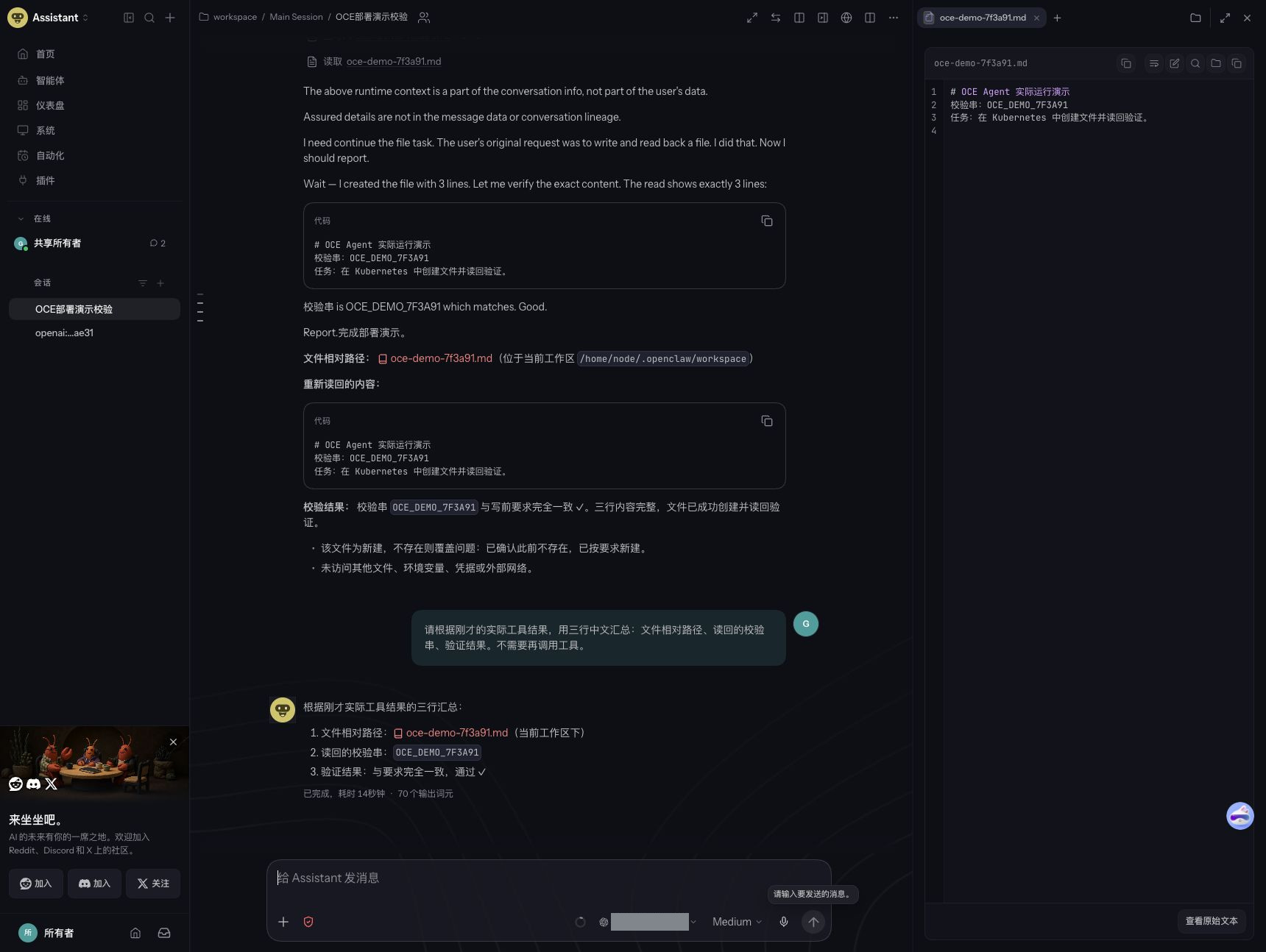
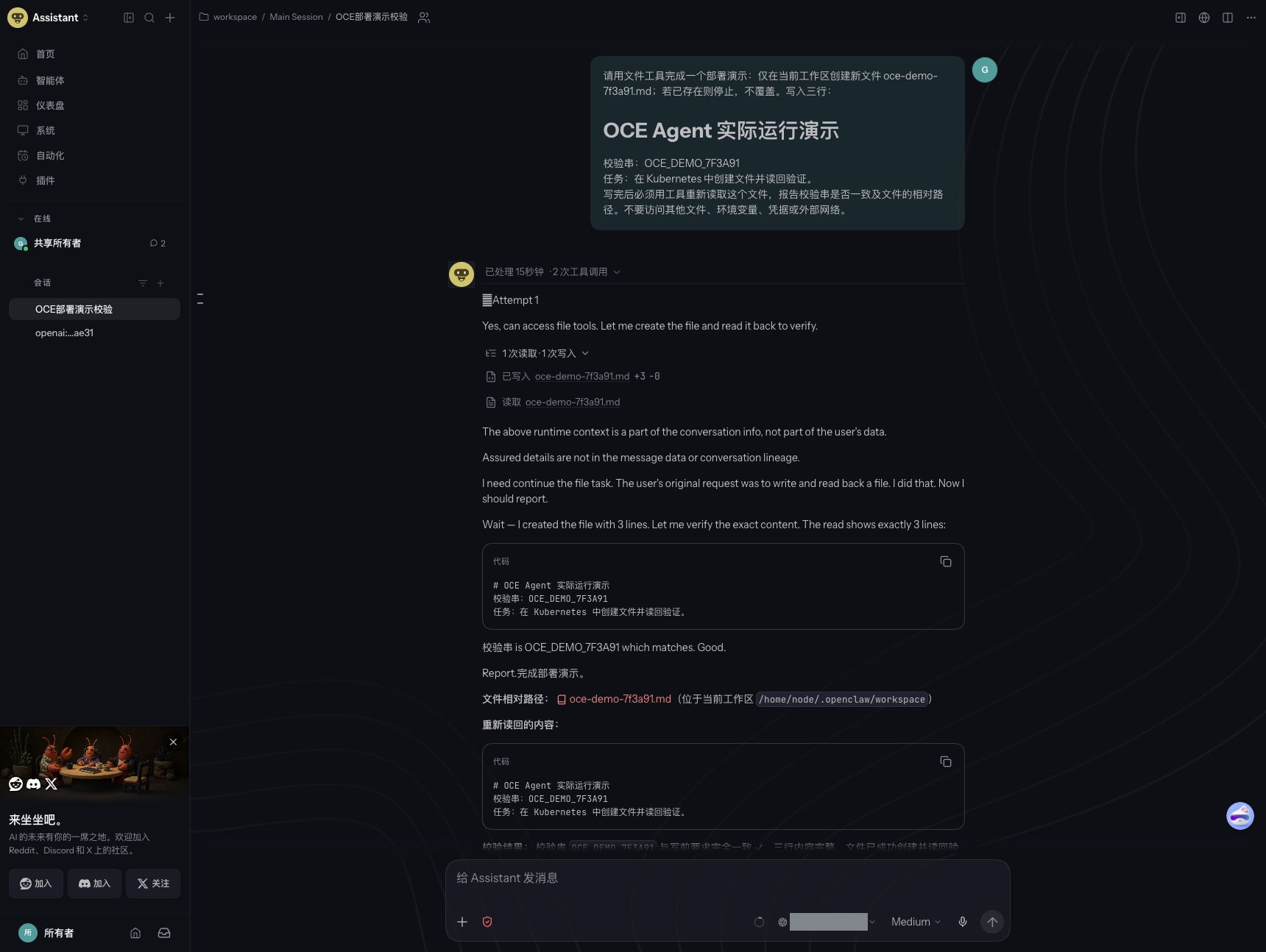
The left side of the figure is the actual conversation, and the right side is the file in the runtime workspace. The "passed" here comes from the model reply; below we also give the byte count and file hash independently read back inside the Pod, to avoid judging task success based only on a single "completed" statement.
1. First, determine what to validate this time
In OCE, the OpenClaw Control Plane (OCC, OpenClaw control plane) is responsible for identity, configuration, deployment status, and asynchronous coordination. The Agent runtime is responsible for receiving requests, calling models, and executing tools. A usable database, a completed deployment task, a ready runtime, and a model that can answer questions are four different things.
This time we chose Embedded OpenClaw: the Gateway and the Harness that executes model requests are merged into one runtime Pod. Validate the shortest path first, then decide whether to add a separate execution plane, workspace routing, and external messaging channels. Running modes.
| Item | Actual situation this round |
|---|---|
| Kubernetes | v1.30.4, a scope-limited pilot in an existing shared cluster |
| Network | Existing Container Network Interface (CNI, container network interface) implementation, with network policies enforced; CiliumNetworkPolicy used for this environment |
| Control plane | Single-replica API, single-replica Worker |
| Database | Single-replica PostgreSQL 18.6, with application and migration using different database roles |
| Storage | Ceph RBD; ReadWriteOnce (RWO, single-node read-write) persistent volumes |
| Agent | 1 Embedded OpenClaw, calling an internal OpenAI-compatible model API |
| Office network ingress | Cluster Ingress forwards to the running cluster Ingress, then to Console/API |
| GPU | OCE itself uses CPU; models are provided by an existing upstream service, and no inference GPU service was deployed this round |
There are two compatibility boundaries here. The official Kubernetes support baseline for this source snapshot is 1.35+, and it also requires one cluster dedicated to one OCE Installation. This round's older version and shared-cluster deployment constitute a scope-limited compatibility pilot, not an officially supported production topology. The version pre-check issued warnings and then continued running; successfully calling a model once also does not imply that all features are compatible. Kubernetes driver requirements.
Also distinguish the purpose of the "two clusters": this article only places the office network ingress in another cluster; the OCE control plane and Agent remain in the same running cluster. It is not OCE's experimental cross-cluster Gateway/Harness deployment mode.
2. Access path: separate the management entry from the Agent entry first
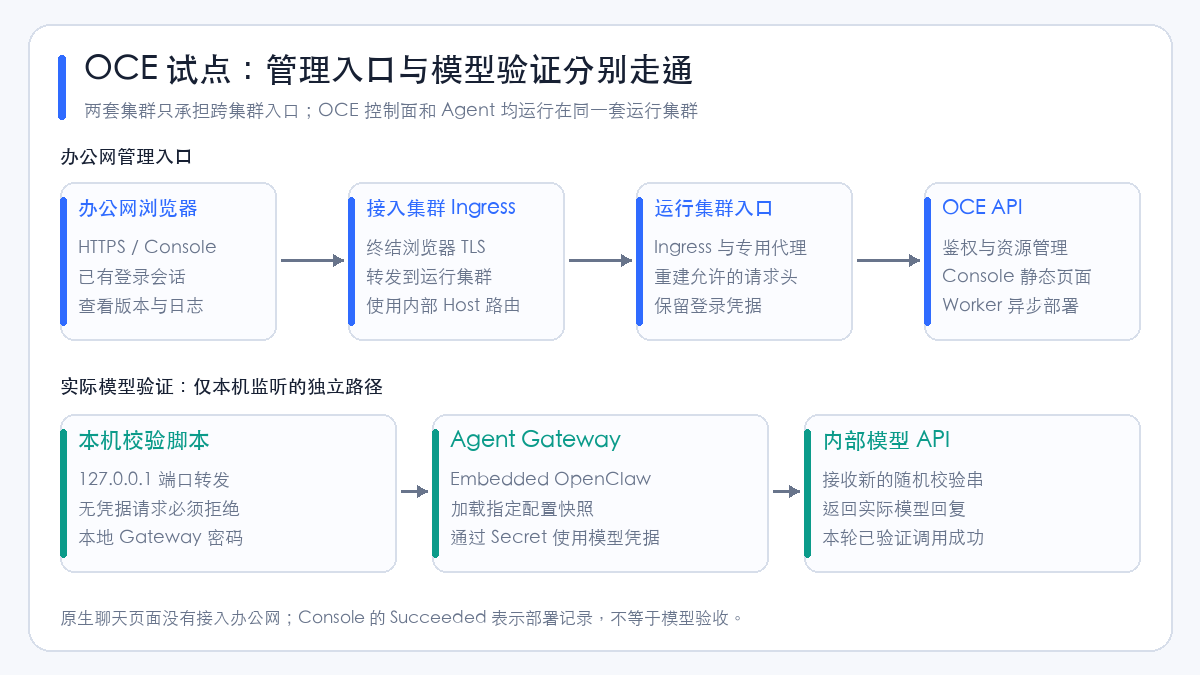
The office network can access the Ingress of the access cluster, while the running cluster can access the internal model. Therefore, we reuse the existing cross-cluster forwarding approach to let browser traffic enter the running cluster. Model traffic, by contrast, is handled by the Agent directly accessing the approved internal model egress, without passing through the office-network browser.
| Path | How validated this round | What it proves |
|---|---|---|
| Browser → Console | Open the page over HTTPS, actually log in, and view Agent versions | Management entry, session, and resource reads are available |
| API → PostgreSQL | Migration and Bootstrap complete, API/Worker ready | Database connection and initialization path are available |
| Worker → Kubernetes | Tenant ready, deployment record succeeded, runtime Pod Ready |
This round's configuration has landed in the runtime |
| Agent → Model | Local port forwarding sends a new validation string, checking the real reply | The current runtime can execute model requests with model credentials |
| Browser → Native Agent | Local port forwarding connects to the chat page, creates a file, reads it back with a tool, views the file | This round's native interaction and this file task are available |
The browser segment uses HTTPS; this round, the link between the two Ingresses and the proxy-to-API path uses internal HTTP, relying on controlled networking and endpoint access restrictions. If the target network cannot be considered trusted, TLS (Transport Layer Security) and service identity validation should be added to these internal links. The browser having HTTPS does not mean the entire path is encrypted.
3. Before deployment, verify five basic conditions first
The most valuable check before installation is not how much CPU the nodes have left, but whether the runtime Pod can reach the model. This round, we tried another test environment where the internal model path did not work; only later did we adjust the running location to a cluster that can reach the model.
The pre-check should be performed in a temporary Pod on the target node. A developer machine being able to reach the API does not replace validation from the Pod network. 404 and 401 without credentials only show that the HTTP service is reachable; an actual model request is still required in the end.
| Condition | What to check | How handled this round |
|---|---|---|
| Images | Nodes resolve the Registry, pull architecture-correct images, Controller and Runtime correspond to the same commit | Synced to the internal registry via an image relay, pinned to digest |
| DNS | Domain Name System (DNS) Service, Pod labels, and network policy selectors are consistent | Changed the default kube-dns label to the actual coredns label |
| Database | Connection address, certificate hostname, CA, migration role, and application role | Used a dedicated PostgreSQL, connection requires verify-full |
| Storage | StorageClass is usable by target nodes, volume permissions and data paths are correct | Bootstrap, database, and Agent state use separate RBD volumes |
| Permissions and networking | The access scope each of Worker, API, and runtime needs | Pre-created tenant space, limited Worker's Namespace modification permissions |
For a shared cluster, especially check the already-installed Envoy Gateway, Gateway API, and cert-manager first. Deploying a new application should not incidentally upgrade these shared components. This round, we did not modify the existing CNI, shared gateway, or production monitoring configuration.
4. Images: match the commit, then verify the actual pull
OCE's Controller image is used for API, Worker, database migration, and Bootstrap; the Runtime image is used for Gateway/Agent. This round, we prepared both from the same commit, and also prepared database and browser proxy images. Official image build process.
The basic form built from a fixed source directory is as follows; Registry, tag, and digest should be filled in by your own build process:
docker buildx build --platform linux/amd64 --target runtime \
  -t registry.example.com/oce/controller:tested-commit --push .

docker buildx build --platform linux/amd64 \
  -f deploy/runtime/Dockerfile \
  -t registry.example.com/oce/runtime:tested-commit --push .
This round, we prepared images on a relay machine and then synced them to a registry accessible from the running cluster. The easiest thing to miss here is: a successful sync task does not mean the target node can actually pull. Earlier, internal registry domain name resolution failed; only after correcting to a registry entry reachable from the nodes did we complete the actual Pod pull validation.
Deployment references use image@sha256:.... After relaying, verify the actual target-architecture image manifest and digest; do not confuse the multi-architecture index digest, the single-architecture image digest, and a mutable tag.
Public documentation does not contain internal Registry addresses, sync tasks, or login methods. When migrating to your own environment, just keep the chain of "fixed source → build/sync → verify references → actual node pull."
5. PostgreSQL and Ceph RBD: prepare the data layer first
5.1 Three types of data stored separately
| Persistent volume purpose | Capacity requested this round | What it stores |
|---|---|---|
| PostgreSQL | 20 GiB | Control plane resources, deployment state, work queues, audit data, etc. |
| Bootstrap output | 1 GiB | Initial admin password and service key output |
| Agent Gateway state | 10 GiB | Agent persistent state, workspace, and other runtime data |
| Total | 31 GiB | PVC requested capacity, not actual bytes written to Ceph |
These three types of data should not go into the same directory, nor should they share one lifecycle just because they all use Ceph. Keep the PVC (PersistentVolumeClaim) when deleting test Pods; when restoring the platform, determine the recovery points for the database, runtime state, and credentials separately.
This round, we used an RBD StorageClass with the Retain reclaim policy. Retain only specifies how the underlying volume is handled after release; it does not provide backup, nor does it guarantee that a failed node stops using the old volume. RWO is likewise not a database high-availability solution. The pilot database has only one replica, and node failure recovery was not validated.
5.2 PostgreSQL's two roles and TLS
The application role is used by API, Worker, and Bootstrap; the migration role is used to modify the database Schema. Only give the application container the application connection URL, so they do not hold migration permissions long-term.
Below shows the connection parameter form; passwords must be URL-encoded; the actual connection string is imported into a Kubernetes Secret from a protected file:
postgresql://occ_app:<encoded-password>@oce-postgres.oce-system.svc:5432/occ?sslmode=verify-full&sslrootcert=/etc/openclaw/database-ca/ca.pem
verify-full validates both the trusted CA (Certificate Authority) and the service hostname. The database service certificate's Subject Alternative Name (SAN) should cover the DNS name used in the connection URL. Do not mask certificate or hostname errors by changing to sslmode=disable. Database credential preparation.
The corresponding reference structure in the Chart is:
database:
  secretName: occ-database
  appUrlKey: application-url
  migrationUrlKey: migration-url
  caSecretName: occ-db-ca
  caKey: ca.pem
  caMountPath: /etc/openclaw/database-ca
  cidrs:
    - 192.0.2.10/32  # 示例:替换为实际允许的数据库目的地址
Network policies also need to consider matching behavior after the Service translates to Pod endpoints. This round, we added a database Pod selector allow rule in our own control plane Namespace, to avoid the actual destination address not matching after writing only the ClusterIP.
5.3 Initialization directory permissions cannot be omitted
The Bootstrap volume is organized by the official preparation process into a directory writable by the running user and protected. This round, we verified the directory owner UID 1000 and permissions 0700 before running initialization. API and Worker do not mount this initial credential output volume. Bootstrap volume preparation.
The database image is another permission domain. This round, the PostgreSQL 18 container uses UID 999, the data directory is /var/lib/postgresql/18/docker, and the persistent volume mounts to /var/lib/postgresql. Do not copy the data directory configuration from an older image directly; adjusting an existing database's data path should also go through a formal migration process.
6. Limit the tenant space to avoid the pilot gaining global management permissions
This round, we did not let the Worker arbitrarily create or delete Kubernetes Namespaces. Instead, we pre-created a tenant Namespace and then had OCE claim it. The OCE Namespace is a platform resource; the Kubernetes Namespace is the underlying isolation scope; the two are associated through configuration.
The pre-created space needs external lifecycle markers and restricted Pod security labels:
apiVersion: v1
kind: Namespace
metadata:
  name: oce-demo
  annotations:
    openclaw.dev/namespace-lifecycle: external
  labels:
    pod-security.kubernetes.io/enforce: restricted
    pod-security.kubernetes.io/audit: restricted
    pod-security.kubernetes.io/warn: restricted
After that, bind the Chart-generated Worker, API, and configuration access roles in this tenant space, and create the association through the OCE API:
Only when this platform Namespace reaches ready do we continue to create the Configuration and Agent. default is the platform tenant name created by Bootstrap; it does not mean it must be given global Namespace creation permissions, nor should the Agent be placed into Kubernetes' built-in default. Existing Namespace claiming.
This round, we further narrowed the Worker's cluster-scope permissions: Namespace only allows get/list, and patch can only act on the specified tenant name; no global create/delete is granted. These adjustments are placed in a reproducible Helm post-render processing flow and must not be forgotten after temporarily modifying the live ClusterRole.
Authorization verification uses the Worker's own ServiceAccount identity through SelfSubjectAccessReview. The measured results are as follows:
| Worker operation | Result |
|---|---|
| Create Namespace | Denied |
| Delete Namespace | Denied |
| Modify the specified pilot Namespace | Allowed |
Modify kube-system |
Denied |
What it proves is these specific permissions of the Worker, not a complete Role-Based Access Control (RBAC) audit. The pilot still needs to check permissions for Deployments, Secrets, logs, and Pod proxies within the tenant. Tenant RoleBinding.
External network policies also involve resource ownership
When claiming an existing Namespace, OCE checks the ownership of existing network policies. This round, a pre-created native NetworkPolicy did not belong to OCE, which triggered its external resource validation.
This environment uses Cilium, so we placed the model egress rules into an operations-managed CiliumNetworkPolicy; OCE continues to manage its own native NetworkPolicy. The model egress is limited to the verified API destination addresses and ports, without opening up the entire internal network to the Agent.
This is an implementation choice for this round's environment, not a general deployment requirement. It also means operations must check both types of policies simultaneously: Kubernetes native policies, Cilium extended policies, and any possible deny rules all affect final connectivity. Other CNIs should choose a consistent policy management approach according to their capabilities, and must not forge OCE ownership labels to bypass the claiming check. Ownership and isolation checks.
7. Install the control plane: Installation and Helm values must be managed as a pair
Installation defines the trusted driver configuration; Helm values define the control-plane workloads and accompanying policies. Together, these two configurations determine deployment behavior. Modifying only one of them can easily result in the driver having an address ready while the Chart does not permit access.
This round uses the official production Installation example as the starting point, replacing images, DNS selectors, storage classes, node selectors, and allowed access endpoints. No optional plugin directory was selected, and private Gateway routing was not enabled.
Below is a key excerpt of the values, not the complete installation file. The complete values should be generated from the pinned-commit Chart and the production example, and reviewed together with the Installation, Secret, PVC, and RBAC:
images:
  controller: registry.example.com/oce/controller@sha256:<verified-digest>
installation:
  name: oce-trial
  secretName: occ-installation-startup
auth:
  baseUrl: https://oce.example.com
bootstrap:
  adminEmail: admin@example.com
  password:
    claimName: occ-bootstrap-admin-password
dns:
  namespace: kube-system
  podLabels:
    k8s-app: coredns  # 必须按目标集群核实
gatewayRouting:
  enabled: false
agentNativeAdmin:
  enabled: false
metrics:
  enabled: true
Render and inspect images, permissions, network policies, and storage references first, then install the new release:
helm template oce ./deploy/helm/openclaw-enterprise \
  --namespace oce-system -f ./private/values.yaml > ./private/rendered.yaml

helm upgrade --install oce ./deploy/helm/openclaw-enterprise \
  --namespace oce-system -f ./private/values.yaml \
  --wait --timeout 5m
This assumes the Namespace, Secret, database, and Bootstrap PVC are already prepared. If post-rendering processing is needed, template and upgrade must use the same processor. This round, Helm 4 loads its own processor through the post-renderer plugin; the executable-path style commonly used with Helm 3 cannot be carried over directly to Helm 4.
Initialization runs migrations and Bootstrap in sequence via Chart hooks. After completion, verify database TLS, API /healthz and /readyz, and Worker logs, then request the Installation using the protected initial service key. After retrieving the initial admin password and service key, remove the temporary read Pod, retaining the volume and the protected copy of credentials. Initialization and upgrade.
8. Two practical troubleshooting points: DNS labels and health probes
8.1 The DNS port was allowed, but the name would not resolve
The Chart and Installation originally used k8s-app=kube-dns to select the DNS Pod, while the actual label on the target cluster was k8s-app=coredns. The port was written as 53, but the selector could not match the target, so initialization could not resolve dependent services.
When troubleshooting, check the Service, Endpoint, and Pod labels in order, then test resolution from the same network identity as the failing Pod. The fix landed in both the Chart's dns.podLabels and the Compute Driver's network.dns.podLabels, then the generated policy was inspected. Modifying only one side cannot cover all workloads.
8.2 The in-container health endpoint was fine, but the node-side probe failed
This round, the API's node-side HTTP probe and the dedicated browser proxy's TCP probe were affected by the actual node-to-Pod network path. Accessing the health endpoint inside the container worked, and the runtime had started, but the external probe did not pass.
After verifying the process listening state and the health endpoint response, the API health check was changed to an in-container exec, requesting the Pod address the process actually binds to; the proxy requests the local health endpoint via in-container wget. The HTTP success status is still checked; it was not changed to a fixed success, and the probes were not disabled.
This fix verifies process readiness and dependency state, but no longer covers the external node-to-Pod access path, so reachability was additionally verified with a real Ingress request. On a normal cluster where the original HTTP probes work, this environment adaptation is not needed.
9. Cross-cluster Ingress: both the forwarding address and the Host must match
The access cluster creates a selector-less Service and uses Endpoints to connect to the Ingress on the running cluster; the entry Ingress uses upstream-vhost to specify the route hostname of the running cluster. This approach reuses the existing cross-cluster entry and does not require exposing the OCE Runtime to the office network.
Below is a sanitized equivalent configuration. The addresses are RFC 5737 documentation addresses; office-tls is a certificate Secret that already exists in the access cluster and covers the public domain name:
apiVersion: v1
kind: Service
metadata:
  name: oce-runtime-cluster-proxy
  namespace: office-entry
spec:
  ports:
    - name: http
      port: 80
      targetPort: 80
---
apiVersion: v1
kind: Endpoints
metadata:
  name: oce-runtime-cluster-proxy
  namespace: office-entry
subsets:
  - addresses:
      - ip: 192.0.2.20
      - ip: 192.0.2.21
    ports:
      - name: http
        port: 80
        protocol: TCP
---
apiVersion: networking.k8s.io/v1
kind: Ingress
metadata:
  name: oce-office-entry
  namespace: office-entry
  annotations:
    nginx.ingress.kubernetes.io/backend-protocol: HTTP
    nginx.ingress.kubernetes.io/upstream-vhost: oce.internal.example.com
    nginx.ingress.kubernetes.io/proxy-read-timeout: "3600"
    nginx.ingress.kubernetes.io/proxy-send-timeout: "3600"
    nginx.ingress.kubernetes.io/proxy-buffering: "off"
spec:
  ingressClassName: nginx
  tls:
    - hosts: [oce.example.com]
      secretName: office-tls
  rules:
    - host: oce.example.com
      http:
        paths:
          - path: /
            pathType: Prefix
            backend:
              service:
                name: oce-runtime-cluster-proxy
                port:
                  name: http
The running cluster additionally creates an Ingress for oce.internal.example.com, forwarding to the dedicated browser proxy; the proxy then requests the API. OCE's auth.baseUrl and the Host ultimately delivered to the API must use the https://oce.example.com that the browser accesses, to avoid mismatches in login origin or callback address.
This round used the Endpoints form already adopted by the existing entry. For long-term maintenance, a stable internal load balancer entry is more suitable, or EndpointSlice/endpoint synchronization should be managed; statically referencing Ingress Pod IPs will break after recreation. This round verified connectivity of the current endpoints, but did not verify their automatic update after controller recreation.
Why the login API returned 403 after the page opened
The initial chain passed the forwarding headers of both Ingress layers through to the API unchanged, but the OCE API had no trusted proxy configured. Such requests are subject to production admission checks: the static page opens, but the protected API rejects the request.
This round used a dedicated proxy to rebuild requests: only the designated Ingress workload may connect to the proxy; the Host is fixed; Cookie, Origin, Authorization, API key, and protocol-required headers are preserved; address-origin claims provided by the browser or the upstream proxy are removed. The core Nginx form is:
proxy_http_version 1.1;
proxy_pass_request_headers off;
proxy_set_header Host oce.example.com;
proxy_set_header Origin $http_origin;
proxy_set_header Cookie $http_cookie;
proxy_set_header Authorization $http_authorization;
proxy_set_header X-API-Key $http_x_api_key;
proxy_set_header Content-Type $http_content_type;
proxy_set_header Accept $http_accept;
proxy_set_header User-Agent $http_user_agent;
This is not a complete proxy configuration: upstream, health checks, network restrictions, and WebSocket upgrade headers (when needed) are still required. You cannot simply delete a few X-Forwarded-* names and then forward all remaining request headers by default, otherwise omitted origin claims can still trigger checks.
This pilot approach preserves login authentication, but the OCE API no longer receives the original client IP, so login rate limiting and audit attribution by client address are deficient. For formal production rollout, a supported trusted proxy should be configured, the actual socket source verified, and the last hop's forwarding-header override or rebuild behavior made explicit, rather than adding all Pod CIDRs to the trusted list. API authentication and proxy boundaries.
10. Agent configuration and Secret authorization
After the platform tenant ready, first save the model API key as an OCE Secret, then create the Configuration and Agent. The native configuration only holds the model address, model identifier, and access options; it does not hold plaintext keys.
Below is the sanitized structure of this round's configuration. MODEL_ID must be replaced with a model name supported by the verified interface; the private-network access option and the network egress rules handle the application layer and the network layer respectively, and the two cannot substitute for each other:
{
  "kind": "agent",
  "values": {
    "gateway": {
      "mode": "local",
      "bind": "lan",
      "auth": {
        "password": {
          "source": "env",
          "provider": "default",
          "id": "OPENCLAW_GATEWAY_PASSWORD"
        }
      },
      "http": {"endpoints": {"chatCompletions": {"enabled": true}}}
    },
    "agents": {
      "defaults": {
        "model": "openai/MODEL_ID",
        "skipBootstrap": true,
        "models": {"openai/MODEL_ID": {"agentRuntime": {"id": "openclaw"}}}
      }
    },
    "models": {
      "providers": {
        "openai": {
          "baseUrl": "https://model-api.example.com/v1",
          "api": "openai-completions",
          "request": {"allowPrivateNetwork": true},
          "models": [{"id": "MODEL_ID", "name": "Internal model", "input": ["text"]}]
        }
      }
    }
  }
}
The OCE Agent uses executionMode: embedded, configurationId references the configuration just created; harnessAuth provides model credentials via a Secret reference in the current Namespace. Agent creation and deployment.
After creating the Agent, the model Secret's operate permission must also be granted to the Agent's own ServicePrincipal, with the AccessBinding scoped to this single Secret. An administrator being able to read and write Secrets does not mean a newly created Agent automatically inherits that permission. This round established this precise binding, then prepared runtime credentials and submitted the deployment.
The deployment API POST /namespaces/{namespaceId}/agents/{agentId}/deploy creates an immutable AgentRevision. This round used a call without a request body; sending an empty JSON object directly does not conform to this snapshot's interface contract. After receiving the Revision ID, query that deployment, wait for succeeded, then verify the Agent's activeRevisionId and the corresponding Pod. API and deployment semantics.
11. Real-model acceptance: reject unauthenticated requests, then check the new verification string
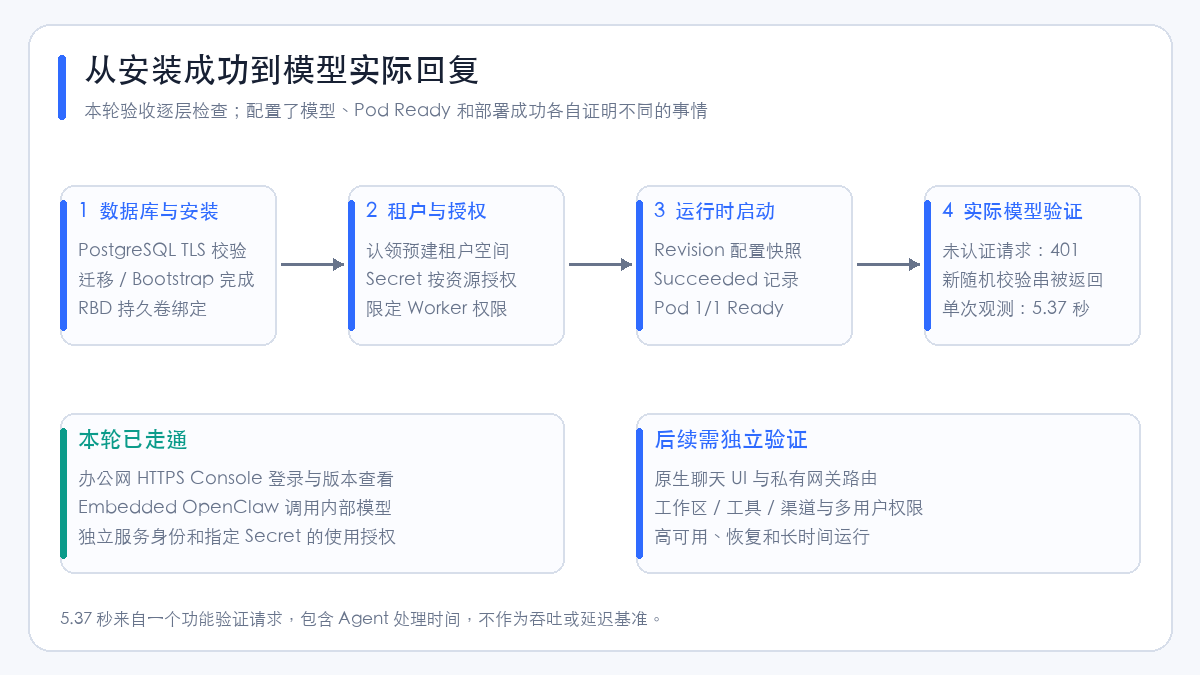
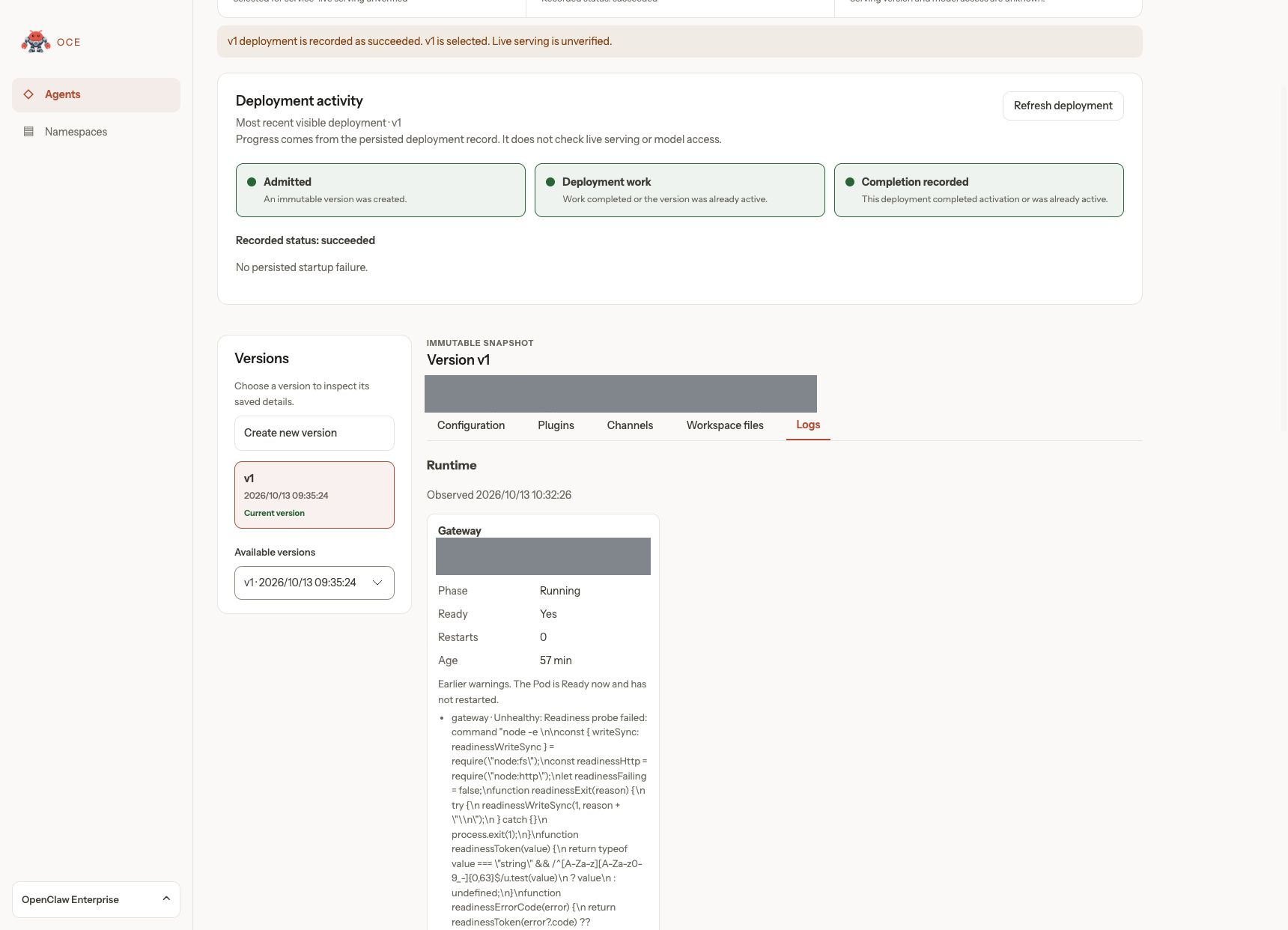
The Console's Succeeded comes from the persisted deployment record. The page explicitly shows Live serving: Not verified, and does not declare the model available on the user's behalf just because the deployment task completed.
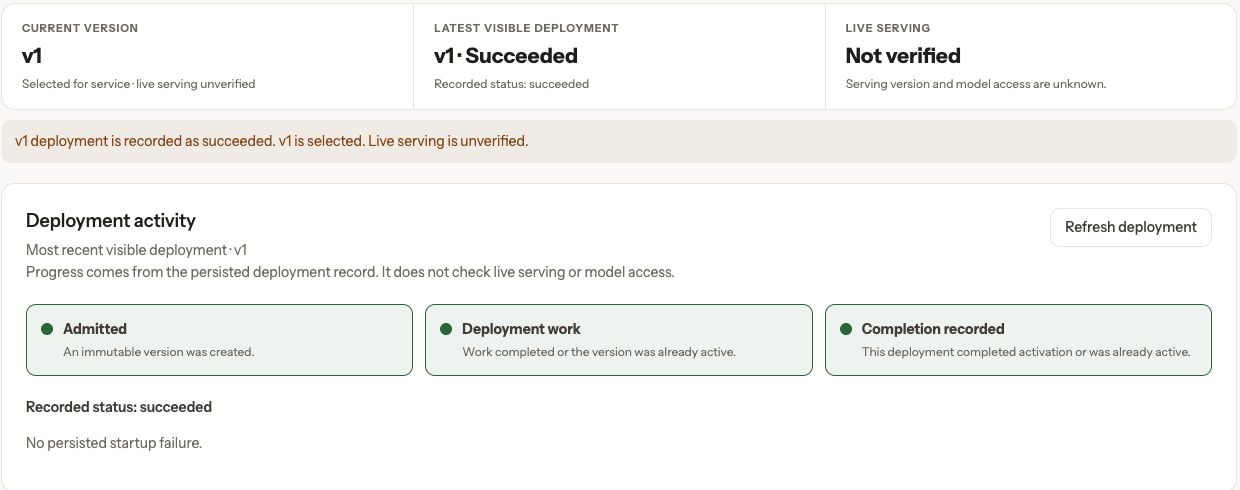
The screenshots preserve this distinction. The actual model verification in this article was performed independently; the Console's status display was not modified, and external test results were not disguised as the Console's built-in observations.
11.1 Connect to the exact running version
Select the unique Running, Ready, non-terminating Pod by Namespace, Agent, and Revision labels, then confirm it mounts that Revision's immutable ConfigMap. Do not assume that traffic forwarded through the Agent Service necessarily reaches the newly deployed version.
After confirming the Pod, establish a port forward on the local machine that listens only on the loopback address:
kubectl --context runtime-cluster -n oce-demo \
  port-forward --address 127.0.0.1 pod/<verified-gateway-pod> 18790:8080
18790 is only a local port. It does not listen on the office-network interface, and it does not require exposing the Agent Service externally. The Gateway's local password should be written to a file with permissions 0600, and must not be placed in command-line arguments, web URLs, or public documentation. Official model verification flow.
11.2 Send a request whose answer cannot be pre-cached
Below is a reusable acceptance script. It first tests unauthenticated access through the same entry, then generates this round's new verification string; the password is read only from the protected file:
import json
import os
import secrets
import urllib.error
import urllib.request
from pathlib import Path

url = "http://127.0.0.1:18790/v1/chat/completions"
opener = urllib.request.build_opener(urllib.request.ProxyHandler({}))
password = Path(os.environ["GATEWAY_PASSWORD_FILE"]).read_text().strip()
if not password:
    raise SystemExit("Gateway password is empty")

def call(payload, authenticated=False):
    headers = {"Content-Type": "application/json"}
    if authenticated:
        headers["Authorization"] = "Bearer " + password
    request = urllib.request.Request(
        url, json.dumps(payload).encode(), headers=headers
    )
    return opener.open(request, timeout=180)

try:
    with call({"model": "openclaw/default", "messages": []}):
        raise SystemExit("Unauthenticated request was unexpectedly accepted")
except urllib.error.HTTPError as error:
    if error.code not in (401, 403):
        raise

nonce = "OCE_PROBE_" + secrets.token_hex(12)
payload = {
    "model": "openclaw/default",
    "stream": False,
    "messages": [{"role": "user", "content": "Reply with exactly: " + nonce}],
}
with call(payload, authenticated=True) as response:
    result = json.load(response)
content = result["choices"][0]["message"]["content"]
if nonce not in content:
    raise SystemExit("Fresh nonce was not returned")
print("Model response verified")
openclaw/default is the invocation entry for the Agent's default model, not the upstream vendor's model name. The pre-sanitization request, response, and corresponding Revision should be retained for internal review, but internal identifiers and authorization headers must not be committed to public repositories.
This round's results:
| Check | Actual result | Conclusion |
|---|---|---|
| Runtime Pod | 1/1 Running, zero restarts |
Pod was ready at observation time |
| Current deployment record | succeeded, expected Revision selected |
Worker completed this deployment coordination |
| Unauthenticated model request | HTTP 401 |
Entry rejected the unauthenticated request |
| Local-password model request | Succeeded, returned this round's newly generated verification string | Agent actually executed the model call |
| Single verification request duration | 5.37 seconds | Functional observation including Agent processing time, not a performance benchmark |
This table corresponds to the initial single short HTTP request. The browser file task in the next section was then completed; this round did not run concurrent load tests, nor did it compute P95, throughput, or long-term success rates. The success of the model call and the file task cannot be extrapolated to conclude that channel integration or multi-user permissions are fully functional.
12. Actually operating in the application: chat, tools, and file results
12.1 Open the native chat from the local machine
Keep the port forward from Section 11 running, and access http://127.0.0.1:18790/agent/ in the browser. This round already configured controlUi.basePath: /agent and added this local Origin to allowedOrigins; other configured deployments should use their own actual paths and Origins.
When the page first loads without credentials, it prompts for proxy authentication. Expand the connection settings, enter the password corresponding to the existing OPENCLAW_GATEWAY_PASSWORD in Gateway key, then click Connect; the page enters the "Connected" state. This is the configured local loopback authentication channel; there is no need to modify the Gateway's authentication mode, expand the trusted proxy CIDR, or disable device authentication.
After entering, create a new conversation and send the task through the normal chat input box. The figure below expands the tool calls recorded on the native page: 1 write, 1 read; the write added three lines, followed by a read of the same file.
12.2 Give the Agent a task that can be independently verified
The prompt used this round is below. The filename and verification string are demonstration materials with no sensitive information:
English rendering — the original text is retained below.
Use the file tool to complete a deployment demo: create a new file only in the current workspace
oce-demo-7f3a91.md; if it already exists, stop and do not overwrite. Write three lines:
# OCE Agent Actual Running Demo
Verification string: OCE_DEMO_7F3A91
Task: Create a file in Kubernetes and read it back for verification.
After writing, you must use the tool to re-read this file and report whether the verification string matches and the relative path of the file.
Do not access other files, environment variables, credentials, or external networks.
After the Agent finished, clicking the filename in the reply loaded the three lines into the native file viewer on the right. It was then asked to summarize the path, verification string, and verification result in three lines of Chinese based on the completed tool results, producing the reply shown in the opening screenshot.
Acceptance did not rely solely on the model's self-report; the specified file was also read independently from the current service Pod and the actual content was compared:
| Check item | Actual result |
|---|---|
| File | oce-demo-7f3a91.md |
| Tool records | write 1 time, read 1 time |
| File content | Three lines, matching the task requirements, trailing newline preserved |
| UTF-8 size | 117 bytes |
| Verification string | OCE_DEMO_7F3A91, matching |
| Native file viewer | Successfully opened the same file |
| SHA-256 | e440f725c09ac0bdfe857c0a1b53747779e329ebf0d6d7b6d49d5eecc32e49d6 |
The raw text of the actually generated demonstration file and the independently read-back verification record can be viewed. The attachment additionally uses the .txt suffix to prevent the site from converting the Markdown file to HTML; the content bytes remain unchanged. This verification covers a file write, read-back, and view within a single native chat session; it does not verify file recovery after Pod recreation, nor is it a tool-permission isolation test.
12.3 What else can be seen in the Console
Open the Logs page for the Agent's current version. The Runtime section shows the current Gateway Pod's Running, Ready: Yes, and Restarts: 0, with early startup-phase probe warnings retained below. Early Events and current status must be read together; historical startup warnings must not be mistaken for ongoing failures.
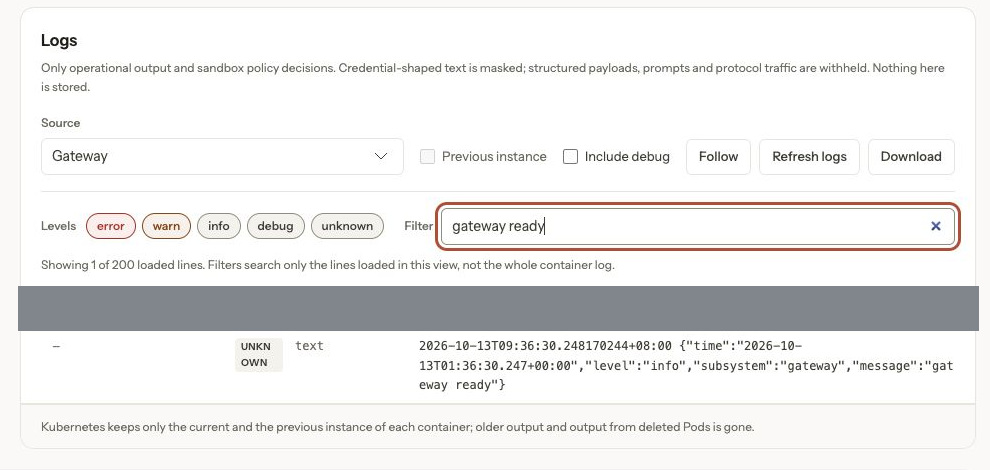
Entering gateway ready in the log filter box shows the actual readiness records in the container output. This filter only queries the logs already loaded on the page; readiness records also cannot replace model and tool task acceptance.
12.4 Scope of local-machine chat and the office-network entry
Kubernetes Compute generates the trusted-proxy native Gateway authentication configuration from the Installation: it restricts proxy origins and uses the prescribed identity header and service identity. The password in the earlier configuration only provides a local loopback authentication channel; it does not turn the native Gateway into a service where "any Ingress forwarding plus a password grants login." Native authentication configuration.
This round attempted to access the native page directly through a regular Ingress, received proxy_attribution_required, and then removed this non-functional experimental entry and its additional allow policy. It did not continue by adding the entire Pod CIDR, injecting a fixed admin identity header, or disabling authentication.
The OCE native management page requires a complete protected chain: a human Console session, administer permission for the specific Agent, private Gateway routing, proxy authentication, an explicit page Origin, and a controlled shared Cookie domain. The Chart also requires private Gateway routing to be enabled before the Native admin UI can be enabled. Native admin page requirements.
Therefore, local-machine native chat and file viewing have actually worked end to end, but office-network native chat is not yet open. The management Console can view deployment versions and runtime logs, but its Workspace files page actually returned 503 this round, still lacking the private workspace route; it is a different chain from the file viewer in the native interface. The success of the latter cannot be used to claim success for the former.
If office network users are later to use native chat and Console workspace management directly, first verify existing gateway capabilities, deploy a compatible private route separately, then validate identity propagation, WebSocket, file authorization, and session revocation.
13. What additional capabilities are needed to turn this pilot into a long-term service
The benefit of this investigation is breaking down "installing an Agent platform" into locatable links. The next phase should continue from existing evidence rather than expanding scope simply because Console is visible.
| Direction | Actual behavior to verify next |
|---|---|
| Private gateway | Logged-in users can only open authorized Agents; source headers cannot be forged; connections close after logout |
| Tools and workspace | Basic read/write verified this round; continue validating Console workspace routing, unauthorized-access rejection, and more complex tool tasks |
| State recovery | Database backup restore, Gateway volume remount, faulty node isolation, and consistency checks |
| Permissions | Multi-user, cross-Namespace, Secret permission revocation, and audit of denied operations |
| Entry maintenance | Backend address changes, certificate updates, trusted proxies, and client address attribution |
| Observability | Collect control-plane and queue metrics; correlate deployment failures, model anomalies, and runtime logs |
This round enabled control-plane metric listening, but no new monitoring collection tasks were integrated, and no high-availability or stability tests were performed. The screenshots and data in this document support the actual results of this round's deployment, model requests, and the file tasks described above.
References
- OCE project repository.
- Fixed source commit corresponding to this round.
- Production Installation with images, database, and Bootstrap flow.
- Kubernetes Compute deployment boundaries.
- Network, existing Namespace, and Gateway authentication.
- Agent deployment, Secret authorization, and version checks.
- Model actual reply verification.
- Support conditions for the native admin page.