CubeSandbox snapshots tested: can a killed process continue from its old progress?
In the Adapter v0.6 long-running job practice, a background Job kept running when its client disconnected. After an Adapter restart, the client could reconnect to its state and resume reading logs. That job stayed inside its original sandbox throughout the test; its process was never killed.
This time the test goes one step further. A program keeps its progress exclusively in memory. We take a snapshot, deliberately kill its process, and restore it. We then delete the entire original sandbox, create a new sandbox from the same snapshot, and check whether its progress survives.
On October 18, 2026, CubeSandbox v0.7.3 completed three rounds in each of two Kubernetes environments. All six passed. The process counter, random identity, PID, and state digest returned to their snapshot values, and the counter continued increasing afterward. The client used Python SDK 0.7.3. No existing deployment, node label, or network configuration was changed.
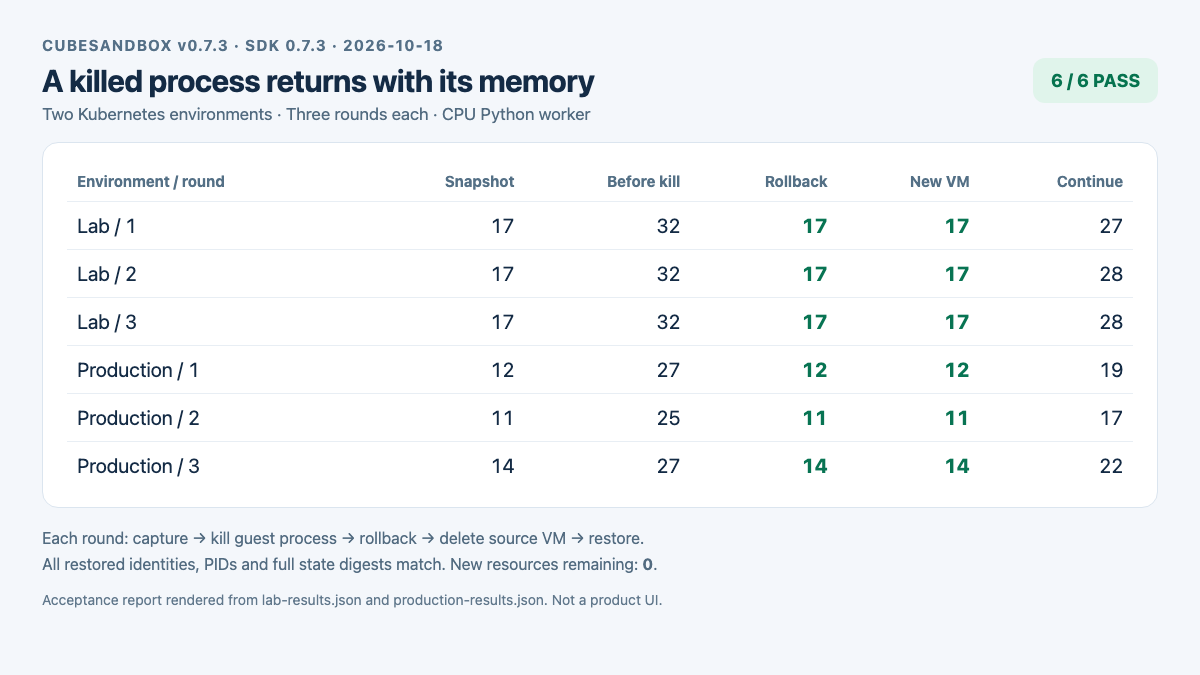
Light acceptance report. It was generated from the redacted JSON recorded in this test and captured in a browser; it is not the CubeSandbox console UI. The complete values are linked at the end.
The dependency chain: who actually saves the process?
Memory recovery depends on CubeSandbox's VM snapshot capability. The Agent requests it, the Adapter adds authorization and resource management, and the CubeSandbox node runtime pauses, saves, and restores the VM. This test called the SDK directly, bypassing the Agent and Adapter to verify that underlying capability.
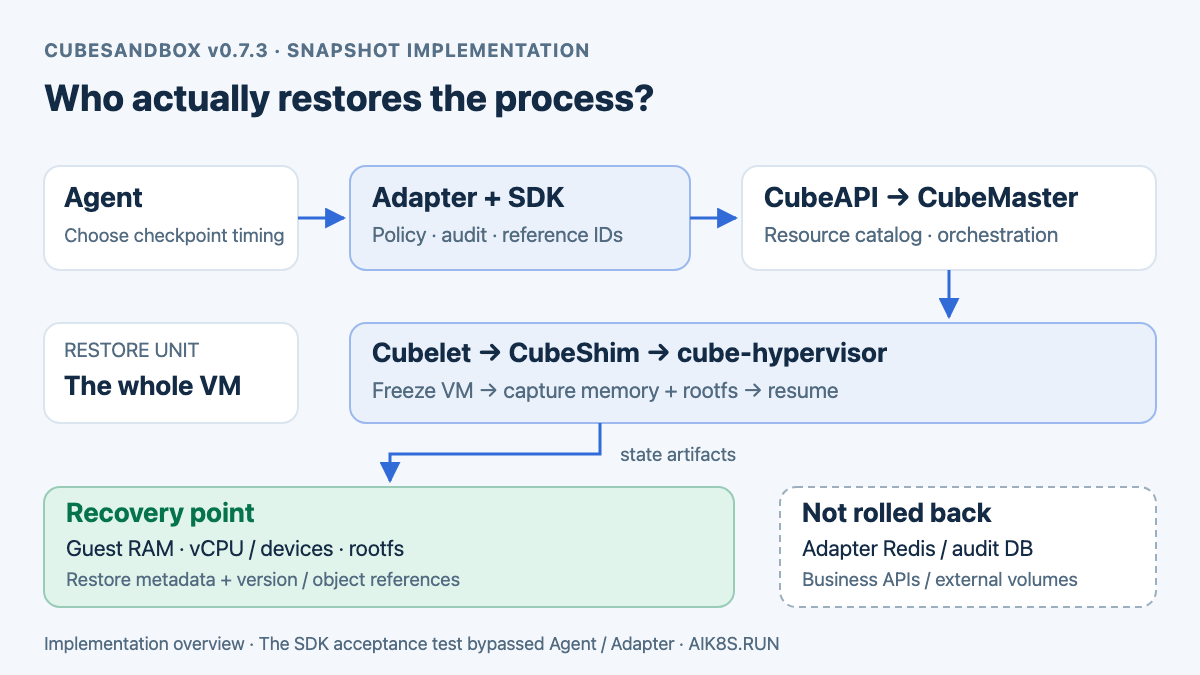
Implementation diagram based on v0.7.3 source, not a runtime trace of this test's requests. Agent/Adapter is an integration path; the test entered CubeAPI directly through the Python SDK.
Where the Agent and Adapter stop
For an OpenClaw cube_checkpoint call, the integrated request path is:
Agent: cube_checkpoint
  → Adapter: authorize identity, lease, Profile and checkpoint policy
  → Python SDK: sandbox.create_snapshot()
  → CubeAPI: POST /sandboxes/{sandboxID}/snapshots
  → CubeMaster: register snapshot work, locate the source node
  → Cubelet: CommitSandbox, coordinate the node operation
  → CubeShim / cube-hypervisor: freeze VM, capture runtime state
  → Snapshot storage: retain memory, rootfs and restore metadata
The Adapter's checkpoint_ref is an authorization-controlled reference. Internally, it maps to the snapshot_id returned by CubeSandbox and is associated with a lease, tenant, and backend_id. The Adapter does not inspect Python objects, store Guest RAM in Redis, or reconstruct progress from chat history. On a cube_rollback request, it resolves the original snapshot and asks CubeSandbox to restore it through the SDK. Adapter implementation
CubeAPI provides the external API. CubeMaster manages the snapshot as a platform resource and delegates the operation to Cubelet on the source node. There, CubeShim works with the repository's cube-hypervisor VMM, which incorporates Cloud Hypervisor implementations. The restored object is a virtual machine; a container restart policy does not rerun the Shell to recreate its progress.
What is saved, and why the PID returns
Several parts must work together to form recoverable state; saving program files alone is insufficient:
| State | Contents | Role in this test |
|---|---|---|
| Guest RAM | Guest kernel data, process address spaces, heaps, stacks, and runtime objects | Preserves the counter, random identity, hold flag, and kernel process records |
| vCPU and device runtime state | Execution position, registers, and supported virtual-device state | Allows VM execution to resume instead of starting at the program entry point |
| rootfs snapshot | Code, dependencies, and writable files in the sandbox root filesystem | Restores the root-file marker to before-snapshot |
| Restore configuration and metadata | VM specification, kernel/image versions, memory/disk object references, and related configuration | Locates the right objects and reconstructs the VM with compatible settings |
From outside the VM, Python interpreter objects and the Guest kernel's process table are both data in Guest RAM. Once that memory and execution state are restored, the application does not need to reconstruct counter and identity. PID 33 in the table is a Guest PID; deleting the original VM and creating another one does not require an equal host-side process PID.
This explains why a new sandbox ID can contain the same Guest PID. The platform creates a new sandbox resource containing the old VM's execution state. It does not boot a fresh Guest system and coincidentally assign Python PID 33 again.
How capture and restore happen on the node
The coordinated snapshot path supported in v0.7.3 first freezes the VM. It captures memory state and commits a CoW rootfs snapshot within the same freeze window, then resumes the source VM. This avoids capturing memory at one point while the program continues changing disk state at another. In the source, CommitSandbox drives SnapshotCapture, performs the rootfs operation, and then sends SnapshotResume. Node coordination code
A snapshot logically supplies complete recoverable state without necessarily copying every byte physically on each capture. Node storage uses CoW. The memory path can use incremental/soft-dirty capture over a valid baseline, falling back to full capture if no usable baseline exists. Writing less data is an optimization; restoration still requires a complete, correct baseline and state. The source retains compatibility branches for older Shims, so assess the node runtime as well as the CubeAPI version when determining consistency behavior.
There are two restoration entry points:
sandbox.rollback(snapshot_id)retains the original platform sandbox identifier, tears down the current VM execution state internally, loads the snapshot's memory, disks, and configuration, and resumes execution. It does not undo aSIGKILL; it replaces the whole VM state with one captured before the process was killed. A failed restore does not imply that the discarded execution state can be recovered.Sandbox.create(template=snapshot_id)allocates a new platform sandbox resource and uses the snapshot as its restore source.cube_forkuses this capability and registers a new lease for that sandbox; it does not automatically create a new training Job.
The test's /hold endpoint is only an application-level barrier that pauses increments for exact comparisons. CubeSandbox performs the actual VM freeze independently of that test HTTP service. Rollback invalidates old connections, so clients must reconnect; every state query in the test establishes a new connection. Shim rollback description
Snapshots, Redis, and the audit database hold different state
| Location | Stored state | What it cannot replace |
|---|---|---|
| CubeSandbox snapshot storage | VM memory, rootfs, and restore metadata, using node-local XFS or a shared S3 storage path | Does not restore business changes already made to external databases or mounted volumes |
| Adapter state backend | Lease, Job, checkpoint-reference, and backend mappings; process memory by default, surviving Adapter restarts only with reliable Redis configured | A snapshot_id without its snapshot objects cannot restore a VM |
| Adapter audit database | The requester, operation, execution intent, outcome, and audit chain, persisted in SQLite or PostgreSQL | Audit events do not contain the memory image needed to restore the VM |
Kubernetes hosts the control plane, node components, Services, and persistent-storage infrastructure in this deployment. The test does not use Kubernetes Job retries or Pod restarts to recover Python memory; CubeSandbox manages snapshot resources and VM recovery. Automatically saving at intervals and selecting a recovery point after failure still requires higher-level task management to determine capture timing, recovery policy, and treatment of external side effects. Installing the Adapter alone does not provide that workflow.
If OpenClaw runs in the office network and its execution sandbox runs in production, the snapshot saves the production sandbox, not the office-side Agent's conversation and plan. The client or Agent framework must persist its own session. Reconnecting still requires locating the original lease, Job, or checkpoint reference. This SDK test verifies process recovery; Agent-session recovery was not counted as a passing check.
Ruling out a script restart that reloads progress from a file
The worker consists of an incrementing thread and an HTTP server listening only on the sandbox loopback interface. The thread increments once every 100 ms. State queries read memory only. The program generates a random identity at startup, does not load an application checkpoint, and does not save progress to a file.
Each query returns five fields: counter, held, identity, pid, and digest. The digest is computed from the random identity and current counter. Public results include only a short hash of the identity, not its original random value.
For exact comparisons, /hold pauses increments before a snapshot while the HTTP server and process remain running. This application-level barrier gives the snapshot a deterministic counter value, avoiding differences caused by a query arriving a few milliseconds later. After recovery, /run releases the barrier, and the same identity's counter must keep increasing.
The test checks more than a familiar progress value. An equal PID is only supporting evidence: the decisive comparison is equality of the in-memory random identity, counter, hold flag, and digest together. Relaunching the script generates a different identity and cannot pass those comparisons.
First path: kill the process, then bring it back with rollback
The first production-side round of the formal three-round run recorded these values:
| Stage | Counter | PID | Short identity hash |
|---|---|---|---|
| At snapshot | 12 | 33 | 7ba5957579f0 |
| After further execution | 27 | 33 | 7ba5957579f0 |
| After killing the process and rolling back | 12 | 33 | 7ba5957579f0 |
| After releasing the barrier and continuing | 20 | 33 | 7ba5957579f0 |
After the counter advances, the script sends SIGKILL to this test PID. It confirms that the loopback HTTP query fails before calling source.rollback(snapshot_id). Once rollback completes, queries succeed again and the entire in-memory state matches the pre-snapshot state. A separate root-filesystem marker also returns from after-snapshot to before-snapshot.
This step does not relaunch the worker, load a model file, or parse the counter from logs.
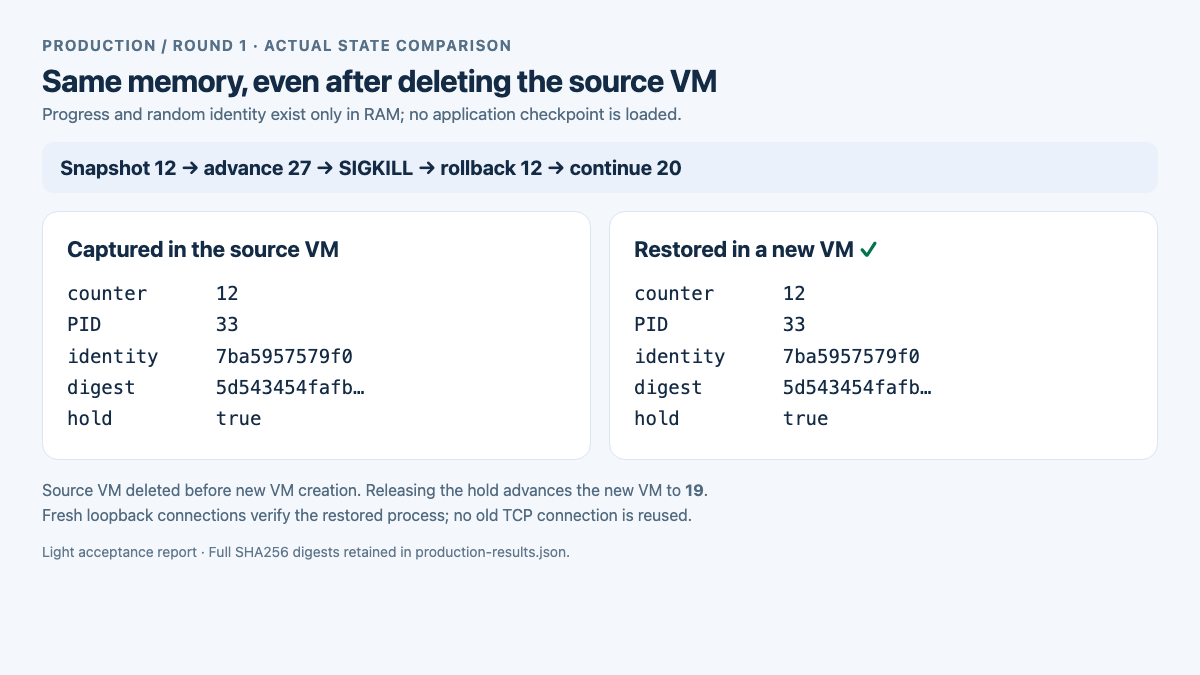
Actual state records from the same round. Comparisons use the complete SHA256 digest; the screenshot shows short digests for readability, while JSON retains the full values.
Second path: delete the source sandbox and create a new one from its snapshot
After checking rollback, the script deletes the original sandbox with source.kill(). It then creates a new sandbox using the earlier snapshot:
snapshot_id = source.create_snapshot().snapshot_id

# The source can be deleted; the snapshot is retained independently.
source.kill()
restored = Sandbox.create(
    template=snapshot_id,
    timeout=600,
    allow_internet_access=False,
)
In that round, the worker in the new sandbox returns counter 12, PID 33, and identity hash 7ba5957579f0. Its full state digest also matches the snapshot. After releasing the barrier, the counter increases to 19.
The saved state therefore includes more than a working directory. Even after the source sandbox is deleted, its snapshot contains process state that can run again. Recovery also restores the same in-process identity. If you use snapshots for multiple branches, assign new external task identifiers rather than treating a restored in-process identity as a globally unique new task ID.
All six rounds
Each round repeats the same sequence: snapshot, advance, kill the process, roll back, advance again, delete the source sandbox, create a new sandbox from the snapshot, and advance once more. The table lists state values only; client-observed timings from different environments are not combined into a performance ranking.
| Environment / round | Snapshot | Before kill | Rollback | Continued after rollback | New VM | Continued in new VM |
|---|---|---|---|---|---|---|
| Lab / 1 | 17 | 32 | 17 | 28 | 17 | 27 |
| Lab / 2 | 17 | 32 | 17 | 28 | 17 | 28 |
| Lab / 3 | 17 | 32 | 17 | 28 | 17 | 28 |
| Production / 1 | 12 | 27 | 12 | 20 | 12 | 19 |
| Production / 2 | 11 | 25 | 11 | 18 | 11 | 17 |
| Production / 3 | 14 | 27 | 14 | 21 | 14 | 22 |
Every round checked complete state equality, post-recovery progress, and resource cleanup. A separate production-side preliminary round also passed before the formal runs. The table counts only the subsequent six fixed-procedure rounds. At completion, neither environment retained any sandbox or snapshot created by this test; pre-existing resources were preserved.
Reproduce it in your own environment
Prepare a READY code template that can execute Python 3, and make both CubeAPI and CubeProxy reachable. Run only in an authorized environment: the script creates and deletes temporary sandboxes and snapshots. It does not change cluster resource configuration, install extra services, or require outbound Internet access from the worker.
Download the complete verification script and run it in your SDK client environment:
python3 -m venv .venv
. .venv/bin/activate
pip install 'cubesandbox==0.7.3'

# Replace example endpoints with controlled endpoints reachable by this client.
export CUBE_API_URL=https://cube-api.example.invalid
export CUBE_PROXY_NODE_IP=cube-proxy.example.invalid
export CUBE_PROXY_PORT_HTTP=80
export CUBE_TEMPLATE_ID=your-ready-code-template
# If authentication is enabled, inject CUBE_API_KEY from your Secret manager.

python process_snapshot_probe.py --environment lab --rounds 3 > results.json
The script starts the worker through the SDK and queries state over the sandbox's loopback HTTP interface. Queries after rollback establish new connections instead of reusing a pre-snapshot TCP session. Cross-network CubeAPI and data-plane traffic should still use a controlled private link or tunnel. These SDK settings configure connections; they do not create network connectivity.
Results contain per-round state, checks, and cleanup details. A run is complete only when result is PASS and both new_sandboxes_remaining and new_snapshots_remaining are 0. Preserve failure records if creation or recovery fails; do not blindly repeat an external operation that may already have taken effect.
What changes when an Adapter sits in front
The Adapter's cube_checkpoint, cube_rollback, and cube_fork add policy and lease mappings around snapshot creation, rollback, and creation from a snapshot. This process-memory acceptance called the SDK directly. It did not change the existing production Profile, and SDK results are not presented as a new native-tool test of every Agent client.
Three details need to be handled according to the workload:
cube_job_resumeresumes log cursors; it does not roll back a VM. If an Agent disconnects while its background Job is still running, continue querying the originaljob_ref.- A VM rollback does not roll back Adapter Job records stored in external Redis. A snapshot branch does not automatically receive a copied set of Job mappings either. A complete task-recovery workflow must coordinate process state with control-plane records rather than trust a previously cached completion status.
- SDK snapshots have a lifecycle independent of the source sandbox. In contrast, Adapter
cube_release(action=kill)cleans up the snapshots managed by that lease. Design retention and garbage collection before relying on a long-lived recovery point; do not release the lease and assume its checkpoints remain available.
These distinctions determine which path fits a long-running task: reconnect for an interrupted client connection, perform controlled VM recovery when process state must be restored, or use application checkpoints and durable storage when training or data processing must continue in another environment.
Where these results apply
The workload was a CPU Python process, with no GPU, external mounted volume, database writes, or persistent outbound connection. Snapshots were taken at an application-level barrier in the incrementing thread. The test establishes memory recovery for this running-process workload; it did not inject a host power failure, force cross-node placement, or recover an hours-long training run.
External services do not roll back with a VM. Committed database transactions, published messages, and model API calls are not undone. Recovery may repeat actions performed after the snapshot, so applications still need idempotency keys, checkpoint commits, and deduplication. Mounted-volume data also stays at its current external state rather than returning to the VM snapshot's point in time, as verified in the earlier mounted-volume acceptance record.
Cross-node recovery has separate storage and compatibility requirements. The official v0.7.3 documentation distinguishes node-local XFS from shared S3 snapshot backends. Successful recovery after deleting a sandbox does not establish recovery after losing its host. See the cross-node snapshot guide.
The conclusion established here is specific: with this CPU workload in the two tested environments, CubeSandbox restored a killed process's memory from a snapshot, restored that state into a new sandbox after deleting its source, and continued execution. Production long-running task recovery still needs coordinated task mappings, external side-effect handling, and recovery-point lifecycle management.
Script, results, and references
- Reproducible verification script
- Three lab-environment rounds
- Three production-environment rounds
- Light acceptance report
- CubeSandbox v0.7.3: Snapshot, Rollback, and Clone
-
Adapter long-running jobs, multiple backends, and durable audit
-
v0.7.3 control-plane snapshot API, Master snapshot task implementation
- v0.7.3 VMM snapshot format and restore documentation