HiRoute Technical Overview: Higress Team's Agent Routing and Model Collaboration Engine
A programming task may start with researching materials and reading code, then move to modifying the implementation and running tests, and finally deal with a concurrency issue that is hard to pinpoint. Each step requires different model capabilities: always using the strongest model means even routine work consumes expensive quota; always using a cheap model can waste a lot of time on trial and error.
HiRoute, developed by the Higress team, attempts to manage this kind of choice. It provides local Agent task delegation, model integration, routing plans, and execution records, letting users keep their existing Agents while choosing appropriate models for different work. The project is licensed under Apache-2.0 and offers both a desktop application and a headless command-line version. Project introduction, open-source description
This article was verified on October 15, 2026. Release status is based on official Releases; mechanisms are cross-checked against v0.3.1 and the main branch snapshot b4c1a927. Section 7 summarizes upstream experiments; Section 8.3 covers the Docker and DSH integration tests actually performed for this article. The enterprise integration diagram is an analytical suggestion.
1. How It Relates to Higress
HiRoute's design reuses the Higress team's gateway engineering experience, but uses an independent Rust implementation and a local product form. To understand both, first look at the problems each one handles: HiRoute architecture description, Higress official introduction
| Component | What It Primarily Manages | Typical Location |
|---|---|---|
| HiRoute | Local Agent connections, execution plans, stage model selection, Worker tasks, and execution records | Development machine, remote workstation, or single-user service environment |
| Higress | Enterprise API entry, authentication, traffic policies, plugins, and model service integration | Enterprise gateway layer |
| Agent Harness | Tool-calling loop, context, file operations, tests, and sessions | Runtimes such as Codex, Claude Code, Pi, DeepSeek Harness |
| Model inference service | Receives inference requests, processes context, and generates results | Cloud model APIs, or self-hosted vLLM, SGLang services |
For example, a developer can have HiRoute select a logical model and then access a self-hosted service through the enterprise Higress. The former makes choices based on the task and stage; the latter enforces enterprise entry policies. Which GPU the model ultimately runs on is still the inference platform's responsibility.
This combination is an integration approach. The official roadmap lists centralized authorization, shared routing plans, and enterprise AI Gateway integration as evolution directions; this cannot be taken to imply that a complete enterprise multi-tenant control plane already exists.
2. Release Timeline and Current Product Form
Based on official release records, HiRoute already has downloadable packages but is still at an early version stage:
| Version | Release Time (Beijing Time) | Key Points |
|---|---|---|
v0.1.0 |
2026-09-22 | First official release, including macOS ARM64 and Linux x86_64 packages |
v0.2.0 |
2026-10-08 | Release packages expanded to both CPU architectures for macOS and Linux |
v0.3.0 |
2026-10-11 | Continued iteration of desktop and headless versions |
v0.3.1 |
2026-10-12 | Fixed issues with subscription configuration, native session association, upgrade recovery, and model catalog |
Sources: v0.1.0, v0.2.0, v0.3.0, v0.3.1.
As of this review, the latest stable version is 0.3.1, providing macOS Desktop and Linux CLI packages for x86_64 and ARM64. The release notes explicitly state that Windows is not supported in this version; different architectures also have different levels of verification depth, so "successfully packaged" should not be treated as the same level of real-world usage verification.
With a GUI, connections, plans, tasks, and sessions can be managed from Desktop; on Linux, these capabilities are used via the CLI and the background daemon hirouted. Routing itself does not require GPU configuration; only when choosing to run execution models or decision models locally do you need to separately evaluate their inference resources.
3. Two Kinds of Routing: Who Gets the Work, and Which Model for This Stage
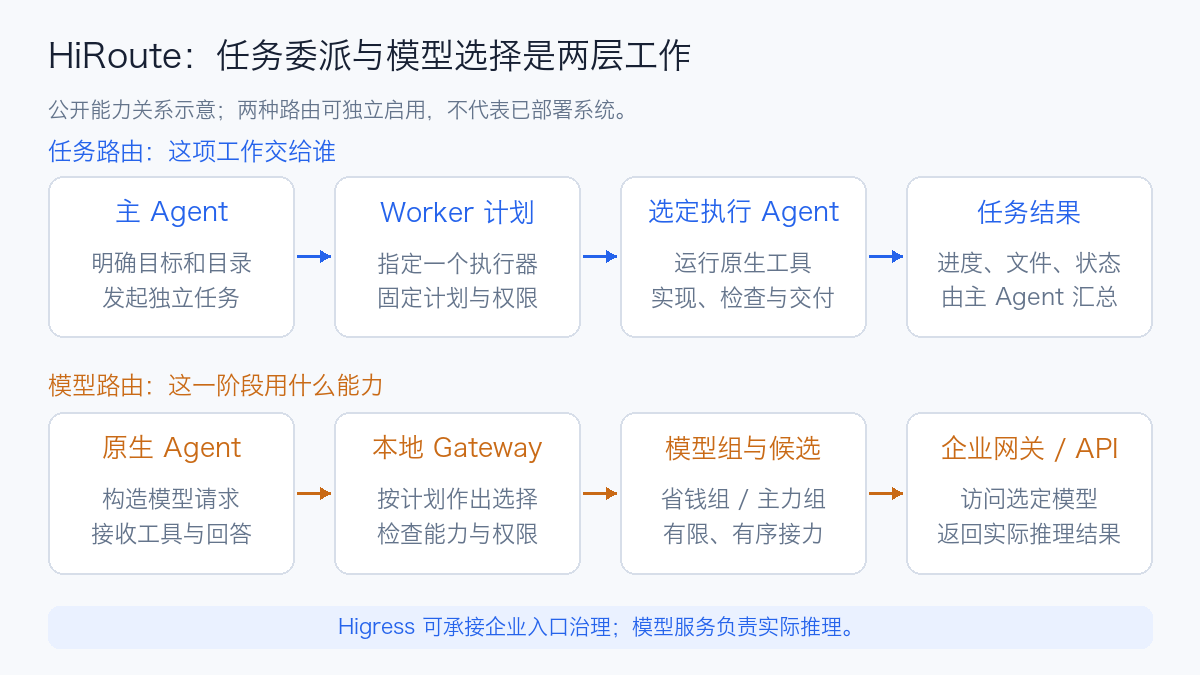
Task routing and model routing can be enabled independently. A piece of work can always be executed by the same Agent while reselecting models at stage boundaries; or it can first be delegated to another Agent, which then uses model routing.
3.1 Task Routing Manages the Execution Agent
The user selects an execution Agent for a plan; the main Agent discovers plans that allow delegation, then submits relatively independent tasks, directories, and delivery requirements. The current task routing guide lists Codex CLI, Claude Code, Qoder CLI, Pi, and DeepSeek Harness; actual availability also depends on local dependencies and adapter capabilities. Task routing guide
Each plan selects one execution Agent; execution failure does not automatically switch to a different Agent, and the execution Agent cannot delegate recursively. This scope is suitable for "handing a parser fix to a Worker," but should not be understood as arbitrary Agents automatically forming teams and decomposing work without limit.
3.2 Model Routing Manages the Actual Inference Source
Model sources can be APIs, self-hosted compatible services, or supported subscription integrations. HiRoute provides four routing modes: model routing guide
| Mode | Primary Selection Method | Suitable Scenarios |
|---|---|---|
| Fixed model | Executes and fails over according to the configured candidate order | Establishing a stable, explainable call path first |
| Smart savings | Decides between the savings group and the primary group | Work difficulty varies noticeably; want to keep a strong model for hard problems |
| Custom branching | First classifies the task, then selects a model group within that category | Writing vs. reviewing, or research vs. implementation, where different responsibilities need different models |
| Free first | Tries free candidates first, then decides by configuration whether to fall back to the primary | Tasks that accept free service capabilities and quota constraints |
"Economy" and "primary" are user configurations in the plan, not a general ranking HiRoute assigns to models. The same model can also play different roles in different plans.
Subscription integration uses the CLIProxyAPI (CPA) adapter. Production choices should still verify upstream authorization methods, terms of service, and organizational policies; successful integration cannot be used to infer unlimited quota or permission for multiple people to share an account. Subscription adapter boundaries
4. How the Decision Model Participates in Model Selection
The execution model is responsible for answering, calling tools, and completing tasks; the decision model returns the category, complexity probability, and optional stage scores. HiRoute then selects a model group according to the published rules and checks whether specific candidates can satisfy the request. Decision model mechanism
This can be directly linked to the previously discussed Jev. Current built-in integrations include Bailian, OpenRouter Jev, TypeSafe, and compatible endpoints; using the built-in connection does not require deploying a separate Jev service. If you want to control the decision logic yourself, you can also implement an HTTP decision extension. Extension interface
4.1 Separating Category, Complexity, and Competence
| Judgment | Question It Answers | Example |
|---|---|---|
| Task category | What is currently being done | Drafting an article, or verifying an existing article |
| Complexity | How much capability the current work needs | Changing a phrase, or verifying cross-system consistency guarantees |
| Stage competence | How well the previous actual stage went | Whether requirements were met, whether evidence is sufficient, whether it got stuck in futile attempts |
Mixing all three into a single "intelligence score" makes the policy hard to explain. A model that is good at drafting is not necessarily good at fact-checking; poor writing performance in the previous segment does not justify upgrading a different review branch.
4.2 The Default Policy Can Be Verified from Source Code
The default simple probability threshold for the two-model-group setup is 0.8, and the stage competence floor is 0.5. The savings group is selected only when the current simple probability meets the threshold and no applicable full low score exists. Here, 0.9 means "more inclined toward the simple category," not a 90% success rate for executing the task. Judgment configuration
The low-score protection in the source code also checks whether the score belongs to the previous actual stage, whether it matches the current round's category and the published plan version, and whether the scoring criteria match. Missing scores, incomplete evidence, or cross-category scores are not treated as zero; historical low scores do not indefinitely persist as a permanent upgrade state. Group selection implementation
The judgment service itself can also time out or return invalid results. Current rules provide a heuristic fallback for smart savings, while custom branching falls back to the preconfigured default category; when a category requires two model groups and complexity is unavailable, the primary group is selected. Both the normal path and the fallback path should be observed; otherwise the plan may say "review" while actual execution has already fallen back to the default branch. Decision operations and execution boundaries
5. ContextHold: Why Not Switch Models After Every Tool Call
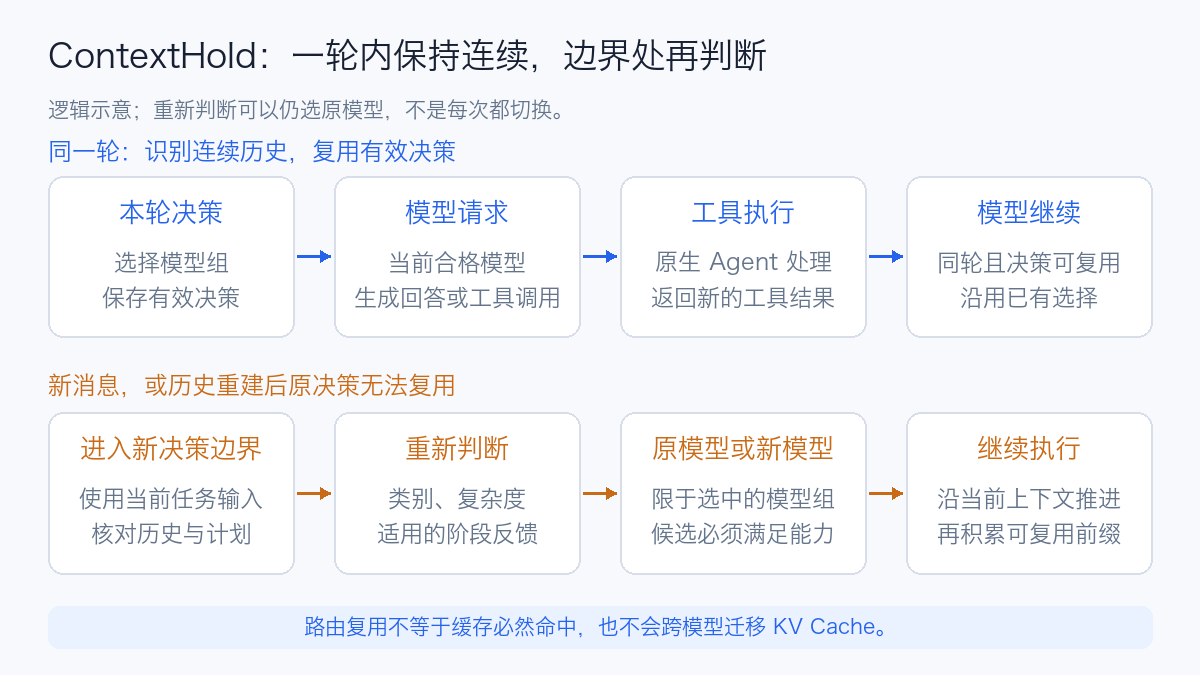
After an Agent receives a user instruction, it may read files, search, run commands, and send results back to the model in sequence. These tool round-trips still belong to the same round of work. ContextHold reuses the existing selection when it identifies the same round, continuous history, and a frozen decision that can be reused, and tries to keep the current qualified model within the selected group.
A new user message triggers re-evaluation; re-evaluation also occurs when context compression or history reconstruction makes the original decision unusable. Re-evaluation can still select the original model, and compression is not an unconditional switch instruction. Context and decision boundaries
The benefit of this design is twofold: it reduces repeated decision requests and creates a continuous context prefix for upstream KV Cache reuse. What it maintains is routing and context continuity; it does not move one model's KV Cache to another model. Whether the cache hits is still determined by the upstream implementation, prefix, lifecycle, and actual requests.
A maintenance coding workflow illustrates this: when reading ten files and running five tests, the model continuously sees the same history; if the model were re-selected after every tool return, each cache might not carry over. Only at a new requirement or a genuine history-reconstruction boundary is it worth evaluating whether to switch capabilities, making it easier to account for the cost of switching.
Therefore, cost-reduction evaluations should record cache reads, missed-token input, output, and decision costs simultaneously. Looking only at the proportion of economy-model calls cannot determine whether a long task ultimately paid off. For cache principles, see the KV Cache overview.
6. Failover, Quality Protection, and Task Recovery
These three behaviors handle different problems:
| Situation | Required Handling | HiRoute's Current Boundary |
|---|---|---|
| Provider rate limiting, candidate temporarily unavailable | Fail over among allowed candidates | Limited attempts in candidate order; explicit failure when exhausted |
| Previous stage performed poorly | Increase capability at the next valid decision | Applicable stage low scores can protectively select the primary group |
| Worker submission response lost, process interrupted | Determine the original task state, then recover or continue | Retains submission identifiers and native sessions, handled according to the specific executor's capabilities |
The savings group can fail over to the primary group in the same category; a directly selected primary group will not downgrade back to the savings group just to make the request succeed, nor will it cross into other task categories. Requests must also satisfy capability requirements such as images, tools, and context; candidates cannot be swapped arbitrarily just because the API formats look similar. Candidate and decision execution
Once streaming responses have begun delivering content to the client, another model cannot be silently spliced in to finish the same response. The client may have already consumed part of the content, so the true failure state must be preserved. Streaming delivery rules
At the task level, Worker admission saves the submission intent, and Continue binds to the original task and native session; when no usable history can be found, a new session should not be started to impersonate a resume. This does not mean arbitrary Shell commands are transactional: files already written, messages already sent, or external changes still need to be verified separately. Worker lifecycle
7. What the Official Experiments Can Show
HiRoute has published research delivery, HTTPX coding, and subsequent writing experiments. When reading them, the original tasks, quality thresholds, and failure samples should be preserved; below only the results directly relevant to routing value are excerpted.
7.1 Research Delivery: Cost Advantage for a Specific Task
The task included six messaging systems, 60 verification cards each, and a Kafka/SQL consistency memo. The hybrid mode let Qwen handle the bulk of the material work while Astra performed the critical judgments. Across three paired runs, pairs 2 and 3 both met the original full-order threshold; pair 1's hybrid delivery did not meet the threshold and cannot serve as a successful cost-reduction sample.
| Pairs where both met the threshold | Hybrid mode cost upper bound | All-Astra cost lower bound | Official conservative reduction |
|---|---|---|---|
| Pair 2 | $0.146806 | $1.838882 | 92.01% |
| Pair 3 | $0.177957 | $2.067170 | 91.39% |
Source: research task, quality thresholds, and full costs. These are API-equivalent costs converted at frozen prices, not subscription bill reductions; the original records include attempted trials, structural retries, and reported decision costs. This supports the benefit within this pre-designed task and does not constitute proof that all tasks are of equal quality or can all reduce costs by ninety percent.
7.2 HTTPX: Stage Failover in a Long Task
One officially recorded HTTPX streaming JSON encoding task took approximately 31 minutes 36 seconds, with 40 business model requests. After the second native context compression, the stage score was 0.485, below the 0.5 floor, after which Astra continued tool execution; all 343 assertions in the independent acceptance passed. This is a single historical execution with no all-Astra cost comparison, so no savings ratio can be derived from it. Task and independent acceptance records
What is more worth learning from here is the evidence chain: it records both the switch and the distinction between "only generated a summary" and "actually started modifying code." A model change does not by itself mean the task outcome has improved.
7.3 The Subsequent Writing Experiment Was Not a Comprehensive Win
In another set of public records, all four final drafts from the all-GLM configuration met the editorial threshold, while the hybrid group with Qwen writing and GLM reviewing showed no quality gain; some review stages even fell back to the default writing branch due to decision timeouts. The records also preserve interruptions, observation gaps, and scoring limitations. Decision routing experiment results
These results remind us that multi-model combinations do not automatically improve quality. Division of labor definitions, judgment reliability, actual execution attribution, and independent acceptance all need to be checked; stage competence cannot be directly treated as a calibrated quality score.
8. How to Get Started
For initial integration, it is best to first establish a fixed model path, confirm native tool calling, streaming completion, and usage records, and only then introduce the decision model and two model groups. This way, when problems arise, it is easier to distinguish between protocol integration, routing judgment, and the execution model itself.
8.1 Desktop and Linux
For the desktop version, choose the package matching your platform from the official Release. The official Linux installer runs under the current user and does not require sudo; if you want to inspect the script first, you can execute it step by step:
curl -fsSLo hiroute-install.sh https://hiroute.ai/install.sh
less hiroute-install.sh
sh hiroute-install.sh

hiroute service start --output json
hiroute system status --output json
The installer above selects the latest stable version at the time. For fixed-version evaluation, keep the corresponding Release package, checksum information, and version number separately. Installation does not automatically start the service; environments without a systemd user service can use hiroute service run to run in the foreground. Linux installation guide
The configuration order is: connect the model source, create and publish a plan, connect the Agent, then check actual requests. Editing a draft does not immediately replace a published plan. CLI automation should first check the local schema and help output to avoid sending new fields added on the main branch to older programs: CLI reference
hiroute schema list --output json
hiroute compute list --output json
hiroute routing list --output json
hiroute agents list --output json
hiroute sessions status --output json
8.2 From Task Submission to Result Retrieval: Walking Through the Full Flow with One Real Operation
In this Docker environment, tasks are submitted via the CLI. The read-only evidence page in the local browser is used to view records; you cannot fill in a task on the page and click run. This section first demonstrates manual use of the Worker; the main Agent delegating automatically through tools is another entry point after the same plan and dependencies are established.
This section starts from the ready hiroute-dsh-lab container. Before operating, you need an existing model source, a selected Worker executor, and a published plan with task delegation enabled. This run uses DSH and the lab-deepseek-adapted plan verified through tool calls; when deploying yourself, copy the plan ID of your own instance from the query results, and do not copy an ID produced by another instance. Calling the model API alone only runs model inference; it does not create a Worker task.
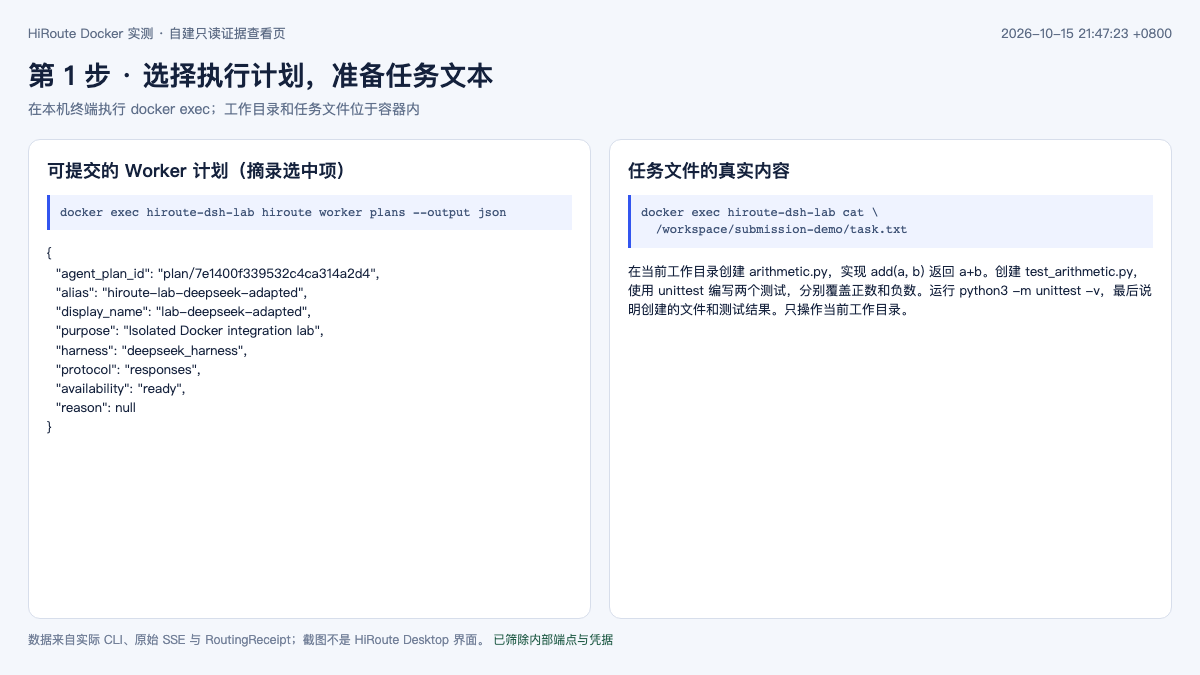
Step 1: Enter the Container and Find a Submittable Plan
On the local terminal, run:
After entering, the hiroute commands below are all executed inside the container:
In the returned data.plans[], focus on these fields:
| Field | Value selected this time | Purpose |
|---|---|---|
display_name |
lab-deepseek-adapted |
Identify the configured plan |
agent_plan_id |
plan/7e1400f339532c4ca314a2d4 |
Passed to the submit command as --plan |
harness |
deepseek_harness |
This plan is executed by DSH |
protocol |
responses |
Protocol used by DSH to access the local HiRoute |
availability |
ready |
Worker submission conditions are currently met |
--plan accepts a plan ID; the display name and model alias in the table have their own purposes and cannot be swapped arbitrarily. ready also does not mean all upstream tool protocols have been verified; this run uses the adapter plan that passed actual testing later. Task routing and dependency requirements
Step 2: Prepare the Project Directory and Prompt
Continue executing inside the container:
PLAN_ID='plan/7e1400f339532c4ca314a2d4'
WORK_DIR='/workspace/submission-demo'
SUBMISSION_KEY='article-submit-demo-20261015-01'

mkdir -p "$WORK_DIR"
cat > "$WORK_DIR/task.txt" <<'TASK'
在当前工作目录创建 arithmetic.py,实现 add(a, b) 返回 a+b。
创建 test_arithmetic.py,使用 unittest 编写两个测试,分别覆盖正数和负数。
运行 python3 -m unittest -v,最后说明创建的文件和测试结果。
只操作当前工作目录。
TASK
WORK_DIR is the container directory visible to the Worker, not the local path with the same name. task.txt stores the task requirements; generated code and test files are also placed in this directory. The identifiers used below are from this real demonstration; when starting a new task in an existing demo container, replace SUBMISSION_KEY, while queries or retries for the same submission keep the original value.
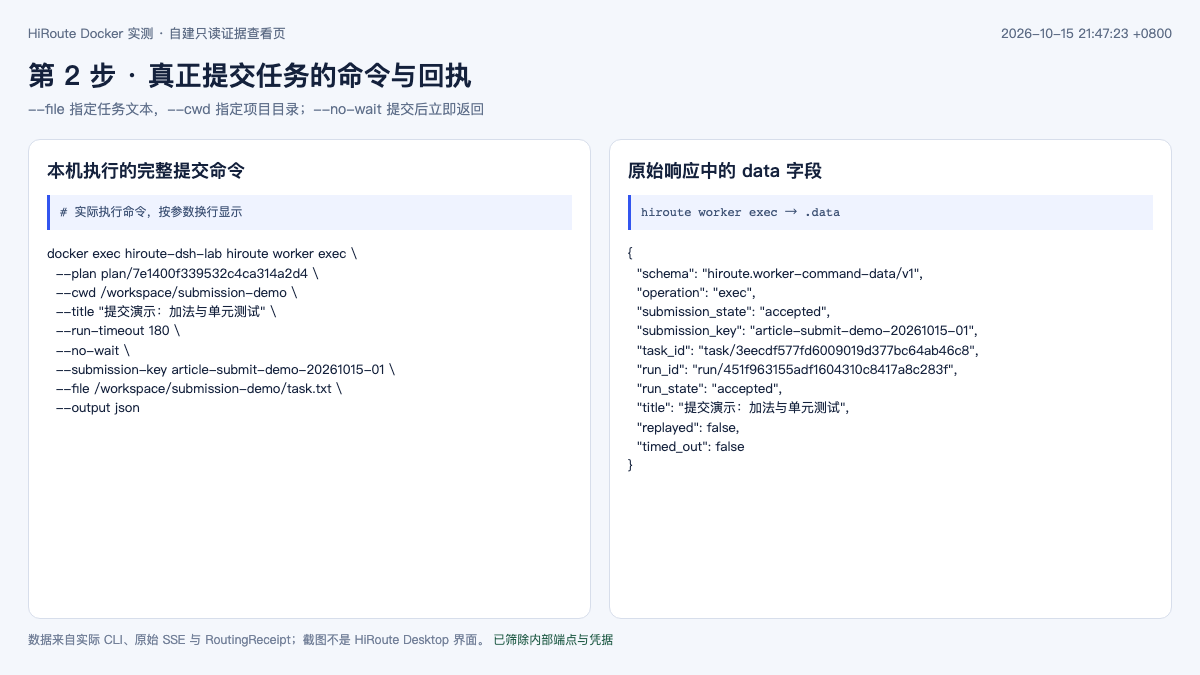
Step 3: Execute the Submit Command
hiroute worker exec \
  --plan "$PLAN_ID" \
  --cwd "$WORK_DIR" \
  --title "提交演示:加法与单元测试" \
  --run-timeout 180 \
  --no-wait \
  --submission-key "$SUBMISSION_KEY" \
  --file "$WORK_DIR/task.txt" \
  --output json
| Parameter | Meaning |
|---|---|
--plan |
Which published plan to use; it determines the execution Agent and model routing |
--cwd |
Which project directory to execute the task in |
--file |
Which UTF-8 file to read the task body from |
--title |
Name used for the task list; the specific work requirements are still in the body |
--no-wait |
Return the task location immediately after submission; execution continues in the background |
--run-timeout 180 |
This execution runs for at most 180 seconds |
--submission-key |
Idempotency identifier for this submission; used to locate the original task if the response is lost |
For short tasks, the body can also be placed directly after --; --file and this form are mutually exclusive:
hiroute worker exec \
  --plan "$PLAN_ID" --cwd "$WORK_DIR" \
  --run-timeout 60 --no-wait \
  --submission-key 'inspect-add-demo-001' \
  --output json \
  -- '读取 arithmetic.py,解释 add 的实现,不修改文件。'
The data receipt for this submission contains:
{
  "submission_state": "accepted",
  "submission_key": "article-submit-demo-20261015-01",
  "task_id": "task/3eecdf577fd6009019d377bc64ab46c8",
  "run_id": "run/451f963155adf1604310c8417a8c283f",
  "run_state": "accepted",
  "replayed": false
}
accepted means it has been accepted; the task has not finished executing at this point. task_id identifies the entire task, and run_id identifies this round of execution; a subsequent Continue keeps the task but creates a new run.
Step 4: Check Progress, Wait for Completion, and Read Results
First query by the submission identifier, especially useful when the terminal disconnected during submission and no receipt was seen:
Save the ID from your own receipt. The two values below are the real values from this screenshot:
TASK_ID='task/3eecdf577fd6009019d377bc64ab46c8'
RUN_ID='run/451f963155adf1604310c8417a8c283f'

hiroute worker status --run "$RUN_ID" --output json
hiroute worker read --run "$RUN_ID" --output json
hiroute worker wait --run "$RUN_ID" --wait-timeout 10 --output json
hiroute worker result --run "$RUN_ID" --output json
These four commands are used respectively to check status, read saved progress, wait with a bound, and retrieve results. wait returns still running, or timed_out=true, which only means this wait ended; it does not mean the task failed or was cancelled. The task's upper runtime limit is controlled by --run-timeout at submission time. Querying progress very early may also temporarily return no readable content; just keep querying the same run.
This record went through accepted → preparing → running → succeeded in sequence. Finally, independently check the files and tests rather than only trusting the Agent's own "done" statement:
ls -l "$WORK_DIR/arithmetic.py" "$WORK_DIR/test_arithmetic.py"
python3 -m unittest discover -s "$WORK_DIR" -v
The actual acceptance result is 2 tests passed, exit code 0. The corresponding complete submission and query records are saved separately as redacted operation log.
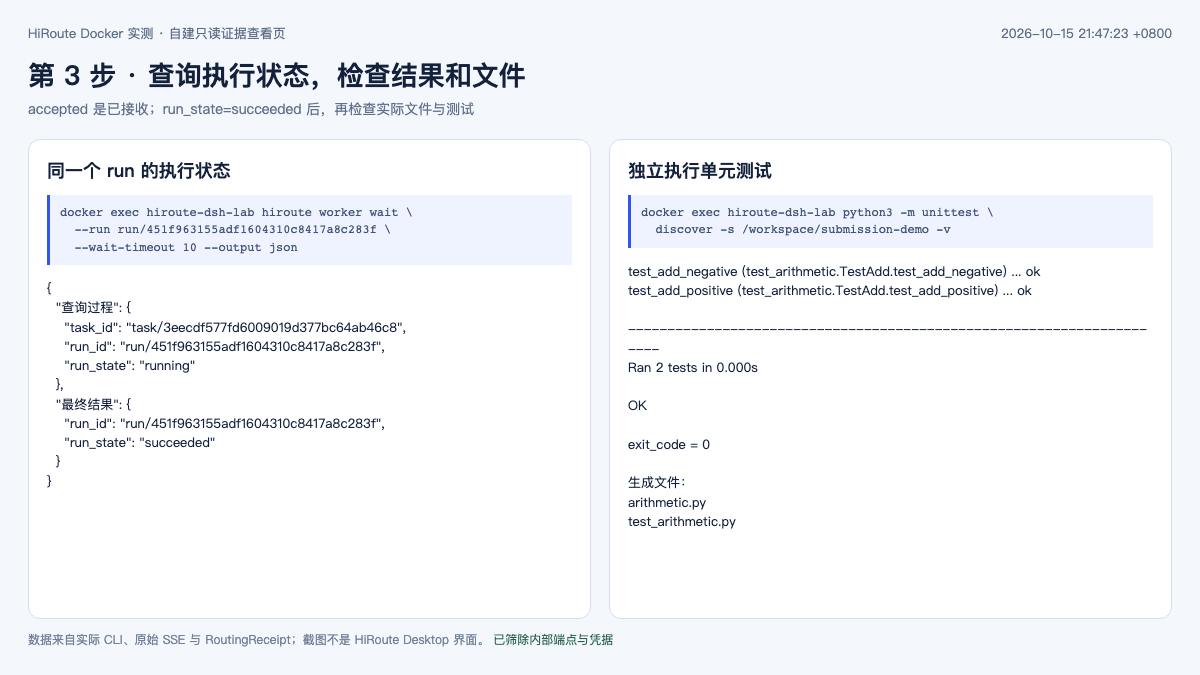
Step 5: Continue the Original Task, or Cancel the Current Execution
To continue modifying on an existing session, use continue and explicitly specify the task's current latest run:
hiroute worker continue \
  --task "$TASK_ID" --expected-latest-run "$RUN_ID" \
  --cwd "$WORK_DIR" --run-timeout 180 --no-wait \
  --submission-key 'add-demo-continue-001' --output json \
  -- '增加 subtract(a,b),把测试扩展到四项并重新运行。'
The new receipt still belongs to the original task, but returns a new run_id. Use this new value for subsequent queries and the next Continue; do not keep using the first round's run as the latest run. The later measured section shows an actual Continue and continued execution after restart.
To stop a particular round, use the precise run ID:
hiroute worker cancel --run "$RUN_ID" --output json
hiroute worker status --run "$RUN_ID" --output json
Cancelling stops that round of execution, but the files already generated still need to be checked by yourself. To retrieve artifacts back to the local machine, first exit to leave the container, then run on the local terminal:
This completes the basic flow from preparing input, submitting, querying, to retrieving deliverables. 0.3.1 CLI contract
8.3 Docker Measured Test: After Connecting DSH, Which Capabilities Actually Worked
This test installed HiRoute 0.3.1 in an independent Docker container, connected to an existing OpenAI-compatible model API, and had DeepSeek Harness perform file operations and tests. The container was limited to 2 vCPU, 4 GiB memory, running Linux ARM64; DSH was 0.2.1-alpha.3, Node.js was 24.22.0. This verifies routing and Agent integration, and does not involve local model loading or GPU throughput testing.
The installation package was pinned to the official ARM64 standalone package from v0.3.1. The file name, size, and SHA-256 in the release manifest were verified first, then the official installer was run. The container used an independent HOME, workspace, and evidence volume, and did not mount the host's Agent configuration. The service was started in the foreground with hiroute service run, without relying on a systemd user service existing in the container.
| Check item | Result this time | Acceptance basis |
|---|---|---|
| Service and local gateway | Passed | control_store, observation_store, gateway are all ready |
| Plain text JSON and SSE streaming | Passed | Returned the specified string; the Responses stream contains response.completed |
| Raw Chat → Responses streaming tool call | Failed | Decoder rejected system_fingerprint; interrupted after the stream had started |
| Raw Responses → Responses streaming tool call | Failed | Native projection reported invalid_lifecycle; no complete termination event delivered |
| DSH Worker after Chat metadata adaptation | Passed | Actually created two files; independent re-run of 2 tests passed |
| Continue extending the original task | Passed | Added subtract; independent re-run of 4 tests passed |
| Same submission replay | Passed | replayed=true; returned the original task and original run |
| Continue after container restart | Passed | Native session ID remained consistent; 4 tests still passed after round 3 execution |
| Failover after preferred endpoint 503 | Passed | RoutingReceipt recorded two attempts: 503 → 200 |
| Cancel while running | Passed | Status entered cancelled, cleanup=complete; waiting for the process to exit |
The four images below are screenshots from the local read-only CLI evidence viewing page: service status and Worker results read the actual container in real time; protocol differences and failover records read the original experiment files. The Linux standalone has no official Web Console available for this version, so these screenshots do not represent the HiRoute Desktop interface; internal endpoints and credentials were not exported. The redacted field snapshot corresponding to the screenshots can be used to verify displayed values.
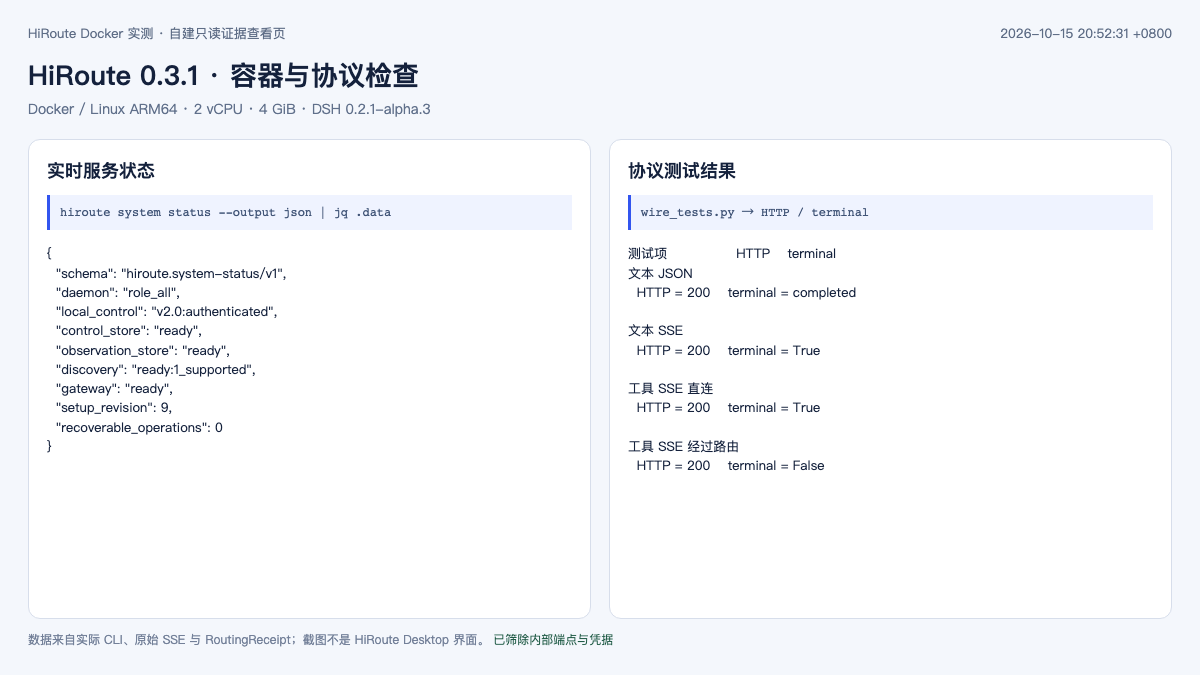
Verify the Complete Protocol First, Then Let the Agent Work
On first connection, the connection check and plain text both succeeded, but the Worker did not write the target file. The error found by following the DSH session log was:
Continuing to compare the raw SSE and HiRoute diagnostic events, the problem split into two paths.
In the cross-protocol path, the upstream Chat stream carried system_fingerprint. HiRoute 0.3.1's diagnostic records explicitly gave stage=decode, reason=unsupported_field, field=system_fingerprint. Some tool parameters had already been delivered, but the termination event was not delivered, so DSH refused to treat this step as a complete tool call.
In the same-protocol path, the upstream Responses tool stream's output_item.added and the final response.completed used different tool id and call_id. HiRoute reported stage=native_projection, reason=invalid_lifecycle. The source code requires the identity of the same tool to remain continuous; the identity change captured this time matches that check, but not all failures of compatible endpoints can be attributed to the same cause. Native tool identity validation
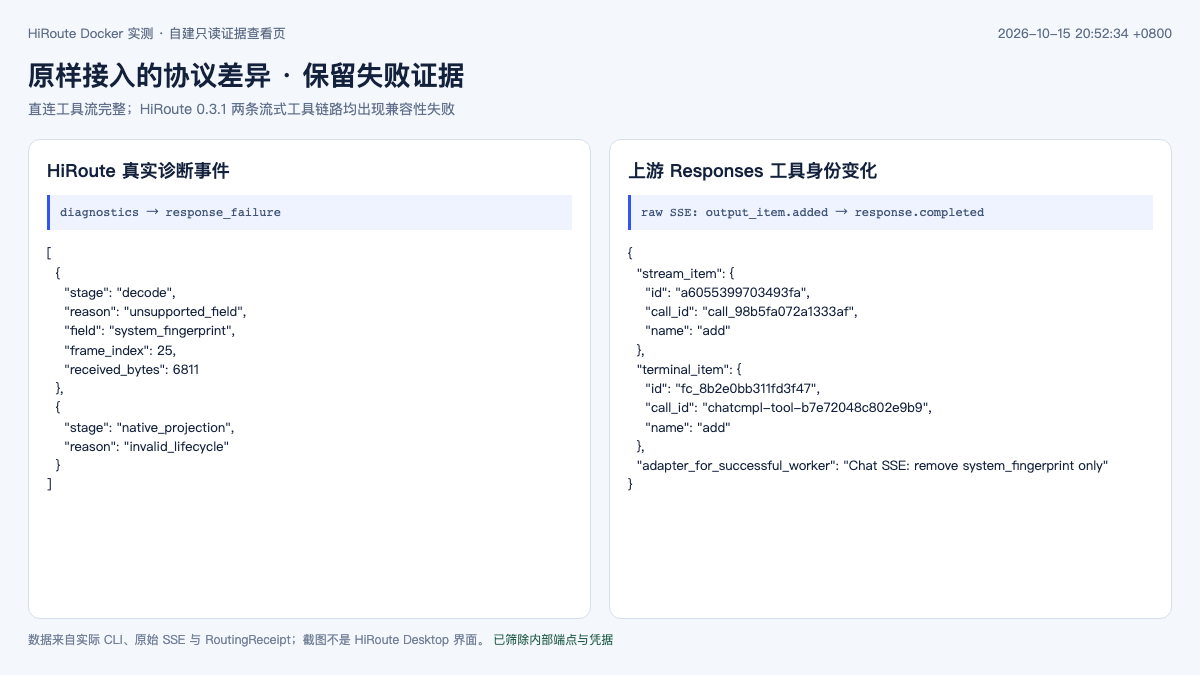
To continue verifying independent capabilities, an adapter layer listening only on the loopback address was added inside the container this time: the Chat SSE only removed the top-level system_fingerprint, without changing model content, tool parameters, usage, completion reason, or [DONE]. The original upstream stream was also preserved separately. After adaptation, the Chat → Responses path was used, and only then did the Worker complete the subsequent tasks.
Therefore, the Worker success in the table is the result of using this adapter layer, and cannot be written as unmodified compatibility of 0.3.1 with the original API. The two failures of raw integration are still counted in the record. The adapter layer also forwarded the existing internal HTTP API; it did not upgrade this upstream connection to TLS. Formal integration should still prioritize providing a certificate-trusted HTTPS endpoint.
Verify Files, Tests, and Native Session Together
The task given to DSH in the first round was:
English reading of the prompt — use the original input below when reproducing the example.
Create
arithmetic.pyin the workspace, implementingadd(a, b); create two tests with unittest, including negative numbers; runpython3 -m unittest -v.
Original prompt (verbatim)
在工作区创建
arithmetic.py,实现add(a, b);用 unittest 创建两个测试,包含负数;运行python3 -m unittest -v。
After the Worker returned success, unittest was run once more separately to confirm the real files exist and both tests pass. In the second round, worker continue was used to point to the original task and the explicit latest run, adding subtract(a, b) and expanding the tests to four. In the third round, the entire experiment container was restarted first, the loopback adapter process was restarted, then Continue was used to read the existing files and re-run the tests.
The three rounds had different runs, the same task, and the same native DSH session ID; the session log showed rounds 1, 2, and 3 in sequence. The final independent acceptance output is as follows:
test_add_negative ... ok
test_add_positive ... ok
test_subtract_negative ... ok
test_subtract_positive ... ok
Ran 4 tests
OK
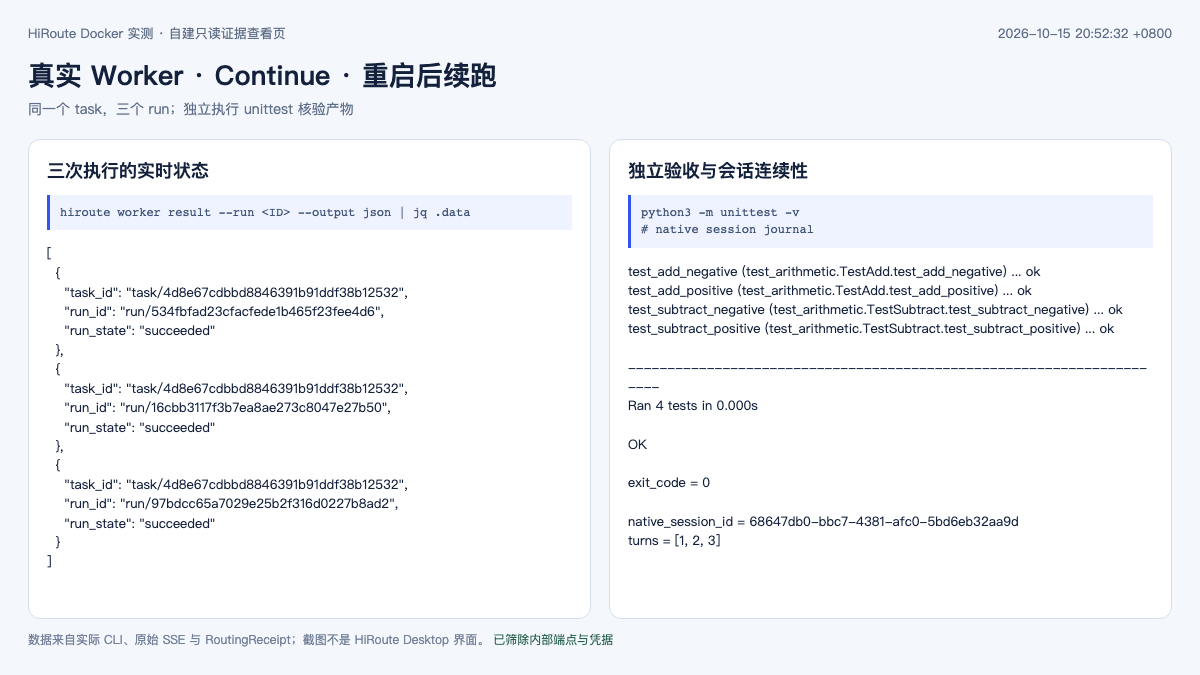
This experiment verified that after completing one round, the service can continue along the original session after a restart. It did not prove that an arbitrary Shell command currently executing can continue from the crash point, nor did it verify that external write operations execute only once. Same-submission replay returning the original run proves task admission deduplication, which cannot be extended to global Exactly Once for business side effects.
Verify Bounded Failover with a Controlled 503
Another fixed-order plan configured two candidates with maximum_attempts set to 2. Both test endpoints passed the connection check first, then only the preferred endpoint of the experiment loopback layer was injected with 503; the shared model service itself was not subjected to fault operations.
| Attempt | Upstream HTTP | Receipt conclusion | Subsequent behavior |
|---|---|---|---|
| 1 | 503 | rejected, transient |
disposition=continue |
| 2 | 200 | accepted |
Full stream ended; Worker returned FAILOVER_OK |
The final request is recorded as attempts_started=2 and accepted_attempt_ordinal=2. For the second request, the upstream reported 3,159 tokens of input and 22 tokens of output, and effective_cost_micros is null. When no trusted price is configured, this null value means the amount is unknown and cannot be taken as evidence that the service is free.
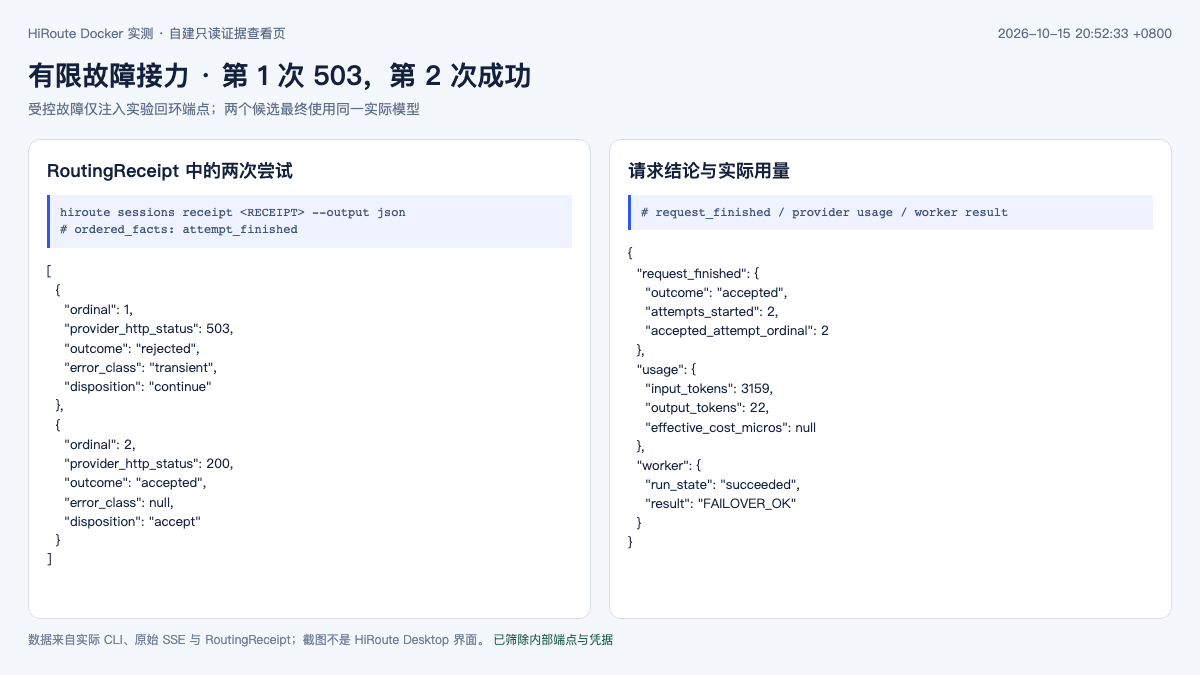
These two candidates ultimately connect to the same actual model service, so only the candidate relay mechanism is verified here. When probing multiple logical model names at first, the model field in the responses reported the same model, so it was not yet possible to confirm that a cross-vendor switch occurred on the backend. Jev decisions, smart cost savings, stage scoring, and multi-model quality-cost comparisons did not produce measured conclusions.
The most practical acceptance sequence for this integration is: correct text → complete streaming → tool parameters and identity continuity → actually executing tools → independently verifying the deliverable → resume and failure relay. Seeing only HTTP 200 or a successful Worker submission is still several steps away from completing the entire task.
9. How to position this in the enterprise and in Kubernetes
9.1 Start from a single-user execution environment
Linux headless is currently based on a single-user environment; it is not an out-of-the-box cluster-level multi-tenant controller. Placing it in Kubernetes can be treated as an integration exploration, but Pods, permissions, networking, storage, and task reclamation still need to be designed by the enterprise itself. Single-user operating boundary
One combinable option for evaluation is as follows; this is not a deployed system:
English rendering — the original text is retained below.
| Location | Suggested responsibility |
|---|---|
| User execution environment | Independent working directory, Agent dependencies, HiRoute state and sessions |
| Enterprise gateway | Identity, tenant quotas, upstream credentials, allowed models, and egress policy |
| Inference platform | Model replicas, GPU scheduling, batching, caching, and endpoint load |
| Enterprise execution platform | Task deadlines, cancellation, resource reclamation, and external action auditing |
When deploying to Pods, it is advisable to start by deploying per user or per isolated workspace, with explicit persistent volumes and directory ownership. Minimal containers typically have no systemd user services; foreground services should be maintained through the container process management approach. The fact that Linux supports headless operation does not mean that replicating the host installation steps completes the Kubernetes integration.
9.2 Local-first and data egress should be considered separately
HiRoute keeps control and execution records locally, but cloud execution models still receive the corresponding inference requests, and the cloud decision service also receives the inputs needed to make its judgment. The model routing guide makes clear that decision inputs include the current full user input and a retained portion of execution history, so "local-first" cannot be inferred to mean that data never leaves the machine. Decision data scope
If the enterprise requires code or business materials to remain on the internal network, the destination addresses of both the execution model and the decision model must be constrained; switching only the business model to a self-hosted service is not sufficient.
The Worker's default approve-all policy allows a fairly broad range of file, command, and network operations, and it does not provide OS-level sandboxing. Multiple tasks sharing one directory may also overwrite each other. Container isolation, separate Git workspaces, and least privilege each still have their own role; cancelling a task cannot undo side effects that have already occurred. Worker permission boundary
9.3 Observability should span the entire task
HiRoute's local session records can explain "why it was chosen" and "what was actually executed"; the enterprise gateway and inference service can provide traffic, latency, and GPU load. When integrating with dashboards, these sources need to be correlated to the same task rather than looking only at the success rate of a single layer.
| Observation target | Suggested records |
|---|---|
| Routing decision | Decision latency, timeout ratio, default-branch fallback, difference between actual group and planned group |
| Model execution | Request errors, time to first token, time per output token, cache reads, and full usage |
| Entire task | Independent acceptance, completion duration, duplicate submissions, cancellation, and manual intervention |
| Stage evaluation | Number of scored vs. unscored items, proportion of partial evidence, consistency between scoring and independent acceptance |
| Cost | Model billing including cache and failed attempts, decision fees, execution environment, and manual acceptance fees |
This is an observability design suggestion; this article does not verify that HiRoute ships a Prometheus scrape endpoint or a ready-made Grafana dashboard. Existing enterprise monitoring still needs to confirm the metric sources and label semantics, so that a local observation module is not directly equated with a scrapable exporter.
10. My assessment
HiRoute's most valuable aspect is turning stage-level model selection into an execution policy that can be configured, tracked, and reviewed: it preserves context within the same turn while allowing capability to be re-selected at appropriate boundaries, and it records the selection rationale separately from actual execution.
It suits work where model capability requirements change noticeably, where multiple Agents or model sources are already in use, and where there is a clear acceptance method. If there is only one stable model, or the task is inherently short, adding a decision service may introduce more waiting and configuration cost; if the need is only unified enterprise authentication and rate limiting, the gateway layer can usually handle that.
What truly needs to be verified is not "whether a cheaper model was successfully invoked," but whether the entire task is more cost-effective and involves less rework at the same delivery threshold, and whether the failure process remains explainable. Both the official positive and negative experiments are worth using as references for designing an evaluation methodology.
Related content: Higress AI Gateway, AI Gateway and intelligent routing, Agent Harness, Agent evaluation methodology, Resuming long-running Agent tasks after interruption.
References
- HiRoute official repository
- 0.3.1 release notes
- Model routing guide
- Task routing guide
- Decision model and routing mechanism
- Decision extension API
- Linux installation guide
- Research delivery experiment
- HTTPX long-task relay experiment
- Subsequent decision routing experiment
- Model switching and cache cost analysis