Qwen-Image-2.1: SGLang vs vLLM-Omni Measured on a Single L20
Qwen-Image-2.1 is a unified image generation and editing model in the Qwen family. The official model card lists the visual generation component as a 7B-parameter, 32-layer Single-Stream DiT, supporting text-to-image, image editing, and native RGBA transparency. It also supports up to 10 reference images, local editing via bounding-box selection or masks, and improved text layout, identity preservation for people and products, texture, and lighting.
The capacity profile of this model is very different from text LLMs. A parameter count of only 7B does not mean that a dozen or so GB of GPU memory is enough to serve it stably online: the text encoder, DiT, VAE, attention workspace, CUDA Graph, and output resolution all consume GPU memory. This article deploys the full BF16 model on a single NVIDIA L20 48 GB and verifies SGLang Diffusion and vLLM-Omni separately, then measures end-to-end performance using the same set of prompts, seeds, resolutions, and sampling steps.
The experiment is split into two parts: first, a 1024×1024 concurrency baseline is established for SGLang and vLLM-Omni; second, the seven official native 2K aspect ratios, image editing, ¼/10 reference images, and 2048×2048 editing are tested. The high-resolution matrix keeps both the Runtime default configuration and the VAE Tiling configuration, to distinguish between "model support" and "whether the current serving parameters can run to completion stably." Model capabilities and example parameters are available in the Qwen-Image-2.1 official model card.
The model is currently under the Qwen Research License. This article discusses research testing and engineering validation; commercial deployment requires separate license confirmation, and the fact that something runs technically does not mean it is cleared for commercial use.
1. Experiment Configuration and Methodology
Each serving process occupies one GPU of the same model and reads the same read-only model files. For the 1024 baseline, each tier runs 2 warm-up executions followed by 10 formal image generations; the extended matrix runs 1 warm-up and 3 formal requests per tier. Failed requests remain in the original denominator and are not re-run to cover up results. The raw JSON, HTTP response, PNG, latency, and SHA-256 of every request are saved outside the Pod and copied back locally for file-by-file verification.
| Item | This Configuration |
|---|---|
| Model | Qwen/Qwen-Image-2.1, BF16 |
| GPU | Single NVIDIA L20, 48 GB GPU memory |
| Serving engine | SGLang Diffusion; vLLM-Omni Preview |
| Resolution | 1024×1024 baseline; seven official native 2K aspect ratios; 2048×2048 editing |
| Inference steps | 40 |
| Concurrency | 1024 baseline: client C1 / C2 / C4; extended matrix: C1 |
| Samples per tier | 1024 baseline: 2 warm-ups + 10 formal requests; extended matrix: 1 warm-up + 3 formal requests |
| Output | Base64 PNG; both regular RGB and RGBA are decoded and verified |
| Prompts | Street scene, Chinese/English text layout, product photography, transparent paper-cut; multi-reference product catalog editing |
| Metrics | Successful images/minute, P50/P95 end-to-end latency, total wall-clock time |
The extended matrix does not use synthetic prompts of only a few words. Three representative original prompts are listed below for reproducibility and to show what the model actually needs to preserve:
| Use case | Prompt |
|---|---|
| Seven native aspect ratios | A premium editorial photograph of a translucent crimson glass teapot on a black stone pedestal, dramatic studio lighting, fine caustics, crisp details, clean composition adapted to the requested aspect ratio |
| 4 reference images | Create a clean 2 by 2 product catalogue using <image1>, <image2>, <image3>, and <image4> in that order. Preserve every numeral and its original colour. |
| 10 reference images | Create a museum collection poster containing all ten reference cards from <image1> through <image10>, arranged in numerical order in two rows. Preserve each numeral and its unique colour; do not omit or duplicate a card. |
Reference images are generated with a deterministic script, and SHA-256 is verified file-by-file in the final ConfigMap; therefore the 1-, 4-, and 10-image tests read the actual deployment package, not a same-named file elsewhere on the test machine.
SGLang uses a single-request dynamic batching cap; vLLM-Omni uses --max-num-seqs 1. Therefore C2 and C4 describe the behavior of multiple client requests queuing in front of a single active request, not server-side fused batch results. This constraint is key to interpreting the data below.
2. Deployment Method
SGLang Diffusion provides sglang generate, sglang serve, and an OpenAI-compatible API. This test uses speed mode, the FlashAttention backend, and Metrics:
sglang serve \
  --model-path /models/Qwen-Image-2.1 \
  --model-id Qwen-Image-2.1 \
  --num-gpus 1 \
  --performance-mode speed \
  --attention-backend fa \
  --host 0.0.0.0 \
  --port 30000 \
  --enable-metrics
The SGLang runtime comes from the 2026-09-18 Nightly build with a Qwen-Image-2.1 support Revision applied on top. Server logs show model components loading in the order of text encoder, Transformer, VAE, Processor, Scheduler, with the full pipeline module loading in about 25 seconds.
vLLM-Omni model support comes from Preview PR 7759. The runtime versions are vLLM 0.29.0b1, vLLM-Omni 0.16.0.dev0+pr7759, PyTorch 2.13.0+cu129, Diffusers 0.40.0, and Transformers 5.14.1:
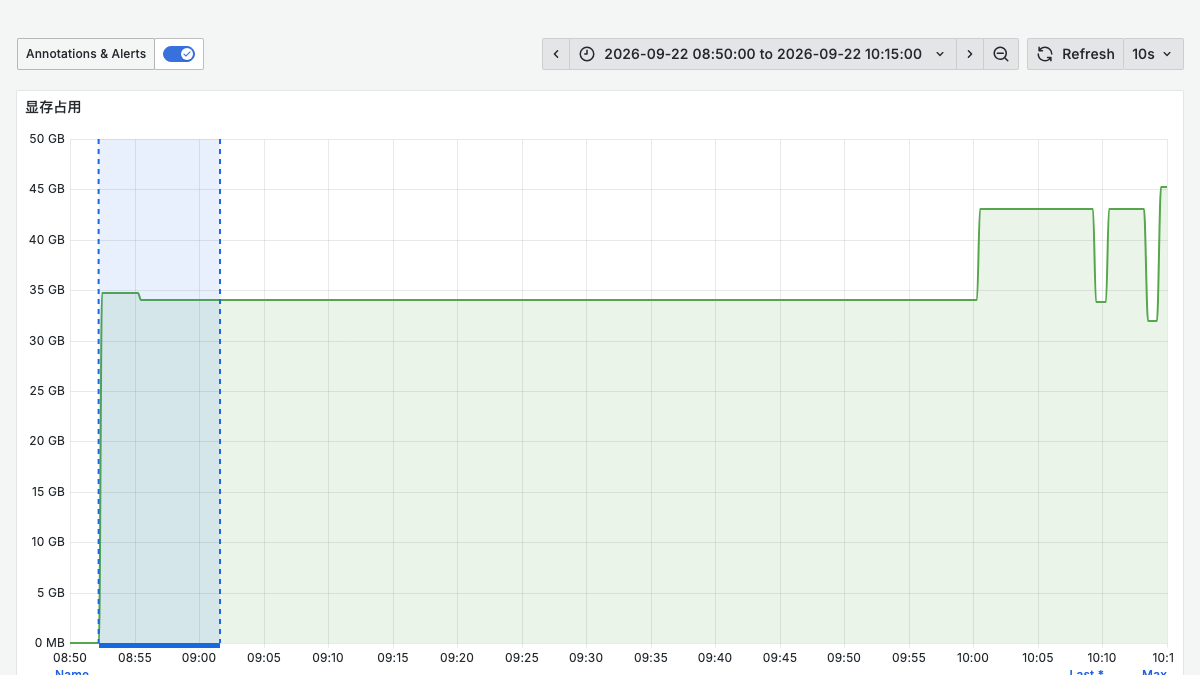
vLLM-Omni logs record a model load time of 28.91 seconds, model loading consuming 30.22 GiB, and process-level GPU memory of 30.58 GiB after loading. At startup, a warning about a major/minor version mismatch between vLLM and vLLM-Omni also appeared, so this article refers to it as a Preview result that cannot be extrapolated to the final performance of a future stable release.
After the default configuration hit out-of-memory in the VAE decode stage for some 2K aspect ratios, the follow-up test added only two memory-related settings, without reducing resolution, steps, or the number of reference images:
# SGLang
export PYTORCH_CUDA_ALLOC_CONF=expandable_segments:True
sglang serve ... --vae-tiling

# vLLM-Omni
export PYTORCH_CUDA_ALLOC_CONF=expandable_segments:True
vllm serve ... --max-num-seqs 1 --vae-use-tiling
VAE Tiling splits the decode process into smaller regions, reducing peak GPU memory at the cost of extra boundary handling and a small amount of time overhead. The default configuration and the Tiling configuration start separate services, so results are not mixed within a single process lifetime.
The first vLLM-Omni deployment failed before GPU scheduling: the image acceptance script treated git as a required dependency, but the final runtime image did not have Git installed. The second attempt changed to reading the version numbers and module paths of installed Python packages, after which GPU Pods were allowed in. This fix did not change model parameters or performance methodology, nor did it consume a wasted GPU load.
3. Functional Verification: Are Text and Transparent Images Actually Usable
Performance numbers only matter if the image pipeline is correct. This round uses the following 5 prompt categories with fixed initial seeds 42–46; the second round uses 47–51.
| Use case | Prompt summary | Acceptance focus |
|---|---|---|
| Realistic street scene | Rain-soaked Shanghai street corner with a red vintage bicycle | Subject, lighting, reflections, and detail |
| Chinese poster | Center shows only "让想象发生" | Glyph shapes, typos, and layout |
| English poster | CREATE WITHOUT LIMITS |
Letter completeness and centered layout |
| Product photography | Semi-transparent red glass teapot | Material, caustics, and background control |
| Transparent asset | Red paper-cut dragon, no background | PNG Alpha channel and subject edges |
First, the actual generated results from both engines. The gallery uses the original PNGs from the formal stress test; the transparent asset is shown on a checkerboard background to display the Alpha channel.
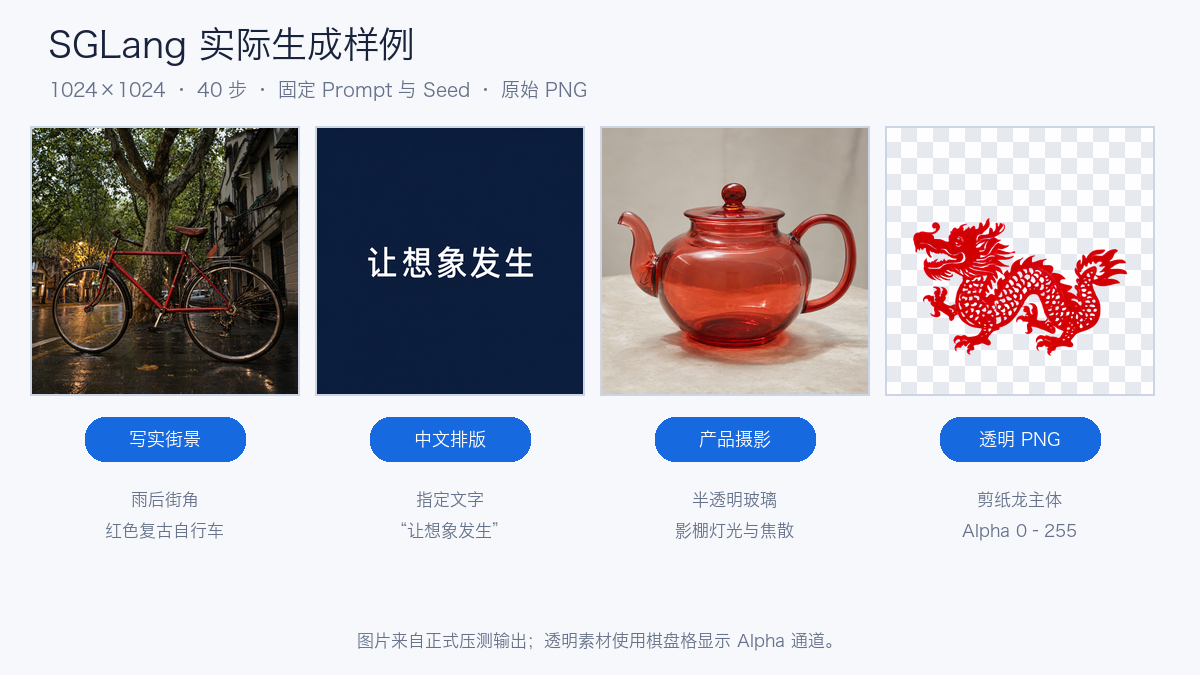
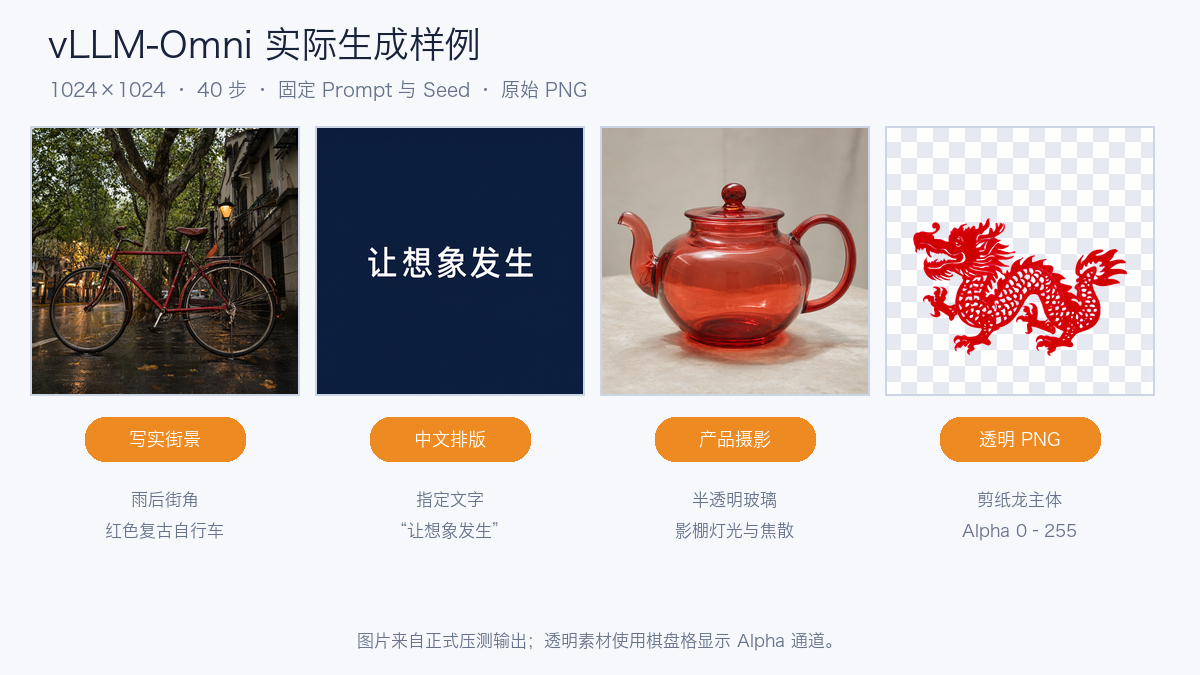
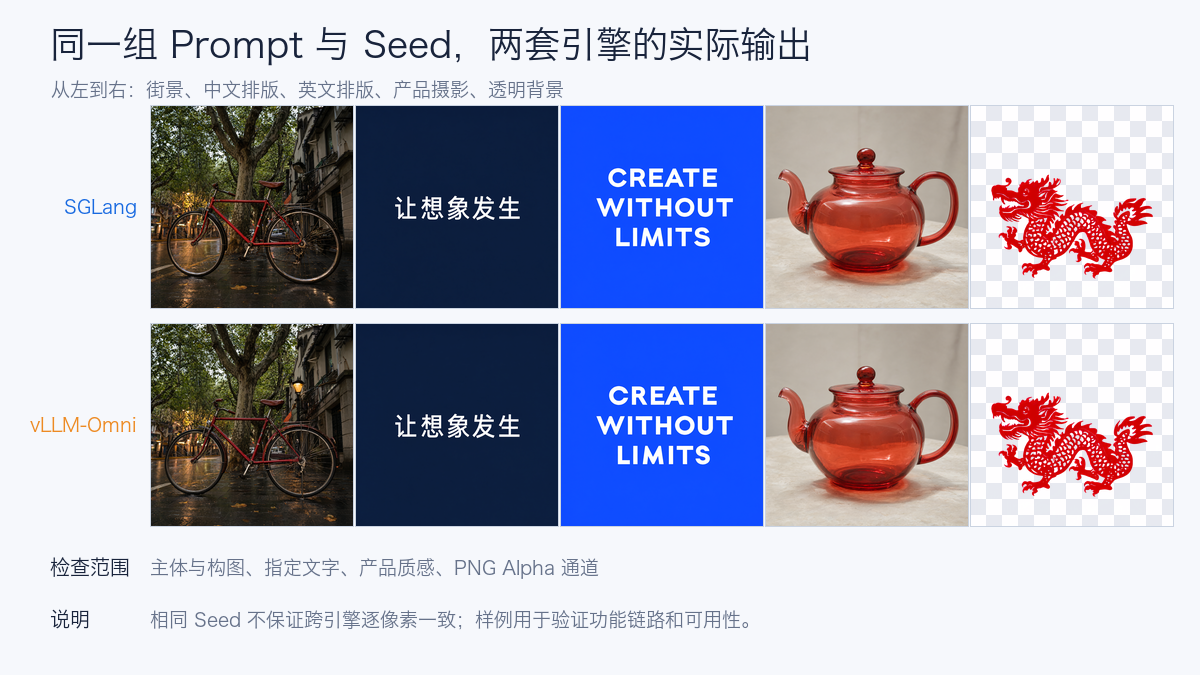
Both engines produced decodable 1024×1024 PNGs. The specified Chinese and English text is fully readable in this sample set; the transparent asset outputs RGBA with Alpha extremes of 0–255, confirming that the background does contain transparent pixels. The same seed does not guarantee pixel-identical results between the two engines, so the samples are used to verify functionality and visual usability, not as a numerical consistency test.
4. Measured Data for SGLang and vLLM-Omni
| Engine | Client concurrency | Success/total | Successful throughput | P50 E2E | P95 E2E | Total wall-clock time |
|---|---|---|---|---|---|---|
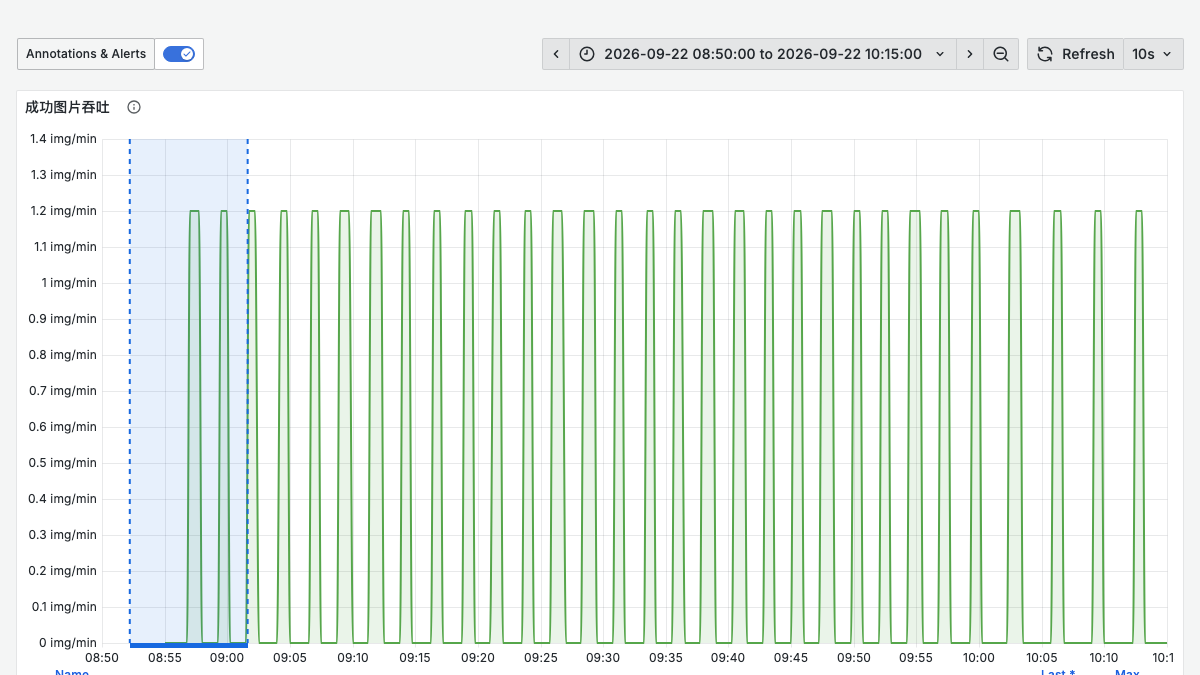
| SGLang | 1 | 10/10 | 2.326 img/min | 25.70 s | 26.20 s | 257.99 s |
| SGLang | 2 | 10/10 | 2.331 img/min | 51.48 s | 51.59 s | 257.39 s |
| SGLang | 4 | 10/10 | 2.329 img/min | 102.99 s | 103.13 s | 257.60 s |
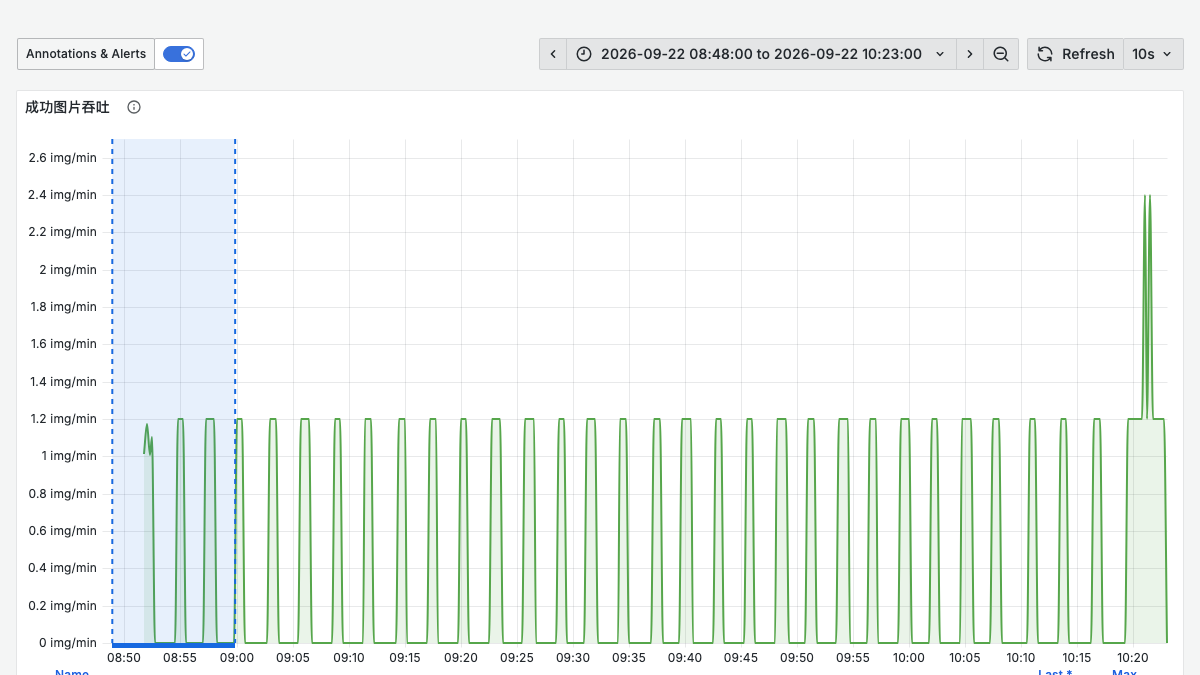
| vLLM-Omni Preview | 1 | 10/10 | 2.016 img/min | 29.25 s | 30.86 s | 297.64 s |
| vLLM-Omni Preview | 2 | 10/10 | 2.054 img/min | 58.34 s | 58.55 s | 292.11 s |
| vLLM-Omni Preview | 4 | 10/10 | 2.055 img/min | 116.79 s | 116.92 s | 292.03 s |
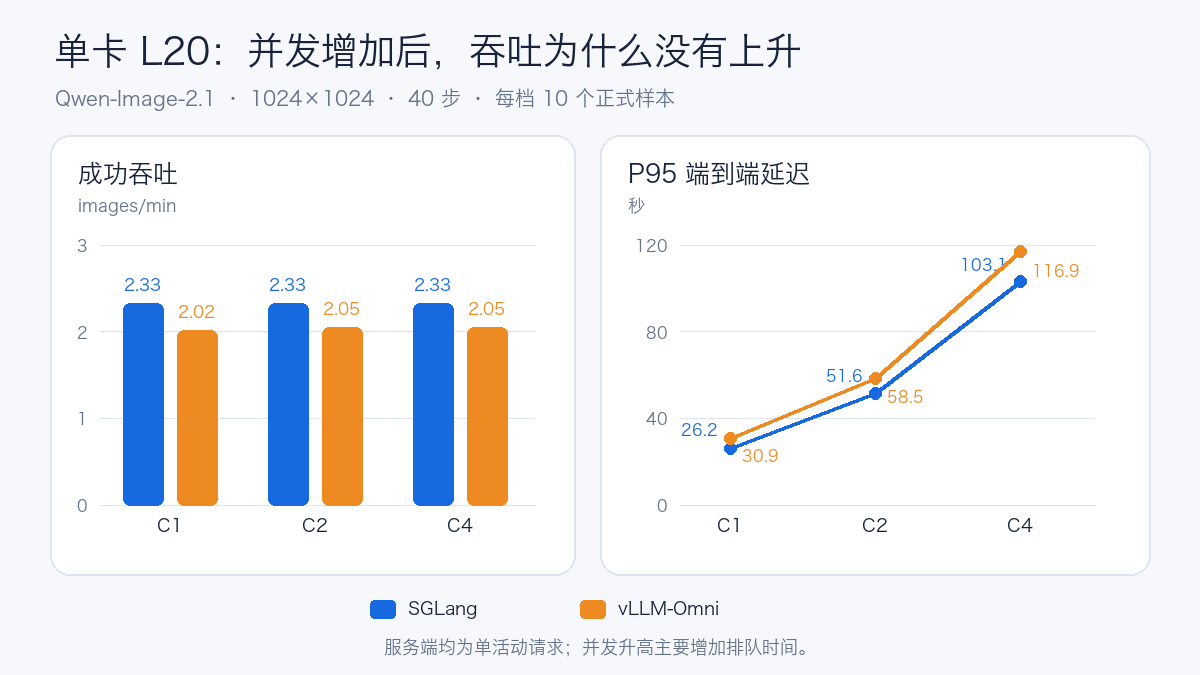
Under this fixed configuration, SGLang C1 throughput is 15.4% higher than vLLM-Omni Preview, and C2 and C4 are 13.5% and 13.4% higher, respectively. The gap applies only to the current Revision, 1024×1024, 40 steps, and the single-active-request configuration, and cannot be written as a general ranking of the two projects.
The concurrency curve is more noteworthy. SGLang stays at about 2.33 img/min from C1 to C4, and vLLM-Omni only moves from 2.02 to 2.05 img/min; meanwhile P95 latency roughly doubles with concurrency. This shows the GPU is serially completing single images, and additional client requests are simply waiting in the queue. The client load tool did send concurrent requests, but the server did not fuse them into the same compute batch.
The vLLM-Omni official documentation offers two follow-up optimization paths: set --max-num-seqs above 1 for request-level batching, or enable the still-experimental --step-execution so compatible requests share Denoise Steps. The official docs also recommend first validating correctness with max_num_seqs=1, then gradually increasing capacity. If batching is tested in the next round, GPU memory, failure rate, image quality, and P95 must all be checked together, not just total throughput.
The redacted per-tier CSV and summary JSON preserve the formal sample counts, wall-clock times, latency percentiles, and the SHA-256 of the source Summary.
5. Seven Native 2K Aspect Ratios: VAE Tiling Determines Stable Operation
The official model card lists seven native 2K aspect ratios. This round keeps 40 steps, Guidance Scale 1, client concurrency 1, with 1 warm-up and 3 formal requests per tier. Times in the table are formal-request P50; FAIL 0/3 preserves the original denominator.
| Output size | SGLang default | SGLang Tiling | vLLM-Omni default | vLLM-Omni Tiling |
|---|---|---|---|---|
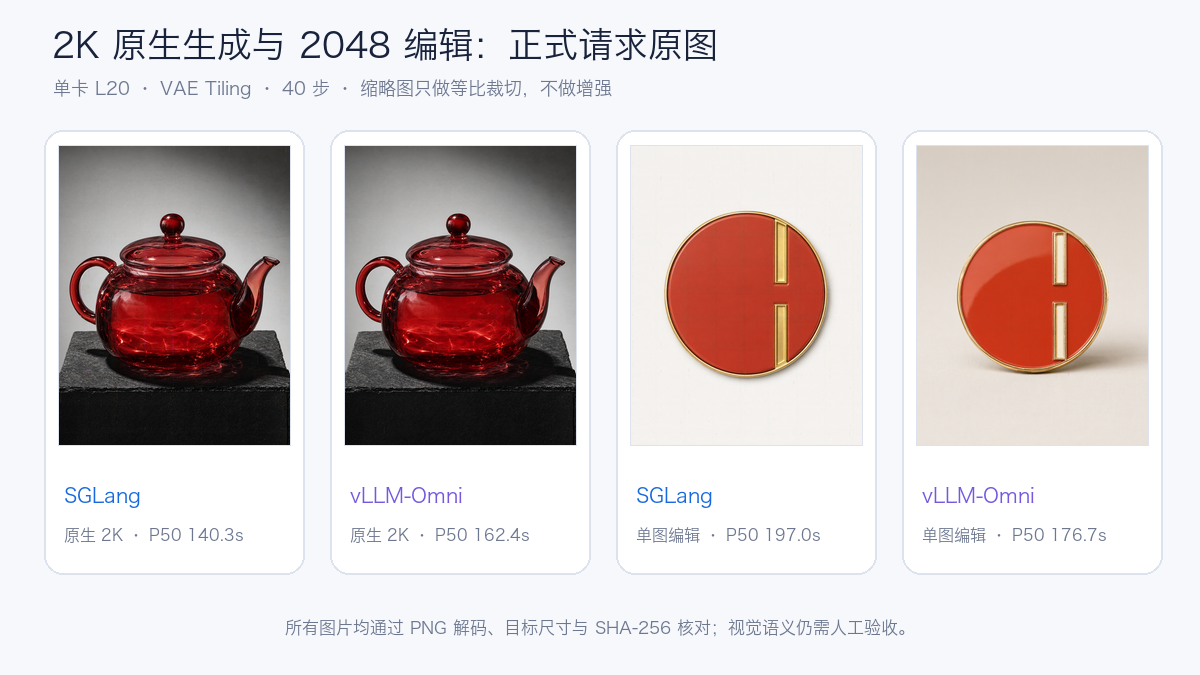
| 2048×2048 | PASS · 140.0 s | PASS · 140.3 s | FAIL · 0/3 | PASS · 162.4 s |
| 2400×1792 | FAIL · 0/3 | PASS · 146.0 s | FAIL · 0/3 | PASS · 169.1 s |
| 1792×2400 | FAIL · 0/3 | PASS · 145.9 s | FAIL · 0/3 | PASS · 169.1 s |
| 2528×1696 | PASS · 143.8 s | PASS · 144.1 s | FAIL · 0/3 | PASS · 167.0 s |
| 1696×2528 | PASS · 143.7 s | PASS · 144.1 s | FAIL · 0/3 | PASS · 166.9 s |
| 2752×1536 | PASS · 140.5 s | PASS · 140.7 s | FAIL · 0/3 | PASS · 163.3 s |
| 1536×2752 | PASS · 140.4 s | PASS · 140.7 s | FAIL · 0/3 | PASS · 163.3 s |
Under the default configuration, SGLang completes 5/7 aspect ratios, with both landscape and portrait 4:3 failing at the VAE stage due to insufficient GPU memory; vLLM-Omni Preview fails all seven tiers at the decode stage. With Tiling enabled, both engines complete 7/7. This shows that "native support" in the model card describes the capability envelope; landing on a single GPU still requires Runtime memory strategy to cooperate.
The average P50 across the seven aspect ratios in the Tiling group is: SGLang 143.1 seconds, vLLM-Omni Preview 165.9 seconds, the latter being 15.9% higher. For the five tiers SGLang already passed under the default configuration, enabling Tiling adds only about 0.2–0.4 seconds; in this data set it behaves more like a stability parameter than a noticeable performance burden.
The four images below are original PNGs from formal requests: the first two are 2048×2048 text-to-image, the last two are single-reference 2048 edits.
6. Image Editing and Multi-Reference Images: Model Capability Is Not the Single-GPU Serving Boundary
The official model card lists a capability ceiling of 10 reference images, but model capability, serving interface, and single-GPU memory are not the same thing. This round increases input stepwise by 1, 4, and 10 images: 1 image verifies the basic editing pipeline and semantic preservation, 4 images verifies multi-image encoding, arrangement, and numbering preservation, and 10 images verifies whether the official ceiling can pass through the current Runtime's interface implementation and single-GPU memory boundary. The 2048 single-image edit is used to observe whether VAE Tiling can turn occasional success into stable pass as resolution increases.
| Engine and configuration | 1-image edit 1024 | 4-image edit 1024 | 10-image edit 1024 | 1-image edit 2048 |
|---|---|---|---|---|
| SGLang default | PASS 3/3 · 30.33 s | PASS 3/3 · 44.49 s | FAIL 0/3 · OOM | FAIL ⅔ · 196.42 s |
| SGLang Tiling | not re-run | not re-run | FAIL 0/3 · OOM | PASS 3/3 · 196.97 s |
| vLLM-Omni default | FAIL 0/3 · OOM | FAIL 0/3 · OOM | FAIL 0/3 · interface cap | FAIL 0/3 · OOM |
| vLLM-Omni Tiling | PASS 3/3 · 34.39 s | FAIL 0/3 · OOM | FAIL 0/3 · interface cap | PASS 3/3 · 176.67 s |
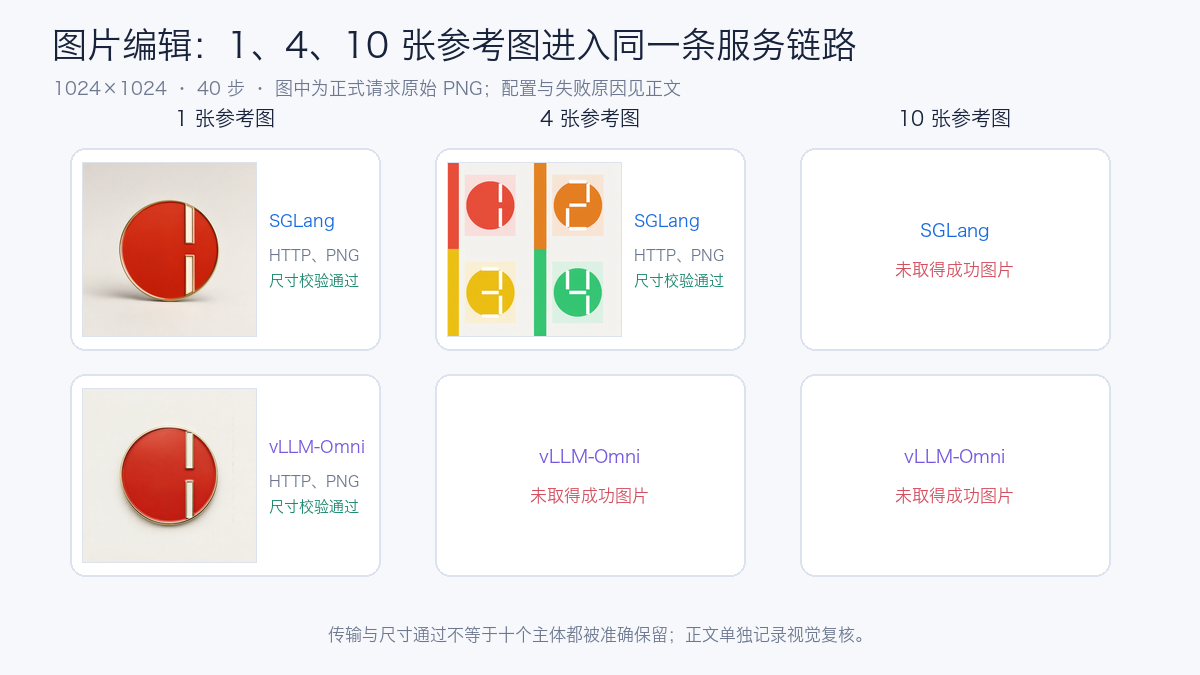
SGLang's default configuration completes 1024 edits for both 1-image and 4-image inputs; for single-image 2048, although two attempts succeeded, the warmup and one formal request failed, so the entire tier is still judged as failed. After enabling Tiling, 2048 edits are stable at 3/3, with P50 around 197.0 seconds. The 10-image input passed upload, encoding, and input validation, then hit OOM at denoising step 0 when attempting to allocate an additional 322 MiB; at that point the GPU had only about 93 MiB left.
With Tiling enabled, vLLM-Omni is stable at 3/3 for both single-image 1024 and single-image 2048; the 2048 edit P50 is about 176.7 seconds, 10.3% lower than this round's SGLang. The 4-image edit hit OOM when attempting to allocate an additional 482 MiB. The 10-image request never entered inference; the current Preview implementation returns HTTP 400 and explicitly limits input to at most 4 images. The official model capability ceiling is 10 images, and the current service interface still does not fully expose this capability.
The 1-image and 4-image samples in the figure passed HTTP, PNG decoding, and dimension checks. The 4-image sample preserved all four colors and the 1–4 arrangement; in the single-image sample, the numbers were processed by the model into graphic-style vertical bars, indicating that protocol success does not equal fully correct edit semantics, and manual or visual evaluation by the model is still required for review.
The extended matrix full CSV and JSON with source file hashes include the default configuration, Tiling configuration, passes, failures, and the denominator of all formal requests.
7. Runtime Resource Records
8. From API to Batch Image Workbench
To keep functional acceptance from being limited to fixed prompts, this round retained a Gradio image workbench. It supports single-image generation and also batch submission of 1–200 images at once, with client parallelism configurable from 1 to 10; the seed can be fully random or increment from a specified value. The page displays progress, success count, failure count, throughput, and estimated remaining time, and allows stopping tasks that have not yet been submitted.
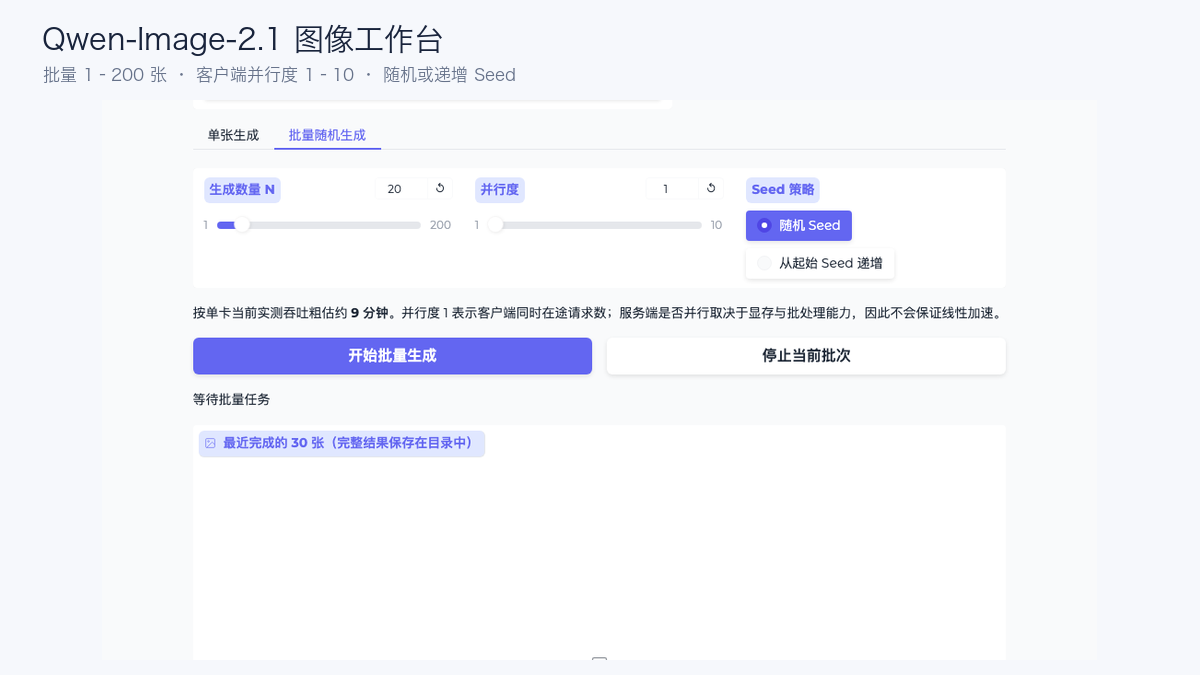
The workbench is deployed separately from the model service; the CPU Pod handles forms, queue, and result indexing, while the GPU Pod only processes image API calls. Each image saves the request JSON, the raw response for every attempt, the result JSON, the PNG, and the SHA-256. The directory is first written to a persistent location outside the Pod, then asynchronously transferred back to the user's machine; Pod recreation does not delete already-generated images.
The client side can access it through local port forwarding without opening a public entry point for the workbench:
Open http://127.0.0.1:7861/ in the browser. Here "parallelism" means the number of concurrent in-flight requests from the client. Based on SGLang's current measured throughput of about 2.33 img/min, 100 images at 1024×1024 with 40 steps take about 43 minutes, and 200 images take about 86 minutes; while the server still limits to a single active request, raising parallelism from 1 to 10 will not yield ten times the speed.
9. API Reproduction
Both engines serve through an OpenAI-compatible image generation interface. The following request can simultaneously verify Chinese typography and Base64 PNG return:
curl -sS http://127.0.0.1:30000/v1/images/generations \
  -H 'Content-Type: application/json' \
  -d '{
    "model": "Qwen-Image-2.1",
    "prompt": "极简科技海报,深蓝背景,中央只显示清晰准确的中文『让想象发生』",
    "size": "1024x1024",
    "num_inference_steps": 40,
    "seed": 43,
    "response_format": "b64_json",
    "output_format": "png"
  }'
Formal acceptance cannot only check HTTP 200. The client should also verify JSON Schema, Base64 decoding, PNG magic number, image dimensions, RGBA channels, file size, and SHA-256; failure responses are kept as-is to help distinguish gateway errors, engine errors, and output parsing errors.
10. Hardware and Production Deployment Recommendations
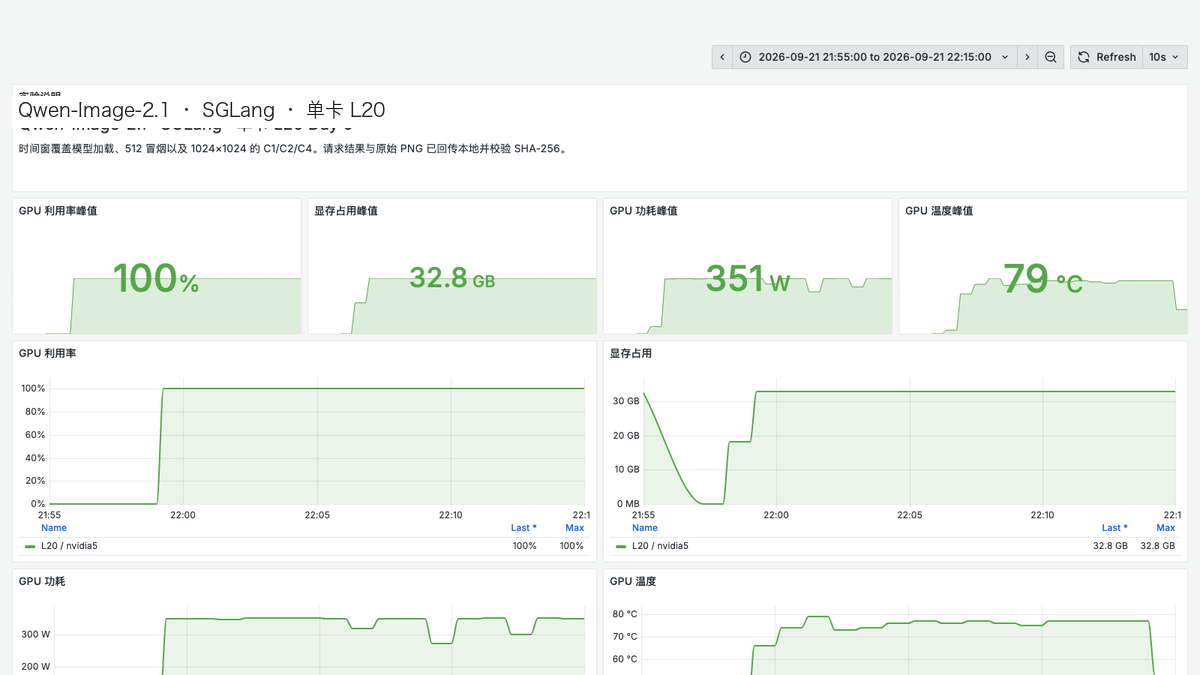
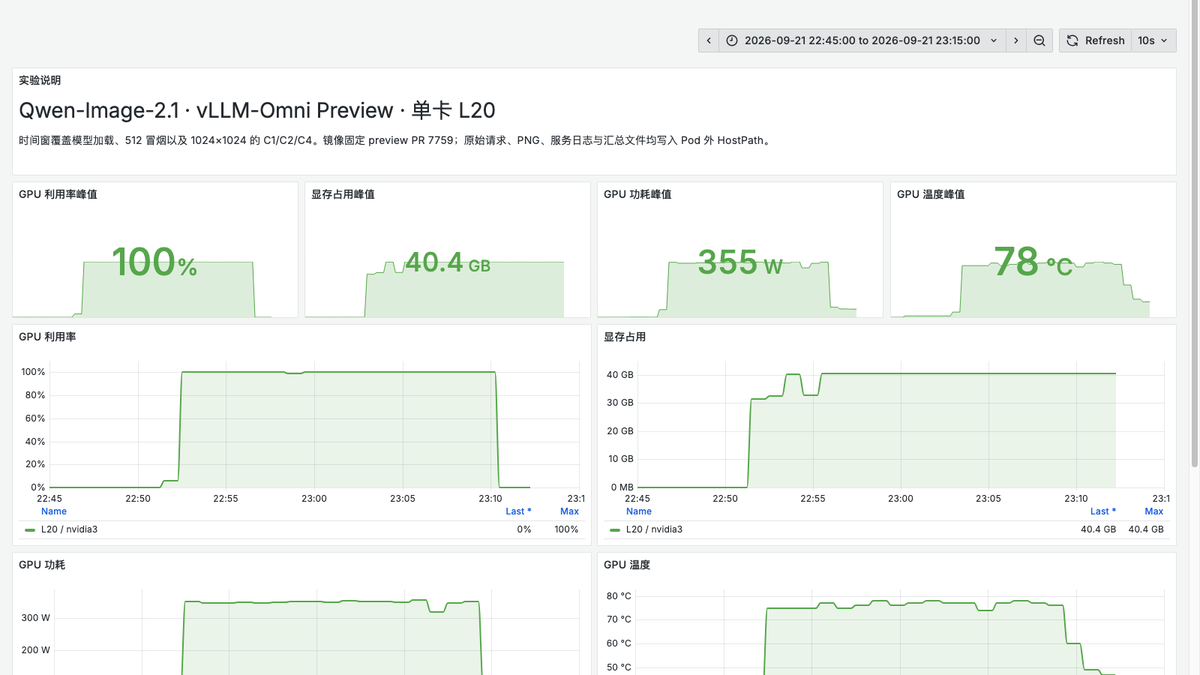
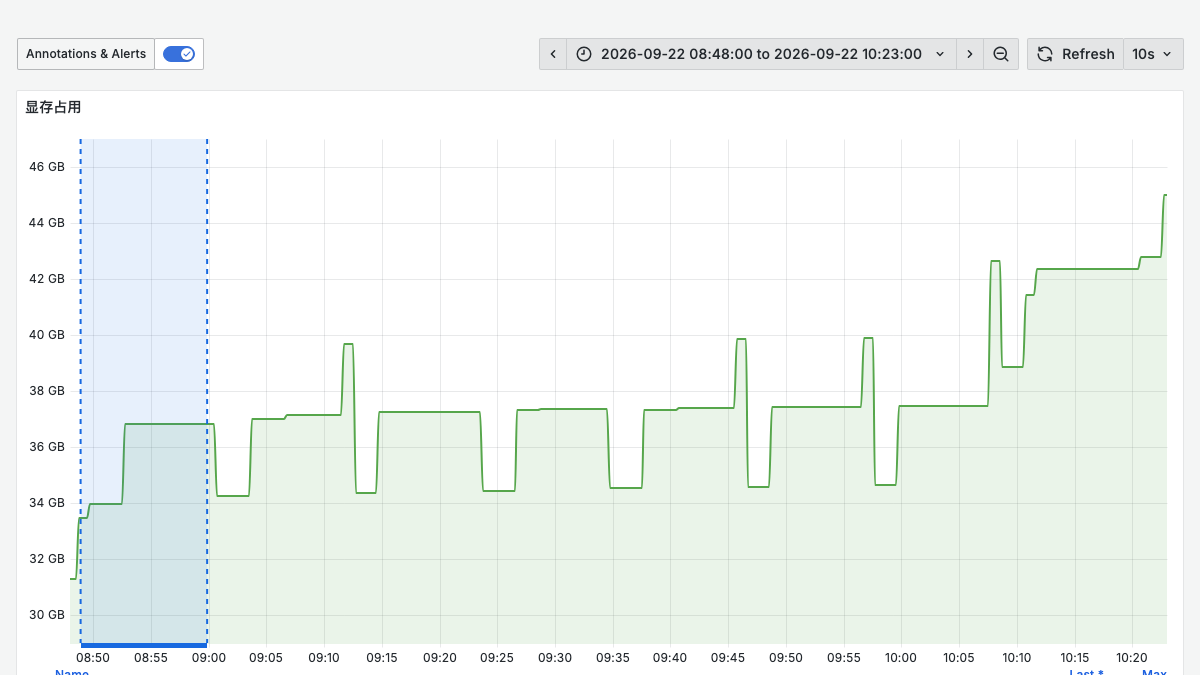
The L20 48 GB is the viable starting point for this complete BF16 single-card deployment. The 1024 baseline peaks are 32.8 GB and 40.4 GB respectively; after scaling to native 2K and the edit matrix, SGLang and vLLM-Omni Preview reach 45.2 GB and 45.0 GB respectively, leaving only about 3 GB of headroom on the card. Production environments also need room for driver differences, CUDA Graph, batching, and occasional fragmentation, so 1024 peaks cannot be used to extrapolate 2K capacity, nor can a single peak be treated directly as the GPU memory request ceiling.
The A30 typically has only 24 GB of GPU memory; per user requirements, no A30 testing was performed this round. Based on the measured peaks from the two L20 setups, the full BF16 runtime cannot fit directly into 24 GB; if the A30 must be used, component CPU Offload, quantization, or multi-card sharding would need to be attempted, accepting PCIe transfer overhead and longer latency. This judgment is a capacity derivation, not a measured A30 conclusion.
For production, the following order can be followed:
- First complete acceptance of fixed prompts, text, transparent PNG, and failure responses with a single active request, then change batching parameters.
- Separate the online workbench, task queue, and GPU engine; limit per-user batch size and global in-flight requests to prevent a 200-image task from occupying the entire service.
- Test 1024, 1536, 2048, and officially recommended aspect ratios level by level; re-record GPU memory peak, single-image latency, and OOM boundaries at each level.
- When vLLM-Omni enables
max_num_seqs>1or Step Execution, form batches from requests with the same size, same CFG, and same LoRA state, and put image quality acceptance before the throughput threshold. - Save generation results to object storage, PVC, or a controlled HostPath; the database only records task and object indexes; set different retention periods for raw responses, PNGs, and metadata.
- Dashboards should simultaneously show queue depth, success/failure rate, end-to-end latency, image throughput, GPU utilization, GPU memory, and power consumption. GPU at 100% alone cannot tell whether users are waiting too long.
- Pin the model Revision, image Digest, Runtime version, and generation parameters. After upgrading SGLang, vLLM-Omni, Diffusers, Torch, or drivers, re-run the same set of functional gates and representative performance tiers.
11. Consumer GPU Deployment: GPU Memory Capacity Is Only the First Threshold
L20 measurements need to distinguish three questions: whether the model can load, whether it can generate one image, and whether it can stably sustain continuous tasks. 48 GB of GPU memory can run the full BF16 pipeline directly; 32 GB consumer cards more likely need VAE Tiling, component offload, or quantization; 24 GB and below usually require even more aggressive CPU Offload. The latter two tiers are not performance measurements from this paper.
As of this paper's testing, the Qwen official repository publishes BF16 weights; the Hugging Face model tree already shows multiple community quantizations. They compress different components, support different GPUs and runtimes, and cannot be selected by download file size alone:
| Route | Community repository and published data | Suitable devices | What to confirm before use |
|---|---|---|---|
| ComfyUI INT8 / W4A8 | Comfy-Org/Qwen-Image-2.1 provides INT8 ConvRot Transformer, plus BF16, INT8 ConvRot, W4A8 text encoders | Priority validation route for 16–32 GB NVIDIA cards | Transformer, text encoder, and VAE must be selected as a set; the repository does not give end-to-end peaks in this paper's terms |
| GGUF Q3–Q8 | Abiray/Qwen-Image-2.1-GGUF Transformer files about 3.19–7.59 GB, loaded via ComfyUI-GGUF | Personal workstations with tight GPU memory that accept component offload | Additional text encoder and VAE still required; the repository's "recommended GPU memory" cannot be read as the entire pipeline's peak |
| W4A4 NVFP4 | ModelsLab/Qwen-Image-2.1-W4A4-nvfp4 reports Transformer file 4.54 GB, resident about 21.53 GB, RTX 5090 1024×1024 40 steps about 7.65 seconds | RTX 50-series Blackwell | SM120 only; text encoder still BF16; repository data needs re-verification with your own prompts and edit matrix |
| MLX 4-bit | ddalcu/Qwen-Image-2.1-MLX-Serve-4bit is a 10.7 GB Text-to-Image Pack | Early experimentation on 16 GB+ Apple Silicon | Depends on a not-yet-released MLX Serve branch; vision tower removed to save capacity, so full editing capability cannot be inferred |
There is also a separate W8A8 FP8 calibration version, but it requires Blackwell, CUDA 13, and a custom loader, and is not a general checkpoint that can be handed directly to ComfyUI, SGLang, or vLLM-Omni. Community repositories release quickly; before production, at minimum verify the source model Revision, quantization scope, license, Runtime Commit, 1024/2048 output, text accuracy, and multi-reference image editing.
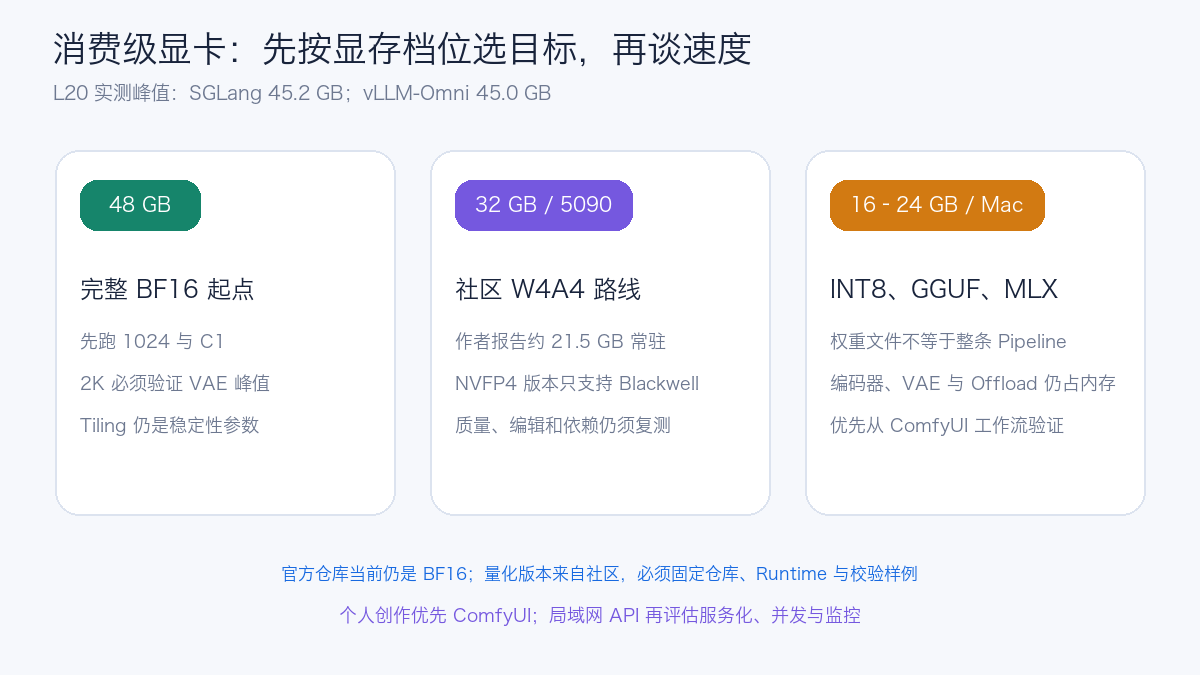
The RTX 5090 provides 32 GB GDDR7, but 32 GB is still below the L20 peaks of some BF16 configurations in this paper. The W4A4 community data shows the 5090 has a chance to fit the full runtime set into GPU memory, but it does not mean BF16 service parameters can be copied as-is. Consumer GPU deployment also needs sufficient system memory and fast NVMe to avoid the text encoder, DiT, and VAE being bottlenecked by memory capacity and PCIe bandwidth when migrating between CPU and GPU. Verification can proceed in the following order:
- Start with 1024×1024, single request, 40 steps; record process GPU memory peak and single-image latency;
- Re-measure after enabling VAE Tiling, quantization, or component-level CPU Offload; confirming the model process did not OOM is not enough;
- Then verify 2048×2048 and aspect-ratio canvases, observing the instantaneous peak during the VAE decoding stage;
- Personal workstations should prioritize a single-user task queue to avoid memory and GPU memory jitter from continuous browser submissions;
- Save images, request parameters, and seeds to local disk so they can be reproduced and traced after service restart.
Personal creation is better suited to Diffusers or ComfyUI combined workflows; LAN API, batch tasks, and unified monitoring are better served by adding an SGLang or vLLM-Omni service layer. A more realistic goal for consumer GPU deployment is stable completion of C1, not directly pursuing multi-user concurrency.
12. NSFW Should Be Treated as a Governance Issue
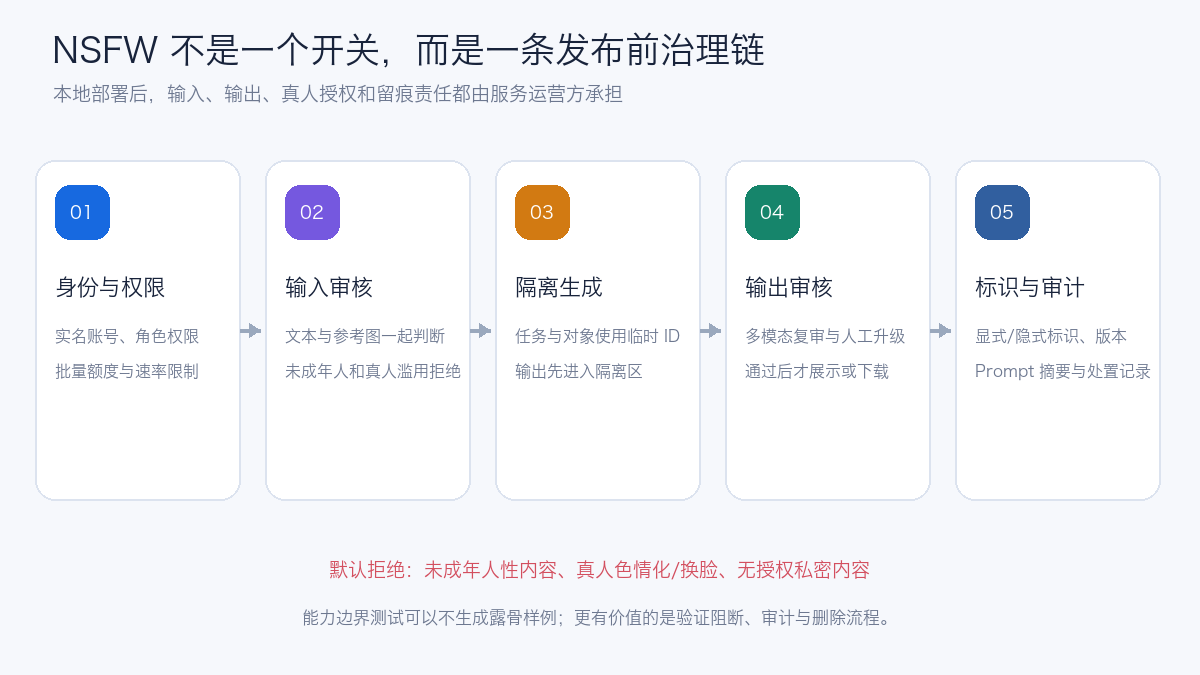
NSFW (Not Safe For Work) is not a single category. Artistic nudity, adult suggestion, explicit content, sexualized editing of real people, and content involving minors have completely different risk levels and handling requirements. The Qwen-Image-2.1 model card does not declare a built-in Safety Checker; after locally deploying open weights, input review, output review, user permissions, and audit trail responsibility all fall to the service operator.
Enterprise environments should at minimum establish the following boundaries:
- Sexual content involving minors or suspected minors is directly rejected;
- Sexualized editing of real people, face-swapping, and private content are rejected by default; legitimate business scenarios must obtain explicit authorization and restrict scope of use;
- Input and output each undergo multimodal review; keyword filtering on prompts alone is not sufficient;
- Batch interfaces use real-name accounts, role-based permissions, rate limiting, and audit logs, recording model version, prompt summary, review results, and output object index;
- Generated content carries explicit identifiers and, per applicable rules, implicit identifiers or metadata;
- Set responsible persons and time limits for misjudgment appeals, violation takedowns, and security incident handling.
This paper did not generate explicit samples, nor did it prove capability by disabling filters. For enterprises, a more valuable test is verifying whether the review chain can block violating content before images enter storage, display, or download, and confirming that audit records and deletion processes are actually usable.
References
- Qwen/Qwen-Image-2.1 model card
- SGLang Diffusion official documentation
- vLLM-Omni Diffusion Execution Modes
- vLLM-Omni Serve CLI
- Comfy-Org/Qwen-Image-2.1 community quantization
- Abiray/Qwen-Image-2.1-GGUF
- ModelsLab/Qwen-Image-2.1-W4A4-nvfp4
- ddalcu/Qwen-Image-2.1-MLX-Serve-4bit
- NVIDIA GeForce RTX 5090 official specifications
- Measures for Labeling AI-Generated Synthetic Content
- Provisions on the Administration of Deep Synthesis Internet Information Services
- Interim Measures for the Management of Generative Artificial Intelligence Services