CubeSandbox v0.8.0 Upgrade Lab: Do Old Templates Still Work?
CubeSandbox v0.8.0 adds filesystem snapshots, JuiceFS CoW, extensible scheduling, sandbox restart policies, sandbox metrics and log collection, and broader E2B SDK compatibility. This article records an upgrade of a Kubernetes test cluster from v0.7.3 to v0.8.0 and the results of tests with real sandboxes.
The key finding: upgrading the control plane and node components does not automatically update the runtime captured inside an old template. The old template tested here retained a v0.7.1 shim. Sandbox creation and full snapshots worked, but filesystem snapshots returned snapshot_filesystem_only_unsupported_node. After building a separate template from the existing rootfs, the same filesystem snapshot test passed.
| Item | Result |
|---|---|
| Chart and CubeSandbox components | v0.7.3 → v0.8.0; existing templates, snapshots, and persistent volumes retained |
| Official Helm tests | All 8 passed |
| Source tests | 357 non-E2E Python SDK tests passed; scheduler Go unit tests passed |
| Old and new lifecycle regression | 2 create/execute/delete rounds each; pause/resume, full snapshot rollback, and clone passed |
| Filesystem snapshot | Passed with a new template: files preserved, subsequent writes isolated, and the original process absent from the new sandbox |
| JuiceFS CoW | Single-node template build, two create rounds, pause/resume, snapshot rollback, clone, fs-only snapshot, and fork passed |
fork |
Two children created in one call; file isolation passed |
| E2B Python SDK | Version 2.64.0: create, execute, connect, and execute again passed |
| Sandbox resource metrics | Both running sandboxes appeared in Cubelet host metrics |
| Same-node port mapping | Connection refused in this Pod-network environment; cause remains undetermined |
| Automatic restart | Probe failure triggered a restart; the file without an explicit sync was missing, while a file synced first remained readable |
| S3 external volume and Volume v2 | External-volume I/O, sharing, and snapshot references passed; v2 empty input creation and oversize rejection passed |
These tests used one compute node. Cross-node scheduling, cross-node recovery, and behavior with other CNIs require separate validation.
To show the upgraded system in use, we created three more test sandboxes from the new template. Each ran a command that wrote and read back checkpoint-ready in /workspace/v080-demo/status.txt. One sandbox also produced a filesystem snapshot. The test labels refer to data cleaning, training, and snapshots; this step did not run full data-cleaning or training workloads.
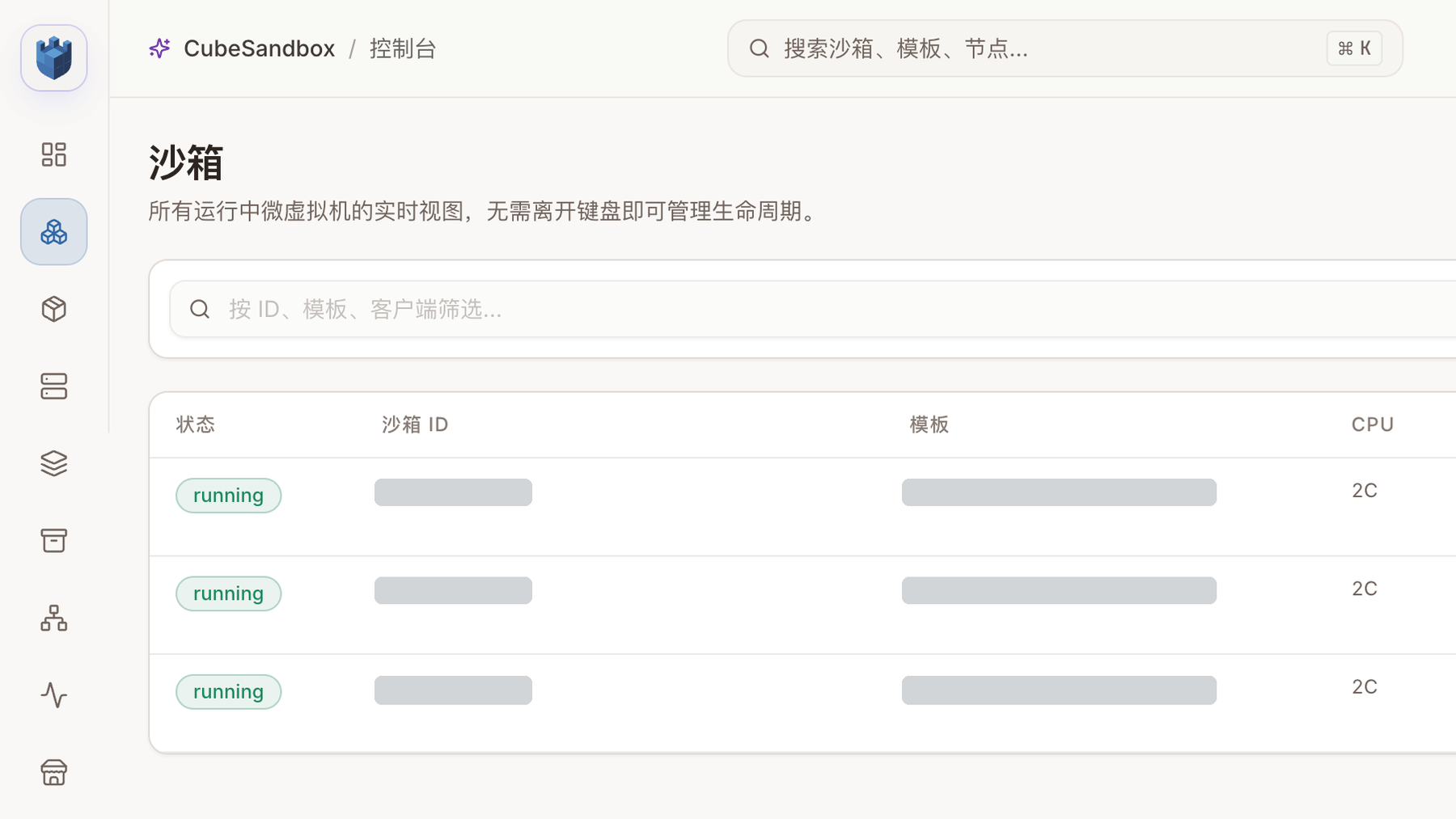
All three test sandboxes were running with two CPU cores each. Resource identifiers are masked; the sandboxes and their new snapshot were deleted after the screenshots.
1. Environment and pre-upgrade checks
The lab used Kubernetes v1.30, Cilium, x86_64 KVM, and one Cube compute node. The control plane and test data used persistent volumes; the data plane used cubeNode.hostNetwork: false. Before upgrading, we confirmed zero active sandboxes, saved the current Helm values and a logical database backup, and recorded existing templates and snapshots.
The v0.8.0 Chart defaults to host networking. On an existing installation, upgrading the Chart must not silently change the network mode through this new default. This lab explicitly retained:
With Pod networking, recreating cube-node destroys its network namespace and breaks networking for existing sandboxes on that node. The official procedure requires isolating the node, waiting at least 60 seconds, and draining sandboxes first; that is the sequence used here. Official upgrade guide
CubeMaster and CubeOps in v0.8.0 perform database migrations at startup. Retain a backup and recovery plan appropriate for your environment before upgrading; Helm rollback is not a database rollback.
2. Image and component upgrade
Nodes on the restricted network could not reach the upstream registry directly. We first copied the v0.8.0 component images into a registry reachable by the cluster, selected linux/amd64, and compared source and destination config and layer digests. A relay host performed the copy; image layers did not pass through the operator's computer.
The old values explicitly pinned images.ops.tag: v0.7.3. Replacing the Chart while retaining that override would leave CubeOps on the old release. We explicitly changed it, updated CubeOps and confirmed it was ready, and then updated the other components and the compute node. CubeAPI, CubeMaster, CubeOps, CubeProxy, WebUI, Cubelet, Shim/Guest/Kernel installers, and Ops Agent all ended on v0.8.0 images. MySQL, Redis, and MinIO retained their existing images and persistent volumes.
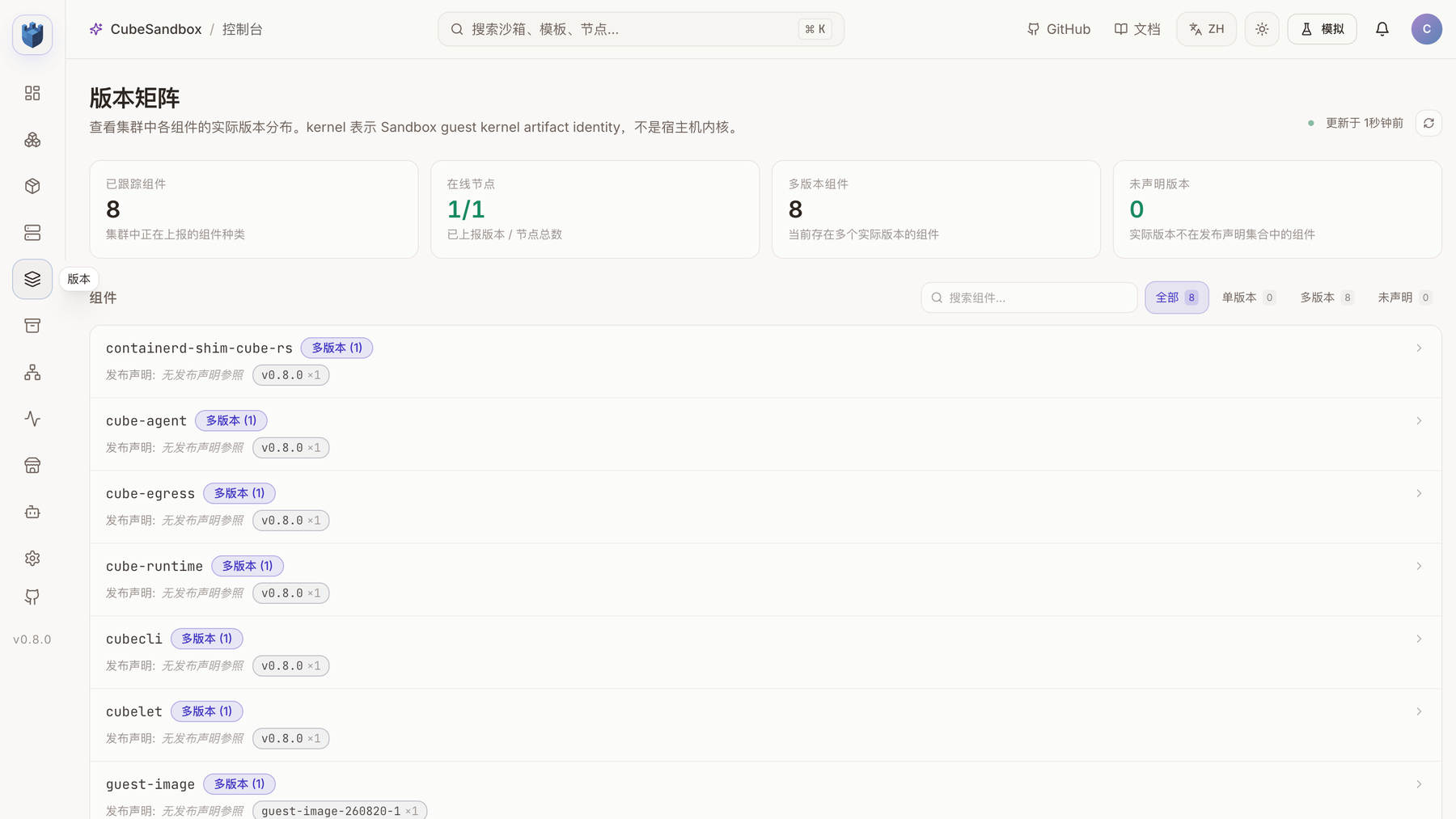
The matrix shows component versions reported by one online node. The page labels components without a release declaration as “multiple versions (1)” even though each reported a single version; the count of eight does not establish eight distinct versions.
The following is a simplified order of operations. Supply image locations, node selectors, and credentials for your own environment:
helm get values cube -n cube-system -o yaml > values-before.yaml
kubectl -n cube-system exec deploy/cube-cubemastercli -- \
  cubeopscli -a cube-ops node isolate <node-id>
# Wait at least 60 seconds and verify that the node has no sandboxes.
helm upgrade cube ./deploy/kubernetes/chart -n cube-system \
  -f values-before.yaml -f values-v080.yaml --reset-values --wait
kubectl -n cube-system exec deploy/cube-cubemastercli -- \
  cubeopscli -a cube-ops node unisolate <node-id>
helm test cube -n cube-system --timeout 10m
Review rendered objects, image availability, and old pinned tags before testing. values-before.yaml may contain credentials and should not be committed directly.
3. Filesystem snapshots: files without processes
The v0.8.0 mode="fs-only" captures only the sandbox root filesystem. A new sandbox created from it cold-boots: files present at capture are visible, but Guest memory and processes do not continue. The source sandbox keeps running. Full snapshots retain memory and the filesystem and support rollback. Filesystem snapshots do not record external mounts; redeclare volumes when creating the new sandbox. Official guide
from cubesandbox import Sandbox

source = Sandbox.create(template="<new-template>", timeout=600)
source.files.write("/tmp/proof", "before")
snapshot = source.create_snapshot(mode="fs-only")
source.files.write("/tmp/proof", "after")
child = Sandbox.create(template=snapshot.snapshot_id, timeout=600)
assert child.files.read("/tmp/proof") == "before"
assert source.files.read("/tmp/proof") == "after"
child.kill()
source.kill()
Sandbox.delete_snapshot(snapshot.snapshot_id)
The actual test also started a background process and recorded its PID. The process remained in the source sandbox; the new sandbox cold-booted from the fs-only snapshot had the captured file but not that process. The example above omits the process check; the complete result is in the test data.
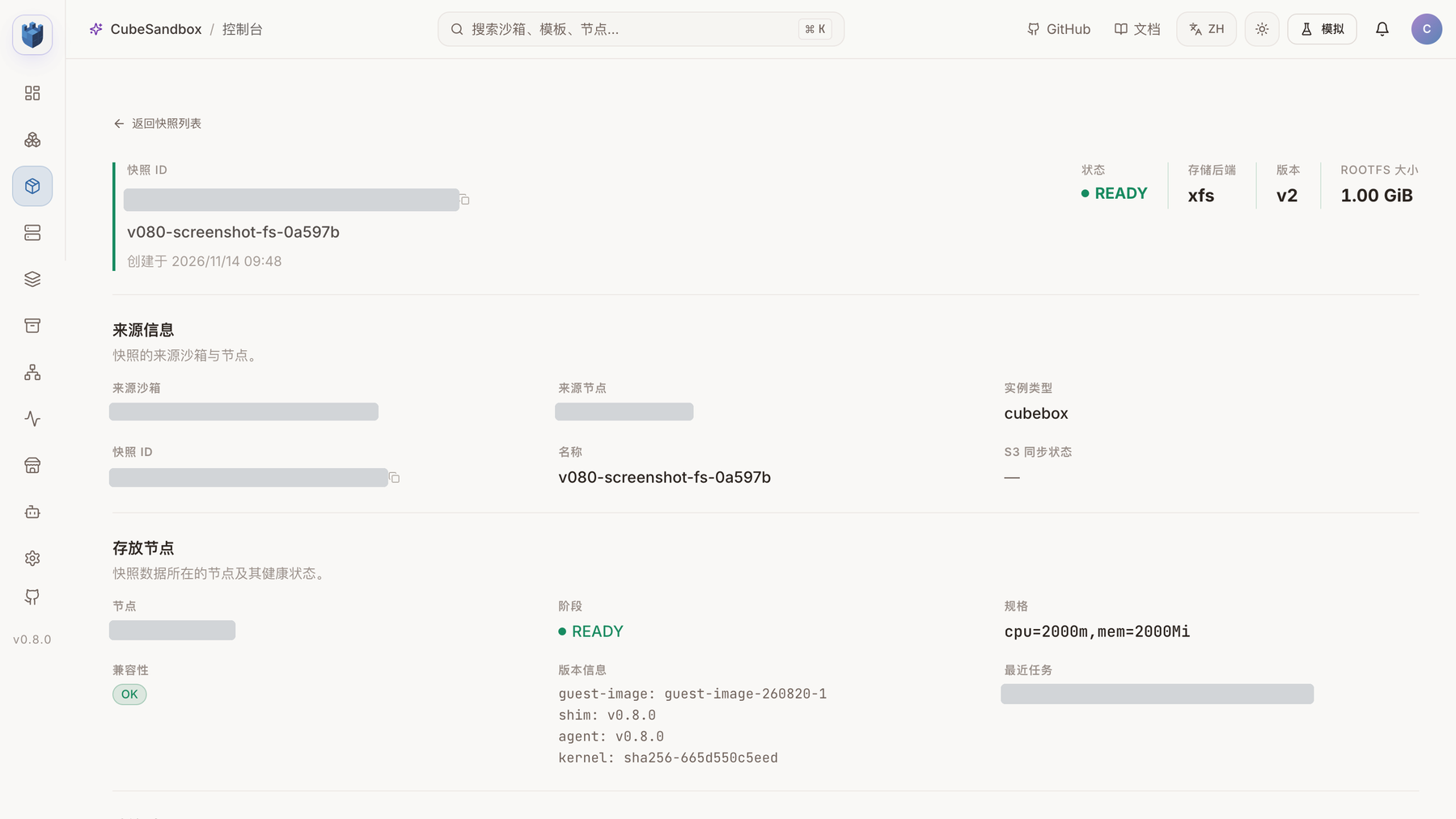
An fs-only snapshot created via the SDK for this screenshot. The console shows READY, the XFS backend, and v0.8.0 runtime components; the creation request confirms the snapshot mode. Resource identifiers and node addresses are masked.
The old template first returned snapshot_filesystem_only_unsupported_node, reporting a v0.7.1 shim. The test passed after building a separate new template from the existing rootfs. An upgrade plan should validate node image versions, runtime versions captured when templates were built, and the new features themselves together. A READY template does not imply support for every new capability.
Single-node JuiceFS validation
The JuiceFS backend is disabled by default. We drained and isolated the compute node before enabling it with the Chart's one-time acknowledgement. It adds a dedicated metadata Redis, a format Job, and a node FUSE mount; the test environment used the existing MinIO for object storage. Both the JuiceFS container and the Cubelet container showed a fuse.juicefs mount.
A newly created JFS-backed test template passed two sandbox create, execute, and delete rounds, as well as pause/resume, full snapshot rollback, create from snapshot, and clone. Upstream still labels this backend Preview; a one-node result does not establish cross-node recovery. See the JuiceFS test data.
There was a restricted-network deployment detail: the dedicated JuiceFS Redis default image did not inherit the existing global registry setting and initially returned ErrImagePull. Explicitly pointing cubeJuiceFS.metadata.redis.image.repository at a reachable internal registry restored it; the setting was then recorded in Helm values. The test added a 1 GiB PVC for the dedicated Redis; the lab retained the JuiceFS components and mount for subsequent single-node experiments. Enabling or disabling JuiceFS affects node mounts, so drain sandboxes and follow the official guide.
A separate snapshot test verified name filtering, deletion by name, and deletion of a missing name; is_running() returned false after sandbox destruction.
4. Fork and E2B compatibility
Calling fork(count=2) on a sandbox created from the new template produced two children. Both read the file from before the fork. After changing one child, the source and the other child retained their values. The test destroyed each sandbox afterward.
The official E2B Python SDK 2.64.0 used the CubeAPI v2 create and connect endpoints to create a sandbox, run a command, reconnect, run another command, and destroy the sandbox. This verifies those calls, not every E2B API. CubeSandbox-specific snapshot operations remain the responsibility of the CubeSandbox SDK. Official compatibility guide
5. Metrics, networking, and restart
Cubelet exposes /v1/metrics/resource. With two test sandboxes running, the endpoint exposed cubesandbox_host_sandbox_* metrics for both. These account for a different scope than workload containers inside the Guest. The endpoint has no built-in authentication or TLS and should not be exposed directly to an untrusted network. Resource metrics guide
We attempted to access the mapped address for one sandbox's exposed port from another sandbox on the same node. The API returned an address, but the connection returned Connection refused. Cubelet was using Pod networking, and the address belonged to the node-component Pod. The observations do not yet establish which layer caused the failure. Do not treat this feature as having passed here or assume that it fails in every environment.
For the restart test, a sandbox used OnFailure and a deliberately failing TCP liveness probe. Its status progressed through Running, BackOff, Restarting, and GaveUp; restartCount reached 2 and the exit reason was LivenessProbeFailed. In a separate run, both the SDK and an in-sandbox command read the expected 17-byte file in /workspace before restart. After the probe-triggered restart, the SDK reported the file missing and an in-sandbox command confirmed it was absent. In another run, we executed sync before the probe failed; after restart, an in-sandbox command read back the same 17-byte content. These observations show that application writes and flushing need separate consideration. The cause of the missing file in the run without explicit sync is undetermined; this does not establish the same outcome for all unsynced data or other storage backends.
The existing scheduler configuration explicitly supplied legacy filters. After the upgrade, successful requests appeared under scheduler_attempts_total{profile="default"}. The new version injects factory Profiles when no scheduler configuration exists, which can change node selection. A single-node test cannot validate scoring across nodes. Scheduler upgrade behavior
Other release-note items
In the S3 external-volume test, the source sandbox and its clone shared a volume. After rollback, the root filesystem returned to the snapshot state while the external volume retained subsequent writes. Creating a sandbox with the mount re-declared also read the current volume data. The Volume v2 endpoint successfully created and cleaned up a test volume with empty private_data, and returned 400 for a 1,025-byte value. Dynamic buckets using credential references, and their end-to-end plugin forwarding, have not been tested here. private_data is stored in plaintext in the database and may be passed in node plugin arguments; use credential references rather than plaintext secrets.
The scheduler's CEL expressions and external gRPC plugins, template QoS limits, Guest workload metrics, log collection dashboards, Redis Cluster, PVM, ARM, cross-node migration, and S3lvol crash recovery have not been tested in this run. The performance figures and each bug fix in the release notes have not been independently reproduced either; a lifecycle pass does not replace those checks.
6. Upgrade reminders and conclusion
- Drain compute nodes first. Recreating
cube-nodeunder Pod networking breaks existing sandbox networking. Isolate the node for at least 60 seconds and verify that sandboxes are gone before updating; a Helm rollout alone does not protect the data plane. - Explicitly pin the existing network mode. The new Chart defaults to
hostNetwork: true. Inspect the live DaemonSet and values, decide whether to retain the mode, and perform the one-time acknowledgement and port/CNI security checks required for a change. - Back up the database first. CubeOps and CubeMaster may migrate the schema at startup. Helm rollback does not roll back the database or host artifacts. Check component order and the recovery plan.
- Render the complete image set. Old values can pin an individual component tag, and optional components may have independent image settings. Check database and template images separately, including reachability and trust.
- Retest old templates. READY means a template is available. The old template tested here retained a v0.7.1 shim and needed rebuilding for fs-only support. Validate each commonly used template in production environments.
- Treat JuiceFS as a separate storage change. Enabling it adds a metadata Redis, persistent volume, and FUSE mount. Check capacity, object storage, credentials, and cleanup; drain sandboxes before changing or disabling it.
- Check node addresses and network paths. After Pod recreation changed the Pod IP, a temporary test template and a failed snapshot record retained an old address and deletion timed out. Same-node port mapping also did not pass and needs further investigation in the target environment.
The upgraded environment passed basic lifecycle, E2B, XFS/JuiceFS snapshot, and S3 external-volume tests, making it useful for continued testing. File preservation without an explicit flush and port mapping under Pod networking did not pass; cross-node recovery and other uncovered capabilities still require independent acceptance. These results do not establish equivalent behavior in production.
7. Test data and scope
- Pre-upgrade v0.7.3 baseline, v0.8.0 lifecycle regression
- Snapshot names and running state, Filesystem snapshot and fork, E2B SDK
- JuiceFS fs-only snapshot and fork, S3 external volume, Volume v2
- Resource metrics and port mapping, restart policy, file check without explicit sync, file check after sync
Creation timings are client observations from a small number of requests over a local port-forward. They should not be directly compared with official throughput or concurrency benchmarks. After the tests, temporary sandboxes and test snapshots were checked against the cleanup status in their result files. One temporary XFS template and a FAILED snapshot record from the first failed test remain because deletion timed out against an old Pod IP. Addresses, registries, and resource identifiers in this article use placeholders; production upgrades need separate validation of their own templates, backups, networks, and storage.