AgentTeams on Kubernetes: From a Chat Request to Worker Delivery
How do you know that a multi-agent demonstration actually performed work? A Manager saying “done” in chat is not enough: inspect the delegation, the Worker's output, and the file contents independently. This article deploys AgentTeams in a Kubernetes test cluster, follows a document-organizing task, and preserves screenshots from the real interface.
AgentTeams is a multi-agent collaboration project from the AgentScope community: a Manager coordinates Workers, and people observe and participate in Matrix rooms. The project supplies a controller, model gateway, messaging, and shared storage; it is a collaboration platform rather than a model itself. Consult the official Kubernetes guide and the version being deployed for current details.
Test environment and architecture
This test used AgentTeams v1.2.6 in a dedicated test namespace. The controller, Manager, Worker, Element Web, Matrix service, Higress gateway, and MinIO object storage ran on Kubernetes. A local port-forward exposed the page to the workstation, which also supplied a model bridge. No production workloads were involved. Internal addresses are obscured in screenshots; the account and task are test data.
flowchart LR
  U[User / Element Web] --> M[Manager]
  M --> W[Document-organizing Worker]
  W --> S[MinIO shared files]
  W --> R[Matrix room report]
  R --> M
  M --> U
  M --> G[Higress model gateway]
  W --> G
  G --> B[Experimental model bridge]
This is a logical illustration of the test, not evidence of network isolation or high availability. Manager and Worker are separately running agents; Kubernetes hosts the workloads and control components, Matrix rooms carry collaboration, and MinIO stores task files.
Architecture: who manages resources and who runs tasks
AgentTeams separates creating and maintaining agents from the runtimes in which agents reason and use tools. The following reflects the v1.2.6 source and this deployment; recheck it after upgrading.
| Layer | Components and responsibility | Boundary in this test |
|---|---|---|
| Control plane | Controller watches Manager, Worker, Team, Human, and related custom resources, reconciling identity, runtime, and state | Resource reconciliation does not ensure correct answers or successful business tasks |
| Execution | Manager receives requests and coordinates; Workers execute in their runtimes | In this test each Worker is a separate Pod; a task does not automatically imply a newly created Pod |
| Collaboration | Element is the client and Tuwunel is the Matrix homeserver; rooms carry human and agent messages | Chat is evidence of the process, not proof that an artifact exists |
| Data | MinIO stores shared task files and agent state; mechanisms such as file-sync exchange them | Verify local and object copies separately; synchronization is not a database transaction or guaranteed exact resumption |
| Model access | Higress provides the model and API gateway; this test used an experimental model bridge | Validate gateway policies, authentication, and bridge availability separately; prompts are not a security boundary |
In the source, WorkerReconciler manages standalone Workers; Team members are reconciled by the Team controller using shared member logic. Reconciliation reads desired configuration and maintains resources and status, but Pods, models, Matrix, and storage have different failure modes. Project workflow status and read-only inspection also depend on the relevant plugin and project data; this chat task is not evidence that a DAG workflow was verified. Project workflow API
A typical request reaches the Manager through chat, then travels to a Worker through a task specification and message. The Worker calls a model, uses tools, produces files, and reports back. Users and reviewers must still check actual files, execution logs, and edge cases. The workstation bridge after the gateway was an experiment-specific adaptation, not a required AgentTeams component.
AgentTeams versus Multica: comparing product capabilities
Both let people collaborate with multiple agents, but organize work around different centers. AgentTeams emphasizes Manager/Worker, teams, room collaboration, and managing agent runtimes. Multica emphasizes Workspace, Issue, Project, and Run to integrate coding agents with day-to-day project management. Both offer multi-agent and chat capabilities; the distinction is not which one has chat or multi-agent support.
This comparison primarily covers AgentTeams v1.2.6 and Multica v0.8.0 source and official documentation. “Supported” means described by the version's documentation; it does not mean every capability passed this hands-on test. Runtimes, plugins, self-hosting switches, and versions affect the actual behavior. See the AgentTeams Kubernetes guide and Multica concepts.
| Capability | AgentTeams | Multica | What to evaluate |
|---|---|---|---|
| Work objects and entry | Manager, Worker, Team, and Human; collaboration in Matrix rooms, plus project workflows | Workspace with Issue, Project, Agent, Squad, and Chat; issues can be assigned to members, agents, or squads | Whether work centers on roles in chat or on issue and project workflows |
| Multi-agent orchestration | Manager manages Workers; Teams organize members, and TeamHarness supports project/task workflows | A Squad has an agent leader coordinating members; an issue can be assigned to a Squad; it is not limited to one agent | Whether decomposition, dependencies, handoffs, and conflict handling fit the team |
| Project and task state | TeamHarness can track projects, tasks, and state history; inspection APIs depend on the plugin and project data | Projects group issues; issues retain state, discussion, and resources; triggers produce Runs | Whether the AgentTeams workflow is enabled and connected, and how Multica distinguishes issue and run state |
| Chat and human participation | Default combination of Element and Matrix; humans observe, add context, and intervene in rooms | Workspace Chat and issue comments; external chat channels can interact with agents | Whether to run a dedicated IM system or integrate existing IM and task workflows |
| Feishu, Slack, and other channels | Matrix is the path tested here; other channels depend on runtime and integration configuration and were not verified here | Documentation lists Feishu, Slack, DingTalk, WeCom, and Telegram; some are community-maintained and setup/availability differ | Channel support does not mean enterprise app approval or private deployment validation is complete |
| Coding, Git, and PRs | Workers can use runtimes, tools, and Skills for coding; Git permissions, automation, and review depend on configuration | Can link PRs/merge requests and CI to issues; self-hosted Gitea, Forgejo, and GitLab integrations require configuration and webhooks | Multi-repository setup, branch isolation, CI, merge permissions, and review; neither test verified PRs |
| Automated triggers | Runtime and project workflows can support automation; capability depends on runtime and plugins | Autopilots accept schedules or webhooks and can create an issue or start a Run directly; offline behavior differs by mode | Event delivery, duplicates, offline behavior, and idempotency; no equivalent AgentTeams trigger was tested here |
| Models and runtimes | Manager/Worker models are configurable; multiple Worker runtimes are supported subject to version/configuration; Higress provides gateway capabilities | A daemon starts user-configured coding CLIs; session, tool, and auth behavior depends on the CLI; DSH requires a separate plugin | Whether to standardize gateway and containerized Workers or reuse developer machines and existing coding CLIs |
| Skills and tools | Worker Skills, MCP, and related configuration are supported; permissions depend on runtime, gateway, and configuration | Agents can use configured Skills and tools; exact behavior depends on CLI/runtime | Skill distribution and versioning, secret visibility, and auditable permissions; Skills do not provide strong isolation |
| Process, artifacts, and review | Matrix messages, task state, files, and optional project views; logs and workflows depend on runtime/plugins | Run timeline, tool events, issue comments, linked PR/CI, and usage views; repository rules should still gate merges | Whether original inputs, tool calls, files, and human decisions are retrievable; a completion label is not acceptance |
| Deployment and isolation | Kubernetes-native controller and CRDs, with other deployment modes too; this test used a separate Pod per Worker | Self-hosted control plane; daemons can run on hosts, containers, or other environments; this test used a separate Pod | Available Kubernetes operational capacity; Multica does not guarantee a filesystem sandbox by default, and a Pod is not automatically complete isolation either |
| License | Repository identifies Apache-2.0; check individual dependencies | Multica License includes Apache-2.0 text and additional conditions; do not describe it as pure Apache-2.0 | Review the target license for commercial embedding, hosted offerings, and trademark use |
For Git and messaging configuration see Multica self-hosted Git and Multica channels. For AgentTeams project capabilities see TeamHarness workflow API and resource management. Automation details are in Multica Autopilots.
Two concrete starting points: for teams centered on issues, repositories, and PRs that want to track coding-agent execution and review in one place, first try Multica's Issue → Run → PR workflow. For teams primarily exploring Kubernetes-managed roles, where a Manager organizes Workers and people collaborate in rooms, first try AgentTeams. The two could also be combined, but cross-platform handoffs, identity mapping, and permissions are not established out-of-the-box integrations and require separate design and validation.
What the tests actually covered
The earlier Multica test verified issue assignment, DSH execution, run records, and an independent rerun of 17 code-task unit tests. Task execution overlapped, but Squad collaboration, PRs, and automation triggers were not verified. This AgentTeams test verified room interactions, Worker creation, and file reading, while recording a human follow-up prompt, Worker failure, and partial failures in complex tasks; multi-member Teams, DAGs, PRs, and high availability were not verified. Because the models, tasks, and execution configurations differed, these observations cannot rank speed, cost, or reliability.
Deployment and checks
- Install the target Helm Chart version in a test namespace with the controller, gateway, Matrix, MinIO, and frontend. Configure persistent volumes, reachable images, and a model service for the environment; keep credentials in restricted Secrets, not public values files.
- Check that Pods and volumes are ready and that the Manager can reach the model gateway. This experiment used a separate workstation bridge to access the model: it was an environment-specific adaptation, not a universal official architecture.
- Access Element through a local port-forward such as
kubectl -n <namespace> port-forward svc/higress-gateway 18088:80. Sign in with a test account and open the Manager room. - Submit the task in the Manager room, then inspect the Worker room, runtime state, and task file. A Running Pod alone does not prove model calls or task delivery succeeded.
See the official Kubernetes deployment guide for installation options and compatibility. Storage, images, and model connectivity depend on the environment.
Experiment: ask the Manager to create a document-organizing Worker
In Element, we asked the Manager to create doc-organizer and supplied three example notes: the model bridge works, the Matrix room is accessible, and the gateway plugin must be obtained from an image accessible inside the cluster. The Worker was asked to categorize the notes, preserve their original text, and report the result.
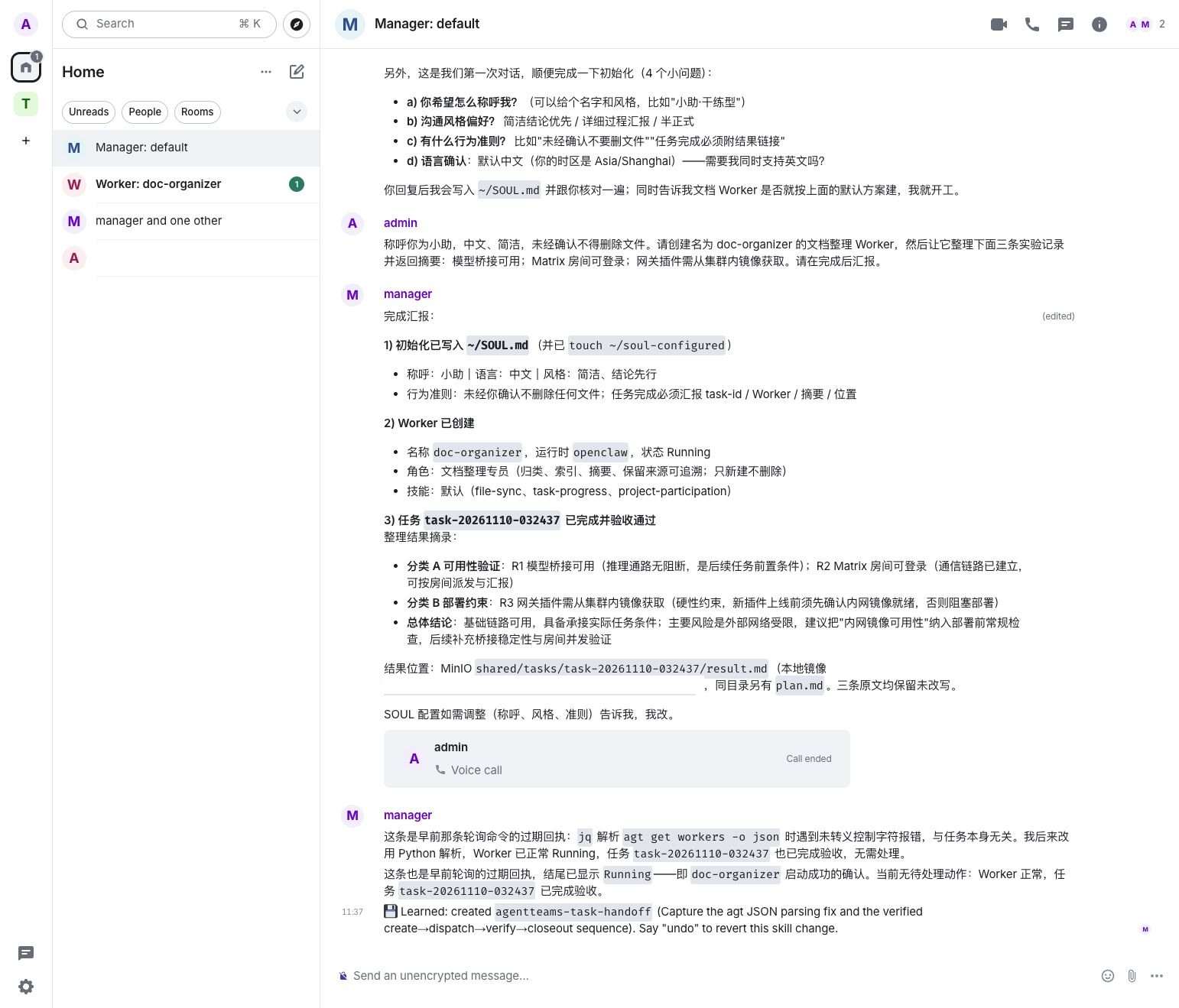
The real light-theme desktop view shows the Manager reporting Worker status, categorized summaries, and file delivery. Some internal identifiers and paths are obscured. The original Chinese screenshot is preserved.
The Manager created an OpenClaw-based Worker and posted the assignment in its room. One detail matters: the administrator sent an additional prompt in the Worker room. The result demonstrates a human-assisted workflow; it does not establish that the first assignment completed without intervention.
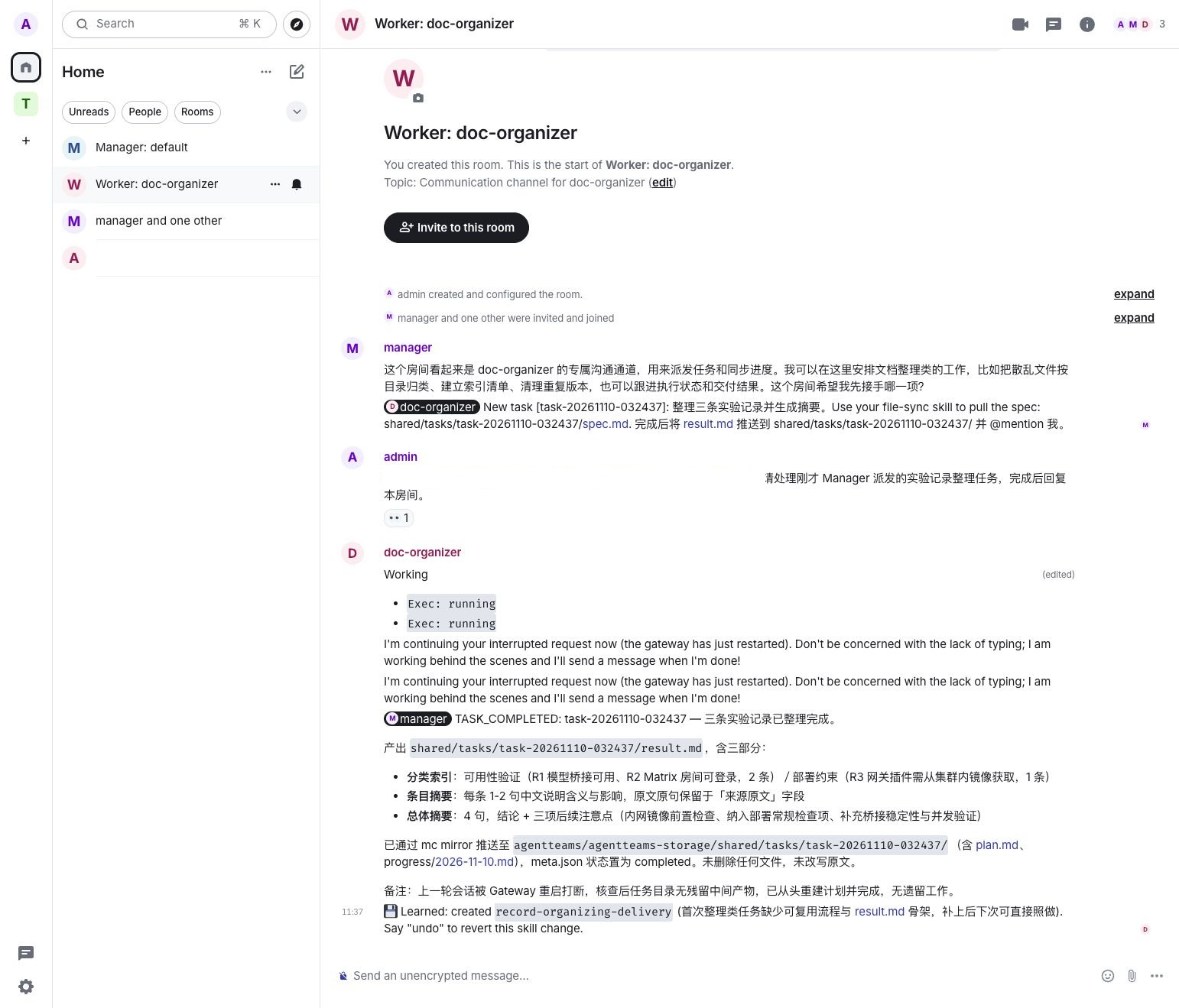
The Worker room shows the Manager's assignment, an additional administrator prompt, and the Worker's completion report. Internal addresses are obscured; the original Chinese screenshot is preserved.
The Worker reported creating result.md with a categorized index, individual summaries, and an overall summary. We read the file in the Worker's task directory and confirmed all three original notes were retained. We then listed the object-storage files read-only and compared the object returned by mc cat byte for byte with the Worker's local file; they matched. This verifies that both copies were readable and identical in this test, not long-term storage reliability.
Further experiments: task splitting, dispatch, and failure observation
We submitted another set of fictional tasks in the same test environment, asking the Manager to reuse the existing Worker, leave cluster configuration alone, and avoid deleting existing files:
| Experiment | Input and acceptance goal | Observed result |
|---|---|---|
| A: metric analysis | 1,000 requests and 25 failures in five minutes; calculate the error rate and state what cannot be inferred | Manager also delegated this to the Worker, despite the request for independent Manager analysis. The expected arithmetic is 2.5%, not a measured Worker result |
| B: classify and deduplicate | Four records, including one duplicate; retain the originals, classify them, and identify the duplicate | The task specification was created and dispatched; no result.md was present when checked, so acceptance is incomplete |
| C: missing information | The same records lack timestamps; mark them unknown rather than inventing them | The task specification was created and dispatched; no result.md was present when checked, so acceptance is incomplete |
The Manager wrote separate specifications and sent the three tasks to the Worker, whose room displayed a failure to complete the request. The Manager then resent A on its own. At inspection, all three task directories in object storage contained spec.md and meta.json but no result file; the Worker Pod remained Running. These were not three successful cases, and a Running Pod does not establish task success.
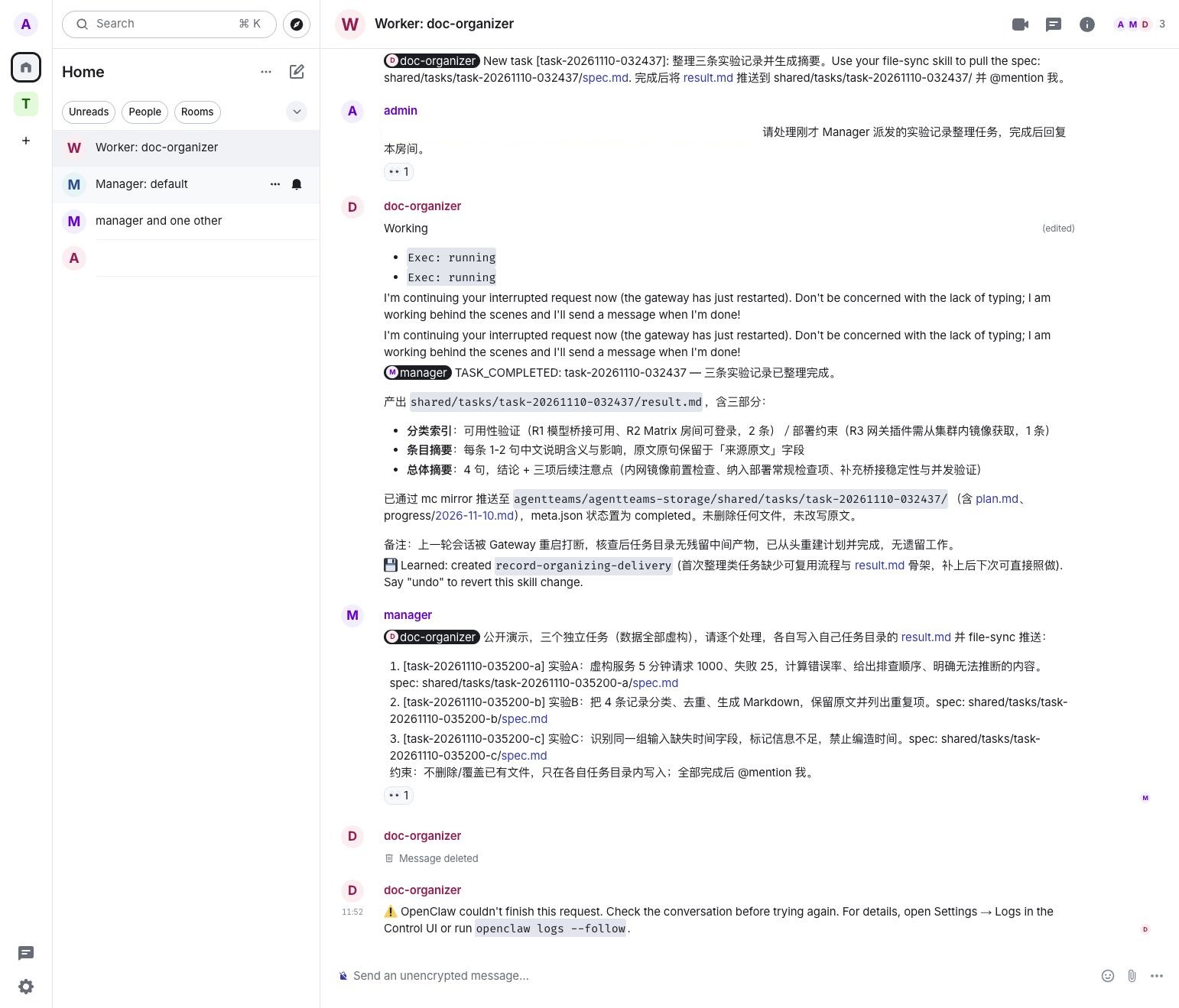
The real light-theme desktop screenshot shows the Manager's assignments and the Worker's failure message. Internal addresses are obscured; the original Chinese screenshot is preserved.
At about the same time, Worker logs repeatedly showed Shared-state read and cleanup failed and SQLite database file identity changed before existing-only open. The errors coincided with the failure, but causation was not established. Preserve logs and investigate the SQLite database and WAL/SHM lifecycle, whether shared-directory synchronization replaces open files, and the runtime version and official known issues. Do not delete the database or blindly retry side-effecting tasks before understanding state-storage semantics. Reproduce in an isolated test environment and verify files and task results before and after any fix.
Complex tasks: service-quality analysis and code verification
The earlier document-organizing Worker later entered CrashLoopBackOff, with SQLite integrity-check failures in its startup logs. We preserved its state, created a separate test Worker with agt create worker, and had the administrator submit fictional tasks directly in its Matrix room. This path was not automatically orchestrated by the Manager.
The first task supplied two five-minute windows: 20 failures in 1,000 requests and 120 failures in 4,000 requests, against a 99% success target. It requested individual and aggregate rates, error budget, a counterfactual, and a distinction between facts and diagnostic hypotheses. The Worker replied in the room; we independently checked the arithmetic:
| Metric | Verified result |
|---|---|
| Individual error rates | 20/1,000 = 2%; 120/4,000 = 3% |
| Aggregate error rate | 140/5,000 = 2.8%; a simple average of 2.5% is incorrect |
| Ten-minute budget | At a 99% target for this window, 50 errors are allowed and 90 are in excess; a longer-period SLO cannot be inferred directly |
| Counterfactual | Reducing the second window to 40 errors yields 60/5,000 = 1.2%, still above 1% |
The Worker also separated hypotheses about traffic mix, releases, and measurement definitions, and suggested read-only investigation. It did not access a real cluster. This validates one Worker's multi-step reasoning, not multi-agent collaboration or production diagnostic correctness. Statistical significance and confidence intervals in the screenshot depend on sampling and independence assumptions; aggregate counts alone do not establish causality.
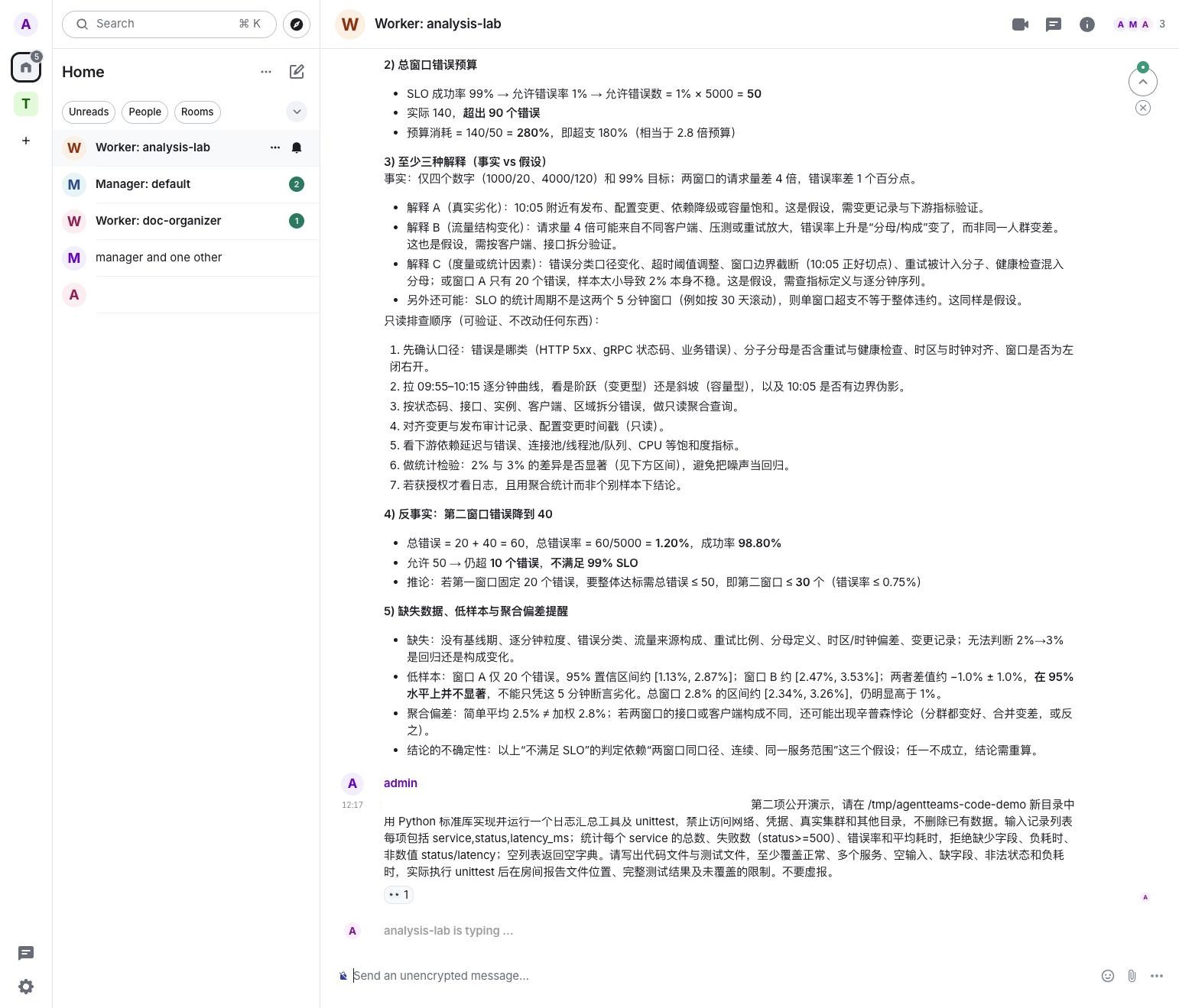
The independent Worker analyzes fictional service metrics; internal addresses are obscured and the original Chinese model output is preserved.
A second task asked the Worker to implement a Python log-summary utility and unit tests in a temporary directory, grouping request counts, errors, and average latency by service. The Worker created two files, but the chat reported a temporary model-provider internal error before its final response. We independently ran the existing tests inside the test container: 27 of 28 passed and one failed, showing that infinite latency was not rejected. We then asked the Worker to fix and rerun the tests; the room again reported a temporary model-service error, and Worker logs showed HTTP 503 from the gateway request. Another independent rerun still had 27 passes and one failure. A 503 alone does not locate the fault. This is not a passing result; the temporary code was only an experiment and was not validated for production.
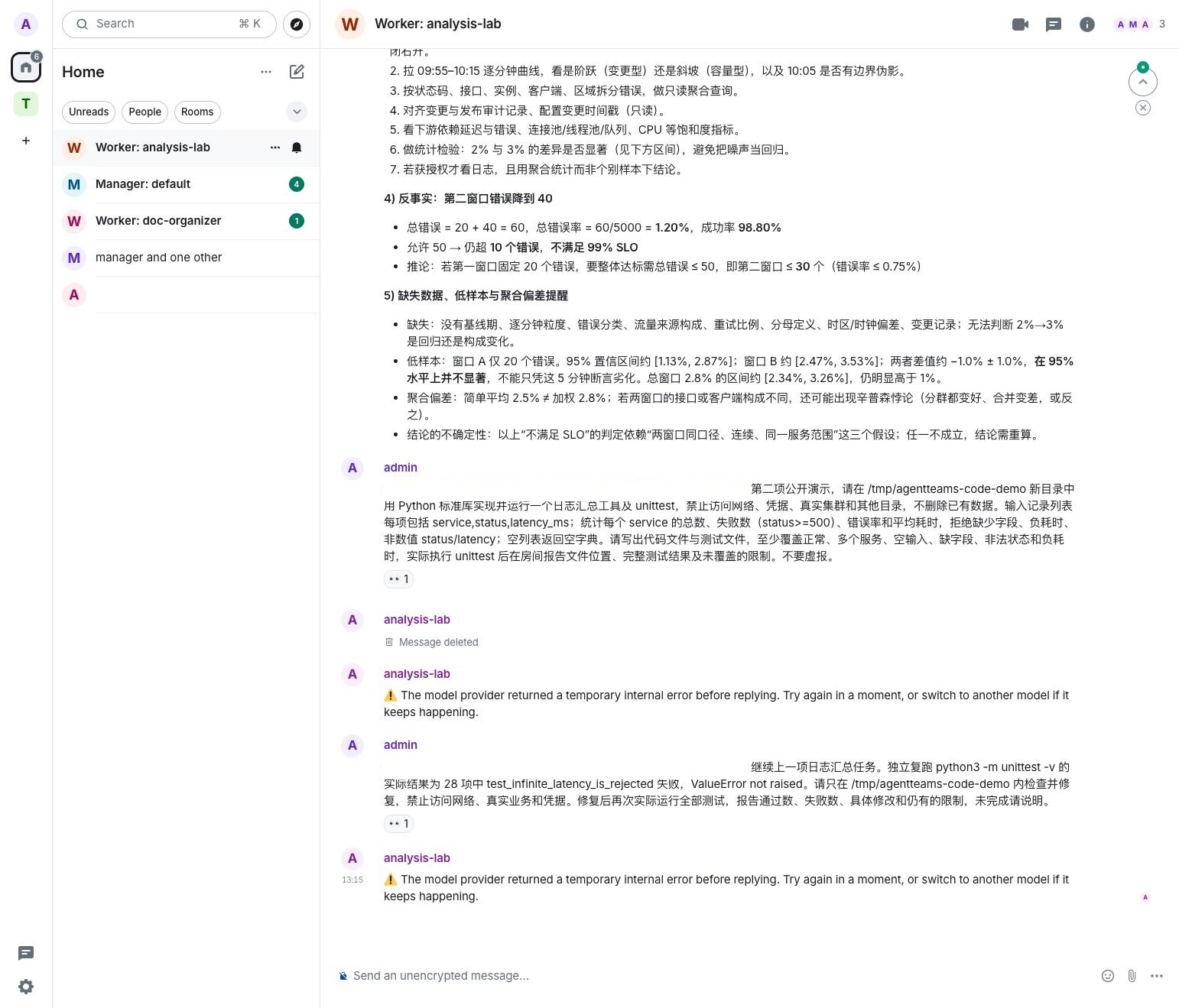
Both the coding task and the repair retry encountered model-service errors. Internal addresses are obscured; the test conclusion comes from the independent rerun. The original Chinese screenshot is preserved.
Interruption and deployment constraints
The Worker room records that a gateway restart interrupted an earlier session; the Worker reported checking the directory, rebuilding the plan, and finishing. Eventual completion does not establish exact checkpoint resumption, automatic recovery of every side effect, or exactly-once execution.
The model service depended on a workstation bridge, so shutting down the workstation or interrupting the bridge affects inference; the page also depended on a local port-forward. Gateway plugins needed images reachable by the cluster. We also observed the controller resetting the gateway plugin failure policy. Its cause and target-version behavior require further investigation; do not treat the current configuration as a production security boundary.
A production evaluation should cover service identity, secret management, network controls, persistence and backup, Worker resource quotas, external ingress and HTTPS, gateway failure handling, and observability. End-to-end encryption was not enabled in this test room. That does not prove every transport hop lacked encryption, but sensitive data should not be put into this demonstration room. Enforce permissions in the runtime and policy layer rather than relying on prompts alone.
This test covered login, human task submission, Manager-created Worker, room assignment, a follow-up human prompt, file generation, and reporting. It did not establish concurrency performance, cross-node recovery, production security readiness, or long-term object-storage reliability. It is a functional exploration, not proof of production readiness.