Deploying and Trying Qwen3-TTS: Turn a Technical Article into Narration
Can a finished technical article become something you can listen to? We adapted the DeepSeek V4.1 vLLM upgrade measurements into a spoken script and called an existing Qwen3-TTS-12Hz-1.7B-CustomVoice deployment. The result is 11 minutes and 43.5 seconds of Chinese narration.
Listen to the complete recording first. It uses the preset male voice uncle_fu, without a human recording or a clone of the author's voice. Numbers, abbreviations, and chart descriptions were adapted for listening. The main content and experimental results remain, while image markup, URLs, and the full build hash are omitted. This is a spoken adaptation of the article.
Download the complete narration: M4A, approximately 5.48 MiB · Read the actual Chinese narration script
This article documents real service calls and local file processing. Cluster names, node addresses, private image registries, ingress domains, and storage paths have been removed. The recordings contain only public technical content. The public page plays static audio files and does not contact the original internal service.
1. Start with the Same Text: Lightweight Synthesis and Qwen
We generated four additional recordings from exactly the same text to make the comparison easier to assess. The baseline is the Mandarin cmn voice in eSpeak NG 1.51, with its rate parameter set to 165. Qwen uses the same model and style instructions, changing only the preset voice.
{
  "input": "下面我们看一个实际的模型升级实验。两次测试使用相同的硬件、相同的输入长度和并发配置。新版在长输入场景中,首内容等待明显缩短,但是单并发长输出,并没有同步变快。所以,部署验收不能只看一个吞吐数字,还要检查输出是否完整,以及实际任务的质量。",
  "instructions": "自然亲切地讲解技术文章,语速适中,有自然停顿,不要播音腔,不添加内容。"
}
The Chinese sample describes a model upgrade experiment using matched hardware, input length, and concurrency. It explains that improved first-content latency for long inputs does not necessarily improve single-request decoding, and that acceptance should check output completeness and task quality as well as throughput. The instructions request friendly technical narration at a moderate pace with natural pauses, without an announcer style or added content.
1.1 eSpeak NG: Lightweight Mandarin Synthesis
1.2 Qwen: uncle_fu, a Low, Mature Male Voice
1.3 Qwen: serena, a Warm and Gentle Young Female Voice
1.4 Qwen: vivian, a Bright Young Female Voice
| Sample | Audio duration | Sample rate | Controls used |
|---|---|---|---|
| eSpeak NG / cmn | 43.44 s | 22,050 Hz | Fixed voice, rate parameter 165 |
| Qwen / uncle_fu | 28.64 s | 24,000 Hz | Preset voice + identical natural-language instructions |
| Qwen / serena | 23.92 s | 24,000 Hz | Preset voice + identical natural-language instructions |
| Qwen / vivian | 25.84 s | 24,000 Hz | Preset voice + identical natural-language instructions |
Listen for pauses at commas, emphasis around a change of argument, sentence endings, and fatigue over several minutes. Different durations for the same text reflect speaking rate and pauses; shorter audio does not mean faster inference. No time stretching, pitch shifting, or background music was applied. We only adjusted paragraph root-mean-square volume: a target of −23 dBFS, at most 6 dB of amplification, and a peak limit. This is not strict perceptual loudness matching.
The eSpeak NG project describes its formant-synthesis approach, favoring a small footprint, offline operation, and straightforward integration, with a tradeoff in naturalness. This comparison illustrates one familiar way of producing intelligible but mechanical speech. It does not represent other neural speech models or commercial services, and it is not a controlled blind listening study. No subjective quality scores have been invented. eSpeak NG project description
2. Which Qwen Model Is Being Used?
TTS means Text-to-Speech: text goes in and sound comes out. It runs in the opposite direction to speech recognition, which converts a recording into text.
| Model | Main inputs | Suitable requirement | Run here? |
|---|---|---|---|
| CustomVoice | Text, preset voice, style instructions | Technical narration with a consistent speaker | Yes, the 1.7B version |
| VoiceDesign | Text, a description of a voice | Designing a new voice from a description | No |
| Base | Text, reference audio, and related inputs | Reference-voice cloning and further customization | No |
The requirement here is to read articles consistently in a chosen voice, rather than design a new voice or clone a person. That makes CustomVoice the relevant choice. voice selects the underlying speaker, while instructions adjusts the delivery. Writing “mature male voice” in the instructions does not create a new voice. CustomVoice model card, VoiceDesign model card, Base model card
Other Chinese presets include dylan, with Beijing-accent characteristics, and eric, with Sichuan-accent characteristics. English presets include ryan and aiden; Japanese has ono_anna, and Korean has sohee. The official recommendation is to prefer each speaker's native language. This experiment actually sampled the three Chinese voices above. Official speaker list
3. The Actual Deployment: One L20 and Two Speech Stages
3.1 Inspect the Runtime Instead of Inferring It from an Image Tag
| Item | Actual environment |
|---|---|
| GPU | 1 × NVIDIA L20, reporting 46,068 MiB of memory |
| NVIDIA driver | 580.173.02 |
| Model | Qwen3-TTS-12Hz-1.7B-CustomVoice |
| vLLM | 0.29.0b1+cu129 |
| vLLM-Omni | 0.16.0.dev0+pr7759, a locally built preview image |
| PyTorch / Transformers | 2.13.0+cu129 / 5.14.1 |
| Container resources | Requests: 4 CPU / 24 GiB; limits: 12 CPU / 48 GiB; 1 GPU |
| Shared memory | 4 GiB |
| API | /v1/audio/speech, WAV output |
These versions were read from the running container. They must not be presented as results from the current official release image just because the package names look familiar. The complete image digest and per-segment records are in the sanitized results file. This run establishes that the configuration works on one L20. It does not establish a minimum memory requirement or validate capacity at 64 concurrent requests.
vLLM-Omni organizes the service into stages: Talker generates speech codes, and Code2Wav turns those codes into a waveform. Both stages here use visible device 0, meaning the same card; they do not each require a separate GPU. The two gpu_memory_utilization: 0.3 settings are per-stage memory-budget parameters, not monitoring evidence of “30% GPU utilization.”
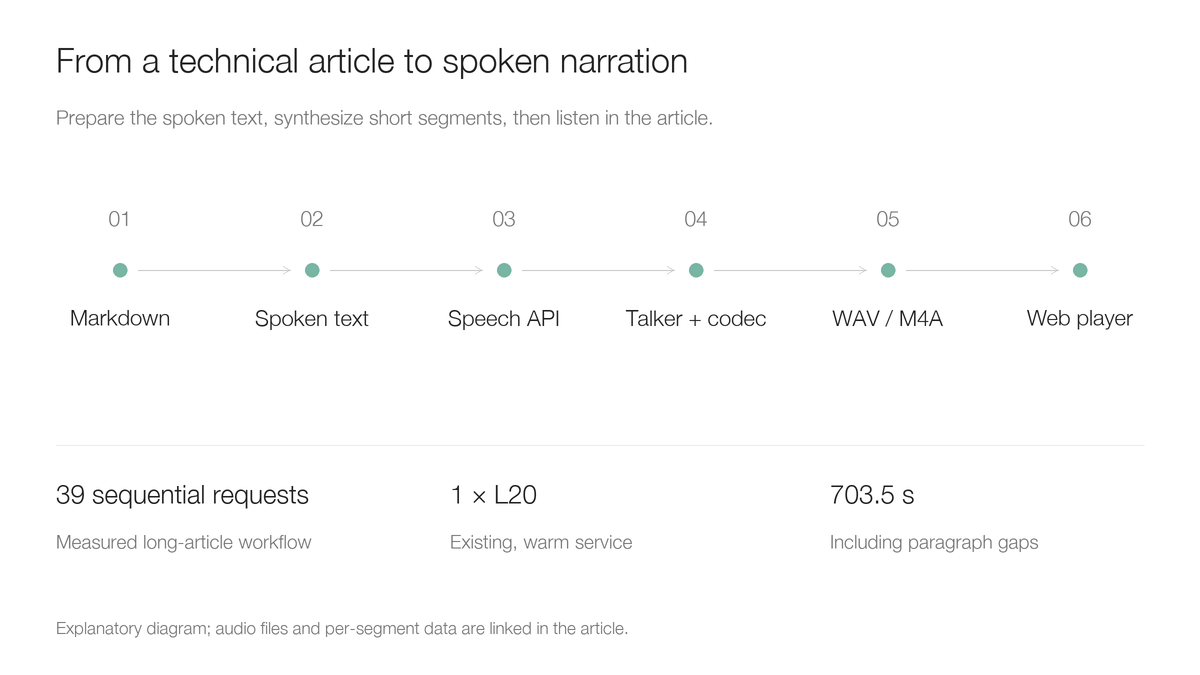
This is an explanatory workflow diagram. The actual outputs are the audio files in this article. The source article tested eight H20-3e cards; the TTS service reading that article uses one L20. These are different workloads.
3.2 The Launch Command and Stage Configuration
The essential command used by the running service is shown below. Model files are mounted read-only. All paths here are generic.
vllm serve /models/Qwen3-TTS-12Hz-1.7B-CustomVoice \
  --omni --host 0.0.0.0 --port 8000 \
  --deploy-config /config/qwen3_tts.yaml
The accompanying complete stage configuration preserves the measured settings with the original comments removed. Both stages use the same card; Talker's output budget is 4,096, and Code2Wav's batch and context limits are 65,536. The stages communicate through shared memory. Asynchronous chunking inside this configuration does not mean client first-packet latency was measured. These requests save a complete WAV, and no real-time playback latency test was performed.
For a new installation, choose matching vLLM and vLLM-Omni versions rather than assuming a standard vLLM image already contains the speech backend. At the time of review, the official documentation provides matching 0.30.0 installation and image examples. That is a candidate for a new environment; it did not generate the recordings in this experiment. Use the stage configuration for the selected version, validate a short recording, and then pin the image digest. Official installation instructions
3.3 Deployment and Access on Kubernetes
The repository includes a sanitized deployment manifest. It retains one replica, the GPU request, health probes, a read-only model mount, and shared memory. Its image is a placeholder that must be replaced with a validated build. The manifest uses Recreate to make updates practical when only one card is free, at the cost of an interruption during updates. This is a reproduction template derived from the tested structure; the running service was not redeployed or modified for this article.
First prepare a PersistentVolumeClaim named tts-models in the tts-demo namespace. Its volume root must contain the complete Qwen3-TTS-12Hz-1.7B-CustomVoice model directory. Choose storage and model delivery appropriate to your environment.
kubectl create namespace tts-demo
kubectl -n tts-demo create configmap qwen3-tts-config \
  --from-file=qwen3_tts.yaml=examples/qwen3-tts-article/qwen3_tts.yaml
# Prepare tts-models PVC and replace the image placeholder before applying.
kubectl apply -f examples/qwen3-tts-article/kubernetes.yaml
kubectl -n tts-demo rollout status deployment/qwen3-tts --timeout=1200s
kubectl -n tts-demo port-forward service/qwen3-tts 8000:8000
In another terminal, check health and the model identifier:
curl --fail-with-body http://127.0.0.1:8000/health
curl --fail-with-body http://127.0.0.1:8000/v1/models
A healthy endpoint does not establish correct speech. The next step must actually synthesize something and check that the response is decodable, non-silent audio. Port forwarding is for local validation. For long-term shared use, add your own authentication, rate limits, and ingress proxy.
4. The First Request: Control the Voice and Delivery Separately
Save the following as request.json. Set model to the identifier returned by /v1/models; a Hugging Face repository name and a local filesystem path are not interchangeable identifiers.
{
  "model": "/models/Qwen3-TTS-12Hz-1.7B-CustomVoice",
  "input": "下面我们演示如何把技术文章生成语音旁白。先检查内容,再选择音色,最后保存音频。",
  "voice": "uncle_fu",
  "language": "Chinese",
  "instructions": "自然亲切地向同事讲解,语速适中,有自然停顿,不要播音腔。",
  "response_format": "wav"
}
curl --fail-with-body --max-time 300 \
  http://127.0.0.1:8000/v1/audio/speech \
  -H 'Content-Type: application/json' \
  --data-binary @request.json -o narration.wav
To select a warm female voice, change voice to serena. To adjust rate, emotion, or pauses, change instructions. Instructions condition the model; they are not deterministic speech parameters that guarantee literal compliance. Long sentences or unprepared abbreviations may still sound awkward even with a request to sound natural. API fields depend on the selected serving version. vLLM-Omni speech API documentation
5. Processing an Entire Article
5.1 Prepare a Spoken Script Before Calling the Model
An article contains tables, code, links, and figures. Sending raw Markdown may cause the model to read markup, omit information contained in charts, or spend a long time pronouncing a build hash. We first made three kinds of edits:
- Express versions, units, and numbers in a form suited to speech, such as rendering
0.32.0as its spoken decimal components in Chinese. - Replace “see the chart” with a verbal description of its results while retaining the statistical method and failure denominator.
- Remove image syntax, reference URLs, and long identifiers, and expand abbreviations on first use.
This is editorial work. Check each number rather than changing the conclusion to make the text sound smoother. English product names also deserve a short listening check. The Chinese recordings retain their actual pronunciation, without claiming that every English abbreviation is pronounced correctly.
5.2 Segments, Resuming, and Assembly
The complete spoken script contains 3,159 characters, split at paragraph and sentence boundaries into 39 sequential requests. Each segment keeps its request, original WAV, timing, and hash. When a segment needs revision, it can be regenerated without repeating the whole article.
The runnable client uses only the Python standard library. It supports content-hash reuse, bounded retries for transient failures, WAV validation, and volume adjustment. It implements the processing approach used here and was exercised against the real service for the three short Qwen samples. Repeating the male-voice task confirmed a cache hit without another service request.
python3 examples/qwen3-tts-article/narrate.py narration-zh.txt \
  --base-url http://127.0.0.1:8000 \
  --voice uncle_fu --output-dir narration-output
All segments use the same voice and instructions. We add 0.35 seconds between body paragraphs and 0.65 seconds after short headings. Assembly uses the actual sample rate, avoiding playback of 24 kHz data as if it had another rate. Original files are retained before volume adjustment; this is not a complete audio-mastering process.
5.3 How Long Did It Take?
| Item | Long-article task measured on 2026-10-28 |
|---|---|
| Sequential synthesis requests | 39 |
| Decodable, non-silent WAV responses | 39 / 39 |
| Sum of segment audio durations | 688.40 s |
| Sum of segment generation-call times | 112.379 s |
| Complete audio with added pauses | 703.50 s |
| Final file | Mono, 24 kHz, AAC M4A, 5,741,704 bytes |
Dividing the sum of generation-call times by the sum of audio durations gives an RTF of approximately 0.163. RTF means Real-Time Factor; below 1 means generation takes less time than the duration of the resulting sound.
This is an observation from a warm, existing service handling one sequential task. Call time includes network and client processing, but excludes model cold start, script preparation, assembly, and transcoding. It is not the complete production time for the article recording. First-audio-packet latency, concurrent users, and sustained serving capacity were not measured. The 39 / 39 result describes file-level success, without word-by-word automatic speech-recognition checks or subjective quality scores.
6. Reproducing the Lightweight Baseline and Embedding Audio
6.1 Generate a Baseline Without a GPU
We actually built and ran the repository's small eSpeak NG container. It installs Debian's eSpeak NG 1.51 and uses a Mandarin voice; an English voice was not used to read Chinese in order to exaggerate the contrast.
docker build -f examples/qwen3-tts-article/Dockerfile.espeak \
  -t aik8s-espeak-tts:bookworm examples/qwen3-tts-article
mkdir -p audio-output
docker run --rm \
  -v "$PWD/examples/qwen3-tts-article:/input:ro" \
  -v "$PWD/audio-output:/output" \
  aik8s-espeak-tts:bookworm \
  -v cmn -s 165 -f /input/sample-zh.txt -w /output/espeak-cmn.wav
Tools like this remain useful for offline notifications, screen readers, and environments with very limited resources. Technical videos and long-form narration place more emphasis on natural pauses, changing delivery, and listening comfort. Choose based on actual samples, deployment cost, and operational constraints. No other modern neural TTS systems were tested, so this does not rank the whole industry.
6.2 Keep WAV Originals and Publish M4A
Segment WAVs are useful for debugging, editing, and assembly. Converting the complete recording to M4A reduced it from approximately 32.2 MiB of WAV to approximately 5.48 MiB, making web downloads and mobile listening more practical. Original WAVs remain archived locally.
The page uses a native audio player, includes download links, and sets preload="none" so opening a long article does not preload every recording. Autoplay is not enabled.
<audio controls preload="none" aria-label="Article narration">
  <source src="article-uncle-fu.m4a" type="audio/mp4">
</audio>
<a href="article-uncle-fu.m4a">Download audio</a>
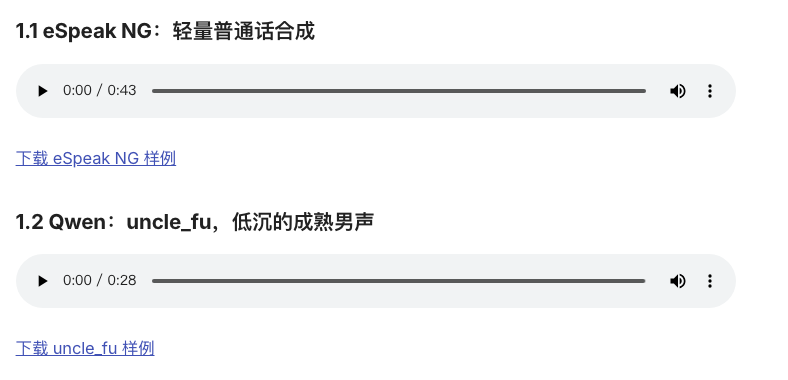
This is a real screenshot of the built page. Its players reference the actual files in this article; it is not an official Qwen console. The official project separately documents its demo interface. This article does not present a custom article page as an official Web UI. Chinese text inside the screenshot is retained as captured.
7. Practices Worth Keeping
The outcome is more than an API call. It is a reusable article-to-audio workflow: review a spoken script, choose a voice using a short passage, generate segments while keeping originals, validate and assemble them, then serve static recordings from the article.
A mechanical delivery can come from both the synthesis system and the writing. Formant synthesis and neural speech models produce sound differently, while technical abbreviations, long numbers, and sentences without pauses continue to affect the result. Listen to the four matched-text examples before deciding whether your narration, training videos, or article recordings justify a GPU service.