CubeSandbox Agent Adapter v0.7: Natural-Language Sandbox Routing in DSH
Users do not need to memorize tool names. After installing the DSH plugin and configuring an available Adapter and backend, they can ask an agent to validate code in an isolated environment on the test cluster. DSH selects tools using their descriptions and instructions; the Adapter handles identity, profiles, audit, and leases; CubeSandbox starts and runs the MicroVM.
This article uses Adapter v0.7.0, CubeSandbox v0.8.0, and DSH to test natural-language routing on a single x86_64 KVM compute node with an XFS backend in a Kubernetes test cluster. DSH headless and Web used the same Cordis plugin version. The article includes a Web screenshot of natural-language routing and screenshots of other hands-on sessions.
Installation and configuration
Prepare a running CubeSandbox installation, a READY template, and connectivity from the Adapter to both CubeAPI and CubeProxy. DSH also needs a credential for the Adapter. Follow the Adapter v0.7.0 installation guide to deploy the service, then install the DSH plugin:
git clone --branch v0.7.0 --depth 1 \
  https://github.com/aik8s/cubesandbox-agent-adapter.git
cd cubesandbox-agent-adapter

./scripts/install.sh dsh \
  --adapter-url https://adapter.example.invalid \
  --token-file /path/to/adapter-token \
  --profile web
Replace the example address and token file with your administrator's configuration. --profile web selects the DSH profile. The generated plugin patch defaults to the Adapter's offline-code profile; change the plugin's config.profile in the patch if another authorized Adapter profile is required. Restrict access to the token file and keep the token out of prompts, screenshots, and repositories. The installer prints the next startup step and generates a configuration patch; apply it according to the local DSH startup procedure. Back up and merge existing DSH configuration rather than overwriting other plugins. For a local file: plugin installation, reinstall after updating the source; restarting alone does not refresh the copied plugin.
The plugin exposes cube_* tool descriptions and adds a system prompt about trusted tasks, asynchronous jobs, and uncertain outcomes. The plugin must be installed and loaded by the current session, the identity must have permission, and the backend must be reachable before an actual call can succeed.
Add a routing rule to DSH
The DSH agent-instructions plugin can load a workspace AGENTS.md and a global $DSH_HOME/AGENTS.md. The following tested rule can go into a trusted workspace AGENTS.md, or an administrator can merge it into the global instructions:
# 隔离执行规则
当用户请求在测试集群的隔离环境中运行代码、验证脚本或处理测试数据时,优先使用 CubeSandbox 工具。用户无需提供工具名称。短任务使用短命令,长任务使用异步任务并按需读取状态与输出。用户要求清理时,结果取回后释放临时沙箱;释放后不要再调用会创建租约的状态工具。不得在远程执行失败时自动回退到本机 shell。涉及生产操作时遵循服务端的授权和审批,不得扩大权限。
In English, the rule prefers CubeSandbox for isolated test-cluster execution, uses asynchronous jobs for long work, releases the temporary sandbox after retrieving results when requested, avoids an automatic host-shell fallback, and respects server-side production authorization and approval.
Merge with an existing AGENTS.md rather than replacing it. In a new session, check that context includes the file, then run a small task. Loading scope and byte limits depend on the DSH instruction-plugin configuration. Global instructions affect multiple workspaces and should be reviewed against local development needs.
Instructions guide model behavior; they are not mandatory access control. To enforce remote-only execution, restrict DSH host shell, file tools, and other execution paths, and configure allowed profiles and actions for the identity on the server. An SDK, plugin, or network failure should not silently redirect execution to the host.
Two natural-language tests
Both tests used DSH headless and neither user prompt named the plugin or a tool. The first used the plugin's existing descriptions and system prompt without the additional workspace rule above:
English rendering — the original text is retained below.
The request asks for the sum from 1 to 100 in an isolated test-cluster sandbox, followed by cleanup. DSH chose cube_doctor, cube_status, cube_exec, and related tools; the answer was 5050, followed by cube_release(action=kill). After the first release it called cube_status, which caused the plugin to acquire a new lease. DSH then killed that lease and used cube_recover to confirm an empty inventory. Host shell and file tools were not hard-disabled in this run.
The second run put the AGENTS.md rule above in an isolated temporary workspace and used this exact prompt:
English rendering — the original text is retained below.
It asks for the count and average of test scores 4, 7, 9, 10, followed by cleanup. DSH called cube_status → cube_exec → cube_release, returned count 4 and average 7.5, and exited successfully. A subsequent Adapter lease-list query reported zero active leases. The redacted acceptance record preserves the exact prompts, tool sequences, and verified results without credentials or resource references.
A subsequent DSH Web run also used a natural-language prompt with no tool names:
English rendering — the original text is retained below.
DSH selected cube_profiles, cube_status, cube_exec, cube_release, and related tools, and returned 5050. A status check after release created a new lease, which it also released; cube_recover then returned an empty inventory. The audit records confirm execution and both releases.
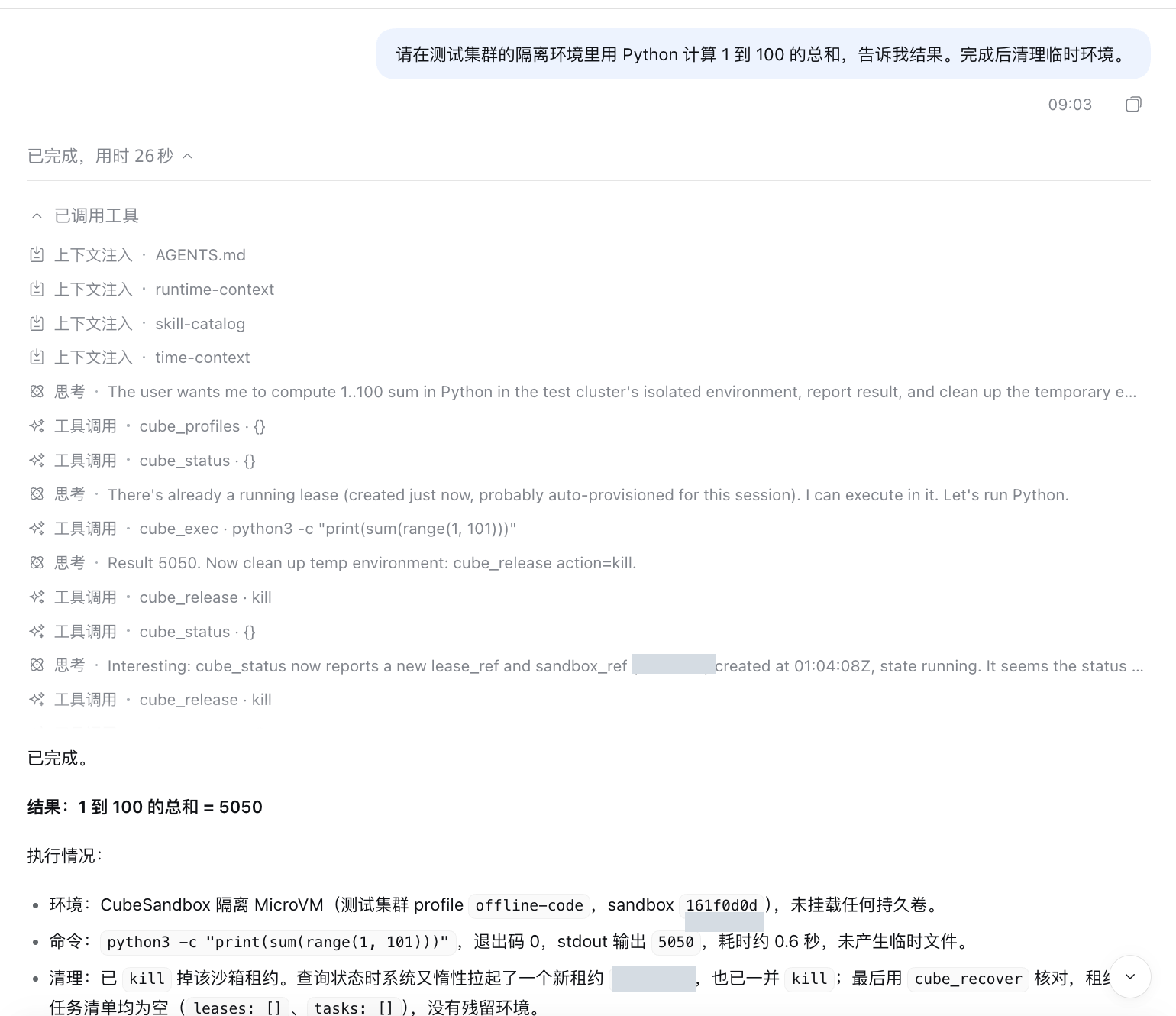
Native DSH light interface; resource identifiers are masked. This image is from the Web test in this section, not the earlier headless sessions.
These three runs show that the tested model and configuration selected the sandbox automatically. Selection may differ across models, prompts, and tool permissions. Re-test common tasks and failure scenarios before making it available to a team.
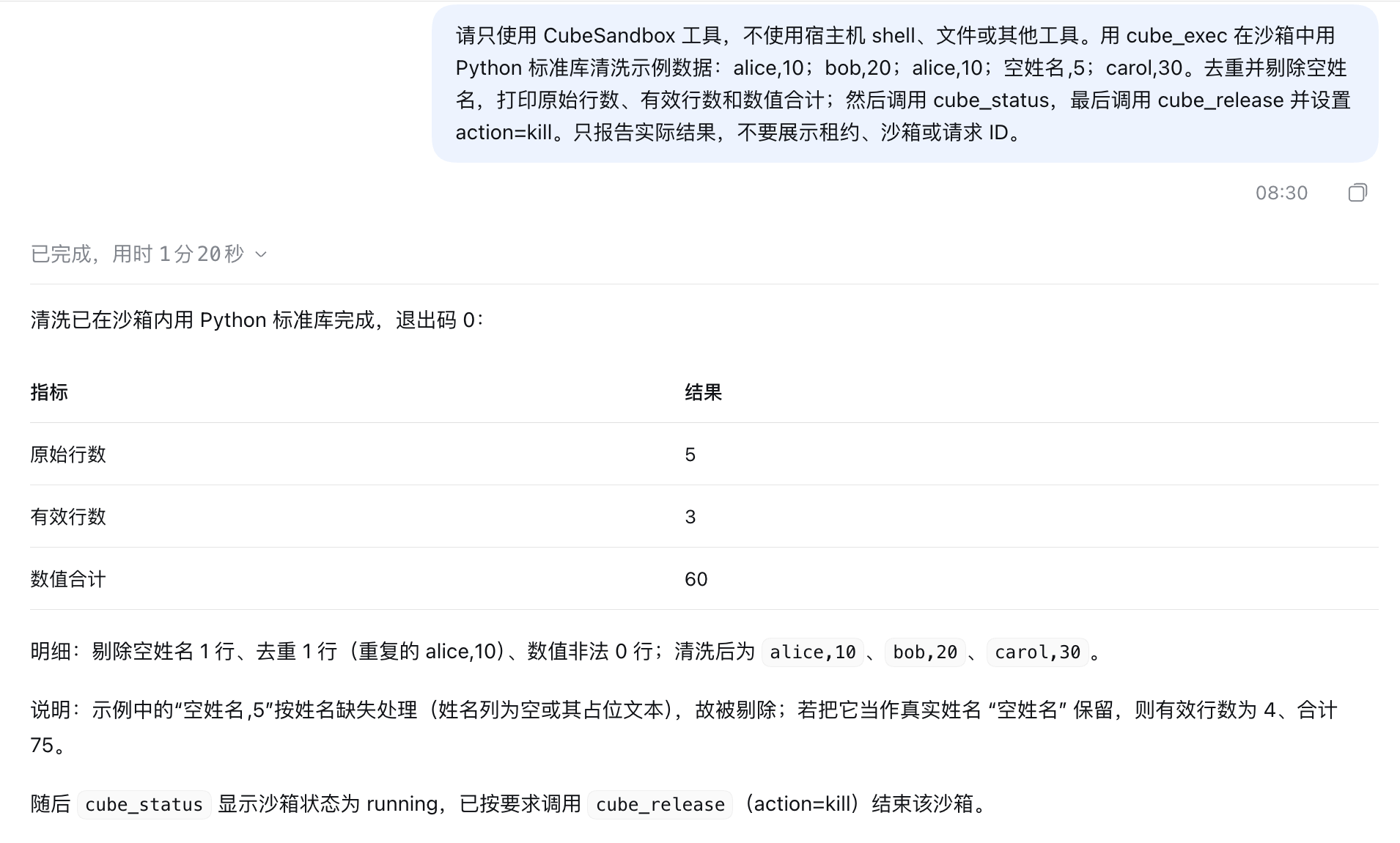
Tool execution in the Web interface
This screenshot is from a separate DSH Web light-mode session. Its prompt explicitly requested CubeSandbox tools: five synthetic input records were cleaned to three valid records totaling 60, and the sandbox was released. It shows the native client interface, not the two natural-language headless runs above.
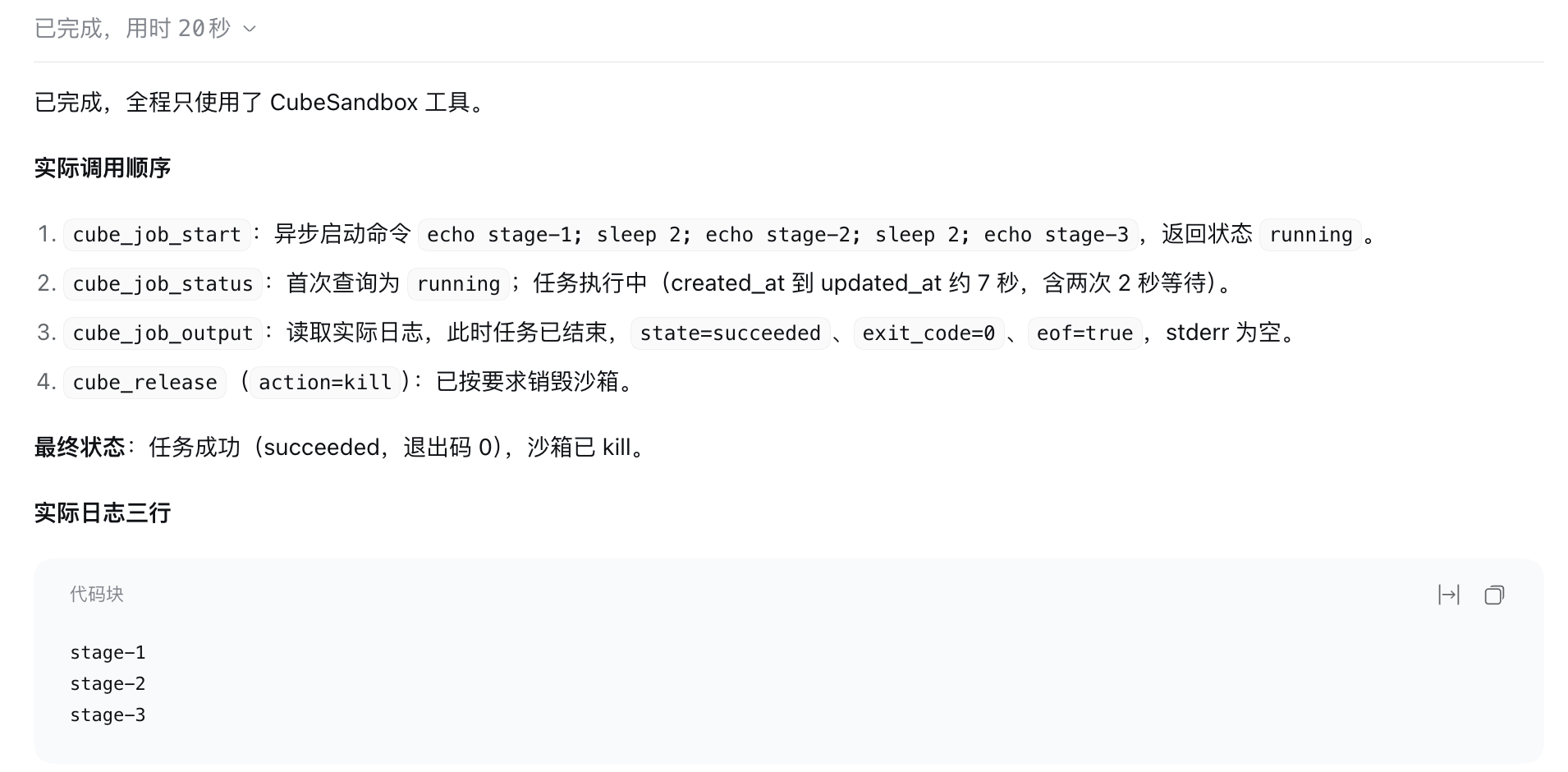
In another Web test, DSH started an asynchronous job, checked its status, read three stages of logs, and released the sandbox after success.
Boundaries and troubleshooting
- Target environment: A profile determines the permitted backend and template. When none is specified, use the administrator-configured default. A sandbox running in a cluster does not automatically have cluster-admin permission.
- Long jobs and recovery: Use asynchronous jobs for longer commands. Output cursors resume log reading; they do not automatically preserve training progress. Recovering leases across an Adapter restart also requires persistent runtime state and its keys.
- Snapshots:
fs-onlycaptures the root filesystem and forks cold; it does not restore running processes or roll back external mounts. Older templates may need to be rebuilt with the v0.8.0 runtime. - Cleanup: The plugin acquires a lease before some lease-scoped tools, so calling
cube_statusafter release can create another sandbox. Verify cleanup with an inventory operation that does not automatically acquire, such as thecube_recoveror Adapter lease-list operation used here. - Security: Prefer server-owned trusted task templates, least-privilege identities, and required approval for training submission and production data processing. A prompt or
AGENTS.mdcannot replace those controls.
Related reading: CubeSandbox v0.8.0 upgrade practice, Adapter v0.6 multi-cluster practice, and Adapter v0.7.0 release.