Testing youki, crun and runc on Kubernetes with cgroup v1 and v2
For a Kubernetes cluster already running runc, I would keep it as the default and canary crun on cgroup v2 nodes that create containers frequently. Two observations support that choice. With crun 1.31, an OCI container that exited immediately took 9.35 ms at the median, down from 18.80 ms with runc 1.1.12. A systemd-managed Pod created through kubelet also landed in the correct resource hierarchy. The same OCI test took 12.68 ms with youki 0.5.6, but it failed to create a Pod sandbox on this v2 node running Linux 5.10.134 and systemd 239.
Which runtime should an existing runc cluster choose?
| Choice | Benefit | Trade-off | Best fit |
|---|---|---|---|
| Keep runc | Systemd-managed Pods ran on both v1 and v2 on this node, with resources attributed to the right Pod. Teams can keep their distribution’s delivery, upgrade and troubleshooting procedures. | The median short-container run on v2 took about 9.45 ms longer than crun. That overhead warrants measurement on platforms that frequently create and destroy containers. | Long-lived APIs, GPU inference services and teams retaining comparable v1 nodes. Use a version your distribution still maintains as the production baseline. |
| Canary crun | On v2, short-container P95 fell from 31.11 ms with runc to 20.42 ms. Systemd-managed Pods ran with both host networking and an isolated bridge. | Systemd Pod creation failed on v1 on the same machine. Switching to cgroupfs started the Pod but placed its processes outside kubelet’s expected Pod hierarchy. The team also owns distribution and upgrades for a second handler. | CI, short batch Jobs and Agent platforms that create a fresh execution environment for each task. |
| Evaluate youki | Version 0.5.6 completed 100/100 short OCI runs on v2. Teams building a Rust executor can also reuse its container management library. youki libcontainer | Both 0.5.6 and 0.7.0 failed to create a systemd Pod sandbox on this v2 node. Version 0.5.6 reached Ready on v1, but its processes had the wrong parent cgroup. | Teams with a Rust integration requirement or the capacity to qualify real Pods on their target kernel and systemd. Keep runc on nodes matching this test. |
How much is 9.45 ms worth? Count how often the workload creates a container. An Agent platform that launches one for every code execution pays the cost repeatedly. A platform serving requests from a warm container pool pays it when it replenishes the pool. For a GPU Pod that loads weights once and serves requests for days, first measure how long it takes to load the model and serve the first successful request. Our timer covered a full OCI CLI run, including creation, execution and exit. Pod cold-start latency, peak runtime memory, GPU memory and inference throughput were outside this measurement. Per-run v2 timings · v2 Pod results
Where the three runtimes fit
The kubelet asks containerd to create Pod sandboxes and containers through CRI. A containerd shim manages the task lifecycle and invokes a low-level OCI runtime. runc is written in Go, crun in C, and youki in Rust. Each reads the bundle's config.json and rootfs, creates namespaces, configures cgroups, mounts filesystems and starts the first container process. Implementation language and binary size alone tell us little about the time this takes. OCI Runtime Specification, runc, crun, youki
We exercised this path from the OCI CLI and from containerd's io.containerd.runc.v2 shim. The CLI lets us time a short process. The shim adds integration details such as arguments, environment variables and cgroup management. Creating a Pod through kubelet also involves CRI, image preparation and CNI. We did not time those stages.
Test environment and method on cgroup v1
The cordoned x86-64 node ran a vendor Linux 5.10.134 kernel, kubelet 1.30.4 and containerd 1.7.14. Its default runtime was runc 1.1.12 with SystemdCgroup=true. We resolved the CPU, memory and PID controller paths through the container PID's /proc/<pid>/cgroup on the host, then read each controller's v1 interface. A separate cgroup2 mount was also present. Its presence alone does not identify the controller version in use for the workload.
We ran the official x86-64 binaries as root from a temporary directory. The shared, read-only rootfs contained the node's shell, sleep, true and their libraries. Each container had its own mount, PID, network, UTS and IPC namespaces. The lifecycle test started /bin/sleep, checked created, running, exec, stopped after KILL, and deletion. A separate container checked whether exit code 17 reached the caller. The following commands assume a prepared test bundle with that rootfs and a long-running process.
RUNTIME=/path/to/runtime
BUNDLE=/path/to/bundle
STATE=$(mktemp -d)
ID=oci-sample-$$
"$RUNTIME" --root "$STATE" create --bundle "$BUNDLE" "$ID"
"$RUNTIME" --root "$STATE" state "$ID"
"$RUNTIME" --root "$STATE" start "$ID"
"$RUNTIME" --root "$STATE" exec "$ID" /bin/sh -c 'printf "OCI_OK\n"'
"$RUNTIME" --root "$STATE" kill "$ID" KILL
"$RUNTIME" --root "$STATE" delete "$ID"
Do v1 resource limits take effect?
runc 1.1.12, crun 1.31 and youki 0.5.6 passed the OCI lifecycle checks. Each container requested half a CPU, 128 MiB of memory and 32 PIDs. On the host, cpu.cfs_quota_us / cpu.cfs_period_us read 50000 / 100000, memory.limit_in_bytes was 134217728, and pids.max was 32. A brief CPU busy loop inside each container increased nr_throttled for all three runtimes. For memory and PIDs we verified the configured kernel limits. We did not induce an OOM or exhaust the PID limit.
youki 0.7.0 failed during create with the same configuration. Repeating the failure under strace -f showed the kernel creating the proc filesystem mount object, then failing to set its attributes. The excerpt preserves call order and omits intermediate calls and some arguments.
fsopen("proc", 0) = 10
fsconfig(10, FSCONFIG_CMD_CREATE, NULL, NULL, 0) = 0
fsmount(10, 0, 0) = 12
mount_setattr(12, "", AT_EMPTY_PATH, ..., 32) = -1 ENOSYS (Function not implemented)
Older nodes have two independent compatibility checks. The resource controllers may continue to use v1, while the kernel must also implement the mount syscalls that a given runtime invokes. Version 0.7.0 calls mount_setattr on this proc mount path. Version 0.5.6 uses a different implementation and succeeded on the same node and configuration. Vendors can backport syscalls, so checking the actual return value is more informative than looking at the major kernel version alone. youki 0.7.0 mount implementation, youki 0.5.6 mount implementation
How long does a short container take on cgroup v1?
Timing started immediately before spawning the OCI CLI and stopped when its foreground run returned. The container executed /bin/true. Every runtime that passed the functional checks got five warm-ups and 100 timed runs. Each round executed the runtimes serially, in an order shuffled with a fixed seed. All shared the rootfs, resource limits and host caches. P95 is the 95th sorted observation.
| Runtime in the same round | Successful runs | Median | P95 |
|---|---|---|---|
| crun 1.31 | 100/100 | 10.57 ms | 29.13 ms |
| runc 1.1.12 | 100/100 | 22.99 ms | 38.76 ms |
| youki 0.5.6 | 100/100 | 39.28 ms | 54.18 ms |
Only crun and runc passed the initial gate, with medians of 9.06 ms and 20.58 ms respectively. The table uses the second, interleaved three-runtime experiment. A roughly 12 ms median difference on this node deserves measurement in services that create many short processes. For a long-running inference service, inspect actual Pod events to establish how much time goes into image preparation, networking, model loading and readiness probes.
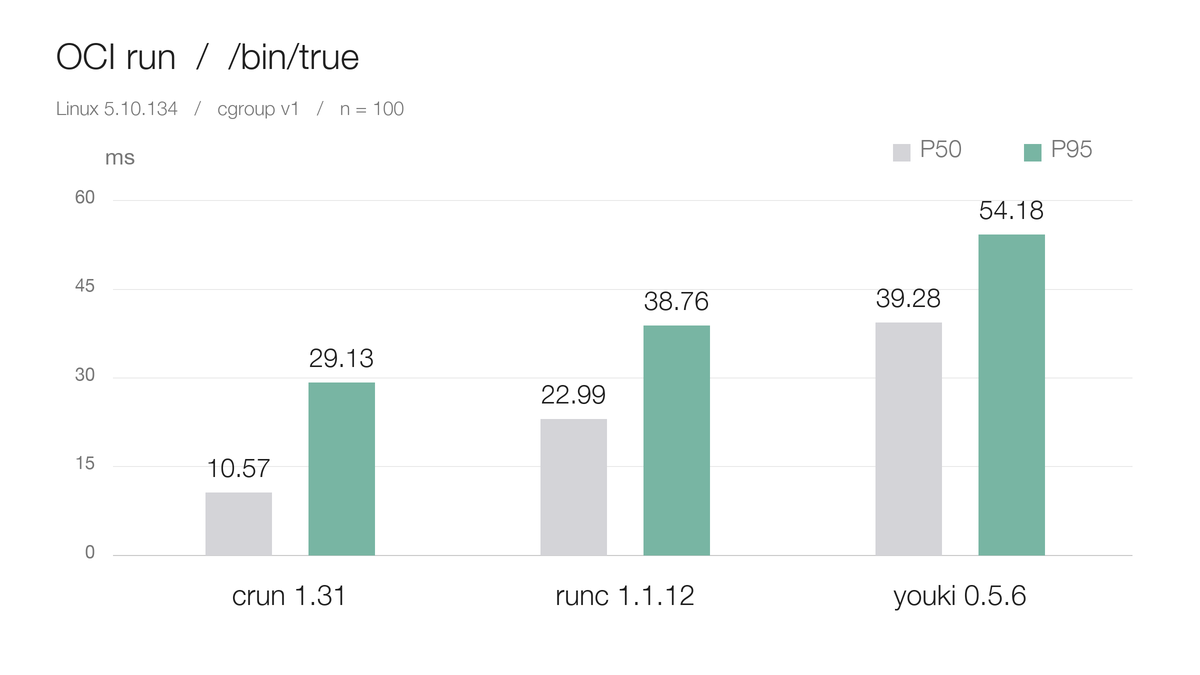
Each pair represents 100 successful runs in the same experiment. The CSV includes both experiments and their warm-ups so readers can recompute the percentiles. Download per-run timings as CSV
What changes when containerd launches the process?
We created a dedicated containerd namespace and selected a runtime binary for each ctr run. Both manager modes received an explicit PATH=/bin, half a CPU and 128 MiB of memory. While the process was alive we read its CPU and memory limits from the host, inspected the expected scope with systemctl show, and checked its actual path in /proc/self/cgroup.
| Runtime | cgroupfs | Requested systemd scope |
|---|---|---|
| runc 1.1.12 | Process ran with correct limits | Process ran, expected scope active, limits correct |
| crun 1.31 | Process ran with correct limits | Creation failed, writing devices.allow returned Operation not permitted |
| youki 0.5.6 | Process ran with correct limits | Process ran with correct limits, expected scope inactive |
| youki 0.7.0 | Container failed to start while mounting proc | Container failed to start while mounting proc |
The youki 0.5.6 result is easy to misread. The requested path format was system.slice:ocitest:<id>. The runc process actually entered /system.slice/ocitest-<id>.scope. The youki CPU controller path was the literal /system.slice:ocitest:<id>, colons included. A check limited to the exit code would pass both. Only the former passed our systemd scope check.
Retesting also exposed an input difference. Passing a directory to ctr --rootfs supplies no image environment, and youki 0.5.6 initially reported PATH environment variable is not set. We set PATH=/bin explicitly for all four versions to obtain the results above. The crun device-rule failure remained reproducible. The evidence does not identify which device rule or parent policy denied the write.
The command below reproduces the systemd branch. Use an isolated test node and set the absolute runtime and bundle paths in the same shell. For the cgroupfs comparison, remove --runc-systemd-cgroup and set the cgroup path to "/$ID". Inspect the scope from a second terminal during the four seconds the process remains alive.
ROOTFS=$(realpath "$BUNDLE/rootfs")
NS="oci-demo-$$"
ID="task-$$"
ctr namespaces create "$NS"
(
  set -e
  ctr -n "$NS" run --rm --runtime io.containerd.runc.v2 \
    --runc-binary "$RUNTIME" --runc-systemd-cgroup \
    --cgroup "system.slice:ocitest:$ID" --env PATH=/bin \
    --cpus 0.5 --memory-limit 134217728 --rootfs "$ROOTFS" "$ID" \
    /bin/sh -c 'echo OCI_SHIM_OK; while IFS= read -r line; do echo "$line"; done </proc/self/cgroup; /bin/sleep 4'
)
rc=$?
ctr -n "$NS" tasks list
ctr -n "$NS" containers list
ctr namespaces remove "$NS"
printf 'task exit code: %s\n' "$rc"
Can a Pod select crun or youki?
Kubernetes supports runtime selection per Pod. For crun, an administrator first installs the binary on eligible nodes and adds a named handler to containerd's CRI configuration, pointing BinaryName at that file. A RuntimeClass then maps its handler to the node configuration of that name. The application sets the RuntimeClass name in the Pod's spec.runtimeClassName, and kubelet passes the corresponding handler in the CRI RunPodSandbox request. The choice applies to the whole Pod. If only some nodes support it, use scheduling.nodeSelector in the RuntimeClass to select their labels. Kubernetes RuntimeClass, containerd 1.7 CRI configuration
Before testing, the target node's CRI plugin reported only runc. Both kubelet and its default handler used systemd. We kept the default and added named handlers on the cordoned test node only. Each RuntimeClass selected that node, and the test Pods bound to it explicitly through spec.nodeName. Run the following commands from the management client and on the target node respectively.
kubectl get runtimeclass -o custom-columns='CLASS:.metadata.name,HANDLER:.handler'
crictl --runtime-endpoint unix:///run/containerd/containerd.sock info |
  jq '.config.containerd | {defaultRuntimeName, handlers: (.runtimes | keys)}'
Real Pod results on cgroup v1
All four Pods initially failed during network creation with the node's existing CNI, including the default runc control. Events identified the same missing local CNI socket, so the initial attempt could not distinguish OCI runtimes. We then tested the same Pod spec with two network setups. One used hostNetwork. The other selected a private network through the test handler's cni_conf_dir. The first dummy-interface attempt returned file exists; we then used an isolated Linux bridge with host-local IPAM. The bridge connected the test Pods with no uplink, gateway or address translation.
| Runtime and requested cgroup manager | hostNetwork | Isolated bridge and dedicated Pod IP | Application container systemd scope |
|---|---|---|---|
| runc 1.1.12 / systemd | Ready | Ready | Active, under the Pod slice |
| crun 1.31 / systemd | Sandbox creation failed | Sandbox creation failed | No scope, device-rule write denied |
| crun 1.31 / cgroupfs | Untested | Ready | Inactive, process in a literal colon-delimited path |
| youki 0.5.6 / systemd | Ready | Ready | Inactive, process in a literal colon-delimited path |
| youki 0.7.0 / systemd | Sandbox creation failed | Sandbox creation failed | No scope |
All three successful bridge Pods had a separate network namespace and Pod IP. Application output was available through kubectl logs, and kubectl exec ran successfully as UID 65534. We checked runtime information for both the CRI sandbox and the application container. Host-side measurements confirmed half a CPU and 128 MiB of memory for each application container, but only runc placed the process under kubelet's expected Pod slice. The network test covered single-node Pod network creation. Services, cross-node traffic and the cluster's existing network policies were outside its scope. Pod verification CSV
At the end of the v1 test, we retained only the isolated crun/cgroupfs test handler and submitted a fresh Pod. It printed CRUN_POD_STARTED and CRUN_POD_COMPLETED, then reached Succeeded. To reproduce this, replace the sample namespace, node and RuntimeClass with your test settings and cache the specified image first. Afterward, the test Pods were removed. The node remained cordoned and all 14 pre-existing containerd task IDs were unchanged. Download the Pod YAML
What changed for real Pods after the switch to cgroup v2?
We kept the node cordoned and added a one-time boot entry for the same kernel with systemd.unified_cgroup_hierarchy=1. The node still ran kubelet 1.30.4, containerd 1.7.14 and systemd 239. After rebooting, we checked the unified hierarchy on the host with the following commands, then traced the cgroups used by real Pods. Once the Pod checks passed, we made v2 the saved boot default and kept the original v1 entry for rollback.
stat -fc %T /sys/fs/cgroup        # cgroup2fs
cat /proc/1/cgroup                # 0::/init.scope
cat /sys/fs/cgroup/cgroup.controllers
One node agent needed attention. The customized Koordlet startup command wrote to /host-cgroup/memory/system.slice/memory.priority and the corresponding user.slice file under the v1 layout. The paths changed on v2. The preliminary command failed and the Koordlet process never started. We excluded the test node using DaemonSet node affinity. All nine other instances stayed Ready with the same Pod UIDs and restart counts. Kubelet still supplies basic statistics on the test node. Features that depend on its local Koordlet for metrics or tuning need separate validation.
Following a Pod from kubelet through containerd to the OCI runtime
We kept the default runc handler and added a crun handler with SystemdCgroup=true, selected via RuntimeClass. Each application container had limits of 500m CPU and 128 MiB of memory. We compared runc and crun with hostNetwork, then used an isolated bridge without an uplink to test crun and youki. While each successful Pod was running we took the host PIDs for its sandbox and application, checked /proc/<pid>/cgroup, and inspected the expected Pod UID and systemd scopes.
| Runtime and manager | Network | Result from kubelet | Hierarchy observed on the host |
|---|---|---|---|
| runc 1.1.12 / systemd | hostNetwork | Ready, then Succeeded | Sandbox and application belonged to the expected Pod slice and active scopes |
| crun 1.31 / systemd | hostNetwork and isolated bridge | Both Pods reached Ready, then Succeeded | Both processes belonged to the correct Pod, in a container child of their respective active scopes |
| crun 1.31 / cgroupfs | Isolated bridge | Ready, then Succeeded | Literal colons in the path, inactive expected scope, outside the expected Pod slice |
| youki 0.5.6 and 0.7.0 / systemd | Isolated bridge | Separate FailedCreatePodSandBox events for both versions |
Application containers never started |
Logs and exec worked for all four successful comparison Pods. The application cgroups showed cpu.max of 50000 100000 and memory.max of 134217728. The older crun/cgroupfs handler produced those same values even though the processes had the wrong parent. Check the ancestor path as well as the leaf limits. For crun, requiring an exact match with the scope root would incorrectly flag its valid child cgroup as a failure. The bridge test covered local network setup and process placement. Cross-node traffic, Services and network policies require their own tests. Download the v2 Pod results
The CRI events for both youki Pods reported runtime exit code 1. In a separate OCI CLI test requesting systemd cgroup management, both versions reported Systemd(CpuSet(OldSystemd)). The error specified that applying cpuset restrictions requires a systemd version greater than 243. The node ran 239. This reproduced one compatibility issue. Attributing an individual Pod failure to that exact step would require the underlying log from its shim invocation. In the independent cgroupfs test, version 0.7.0 still reported ENOSYS when mounting proc.
Repeating 100 short-container runs on the same node
Both boots used the same runtime binaries, rootfs, resource limits and foreground /bin/true workload. Each runtime that passed the functional gate ran five warm-ups and 100 measured rounds interleaved with the other runtimes. All values below are milliseconds. The reboot, background load and Koordlet state could also affect these results, so the two columns describe observations on this particular node.
| Runtime | v1 median | v1 P95 | v2 median | v2 P95 |
|---|---|---|---|---|
| crun 1.31 | 10.57 | 29.13 | 9.35 | 20.42 |
| runc 1.1.12 | 22.99 | 38.76 | 18.80 | 31.11 |
| youki 0.5.6 | 39.28 | 54.18 | 12.68 | 24.48 |
Each runtime completed 100/100 measured runs on v2. The independent OCI lifecycle test also verified pids.max=32, half a CPU, 128 MiB of memory and CPU throttling under load. Version 0.7.0 of youki failed the create check, so it has no timing result. Estimating application scale-out would require measuring from Pod submission to application readiness. Download the v2 per-run timings
Reusing the test
Download the sample OCI configuration to $BUNDLE/config.json in an empty test directory. The example uses a fixed /oci-sample cgroup path for serial runs on one node. Assign unique paths when running concurrently. The commands below build the minimal rootfs used here on a Linux test host with a dynamically linked shell and GNU userland. Then run the lifecycle commands above. For timing, change process.args to ["/bin/true"] and measure the foreground run externally.
mkdir -p "$BUNDLE/rootfs"
python3 - "$BUNDLE/rootfs" <<'PY'
import pathlib, re, shutil, subprocess, sys
root = pathlib.Path(sys.argv[1])
for src in ("/bin/sh", "/bin/sleep", "/bin/true"):
    libs = subprocess.check_output(["ldd", src]).decode()
    for path in [src] + re.findall(r"(/[^\s()]+)", libs):
        target = root / path.lstrip("/")
        target.parent.mkdir(parents=True, exist_ok=True)
        shutil.copy2(path, str(target))
for sub in ("proc", "dev", "tmp"):
    (root / sub).mkdir(exist_ok=True)
PY
When to expand a crun canary
- Pick a workload that frequently starts cold. Add a crun handler to labeled v2 nodes, keep runc as the default and use the RuntimeClass node selector to constrain the trial. Prepare two otherwise identical workload templates, one using the default runtime and the other selecting crun. Applications can then enter the trial individually. Kubernetes RuntimeClass
- Time what the user waits for. On comparable nodes, hold the image digest, application CNI, resources and concurrency constant. Test cached images and images that need pulling separately. For short Jobs, record P50/P95 from submission to completion. For on-demand services, record submission to the first successful request. Retain startup failure counts and totals in both groups. Check that the sandbox and application processes belong to their Pod slice and that limits and metrics agree. If GPUs are in scope, verify device allocation and run a minimal inference request on a real GPU.
- Decide whether to expand or roll back. Extend the trial to similar nodes once the workload’s P95 meets the improvement target agreed in advance and creation success, resource accounting and application behavior all pass. Keep runc if only the short OCI benchmark improves or if resources are charged to the wrong Pod hierarchy. To roll back, remove
runtimeClassNamefrom the workload template and recreate Pods under the existing rollout policy. An existing Pod switches to the default runtime when it is recreated.